[Beta]{class="badge informative"}
Activate now for streaming destinations
Activate now overview overview
This article explains how to use the Experience Platform UI to trigger an on-demand refresh of an audience’s full membership to streaming and API-based destinations.
Activate now is the streaming counterpart to Export file now, which serves the same purpose for file-based destinations.
You can also use the Experience Platform APIs for this purpose. Read how to activate audiences on-demand to streaming destinations via the ad-hoc activation API.
Use cases use-cases
Many streaming and API-based destinations apply a time-to-live (TTL) to the audience membership they receive from Adobe Experience Platform. When that TTL expires on the destination side, previously qualified profiles are treated as inactive, even though they remain qualified in Experience Platform. This can cause your addressable audience to shrink mid-campaign.
Use the Activate now control to resend every currently qualified profile for an audience through the existing streaming activation pipeline, without waiting for the next scheduled refresh or audience qualification event. This gives you a self-serve way to counteract destination-side TTL expiration instead of filing a support ticket for a manual backfill.
Known limitations known-limitations
The Activate now feature:
- Resends full audience membership regardless of qualification state, rather than a differential or changes-only refresh. This behavior may change in future updates.
- Is available at first for The Trade Desk, Google Customer Match, and Facebook (Facebook Custom Audiences).
- You cannot use Activate now on an audience within 24 hours after you map it to a dataflow.
- There is currently no feedback mechanism in the form of a triggered dataflow run after you use Activate now on an audience, apart from the in-product confirmation toast.
Guardrails guardrails
Activate now enforces the following limit:
- One on-demand run per dataflow, per audience, within a rolling 24-hour window (not a calendar-day reset).
If the same audience was already triggered for this dataflow within the last 24 hours, the trigger is rejected, and the UI shows a message indicating when you can try again.
Prerequisites prerequisites
To activate data, you need the View Destinations, Activate Destinations, View Profiles, and View Segments access control permissions. Read the access control overview or contact your product administrator to obtain the required permissions.
To use Activate now, you must have successfully connected to a destination and configured an activation dataflow to a streaming or API-based destination. If you haven’t done so already, go to the destinations catalog, browse the supported destinations, and configure the destination that you want to use.
How to activate an audience on-demand how-to-activate-audience-now
Follow these steps to trigger an on-demand refresh of an audience to a streaming or API-based destination.
-
Go to Connections > Destinations, select the Browse tab, and select your streaming or API-based destination connection.
-
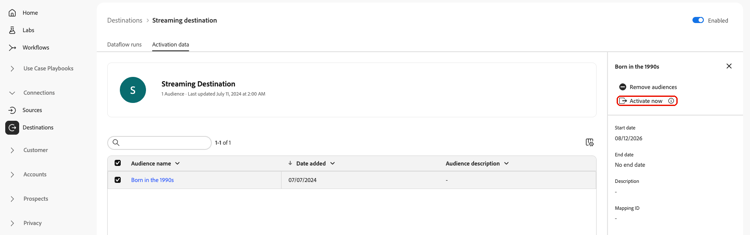
On the destination details page, select the Activation data tab.
-
Select one or more audiences that you want to refresh, then select the Activate now control. This control is available for both a single audience row and a bulk selection of audiences.
-
In the confirmation dialog, select Yes to confirm and trigger the refresh.
-
A toast message appears, confirming that the refresh has been queued. Experience Platform creates one streaming job per selected audience.