The Trade Desk connection
Overview overview
Use this destination connector to send profile data to The Trade Desk. This connector sends data to the The Trade Desk first-party endpoint. The integration between Adobe Experience Platform and The Trade Desk does not support exporting data to the The Trade Desk third-party endpoint.
The Trade Desk is a self-service platform for ad buyers to execute retargeting and audience-targeted digital campaigns across display, video, and mobile inventory sources.
To send profile data to The Trade Desk, you must first connect to the destination, as described in the following sections of this page.
Use cases use-cases
As a marketer, I want to be able to use audiences built off of Trade Desk IDs or device IDs to create retargeting or audience-targeted digital campaigns.
Supported identities supported-identities
The Trade Desk supports the activation of audiences based on the identities shown in the table below. Learn more about identities.
Below are the identities supported by The Trade Desk destination. Use these identities to activate audiences to The Trade Desk.
All identities in the table below are preconfigured and automatically mapped during activation. You do not need to manually configure these mappings in the activation workflow.
Supported audiences supported-audiences
This section describes which types of audiences you can export to this destination.
This category includes all audience origins outside of audiences generated through the Segmentation Service. Read about the various audience origins. Some examples include:
- custom upload audiences imported into Experience Platform from CSV files,
- look-alike audiences,
- federated audiences,
- audiences generated in other Experience Platform apps such as Adobe Journey Optimizer,
- and more.
Supported audiences by audience data type:
Export type and frequency export-type-frequency
Refer to the table below for information about the destination export type and frequency.
Prerequisites prerequisites
Prerequisites depend on which identity types you plan to use for audience activation:
For mobile ID activation only, there are no prerequisites. As long as you are collecting and managing IDs (GAID and/or IDFA) for your customers, you can start activating audiences to The Trade Desk.
For cookie-based targeting on The Trade Desk, make sure that a mapping between ECID and Trade Desk ID is established. Complete the steps below to do so:
-
Enable ID sync functionality: If this is your first time setting up The Trade Desk ID activation and you have not enabled the ID sync functionality in the Visitor ID Service in the past (with Adobe Audience Manager or other applications), contact Adobe Consulting or Customer Care to enable ID syncs.
- If you have previously set up The Trade Desk integrations in Audience Manager, your existing ID syncs automatically carry over to Experience Platform.
-
Instrument your web pages: Implement code on your web pages to create mappings between The Trade Desk ID and Adobe ECID. This allows Experience Platform to associate Trade Desk IDs with your customer profiles.
Connect to the destination connect
To connect to this destination, follow the steps described in the destination configuration tutorial.
Connection parameters parameters
While setting up this destination, you must provide the following information:
-
Name: A name by which you will recognize this destination in the future.
-
Description: A description that will help you identify this destination in the future.
-
Account ID: Your The Trade Desk Account ID.
-
Server Location: Ask your The Trade Desk representative which regional server you should use. Below are the available regional servers that you can choose from:
- APAC
- China
- Tokyo
- UK/EU
- US East Coast
- US West Coast
Enable alerts enable-alerts
You can enable alerts to receive notifications on the status of the dataflow to your destination. Select an alert from the list to subscribe to receive notifications on the status of your dataflow. For more information on alerts, see the guide on subscribing to destinations alerts using the UI.
When you are finished providing details for your destination connection, select Next.
Activate audiences to this destination activate
- To activate data, you need the View Destinations, Activate Destinations, View Profiles, and View Segments access control permissions. Read the access control overview or contact your product administrator to obtain the required permissions.
- To export identities, you need the View Identity Graph access control permission.
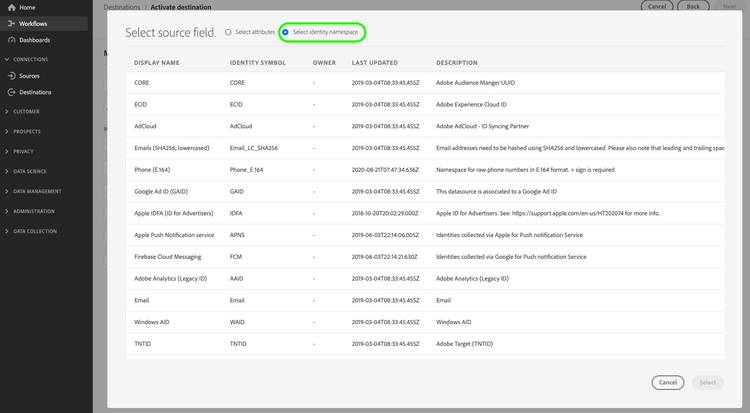
See Activate audience data to streaming audience export destinations for instructions on activating audiences to this destination.
In the Audience schedule step, you must manually map your audiences to their corresponding ID or friendly name in the destination platform.
When mapping audiences, Adobe recommends that you use the Experience Platform audience name or a shorter form of it, for ease of use. However, the audience ID or name in your destination does not need to match the one in your Experience Platform account. Any value you insert in the mapping field will be reflected by the destination.
Preconfigured mappings preconfigured-mappings
The following identity mappings are preconfigured and automatically populated for you in the audience activation workflow:
- GAID (Google Advertising ID)
- IDFA (Apple ID for Advertisers)
- ECID (Experience Cloud ID)
- The Trade Desk ID
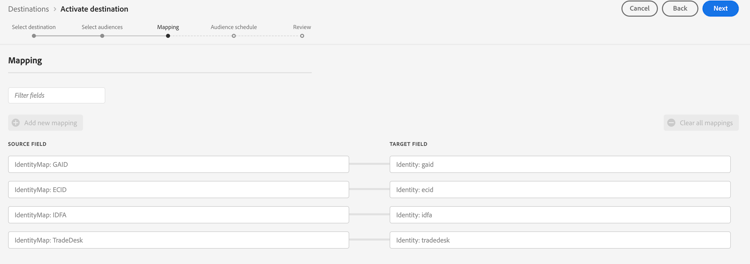
These mappings are grayed out and read-only. You do not need to configure anything in this step. Select Next to continue.
Experience Platform automatically checks each profile that belongs to audiences mapped in the activation workflow for all supported identity types and then activates the profile using any identities that are present.
Identity requirements by activation type identity-requirements-by-activation-type
Mobile ID activation (GAID/IDFA): Profiles with just GAID or IDFA are sufficient for activation. No additional identities or prerequisites are required.
Cookie-based targeting (Trade Desk ID): Requires both:
- ECID present on the profile
- An ID sync mapping between the Trade Desk ID and ECID (configured as described in the prerequisites section)
Multiple IDs behavior: If a profile contains multiple supported identities, each identity will be activated separately to The Trade Desk. This ensures maximum reach and flexibility in your audience activation.
Activation examples activation-examples
- Mobile ID profiles: Profiles with GAID and/or IDFA are activated using their respective advertising IDs. If a profile contains both GAID and IDFA, each ID will be activated separately.
- Cookie-based profile: A profile with ECID and a corresponding Trade Desk ID mapping will be activated using the Trade Desk ID for cookie-based targeting.
- ECID-only profile: A profile with only ECID and no Trade Desk ID mapping will not be exported. ECID alone is insufficient for activation.
Exported data exported-data
To verify if data has been exported successfully to the The Trade Desk destination, check your The Trade Desk account. If activation was successful, audiences are populated in your account.