Microsoft Ads Customer Match connection microsoft-ads-customer-match-destination
Overview overview
Use the Microsoft Ads Customer Match destination to match customers by email address and reengage with them across the Microsoft Advertising Network, including Search and Audience ads. Link your Microsoft Advertising account to Real-Time CDP to automate customer match list creation and management directly from Experience Platform.
Use cases use-cases
To help you better understand how and when to use the Microsoft Ads Customer Match destination, here are sample use cases that Adobe Experience Platform customers can solve by using this feature.
Retarget existing customers with personalized offers use-case-1
An e-commerce brand wants to reach existing customers through Microsoft Search and Microsoft Audience Network to personalize offers based on their past purchases and browsing history. The brand can ingest email addresses from their own CRM into Experience Platform, build audiences from their own offline data, and send these audiences to Microsoft Ads Customer Match to be used across search and audience ads, optimizing their advertising spending.
Promote new products to existing customers use-case-2
A technology company launched a new product and wants to drive awareness among customers who previously purchased related products. They upload email addresses from their CRM database into Experience Platform, using the email addresses as identifiers. Audiences are created based on customers who own related products. Those audiences are sent to Microsoft Ads Customer Match, so the company can target current customers and similar customers across the Microsoft Advertising Network.
Supported identities supported-identities
Microsoft Ads Customer Match supports the activation of identities described in the table below. Learn more about identities.
For recommended source-to-target mapping pairs based on your schema structure, see the Mapping section.
emailemail_lc_sha256Supported audiences supported-audiences
This section describes which types of audiences you can export to this destination.
This category includes all audience origins outside of audiences generated through the Segmentation Service. Read about the various audience origins. Some examples include:
- custom upload audiences imported into Experience Platform from CSV files,
- look-alike audiences,
- federated audiences,
- audiences generated in other Experience Platform apps such as Adobe Journey Optimizer,
- and more.
Supported audiences by audience data type:
Export type and frequency export-type-frequency
Refer to the table below for information about the destination export type and frequency.
Prerequisites prerequisites
To send audience data to Microsoft Ads, you need to have an active Microsoft Advertising account. For details on creating an account, visit the Microsoft Advertising documentation.
Accept customer match terms and conditions accept-customer-match-terms
Before activating audiences through this destination, you must first manually create a customer match list in your Microsoft Advertising account. This initial manual creation is required to accept the customer match terms and conditions, which enables audiences sent from Experience Platform to be created automatically. Failure to complete this step may result in errors when activating audiences.
Work account (MS Entra) IT admin approval work-account-admin-approval
If you are authenticating with a Microsoft Work Account (also known as a Microsoft Entra account), your organization’s IT admin may need to grant approval before you can connect to Microsoft Advertising.
When you attempt to authenticate using a Work Account, you may be redirected to an Approval required page. This page requests a justification for linking the app and lists the required permissions, including ads.manage. Submit the request and your IT admin will receive a notification to review it. You will also receive a confirmation email that your request was submitted.
Once the IT admin approves the request in the Azure Portal, you can return to Experience Platform and authenticate using your Work Account. For guidance, see the Microsoft documentation:
If the IT admin has not yet approved the request, authentication will fail with the following error: AADSTS650052: The app needs access to a service ('https://ads.microsoft.com') that your organization has not subscribed to or enabled. Contact your IT Admin to review the configuration of your service subscriptions.
Account configuration account-configuration
When configuring the destination, you must provide the following information:
- Customer ID: your Microsoft Ads Customer ID (CID), in integer format. Find this value in the
cid=parameter of your Microsoft Advertising campaign URL, or as the Manager Account ID under Settings > Manager Account Settings in Microsoft Advertising. See the Microsoft Advertising documentation for more information. - Customer Account ID: your Microsoft Ads Customer Account ID. Find this value in the
aid=parameter of your Microsoft Advertising campaign URL (notuid=orcid=), or as the Account ID under Settings > Account Settings in Microsoft Advertising. See the Microsoft Advertising documentation for more information.
For an example of where these values appear in a campaign URL, see Fill in destination details.
Connect to the destination connect
To connect to this destination, follow the steps described in the destination configuration tutorial.
Fill in destination details parameters
While setting up this destination, you must provide the following information:
-
Name: A name by which you will recognize this destination in the future.
-
Description: A description that will help you identify this destination in the future.
-
Customer ID: Your Microsoft Ads Customer ID (CID). Find this value in the
cid=parameter of your Microsoft Advertising campaign URL, or as the Manager Account ID under Settings > Manager Account Settings in Microsoft Advertising. See the Microsoft Advertising documentation for more information. -
Customer Account ID: Your Microsoft Ads Customer Account ID. Find this value in the
aid=parameter of your Microsoft Advertising campaign URL (notuid=orcid=), or as the Account ID under Settings > Account Settings in Microsoft Advertising. See the Microsoft Advertising documentation for more information. -
Membership Duration: The number of days a user remains in the customer match list. Accepted values are between 1 and 390 days.
-
Customer Match List Availability: Select the availability of the customer match list. In Microsoft Advertising, a Customer ID can have multiple Customer Account IDs (advertiser accounts) under it. Select Customer ID (all advertising accounts) to make the list available across all advertiser accounts under your Customer ID, or Customer Account ID (single advertising account) to restrict the list to the specific Customer Account ID you provided above. See the Microsoft Advertising documentation for more details.
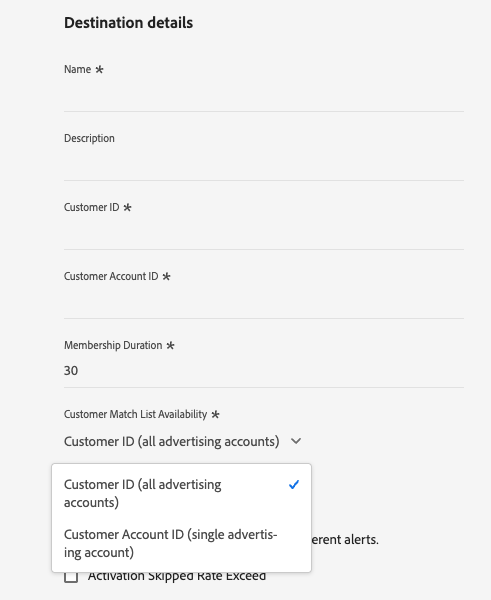
The Microsoft Advertising campaign URL contains several similar identifiers. The following anonymized example URL shows which value maps to each field:
https://ui.ads.microsoft.com/campaign/vnext/overview?aid=<ACCOUNT_ID>&ccuisrc=4&cid=<CUSTOMER_ID>&uid=<USER_ID>
aid=maps to Customer Account ID.cid=maps to Customer ID.uid=does not map to either field.
You can also find these values in the Microsoft Advertising user interface:
- Customer ID is the Manager Account ID under Settings > Manager Account Settings.
- Customer Account ID is the Account ID under Settings > Account Settings.
Enable alerts enable-alerts
You can enable alerts to receive notifications on the status of the dataflow to your destination. Select an alert from the list to subscribe to receive notifications on the status of your dataflow. For more information on alerts, see the guide on subscribing to destinations alerts using the UI.
When you are finished providing details for your destination connection, select Next.
Activate audiences to this destination activate
- To activate data, you need the View Destinations, Activate Destinations, View Profiles, and View Segments access control permissions. Read the access control overview or contact your product administrator to obtain the required permissions.
- To export identities to destinations, you need the View Identity Graph access control permission.
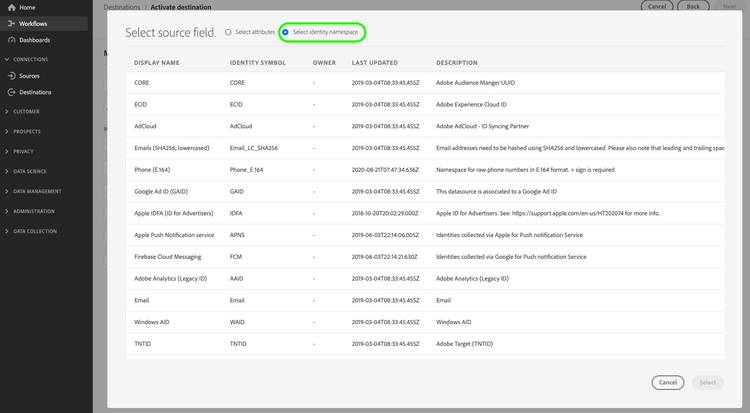
See Activate audience data to streaming audience export destinations for instructions on activating audiences to this destination.
Mapping mapping
In the Mapping step, you map a source field that contains your email addresses to a target field in Microsoft Ads Customer Match. The target field you choose must match the format of your source data.
There are two target fields:
email: for source fields that contain plain text (unhashed) email addresses. Experience Platform sanitizes and hashes these values automatically before exporting them to Microsoft Ads.email_lc_sha256: for source fields that contain email addresses you have already sanitized and hashed with SHA-256. Experience Platform sends these values without further transformation.
The mapping does not use a transformation step. When you map a plain text source field to email, Experience Platform sanitizes and hashes the email addresses automatically before sending them to Microsoft Ads Customer Match.
Choose the correct target field
Use the table below to select the target field based on your source data. Both identity namespaces and XDM attributes are supported as source fields.
IdentityMap: Email or an XDM attribute such as personalEmail.addressemailIdentityMap: Email_LC_SHA256 or an XDM attribute that stores hashed emailsemail_lc_sha256email_lc_sha256 target field, follow the Microsoft Ads sanitization and hashing requirements (lowercase, trim, then SHA-256) before mapping. Experience Platform does not re-sanitize already-hashed values, so you are responsible for correct sanitization and hashing. Mapping a non-email field, such as a city name, is still hashed but does not produce valid matches.Correct mapping examples
The following examples show supported mappings, where the source field format matches the target field.
Plain text identity namespace to email
Map the IdentityMap: Email namespace, which contains plain text email addresses, to the email target field.

Hashed identity namespace to email_lc_sha256
Map the IdentityMap: Email_LC_SHA256 namespace, which contains already-hashed email addresses, to the email_lc_sha256 target field.

Plain text XDM attribute to email
Map a plain text email attribute, such as personalEmail.address, to the email target field. Experience Platform hashes the values before export.

Hashed XDM attribute to email_lc_sha256
Map a pre-hashed email attribute to the email_lc_sha256 target field. Experience Platform sends the values without further transformation.

email_lc_sha256 target field. Experience Platform does not hash your data when you map to email_lc_sha256, so Microsoft Ads rejects the payload and the export fails. The mapping UI does not prevent this combination, so you must select the correct target field yourself. Always map plain text email addresses to the email target field.Incorrect mapping example
Plain text source to email_lc_sha256 (not supported)
The following example shows an unsupported mapping. Both source fields, personalEmail.address and IdentityMap: Email, contain plain text email addresses, but they are mapped to the email_lc_sha256 target field. Microsoft Ads rejects these values because they are not hashed.

Audience naming audience-naming
Experience Platform appends a UTC timestamp to the audience name when it exports the audience through the Microsoft Ads Customer Match destination. The timestamp differentiates audiences created through this destination from audiences created through the legacy Microsoft Bing connector, and it prevents duplicate or colliding audience names in your Microsoft Ads account.
Exported data exported-data
To verify if data has been exported successfully to the Microsoft Ads Customer Match destination, check your Microsoft Advertising account. If activation was successful, audiences are populated in your account as customer match lists.
Match rates match-rates
Match rate refers to the percentage of profiles in a Real-Time CDP audience that Microsoft Ads successfully matches to existing users in its network when the audience is created in Microsoft Advertising.
Several factors within Experience Platform and Microsoft Ads contribute to the match rates observed for a submitted audience. Match rates can be affected by data quality considerations such as invalid, outdated (stale), or incorrectly formatted email addresses.
Microsoft Advertising matches users that are known and targetable within its advertising network. As a result, only users that can be identified and are eligible for advertising use can contribute to the final match rate.
The following Experience Platform considerations also affect your match rates:
- Experience Platform filters out profiles that do not have an email address before export. Only profiles with at least one email address are included in the export payload.
- Experience Platform sends all email addresses associated with a profile. You cannot configure which emails are sent.
- For the
email_lc_sha256namespace, match rates depend on correct sanitization and hashing. Follow the Microsoft Ads sanitization and hashing requirements (lowercase, trim, then SHA-256) before mapping. Experience Platform does not re-sanitize already-hashed values. - Map only valid email fields as the source for either identity. Mapping a non-email field, such as a city name, is still sanitized and hashed but does not produce valid matches.
Additional resources additional-resources
See the Microsoft Advertising Help Center for additional information.