Microsoft Bing connection bing-destination
Overview overview
Use the Microsoft Bing destination to send profile data to the entire Microsoft Advertising Network, including Display Advertising, Search, and Native.
The Microsoft Bing destination creates Custom Audiences in Microsoft. Those are available both in the Microsoft Search Network and Audience Network (Native /Display /Programmatic) as listed in the Microsoft Advertising documentation.
To send profile data to Microsoft Bing, you must first connect to the destination.
Use cases use-cases
As a marketer, I want to be able to use audiences built off of Microsoft Advertising IDs to target users via display or search advertising across Microsoft Advertising channels.
Supported identities supported-identities
Microsoft Bing supports the activation of audiences based on the identities shown in the table below. Learn more about identities.
All identities in the table below are preconfigured and automatically mapped during activation. You do not need to manually configure these mappings.
Supported audiences supported-audiences
This section describes which types of audiences you can export to this destination.
This category includes all audience origins outside of audiences generated through the Segmentation Service. Read about the various audience origins. Some examples include:
- custom upload audiences imported into Experience Platform from CSV files,
- look-alike audiences,
- federated audiences,
- audiences generated in other Experience Platform apps such as Adobe Journey Optimizer,
- and more.
Supported audiences by audience data type:
Export type and frequency export-type-frequency
Audience Export - you are exporting all members of an audience to the Microsoft Bing destination.
Refer to the table below for information about the destination export type and frequency.
Prerequisites prerequisites
The Microsoft Bing destination requires the following setup to function correctly:
-
Enable ID sync functionality: If this is your first time setting up Microsoft Bing activation and you have not enabled the ID sync functionality in the Adobe Visitor ID Service in the past (with Adobe Audience Manager or other applications), contact Adobe Consulting or Customer Care to enable ID syncs.
- If you previously set up Microsoft Bing integrations in Audience Manager, your existing ID syncs automatically carry over to Experience Platform.
-
Ensure ECID on profiles: All profiles must have an ECID present to be successfully exported. ECID is mandatory for this destination.
When configuring the destination, you must provide the following information:
- Account ID: this is your Bing Ads CID, in integer format.
Connect to the destination connect
To connect to this destination, follow the steps described in the destination configuration tutorial.
Fill in destination details parameters
While setting up this destination, you must provide the following information:
- Name: A name by which you will recognize this destination in the future.
- Description: A description that will help you identify this destination in the future.
- Account ID: Your Bing Ads Customer ID (CID). Your CID is an integer, found in the URL when you log into Microsoft Advertising.
Enable alerts enable-alerts
You can enable alerts to receive notifications on the status of the dataflow to your destination. Select an alert from the list to subscribe to receive notifications on the status of your dataflow. For more information on alerts, see the guide on subscribing to destinations alerts using the UI.
When you are finished providing details for your destination connection, select Next.
Activate audiences to this destination activate
See Activate audience data to streaming audience export destinations for instructions on activating audiences to this destination.
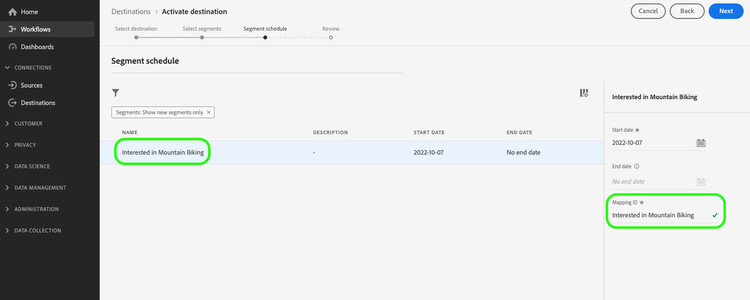
In the Audience schedule step, you must manually map the audience name in the Mapping ID field. This ensures that audience metadata is correctly passed through to Bing.
Preconfigured mappings preconfigured-mappings
The following identity mappings are preconfigured and automatically populated during the audience activation workflow:
- MAID (Microsoft Advertising ID)
- ECID (Experience Cloud ID)
These mappings are grayed out and read-only. You do not need to configure anything in this step. Select Next to continue.
Activation examples activation-examples
- Profile with ECID and Microsoft Advertising ID mapping: Profile is successfully exported and activated
- Profile with ECID only (no Microsoft Advertising ID mapping): Profile is not exported. The ID sync mapping between ECID and MAID is required.
- Profile without ECID: Profile is not exported. ECID is mandatory for this destination.
Exported data exported-data
To verify if data has been exported successfully to the Microsoft Bing destination, check your Microsoft Bing Ads account. If activation was successful, audiences are populated in your account.