Bombora ABM Audiences connection bombora
Activate profiles for your Bombora campaigns for audience targeting, personalization, and suppression, based on account audiences.
Use cases use-case
To help you better understand how and when you should use the Bombora destination, here are sample use cases that Adobe Experience Platform customers can solve by using this destination.
DSP integration dsp-integration
As a B2B marketer, you can create an account list in Real-time CDP, identifying companies which show high intent for your products, then use this destination to activate this list in Bombora.
Through Bombora’s integration with DSPs you can run targeted ad campaigns using Bombora data. This ensures your ad spend is focused on companies which are most likely to convert.
Account-Based Marketing abm
As a B2B marketer, you can build an account list based on CRM and marketing signals. Then, you can use this destination to activate this list in Bombora, where ABM-aware controls help you target decision makers at these companies.
Multi-channel account-based marketing activation multi-channel-abm
As a B2B marketer, you can create an account list in Real-time CDP, identifying companies with high intent. Then, you can use this destination to activate the list in Bombora to run targeted campaigns across multiple channels.
On paid social media, you might serve personalized ads to professionals at target accounts on platforms like LinkedIn and Facebook. Using native ad platforms, you can ensure the content reaches relevant decision makers.
You can also extend campaigns to advanced TV, delivering ads to key accounts.
This multi-channel approach ensures consistent messaging across platforms, maximizing engagement and conversion rates.
Supported audiences supported-audiences
This section describes which type of audiences you can export to this destination.
This category includes all audience origins outside of audiences generated through the Segmentation Service. Read about the various audience origins. Some examples include:
- custom upload audiences imported into Experience Platform from CSV files,
- look-alike audiences,
- federated audiences,
- audiences generated in other Experience Platform apps such as Adobe Journey Optimizer,
- and more.
Supported audiences by audience data type:
Supported identities supported-identities
Bombora requires the mapping of the target identity described in the table below. Learn more about identities.
primaryIdExport type and frequency export-type-and-frequency
Refer to the table below for information about the destination export type and frequency.
Prerequisites prerequisites
To export account audiences to Bombora, you need the following information.
- A Bombora account. If you do not have one, you can request a Bombora account using the Bombora audience activation request form.
- A Bombora client ID and client secret.
- Data sent to Bombora must be from datasets that are Profile-enabled, so the dataset is included in Profile. Ensure that your datasets are enabled for Profile before activating audiences to this destination.
Connect to the destination connect
To connect to this destination, follow the steps described in the destination configuration tutorial. In the configure destination workflow, fill in the fields listed in the two sections below.
Authenticate to destination authenticate
To authenticate to the destination, fill in the required fields and select Connect to destination.
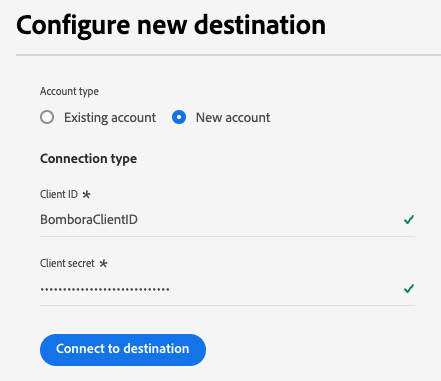
- Client ID: Enter your Bombora client ID.
- Client secret: Enter your Bombora client secret.
Fill in destination details destination-details
To configure details for the destination, fill in the required and optional fields below. An asterisk next to a field in the UI indicates that the field is required.
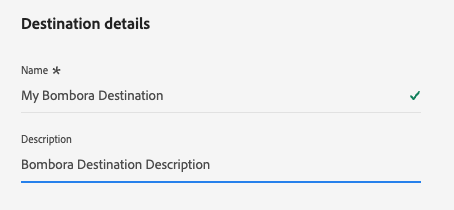
- Name: A name by which you will recognize this destination in the future.
- Description: A description that will help you identify this destination in the future.
Now you’re ready to activate your audiences within Bombora.
Activate audiences to this destination activate
- To activate data, you need the View Destinations, Activate Destinations, View Profiles, and View Segments access control permissions. Read the access control overview or contact your product administrator to obtain the required permissions.
- To export identities, you need the View Identity Graph access control permission.
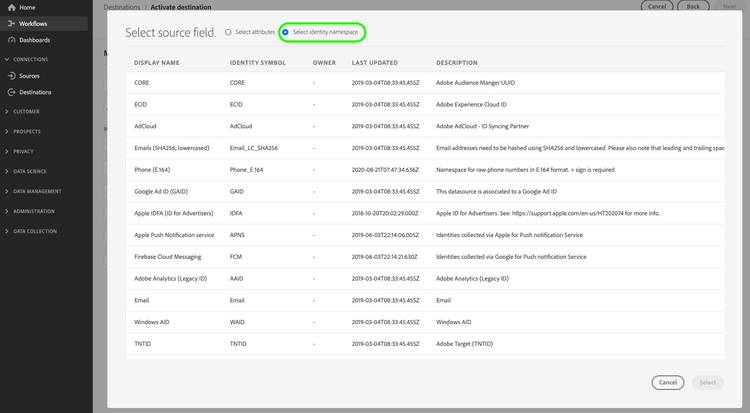
Read Activate account audiences for instructions on activating account audiences to this destination.
Mandatory mappings mapping
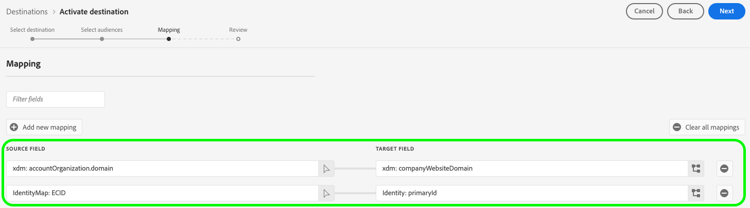
The Bombora destination requires you to configure the following mappings for successful data activation.
Identity: primaryIdxdm: accountOrganization.domainxdm: companyWebsiteDomainxdm: accountKey.sourceKeyxdm: externalAccountId
Audience sync behavior sync-behavior
After the initial audience activation, subsequent updates to the audience in Experience Platform are incrementally synced to Bombora. The following behaviors apply:
- Account added to the audience: When an account is added to the audience in Experience Platform, it is automatically added to the corresponding audience in Bombora.
- Account removed or no longer qualifies: When an account no longer qualifies for the audience or is removed from the audience in Experience Platform, it is removed from the corresponding audience in Bombora.
- Account or profile deleted: When an account or profile is deleted from Experience Platform and that account no longer qualifies for the audience, it is removed from the corresponding audience in Bombora.
Audience deletion and disconnect behavior deletion-disconnect
Deleting an audience in Experience Platform or removing an audience from a Bombora activation dataflow removes the audience from your Bombora account.
Additional notes and important callouts additional-notes
If an account audience with the same name was activated earlier to Bombora, you will receive an error if you try to activate it again through a different dataflow to the Bombora destination.