Use first-party device IDs in Data Collection
The Experience Platform Edge Network uses Experience Cloud IDs (ECIDs) to identify website visitors. To improve identity durability on owned properties, you can set and manage your own device identifiers, known as first-party device IDs (FPIDs). The Edge Network uses the FPID to seed the ECID that Adobe solutions use.
This page assumes that you are familiar with ECIDs and identityMap. See Identity in Data Collection for more information.
When to use FPIDs when-to-use
Browser restrictions can shorten the life of cookies that Adobe uses to recognize returning visitors. If you need more durable identity on sites that your organization owns and controls, FPIDs let you manage your own device identifier and use it to seed the ECID.
FPIDs are supported for web implementations that use the Web SDK, including the Web SDK tag extension. They are ideal when your main goal is stronger identity persistence on domains your organization owns, or you want better continuity for reporting and personalization on owned web properties. They also allow you to set and manage a first-party cookie from infrastructure you control.
FPIDs are not the right tool when your main goal is app-to-web handoff or identity continuity across multiple domains. For those scenarios, see mobile-to-web identity sharing and cross-domain sharing.
Benefits to using FPIDs include:
- Stronger persistence on owned properties.
- More control over how the device identifier is generated and managed.
- A durable foundation for analytics and personalization.
Tradeoffs to using FPIDs include:
- More implementation responsibility than relying on default identity behavior.
- Coordination across your server-side cookie logic and data collection configuration.
- Additional validation to confirm the identifier is being used as expected.
High-level setup path
- Generate and manage a first-party device ID on infrastructure you control.
- Configure your implementation to read that ID either from a first-party cookie or from the identity payload.
- Validate that returning visitors keep a consistent identity over time on your owned properties.
How FPIDs work how-fpids-work
The FPID passed to Adobe Experience Cloud is converted to an ECID using a deterministic algorithm. Each time the same FPID is sent to the Edge Network, the same ECID is seeded from the FPID. Once the FPID has been used to seed an ECID, it is dropped from the identityMap and replaced with the generated ECID. The FPID is not stored in Adobe Experience Platform or Experience Cloud solutions.
When both an ECID and FPID exist, the ECID is always used to identify the user first. This prioritization ensures that when an existing ECID is present in the browser cookie store, it remains the primary identifier and existing visitor counts do not risk inflation. For existing users, the FPID does not become the primary identity until the ECID expires or is deleted as a result of browser policy or manual action.
Identities are prioritized in the following order:
- ECID included in the
identityMap - ECID stored in a cookie
- FPID included in the
identityMap - FPID stored in a cookie
Generate and set the FPID cookie set-fpid-cookie
The Edge Network only accepts IDs that comply with the UUIDv4 format. Device IDs not in UUIDv4 format are rejected.
- UUIDs are unique and random, with a negligible probability of collision.
- UUIDv4 cannot be seeded using IP addresses or any other personally identifiable information (PII).
- Libraries to generate UUIDs are available for every programming language.
Server-side cookie setting set-cookie-server
When setting a cookie through your own server, you can use various methods to help prevent the cookie from being restricted by browser policies:
- Generate cookies using server-side scripting languages
- Set cookies in response to an API request made to a subdomain or other endpoint on the site
- Generate cookies using a content management system (CMS)
- Generate cookies using a content delivery network (CDN)
First-party cookies are most effective when they are set using a server that uses a DNS A record (for IPv4) or AAAA record (for IPv6), as opposed to a DNS CNAME or JavaScript code.
document.cookie method (including using the tag method cookie.set()) are almost never protected from browser policies that restrict cookie duration.Note that A or AAAA records are only supported for setting and tracking cookies. The primary method for data collection is through a DNS CNAME. FPIDs are set using an A or AAAA record and sent to Adobe using a CNAME. The Adobe-Managed Certificate Program allows you to configure a CNAME for data collection.
When to set the cookie when-to-set-cookie
The FPID cookie is ideally set before sending data to the Edge Network. If your implementation requires consent before collecting data, see Consent with first-party device IDs for guidance on coordinating the FPID cookie with your consent flow. Visitor inflation is reduced when you ensure that the FPID is available to seed the ECID from the first request. In scenarios where that is not possible, an ECID is still generated using existing methods and acts as the primary identifier as long as the cookie exists. The generated FPID does not become the primary identifier until the ECID is no longer present. Assuming the ECID is eventually impacted by a browser deletion policy, but the FPID is not, the FPID becomes the primary identifier on the next visit and is used to seed the ECID on each subsequent visit.
Setting the expiration set-expiration
Adobe recommends carefully considering the lifetime of your FPID cookie. Make sure that you factor in your organization’s privacy policy along with the laws and policies of the countries or regions in which your organization operates. Depending on your organization’s setup, you could adopt a company-wide cookie-setting policy or one that varies for users in each locale where you operate. Regardless of initial cookie expiration, ensure that you include logic that extends the expiration each time a new site visit occurs.
Cookie flags cookie-flags
There are several cookie flags that impact how cookies are treated across different browsers:
HTTPOnly: Cookies set using theHTTPOnlyflag cannot be accessed using client-side scripts. This means that if you set anHTTPOnlyflag when setting the FPID, you must use a server-side scripting language to read the cookie value for inclusion in theidentityMap. If you choose to have the Edge Network read the value of the FPID cookie, setting theHTTPOnlyflag ensures that the value is not accessible by client-side scripts but does not negatively affect the Edge Network’s ability to read the cookie. The use of theHTTPOnlyflag does not affect cookie policies that can restrict cookie lifetime. However, it is still something to consider as you set and read the value of the FPID.Secure: Cookies set with theSecureattribute are only sent to the server with an encrypted request over the HTTPS protocol. Using this flag can help ensure that man-in-the-middle attackers cannot easily access the cookie value. When possible, it is always a good idea to set theSecureflag.SameSite: TheSameSiteattribute lets servers determine whether cookies are sent with cross-site requests. The attribute provides some protection against cross-site forgery attacks. Three possible values exist:Strict,Lax, andNone. Consult your internal team to determine which setting is right for your organization. If noSameSiteattribute is specified, the default setting for some browsers isSameSite=Lax.
Send the FPID to the Edge Network send-fpid
You can send FPIDs to the Edge Network in two ways:
Method 1: Configure a CNAME and set a first-party ID cookie in your datastream setting-cookie-datastreams
To set an FPID cookie from your own domain, you must configure your own CNAME for your Web SDK calls, then enable the First-party ID cookie functionality in your datastream configuration. A CNAME record in your DNS allows you to create an alias from one domain name to another. This alias can help make third-party services appear as if they are part of your own domain, making their cookies look like first-party cookies. When first-party data collection is enabled using a CNAME, all cookies for your domain are sent on requests made to the data collection endpoint.
-
Work with Adobe to create a
CNAMErecord for data collection use in your organization. See the Adobe-managed certificate program for the full process. -
Enable the First Party ID Cookie option in your datastream. This setting tells the Edge Network to refer to the specified cookie when looking up a first-party device ID instead of looking up the value in the identity map. When enabling this setting, you must provide the name of the cookie where the FPID is expected to be stored. See Create and configure datastreams for more information.
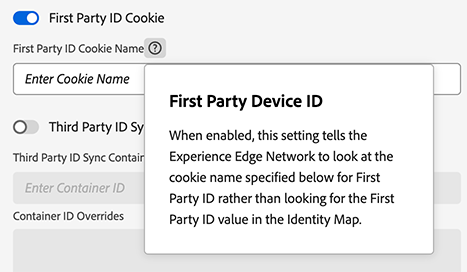
Method 2: Use FPIDs in identityMap identityMap
As an alternative to storing the FPID in your own cookie, you can send the FPID to the Edge Network through the identity map.
Below is an example of how to set an FPID in the identityMap:
{
  "identityMap": {
    "FPID": [
      {
        "id": "123e4567-e89b-42d3-9456-426614174000",
        "authenticatedState": "ambiguous",
        "primary": true
      }
    ]
  }
}
As with other identity types, you can include the FPID with other identities within identityMap. The following example includes the FPID with an authenticated CRM ID:
{
  "identityMap": {
    "FPID": [
      {
        "id": "123e4567-e89b-42d3-9456-426614174000",
        "authenticatedState": "ambiguous",
        "primary": false
      }
    ],
    "EMAIL": [
      {
        "id": "user@example.com",
        "authenticatedState": "authenticated",
        "primary": true
      }
    ]
  }
}
If the FPID is contained in a cookie being read by the Edge Network when first-party data collection is enabled, capture only the authenticated CRM ID:
{
  "identityMap": {
    "EMAIL": [
      {
        "id": "user@example.com",
        "authenticatedState": "authenticated",
        "primary": true
      }
    ]
  }
}
The following identityMap results in an error response from the Edge Network because it is missing the primary indicator for the FPID. At least one of the IDs present in identityMap must be marked as primary.
{
  "identityMap": {
    "FPID": [
      {
        "id": "123e4567-e89b-12d3-a456-426614174000",
        "authenticatedState": "ambiguous"
      }
    ],
    "EMAIL": [
      {
        "id": "user@example.com",
        "authenticatedState": "authenticated"
      }
    ]
  }
}
Migrating to FPIDs migrating-to-fpid
If you are migrating to first-party device IDs from a previous implementation, it can be difficult to visualize what the transition might look like at a low level. To help illustrate this process, consider a scenario that involves a customer who has previously visited your site and what impact an FPID migration would have on how that customer is identified in Adobe solutions.

A record, the FPID persists. The FPID is now considered the primary ID and is used to seed the ECID, which is written to the end-user device. The user is now considered a new visitor in Adobe Experience Platform and Experience Cloud solutions.