[AEM Forms]{class="badge positive" title="Applies to AEM Forms)."}
Rectangle Component in Interactive Communication Editor
1. Introduction
The Rectangle component in the Interactive Communication (IC) editor allows authors to add shaped graphical elements that serve as layout dividers, visual accents, or content containers. Rectangles enhance visual hierarchy and guide user attention in structured communication layouts.
This component is not tied to data but is instrumental in improving design clarity, grouping related fields, and enhancing overall presentation.
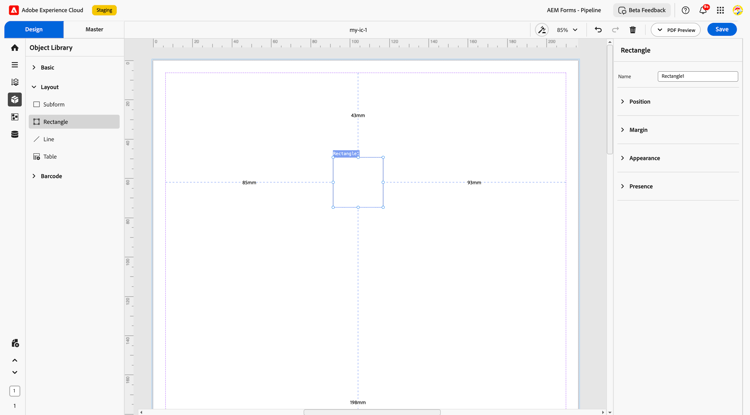
2. Properties
The Rectangle component includes several customizable properties:
2.1. Name
Name: A unique identifier for the rectangle. Primarily used for referencing in layout hierarchies or applying styles consistently.
2.2. Position
-
Description: Determines where the rectangle appears in the document layout.
-
Settings:
-
X and Y coordinates: Define horizontal and vertical placement.
-
Height and Width (in mm): Control the size of the rectangle.
-
2.3. Margin
Defines spacing around the rectangle component to separate it from other UI elements:
-
Top (Up)
-
Bottom (Down)
-
Left
-
Right
2.4. Appearance
-
Description: Governs the visual styling of the rectangle.
-
Customization Options:
-
Fill: The internal color of the rectangle.
-
Stroke: The outline color of the rectangle.
-
Stroke Width: Thickness of the rectangle’s border.
-
Style: Pre-set styles such as flat, bordered, or elevated.
-
Edges: Controls corner appearance (e.g., rounded or sharp edges).
-
2.5. Presence
-
Description: Specifies whether the rectangle is displayed when the communication is rendered.
-
Options:
-
Visible: Shows the rectangle at runtime.
-
Hidden: Keeps the layout space without showing the rectangle.
-
3. Usage
The Rectangle component is typically used for layout and styling purposes rather than content input. Common use cases include:
-
Creating visual separation between sections
-
Highlighting grouped elements
-
Enhancing readability and visual balance
-
Framing headers, footers, or call-out sections
Rectangles can be combined with other layout elements like subforms or containers for complex visual design structures.
4. Best Practices
-
Use consistent styling for rectangles across your layout to ensure visual harmony.
-
Apply adequate margins and spacing to prevent crowding adjacent fields.
-
Choose fill and stroke colors that align with your brand or document theme.
-
Use rounded edges subtly to improve aesthetics in modern UI layouts.
-
Hide rectangles if they are only needed for design purposes during editing but not required in the final output.
The Rectangle component is a non-interactive yet powerful tool in the IC Editor. When styled and positioned effectively, it enhances layout precision, visual flow, and user experience without adding complexity to data binding or interactivity.