[AEM Forms]{class="badge positive" title="Applies to AEM Forms)."}
Image Component in Interactive Communication Editor
1. Introduction
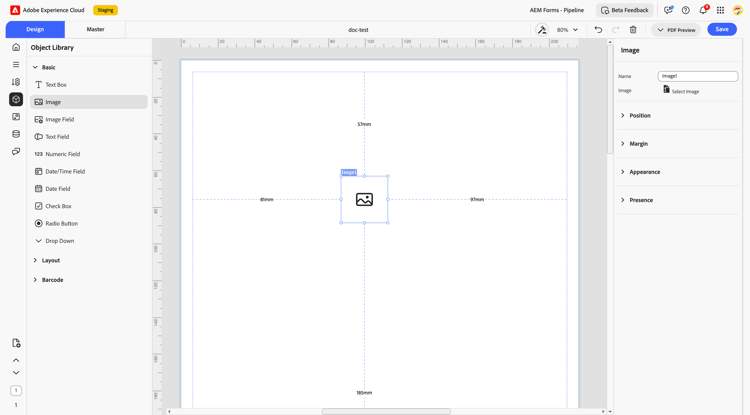
The Image component in the Interactive Communication Editor allows authors to enhance communication layouts by inserting static images. This component is essential for creating visually appealing layouts and incorporating branding elements such as logos or visual icons. Authors can place it in both Master Pages and Design View to ensure a consistent appearance across various output formats such as PDF.
2.Properties
The Image component provides several properties to help configure its look, feel, and behavior.
2.1. Image Description
Name:
Acts as a unique identifier for the image component, allowing easy reference within the component hierarchy or rules editor.
Select Image: Enables the author to upload or reference an image, such as a logo, icon, or any other static visual from multiple sources.
2.2. Position
Description: Controls the spatial placement of the image in the layout.
Settings:
X and Y coordinates
Height and width (in mm)
2.3 Margin
Define spacing around the text box:
-
Top (Up)
-
Bottom (Down)
-
Left
-
Right
2.4. Appearance
Appearance: Defines the visual style of the image field, choose presets like bordered, flat, or elevated, and customize with fill color, stroke width, and corner style (rounded or sharp).
2.5. Presence
Description: Determines visibility of the image component at runtime.
-
Options:
-
Visible
-
Hidden (keeps space)
-
3.Usage
The Image component is ideal for:
-
Inserting logos in document headers
-
Showing product images in invoices or quotes
-
Enhancing visual engagement of communications
4.Best Practices
-
Use images from a shared library for easy reuse and consistency.
-
Keep the image’s shape consistent to avoid stretching or pixelation.
-
Avoid using very large image files to keep the document fast and responsive.
-
Set the image to show or hide conditionally if it’s not always needed.
The Image component in AEM Interactive Communication plays a vital role in creating branded, personalized, and visually effective communications. With configurable properties, it enhances the user experience while maintaining design consistency across different formats.