[AEM Forms]{class="badge positive" title="Applies to AEM Forms)."}
Radio Button Component in Interactive Communication Editor
1. Introduction
The Radio Button component in the Interactive Communication (IC) editor allows authors to present a set of mutually exclusive choices to users—meaning only one option can be selected at a time. This makes it ideal for use cases like Yes/No questions, gender selection, rating levels, or predefined categorical responses.
Radio buttons are intuitive, easy to configure, and can be bound to back-end data models for seamless data capture and integration.
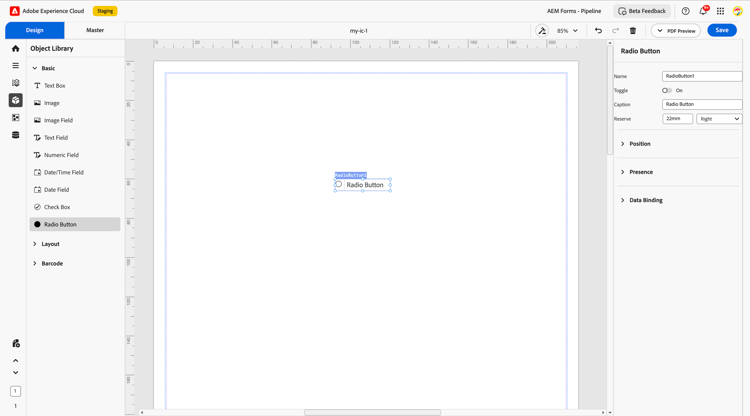
2. Properties
The Radio Button component includes several configurable properties:
2.1. Basic Field
-
Name: A unique identifier for the field. It is used for referencing within data models, rules, and business logic.
-
Toggle: Allows defining each selectable choice in the button group. Each toggle represents a possible value.
-
Caption: The label associated with the radio button group to guide the user.
-
Reserve: Optional fallback value if no selection is made or data binding is empty.
2.2. Position
Description: Controls the spatial placement of the radio button group in the layout.
Settings:
-
X and Y coordinates
-
Height and Width (defined in mm or % for responsive layout design)
2.3. Margin
Define spacing around the text box:
-
Top (Up)
-
Bottom (Down)
-
Left
-
Right
2.4. Presence
-
Description: Determines the visibility of the radio button component at runtime.
-
Options:
-
Visible: Displayed to users and occupies space.
-
Hidden (keeps space): Not visible but retains layout spacing.
-
2.5. Data Binding
-
Description: Connects the radio button group to a data model for capturing the selected option.
-
Binding Types:
-
Use Name: Uses the assigned field name as the reference for binding.
-
Use Global Data: Binds the field to a global data model or schema element.
-
No Data Binding: The radio button selection is not tied to any data source; used for UI-only behavior.
-
3. Usage
The Radio Button component is well-suited for scenarios where users must choose only one value from a list. Typical use cases include:
-
Selecting a preferred communication method (Email / Phone / SMS)
-
Confirming binary decisions (Yes / No)
-
Choosing from limited options (e.g., Gender, Marital Status)
-
Indicating satisfaction levels or agreement scales (e.g., Disagree / Neutral / Agree)
Authors can group related radio buttons together and position them inside layout containers for consistent alignment. Labels can be positioned inline or above the buttons depending on visual design requirements.
4. Best Practices
-
Limit the number of options to 5 or fewer to avoid overwhelming the user.
-
Use clear and concise captions to describe what the user is selecting.
-
Preselect the most common or safe choice if appropriate.
-
Avoid using radio buttons when users should be allowed to choose more than one option, use checkboxes instead.
-
Bind radio buttons directly to schema nodes when integrating with back-end data models.
-
Apply consistent spacing and alignment for better visual clarity, especially in mobile-friendly layouts.
The Radio Button component in the Interactive Communication editor is a fundamental input component that offers clean, structured decision-making for end users. When configured with clear labels, thoughtful spacing, and data binding, it ensures reliable data collection and a smoother user experience for forms, surveys, and onboarding workflows.