Understand your audiences and where they’re activated
Select to zoom.
Knowing which audiences are live, where they are flowing, and whether destinations are healthy is critical before a campaign launches or when one underperforms. This walkthrough shows how to get a complete activation picture through an AI client, using the Real-Time CDP MCP Server to surface audience status and destination health in seconds, without opening Real-Time CDP.
Each step shows one representative prompt and an example AI response. A More you can accomplish section follows for additional exploration in the same session.
Before you begin
The fastest way to get this activation picture is CX Enterprise Coworker, which requires no server setup or AI client configuration. Try CX Enterprise Coworker
If you’d rather connect your own AI client directly to Real-Time CDP, see the tabs below. The Real-Time CDP MCP Server is in public beta and requires your organization to be allowlisted.
Connect the Real-Time CDP MCP Server as a custom connector.
- Go to Settings > Integrations in Claude.ai.
- Select Add custom connector and enter the server URL:
https://rtcdp-mcp.adobe.io/mcp - Select Connect and sign in with your Adobe ID.
Full setup: Claude.ai Custom Connectors documentation
Connect the Real-Time CDP MCP Server using ChatGPT Developer Mode (Pro, Plus, Business, Enterprise, or Education plan required).
- Enable Developer Mode in ChatGPT Settings.
- Go to Settings > Integrations and select Add custom connector > Remote MCP server.
- Enter the server URL:
https://rtcdp-mcp.adobe.io/mcp - Select Connect and sign in with your Adobe ID.
Full setup: ChatGPT MCP documentation
Using Gemini, Microsoft Copilot, Cursor, Claude Code, or another MCP-compatible environment? Connect to the Real-Time CDP MCP Server using this endpoint:
| code language-none |
|---|
|
Full setup instructions for all supported clients: Connect to your AI client
Step 1: Discover your audiences and what they represent
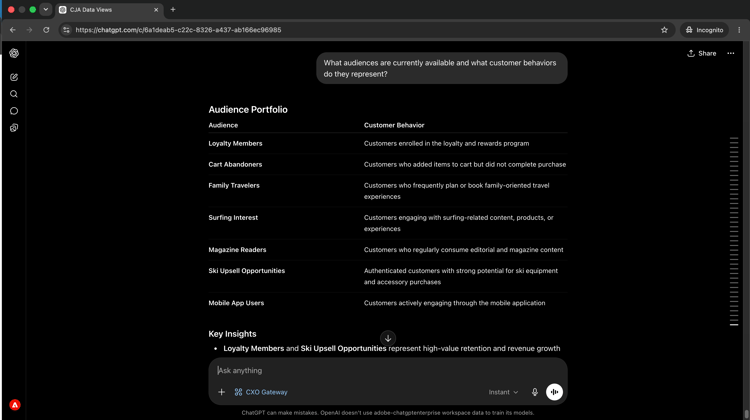
Start by asking for an inventory of available audiences and the customer behaviors they capture. This gives you the full landscape before drilling into any specific segment.
What audiences are currently available and what customer behaviors do they represent?
Select to zoom.
Step 2: Identify your most valuable segments
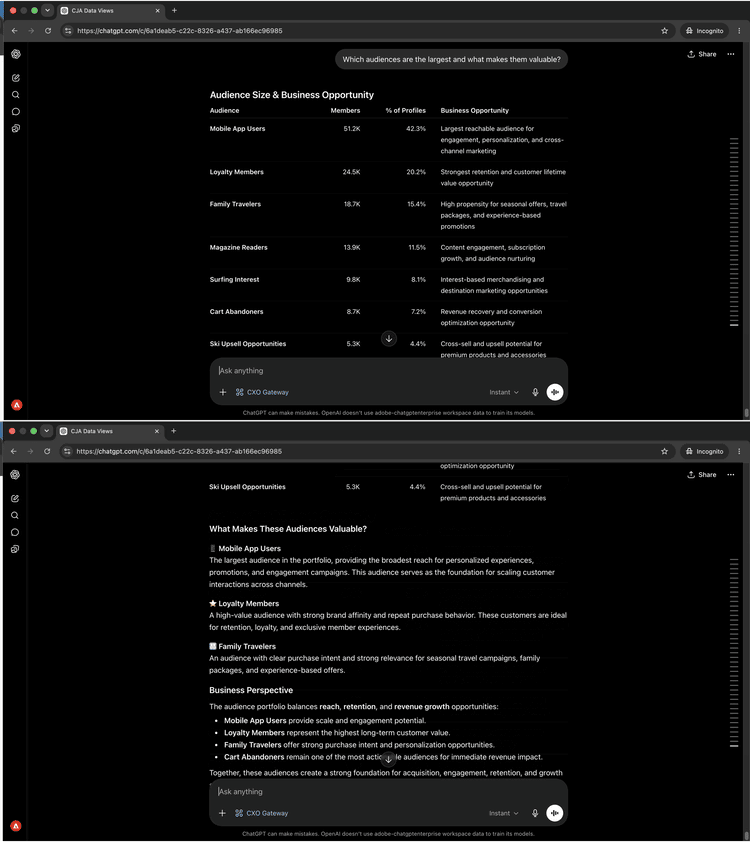
With the audience landscape in view, ask which segments are largest and what makes them strategically valuable.
Which audiences are the largest and what makes them valuable?
Select to zoom.
Step 3: Review activation and destinations
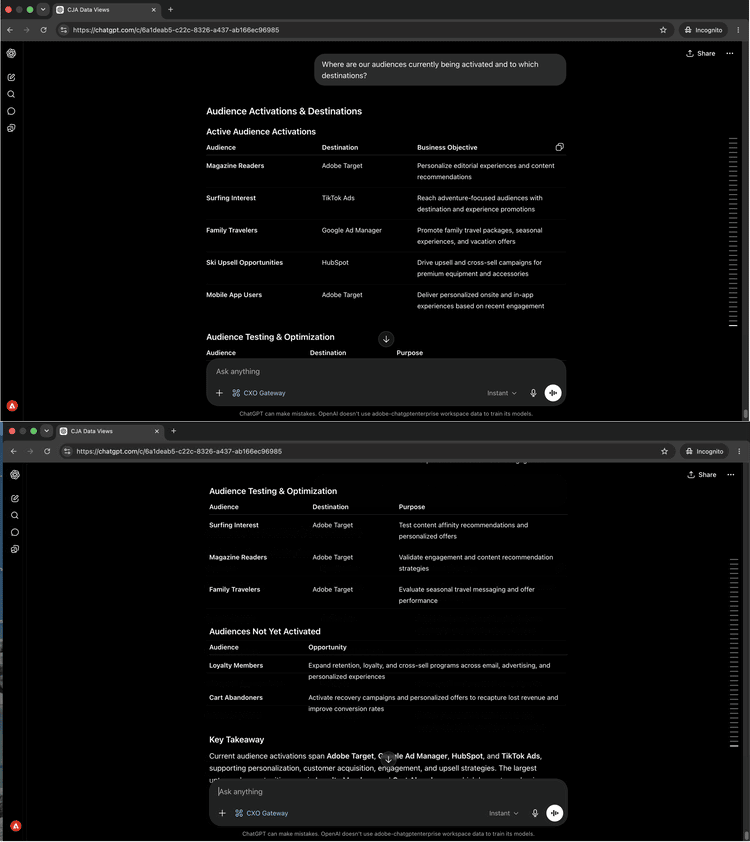
Ask where your audiences are currently flowing and which destinations they are activated to.
Where are our audiences currently being activated and to which destinations?
Select to zoom.
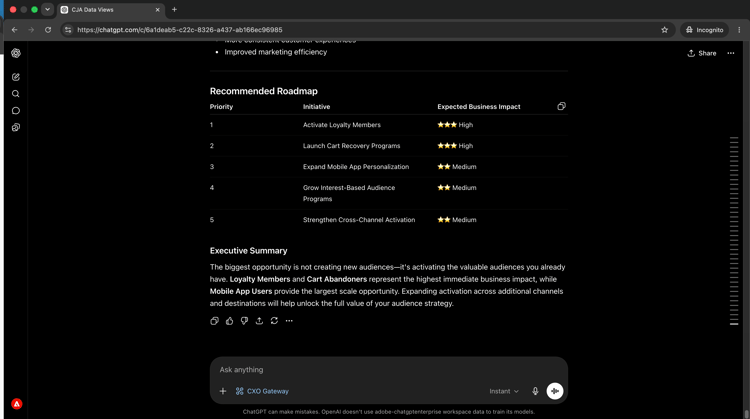
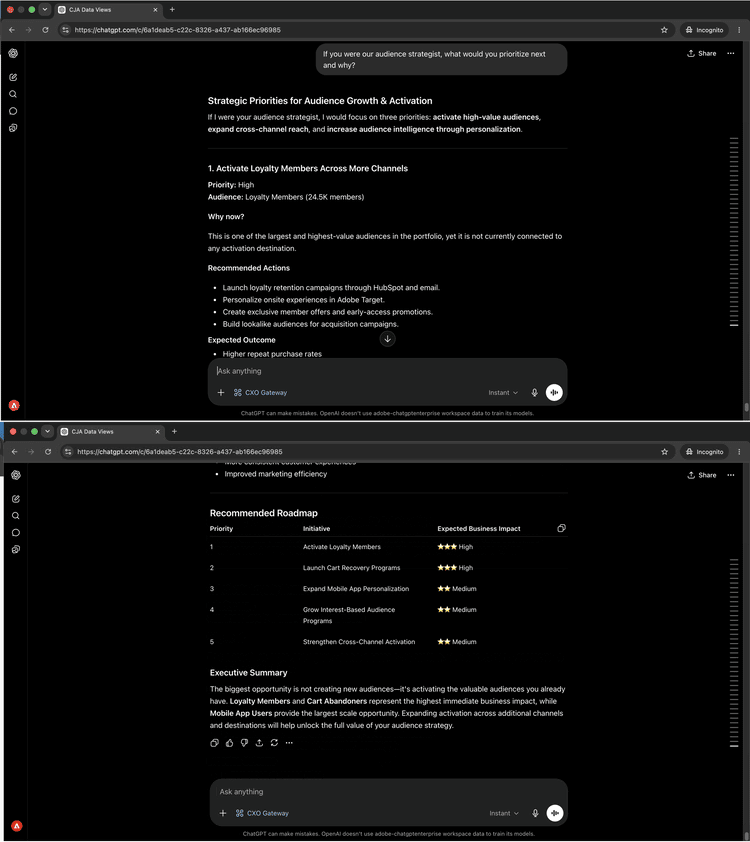
Step 4: Get strategic recommendations
The Real-Time CDP MCP Server’s tools are read-only – they surface activation status, destination health, and dataflow data, but do not modify configuration. Once you have identified an issue, the fix happens in the application.
If you were our audience strategist, what would you prioritize next and why?
Select to zoom.
What you accomplished
You connected an AI client to Real-Time CDP and built a strategic picture of your audience portfolio in four prompts. You mapped available audiences to the customer behaviors they capture, identified your largest and most valuable segments, confirmed where each audience is flowing and to which destinations, and received prioritized recommendations on your next activation. This replaces navigating multiple Real-Time CDP screens with a direct, strategic conversation.
More you can accomplish
The Real-Time CDP MCP Server supports a wide range of audience and activation queries. Expand a scenario below to see prompts you can try in the same session.
Activation failures are silent. Audiences stop flowing without warning and campaigns send to outdated lists. These prompts give you a clear picture of which segments are reaching which destinations and when.
Prompts
| code language-none |
|---|
|
| code language-none |
|---|
|
| code language-none |
|---|
|
A destination that missed a run or a segment with no active destination means your campaign may be reaching fewer people than intended. These prompts surface those gaps proactively.
Prompts
| code language-none |
|---|
|
| code language-none |
|---|
|
| code language-none |
|---|
|
When audience sizes shift or new segments are created, having a clear inventory helps you plan and avoid activating the wrong list. These prompts give you that visibility on demand.
Prompts
| code language-none |
|---|
|
| code language-none |
|---|
|
| code language-none |
|---|
|
| code language-none |
|---|
|
Identity namespaces and merge policies directly affect which profiles are included in an audience and how they are resolved. These prompts surface configuration details that can explain unexpected audience sizes or profile overlaps.
Prompts
| code language-none |
|---|
|
| code language-none |
|---|
|
| code language-none |
|---|
|