Success metrics
This page provides an overview of the key performance metrics for your Adobe Commerce Optimizer store. The goal is for you to quickly understand the results of implementing Adobe Commerce Optimizer then help you and your team identify opportunities for growth, and highlight areas for optimization.
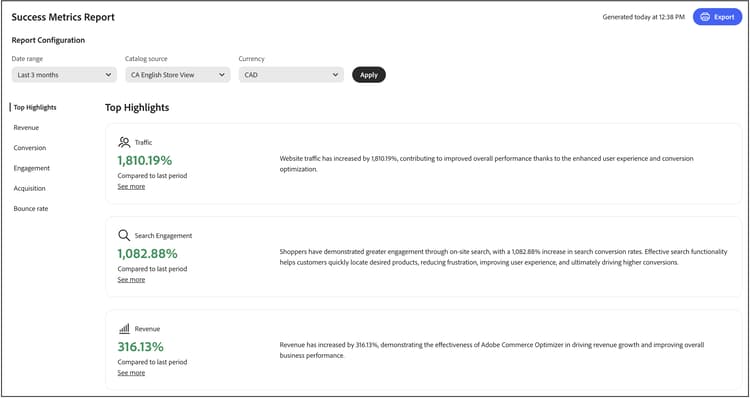
The metrics in the report are pulled from storefront event data. Learn more about the event data collected.
Understanding your metrics
The success metrics report delivers actionable insights into five key performance areas that directly impact your business outcomes. Each metric reveals patterns in customer behavior and store performance that help you uncover opportunities and address challenges. Leverage these insights to drive smarter decisions and to optimize your commerce experience.
Top Highlights summarizes key metrics from each performance area. Use this section to quickly identify your biggest opportunities for improvement.
The key performance indicators are:
- Revenue—Your primary financial metric showing total sales performance.
- Conversion—The percentage of visitors who complete purchases.
- Engagement—How actively users interact with your site.
- Acquisition—The effectiveness of your customer acquisition efforts.
- Bounce Rate—The percentage of visitors who leave after viewing only one page.
Data freshness and accuracy
Update frequency: Success Metrics data is processed and updated regularly as storefront events are collected and processed.
When to check metrics: For the most accurate trend analysis, review metrics after sufficient time has passed to collect meaningful data. Daily fluctuations are normal; focus on weekly or monthly trends for strategic decisions.
Data accuracy: Metrics are calculated from actual customer interactions captured through storefront events. Ensure your store has proper event tracking configured for accurate reporting.
Generate a report
-
From the left rail, select Success Metrics.
-
Under Report Configuration specify the Date range, Catalog source, based on your locale setting, and Currency.
-
Click Apply.
The Top Highlights, Revenue, Conversion, Engagement, Acquisition, and Bounce rate all update based on your report configuration.
-
Click Export to save the report as a PDF.
C2PA metadata on exported reports c2pa-metadata-on-exported-reports
The Success Metrics report includes highlights and summaries using generative AI. When you export a report to PDF, Adobe automatically attaches C2PA metadata to the exported file.
C2PA metadata is tamper-evident, machine-readable metadata based on the C2PA open standard. The metadata records that generative AI was used to produce content in the report, along with information such as the AI system used, whether content was generated or edited with generative AI, and a timestamp.
What this means for your exported reports
- When you export a Success Metrics report to PDF, the exported file carries C2PA metadata.
- C2PA metadata travels with the PDF when you share or download it. Third-party platforms that support C2PA metadata may read this metadata and display transparency information to viewers.
- You can verify the C2PA metadata attached to any file by uploading it to Inspect.
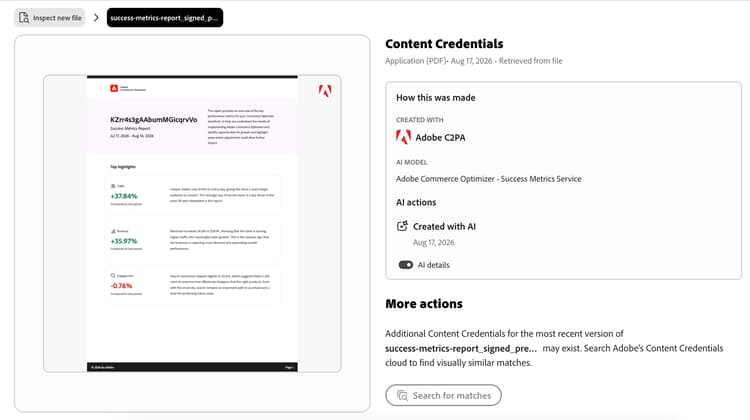
Learn more about Generative AI content transparency.
Using Success Metrics and Sites Optimizer together
Success Metrics and Sites Optimizer (Opportunities) are complementary tools designed to work together, helping you to enhance your commerce site’s performance. Understanding the difference between these features helps you make better decisions and achieve measurable results.
Key differences
How to use these features together
The most effective approach combines both tools in a continuous improvement cycle:
-
Measure with Success Metrics: Start by reviewing your Success Metrics dashboard to understand your current performance. Identify which KPIs need improvement (for example, low conversion rate or high bounce rate).
-
Diagnose with Opportunities: Navigate to the Opportunities page to discover specific issues that may be causing poor performance. Sites Optimizer scans your product catalog, search logs, and recommendation data to identify problems such as missing product data, poor search relevance, or navigation issues.
-
Implement recommendations: Follow the AI-driven recommendations provided in Opportunities to address detected issues. These might include fixing product data quality issues, improving SEO, or optimizing search and discovery.
-
Track improvements: Return to Success Metrics to monitor how the changes impact your KPIs over time. Use the date range selector to compare performance before and after implementing recommendations.
-
Iterate and optimize: Continue this cycle, using Opportunities to identify new issues and Success Metrics to measure the impact of your optimizations.
Example workflow
A merchant notices their conversion rate declining in Success Metrics. Here’s how they can use both features to address it:
-
Identify the problem: The Success Metrics dashboard shows conversion rate dropped 15% over the past month.
-
Find the cause: The Opportunities page reveals several issues:
- Multiple products missing key attributes affecting search relevance.
- Popular search queries returning poor results.
- Slow page load times on category pages.
-
Take action: The merchant prioritizes fixing the product data quality issues first, as Sites Optimizer categorizes these as high-impact opportunities affecting search and recommendations.
-
Measure results: After updating product attributes and implementing recommended changes, the merchant monitors Success Metrics weekly. Over the next month, conversion rate increases by 12%, and search engagement metrics improve significantly.
-
Continue optimizing: With conversion rate improving, the merchant shifts focus to the next priority shown in Opportunities—optimizing page load speed to reduce bounce rate.
When to use each feature
Use Success Metrics when you want to:
- Track overall business performance.
- Measure the impact of changes over time.
- Identify which areas of your business need attention.
- Share performance reports with stakeholders.
- Understand customer behavior trends.
Use Sites Optimizer (Opportunities) when you want to:
- Discover specific issues affecting performance.
- Get actionable recommendations to fix problems.
- Understand why certain metrics are declining.
- Prioritize which optimizations to tackle first.
- Leverage AI to identify issues you might miss manually.
Together, these features provide a complete solution: Success Metrics tells you what is happening, while Sites Optimizer tells you why and how to fix it.
Next steps and optimization strategies
Use your success metrics data to identify opportunities for improvement and implement targeted optimization strategies. The following sections provide specific, actionable guidance for each metric area.
For revenue, your goal is to increase total sales and average order value.
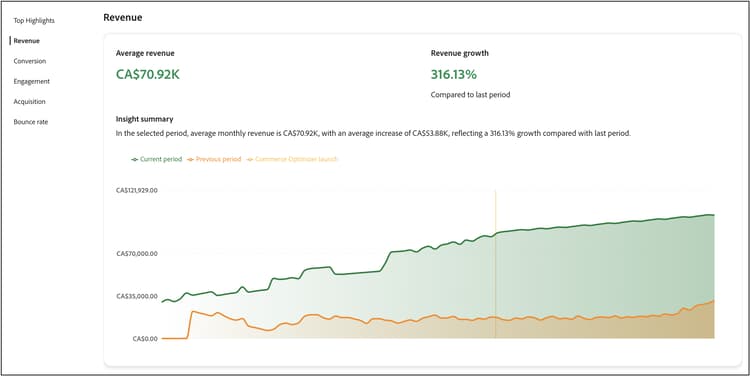
Understanding the revenue metric
What it measures: Total income generated by your store during the selected time period.
How it’s calculated: Revenue is the sum of all completed orders (base price × quantity) for all products sold during the reporting period. The calculation uses data from place-order events captured on your storefront.
| note important |
|---|
| IMPORTANT |
Revenue calculations exclude canceled orders, returns, and orders where the place-order event was not captured. Events may be missing due to consent settings, browser issues (ad blockers, script failures), or technical processing errors. |
Formula:
| code language-none |
|---|
|
Data source: Storefront events (specifically place-order events)
What’s included:
- All completed orders during the selected date range.
- Base product prices multiplied by quantities purchased.
- Revenue from all sales channels tracked by Adobe Commerce Optimizer.
Important notes:
- Revenue is calculated based on base prices captured in storefront events.
- The reporting period is determined by the date range you select in the report configuration.
- Revenue metrics update as new order events are processed.
Strategies
-
Implement AI-powered recommendations: Use the optimizer’s recommendation engine to surface relevant products that drive higher conversion rates. Deploy Customers who viewed this also viewed and Bought this, bought that recommendation types to increase cross-selling opportunities.
-
Create merchandising rules: Boost high-margin products in search results using merchandising rules. Pin best-selling items to the top of search results for high-traffic queries.
-
Optimize product discovery: Use intelligent facets to help customers find products more efficiently, leading to higher conversion rates and increased revenue.
-
Leverage seasonal opportunities: Create time-based merchandising rules to promote seasonal or promotional items during peak shopping periods.
To improve your conversion rate, your goal is to convert more visitors into customers.
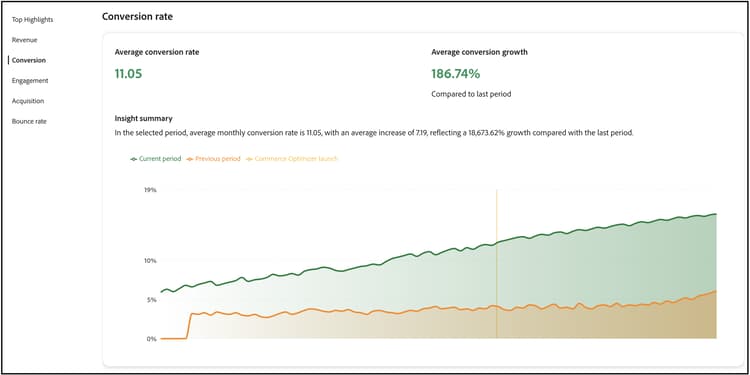
Understanding the conversion rate metric
What it measures: The percentage of visitors who view products and then complete a purchase, indicating how effectively your store converts browsers into buyers.
How it’s calculated: Conversion rate compares the number of unique visitors who purchased products against the number of unique visitors who viewed products.
Formula:
| code language-none |
|---|
|
Data source: Storefront events.
How it works:
- Product views are tracked when visitors view product pages (using
product-viewevents). - Purchases are tracked when orders are completed (using
place-orderevents). - The calculation matches users who viewed specific products with those who purchased them.
Important notes:
- A visitor who views multiple products but makes one purchase counts as one conversion.
- The metric tracks unique visitors using browser-based identifiers.
- Product view events always include a click, so views represent genuine user interest.
Strategies
-
Optimize search relevance: Implement synonyms to ensure that customers find what they’re looking for, even with different search terms. Use dynamic faceting to provide relevant filtering options.
-
Strategic recommendation placement: Deploy recommendation units on high-traffic pages like product detail pages and category pages. Use Most viewed and Most purchased recommendations to build trust and urgency.
-
Improve product visibility: Use merchandising rules to ensure best-selling and high-converting products appear prominently in search results.
-
A/B test recommendation types: Experiment with different recommendation types and placements to find what works best for your audience.
To enhance engagement, your goal is to increase customer interaction and time on site.
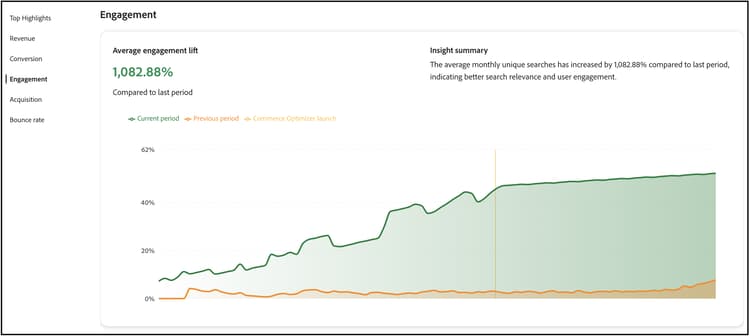
Understanding the engagement metric
What it measures: How actively users interact with your store, tracking meaningful actions from initial browsing through the checkout process.
How it’s calculated: Engagement tracks all interactions that indicate active participation with your store, including product browsing, shopping cart activities, and checkout actions.
Data source: Storefront events
What counts as engagement:
Engagement includes the following event categories and actions:
- Product interactions: Product views, product clicks, and product comparisons.
- Shopping cart activities: Adding items to cart, updating quantities, removing items.
- Checkout actions: Initiating checkout, completing checkout steps.
- Category browsing: Viewing category pages, filtering by facets.
- Wishlist activities: Adding to wishlist, viewing wishlist items.
Event tracking details:
The system tracks engagement when events have:
- Category:
product,shopper,shopping-cart, orcheckout. - Property:
Product,Checkout,Cart,Category, orWishlist.
Important notes:
- Higher engagement typically correlates with higher conversion rates.
- Engagement metrics help identify where users are most active in their journey.
- Use engagement data to optimize high-traffic pages and improve user experience.
Strategies
-
Diversify recommendation types: Avoid showing the same recommendations repeatedly. Use a mix of Recommended for you, Trending, and Recently viewed to keep content fresh and engaging.
-
Implement intelligent search: Use AI-driven dynamic faceting and result re-ranking to adapt search results in real-time based on shopper behavior.
-
Create personalized experiences: Deploy “Recommended for you” units on the homepage and throughout the customer journey to provide personalized product suggestions.
-
Optimize search experience: Use synonyms to improve search relevance and ensure customers find what they’re looking for quickly.
To acquire more growth, your goal is to attract more new customers and improve acquisition efficiency.
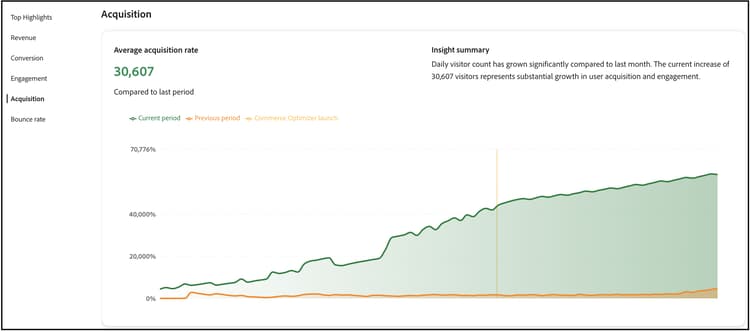
Understanding the acquisition metric
What it measures: The number of new, unique visitors coming to your store, helping you understand the effectiveness of your marketing and customer acquisition efforts.
How it’s calculated: Acquisition counts unique visitors based on browser identifiers assigned during their first visit to your store.
Data source: Storefront events.
How it works:
- Each visitor’s browser receives a unique identifier (
domain_userid) via a first-party cookie. - New visitors are identified when their session index equals 1 (first visit).
- The system tracks these identifiers to distinguish new visitors from returning ones.
Important notes:
This tracking method has some known limitations:
- Cross-device users: The same person visiting from different devices (desktop, mobile, tablet) or browsers is counted as multiple unique visitors since each device and browser receives a different identifier.
- Cookie clearing: Users who clear their browser cookies are assigned a new identifier and counted as new visitors again.
- Privacy settings: Users with strict privacy settings or cookie blockers may not be tracked.
Best for:
- Tracking new visitor trends over time.
- Analyzing marketing campaign effectiveness.
- Understanding traffic growth patterns.
Interpretation tip: While not perfectly accurate due to the limitations above, acquisition metrics are reliable for identifying trends and comparing periods when most users browse on the same device and don’t frequently clear cookies.
Strategies
-
Leverage search performance data: Use the search performance report to identify trending products and popular search terms. Create merchandising rules to highlight these items.
-
Optimize recommendation performance: Monitor recommendation performance metrics to identify which recommendation types drive the most traffic and conversions.
-
Highlight new and promotional items: Use merchandising rules to boost new products or promotional items in search results to attract attention from new visitors.
-
Track traffic sources: Use event data to understand which channels bring the most valuable traffic and optimize your marketing efforts accordingly.
To reduce the bounce rate, your goal is to keep visitors engaged and reduce single-page visits.
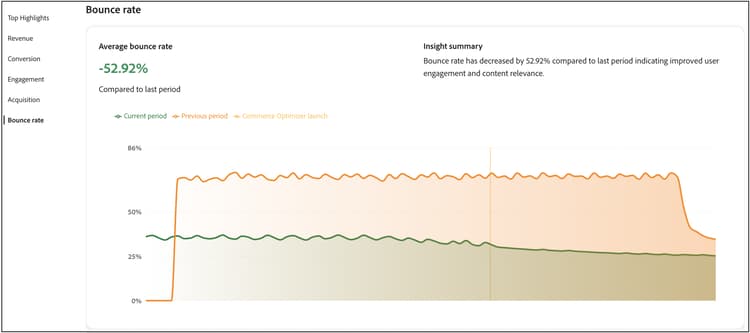
Understanding the bounce rate metric
What it measures: The percentage of visitors who leave your site after viewing only one page, indicating potential issues with user experience, page relevance, or site engagement.
How it’s calculated: Bounce rate compares single-page sessions against total sessions to determine what percentage of visitors leave without further interaction.
Formula:
| code language-none |
|---|
|
Data source: Storefront events.
How it works:
- A bounced session is counted when a visitor views only one page during their entire visit.
- The system tracks page views within each session to identify single-page visits.
- Sessions are determined by user activity and time between interactions.
What causes bounces:
- Visitors landing on irrelevant pages (poor search/ad targeting).
- Slow page load times.
- Poor user experience or confusing navigation.
- Finding information quickly without needing to explore further.
- Technical issues or errors.
Important notes:
- High bounce rates aren’t always negative—some pages (like contact information or specific product specs) may naturally have high bounce rates.
- Compare bounce rates across different page types and traffic sources to identify problem areas.
- Sudden increases in bounce rate often indicate technical issues or poor campaign targeting.
What’s a good bounce rate? This varies by industry and page type, but generally:
- 40-60%: Average for ecommerce sites.
- Below 40%: Excellent engagement.
- Above 70%: May indicate problems requiring investigation.
Strategies
-
Improve search relevance: Use synonyms and intelligent faceting to ensure customers find relevant products quickly. Poor search results are a major cause of high bounce rates.
-
Implement recommendation units: Deploy recommendation units on category and search results pages to provide additional product options and keep visitors engaged.
-
Optimize product discovery: Use merchandising rules to ensure the most relevant and popular products appear first in search results.
-
Create engaging homepage experiences: Use “Recommended for you” and “Trending” recommendation types on your homepage to immediately engage visitors with relevant content.
Troubleshooting and optimization
When metrics are declining
Revenue declining:
- Check if recommendation units are still active and performing well.
- Review merchandising rules to ensure high-margin products are being promoted.
- Analyze search performance to identify if popular products are still ranking well.
Conversion rate dropping:
- Verify that search relevance is maintained (check synonyms and facets).
- Ensure recommendation units are displaying correctly.
- Review merchandising rules for any conflicts or issues.
High bounce rates:
- Check search result relevance and implement synonyms if needed.
- Ensure recommendation units are loading properly.
- Review product data quality and availability.
Low engagement:
- Diversify recommendation types to prevent customer fatigue.
- Implement more personalized recommendation strategies.
- Optimize search experience with better facets and synonyms.
Field descriptions
Report configuration
More like this
- Search Performance - Analyze search terms and optimize search relevance.
- Recommendation Performance - Monitor and optimize recommendation effectiveness.
- Recommendations Overview - Learn about AI-powered product recommendations.
- Merchandising Rules - Boost, bury, pin, or hide products in search results.
- Facets - Enhance search with intelligent filtering.
- Synonyms - Improve search relevance and customer experience.
- Events Overview - Understand the data that powers your metrics.