Manage configurations
After you create Conversation Insights configurations, you can view, edit, or delete these configurations.
Only system administrators can manage Conversation Insights configurations.
For information about Conversation Insights, see Conversation Insights overview.
View and filter existing configurations
To view your existing Conversation Insights configurations:
-
In Customer Journey Analytics, select Data Management > Conversation Insights configuration.
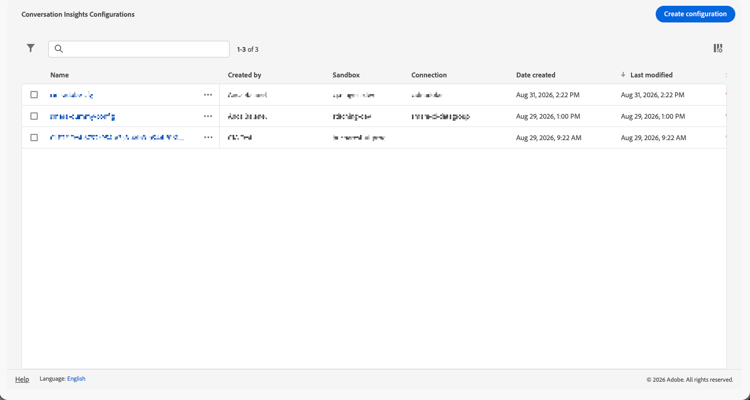
The following columns of information are available about each configuration:
-
Name: The name of the Conversation Insights configuration.
-
Created by: The user who created the configuration.
-
Sandbox: The Experience Platform sandbox that contains the profile dataset that you added to your connection.
-
Connection: The connection that you added to your configuration.
-
Date created: The date and time that the configuration was created.
-
Last modified: The date the configuration was last modified.
-
Status: The status of the configuration. Possible values are:


To configure which columns to display in the table, select

-
-
(Optional) To filter the list of configurations, select

-
Connection
-
Created by
-
Sandbox
-
Status
-
Create a configuration
To create a new Conversation Insights configuration:
- Select Create configuration.
- Use the Create configuration dialog to configure conversation insights.
Edit a configuration
To edit an existing Conversation Insights configuration:
-
Do any of the following:
- Select the name of the configuration that you want to edit.
- Select the checkbox next to the configuration that you want to edit, then select

- Select

-
Use the Configuration / name of configuration dialog to manage conversation insights.
Delete a configuration
To delete an existing Conversation Insights configuration:
-
Do any of the following:
- Select the checkbox next to the configuration that you want to delete, then select

- Select
- Select the checkbox next to the configuration that you want to delete, then select
-
In the Delete Configuration dialog, select Delete to delete the configuration. Select Cancel to cancel.