Conversation Insights
Conversation Insights enables you to analyze conversations from the agent experiences you offer to your customers. Those agent experiences can be based on large language models (LLM) or based on human conversations. For example, a chatbot interacting with a customer or call center transcripts.
Conversation Insights analyzes the conversations at scale and provides context for these conversations within the full customer journey. Through Conversation Insights you are able to understand the impact of agents on actual user outcomes.
Conversation Insights addresses problems you might experience. Such as:
-
You do not have insight into what happens when customers interact with agents (LLM or human) within the context of the journey.
-
You do not have the ability to understand:
- what agents are telling customers at scale.
- how customers interact with agents at scale.
- what is the overall impact on KPIs as a result of these interactions.
-
You create agentic experiences to accommodate shifting user preferences.
With Conversation Insights you are able to understand:
- What agents are telling users.
- What users are asking from agents.
- How the conversations impact your KPIs.
You can determine how your agents are performing against the directives, how closely the agents are adhering to brand guidelines, and whether the outcomes justify the cost of running agents.
Concepts
At a high level in Conversation Insights, a conversation is a sequence of correlated turns. Each turn can have independently delivered prompt, response, and feedback events. Signals are structured observations derived from the conversation, while the blended dataset brings the source events and signals together for reporting.
Conversation Insights analyzes agent interactions at two levels:
- Conversation level: The complete interaction between a user and an agent, which contains multiple turns.
- Turn level: One interaction cycle within that conversation, consisting of a user prompt and an agent response.
The agent application or service emits conversation-related experience events into Experience Platform. Prompt, response, and feedback event data can arrive independently. Platform services correlate and blend those events into a turn-level record, optionally enrich the data with extracted signals, and make the resulting data available for Customer Journey Analytics reporting.
Conversation
A conversation is the complete interaction between a user and an agent. It can contain one or many turns.
A conversation is the container or grouping level. That container is useful for questions such as:
- How many conversations occurred?
- What was the overall topic of a conversation?
- How did sentiment change across a conversation?
- Which conversations eventually led to a conversion?
For implementation details, refer to the conversation object in the Implement Conversation Insights documentation.
Turn
A turn is one interaction cycle within a conversation.
A typical turn consists of
- User prompt
- Agent response
- (optional) User feedback
The turn is the primary analytical object for reporting purposes. The conversation blender service combines the available prompt, response, feedback, and signal information into turn-level records.
For implementation details, refer to the turn object in the Implement Conversation Insights documentation.
Prompt
A prompt is the input submitted to the agent. In most customer scenarios, this input is the user’s question, request, instruction, or message.
A prompt can contain multiple raw segments. For example, a user enters text and includes a URL.
-
Prompt"What is the capital of France""https://example.com/france"
The prompt is the primary input from which Conversation Insights can derive analytical information such as:
- The user’s intent
- The subject or topic
- The user’s tone
- The user’s sentiment
- Other supported signals
For implementation details, refer to the prompt object in the Implement Conversation Insights documentation.
Response
A response is the content returned by the agent or another responding party.
A response often contains different types of content. For example:
- Main answer
- Citation or reference
- Link
- Image
- Promotional content
This distinction is useful because the analysis needs to separate the main answer from supporting links, citations, advertisements, or other response components.
For implementation details, refer to the response object in the Implement Conversation Insights documentation.
Feedback
Feedback is the user’s explicit evaluation or reaction to the interaction.
The feedback can contain:
- Free-form feedback text
- A numerical rating
- A rating classification
- One or more reasons for the rating
Feedback is not necessarily available at the same time as the prompt or response. You can send the feedback at a later time from the agent application or service, after the user has evaluated the answer.
For implementation details, refer to the feedback object in the Implement Conversation Insights documentation.
Signal
A signal is a structured analytical observation about conversation content. The signal extraction service extracts signals.
For implementation details, refer to the signal object in the Implement Conversation Insights documentation.
Agent
To identify the agent application or service, for each Conversation Insights event (prompt, response, feedback, signal) agent information is required.
Skill invocations
If your agent experience application supports the invocation of skills that represent capabilities invoked during processing, you can add these skill invocations as part of the agent information field group.
For implementation details, refer to the agentic information field group in the Implement Conversation Insights documentation.
How it works
Conversation Insights is built upon three core functionalities:
- Data collection: Enables users to understand how well LLM and agents perform their tasks. Data collection is required to collect all the necessary datapoints.
- Signal extraction and conversation blending: Transforms the unstructured prompts and responses (also known as turns) into reportable datapoints, like intent and sentiment. So users can report on those datapoints at scale.
- Reporting: To determine an agent’s efficacy and ROI, analyze conversations at scale in the context of the customer journey.
The overall process of data collection, signal extraction and conversation blending is described below.
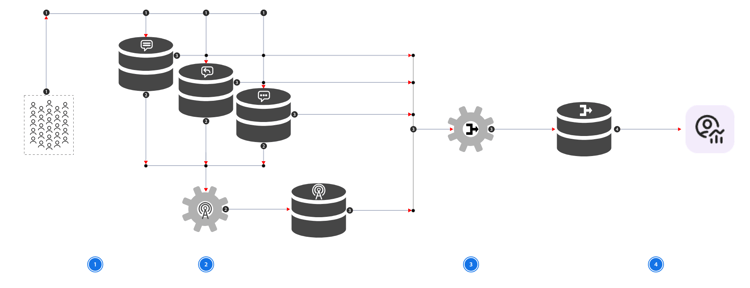


For details on how to instrument your agent application or service, refer to the implementation documentation.

This step is implemented as part of the definition of a Conversation Insights configuration.

This step is implemented as part of the definition of a Conversation Insights configuration.
This step is implemented as part of the definition of a Conversation Insights configuration.