Customer Journey Analytics landing page
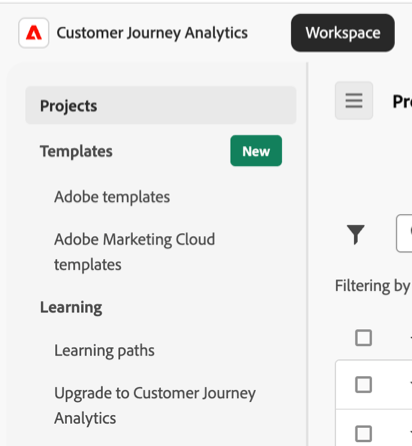
The Customer Journey Analytics landing page includes the following subtabs:
Projects: Customized designs that combine data components, tables, and visualizations that you built or that someone else built and shared with you. Projects also refers to blank projects and blank mobile scorecards.
Templates: Includes templates provided by Adobe and any templates specific to your organization.
Learning: Contains hands-on video tours, tutorials, and links to documentation. It also contains information about upgrading from Adobe Analytics to Customer Journey Analytics, along with a tool to dynamically generate upgrade steps specific to your organization.
See

This video demonstrates the functionality using Adobe Analytics. However, the functionality is similarly available in Customer Journey Analytics. Be aware of the differences in terminology between Adobe Analytics and Customer Journey Analytics (for example visits versus sessions).
Projects
The Projects section in the left rail serves as the home page for the Workspace tab.
To access projects in Customer Journey Analytics:
-
Select the Workspace tab.
-
Select Projects in the left rail.
The Projects section displays the Company folder, any personal folders you created, your Workspace projects, and Mobile scorecards. Use this page to view, create, and modify folders, projects, and mobile scorecards. See Projects for more information.
Projects are customized designs that combine data components, tables, and visualizations that you built or that someone else built and shared with you. Projects also refers to blank projects and blank mobile scorecards.
See Projects for more information.
Templates
To access templates in Customer Journey Analytics:
-
Select the Workspace tab.
-
In the Templates section in the left rail, you can select either Adobe templates or company templates.
For information about using templates, see the following resources:
Learning
The Learning section on the Workspace tab provides information about beginner, intermediate, or advanced features and use cases in Customer Journey Analytics. It also provides information about how to upgrade from Adobe Analytics to Customer Journey Analytics.
Learning paths
To access information about learning paths in Customer Journey Analytics:
-
Select the Workspace tab.
-
In the Learning section in the left rail, select Learning paths.
This page contains hands-on video tours, tutorials, and links to documentation.
The Learning paths page offers the following features:
-
Filter content: Use

-
Track progress: After you select a piece of content, a

-
View additional content: While viewing any video, select Learn more to view related documentation content on Experience League. Or, from the Learning page, select either of the following options to view additional content:
- Visit YouTube: View the full Analysis Workspace YouTube playlist.
- Visit Experience League: View the full suite of Customer Journey Analytics documentation on Experience League.
-
Fundamentals for new users: The Learning Workspace Fundamentals tour is recommended for new users. This tour takes you directly to Workspace and walks you through the most common actions. This tour can also be relaunched any time in Workspace via the tooltip from the Freeform panel or Blank panel header.
Upgrade to Customer Journey Analytics
To access information about upgrading to Customer Journey Analytics:
-
Select the Workspace tab.
-
In the Learning section in the left rail, select Upgrade to Customer Journey Analytics.
This page is intended for customers who have not yet fully upgraded from Adobe Analytics to Customer Journey Analytics. It provides a questionnaire that results in dynamically generated upgrade steps for your organization’s unique circumstances.
For more information, see Dynamically generate upgrade steps for your organization in Upgrade from Adobe Analytics to Customer Journey Analytics.
Preferred landing page
You can set your preferred landing page. See User preferences for more information.