Auf dieser Seite: Verwenden Sie den Adobe Experience Platform Privacy Service, um Datenzugriffs- und Löschungsanfragen für Adobe Journey Optimizer zu senden und zu verwalten, damit Sie die Rechte der betroffenen Personen wahrnehmen und die Einhaltung der Datenschutzbestimmungen automatisieren können.
Der Privacy Service von Adobe Experience Platform stellt eine RESTful-API und eine Benutzeroberfläche bereit, mit der Sie Anfragen zu Kundendaten verwalten können. Mit Privacy Service können Sie Anfragen zum Zugreifen auf personenbezogene Kundendaten und Löschen von diesen aus Adobe CX Enterprise-Anwendungen stellen, was die automatische Einhaltung gesetzlicher und unternehmensinterner Datenschutzbestimmungen erleichtert.
Datenschutzanfragen können über das Menü Anfragen erstellt und verwaltet werden.
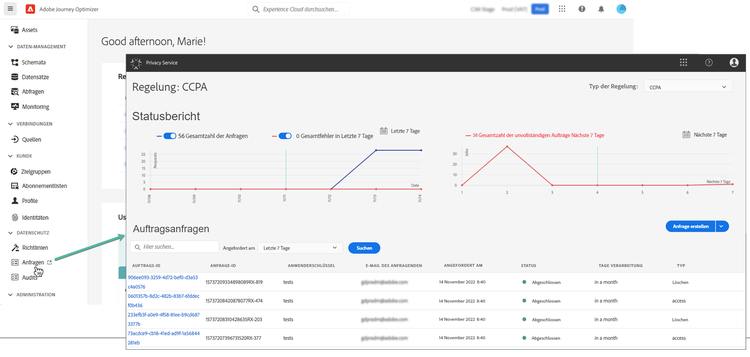
Weitere Informationen zum Privacy Service und zum Erstellen und Verwalten von Datenschutzanfragen finden Sie in der Dokumentation zu Adobe Experience Platform.
Verwalten einzelner Datenschutzanfragen, die Sie an Adobe Journey Optimizer senden können data-privacy-requests
Sie können individuelle Anfragen zum Zugriff auf und zum Löschen von Verbraucherdaten aus Adobe Journey Optimizer auf zwei Arten senden:
- Über die Privacy Service-Benutzeroberfläche. Weitere Informationen
- Über das Privacy Service-API. Weitere Informationen
Privacy Service unterstützt zwei Arten von Anfragen: Datenzugriff und Datenlöschung.
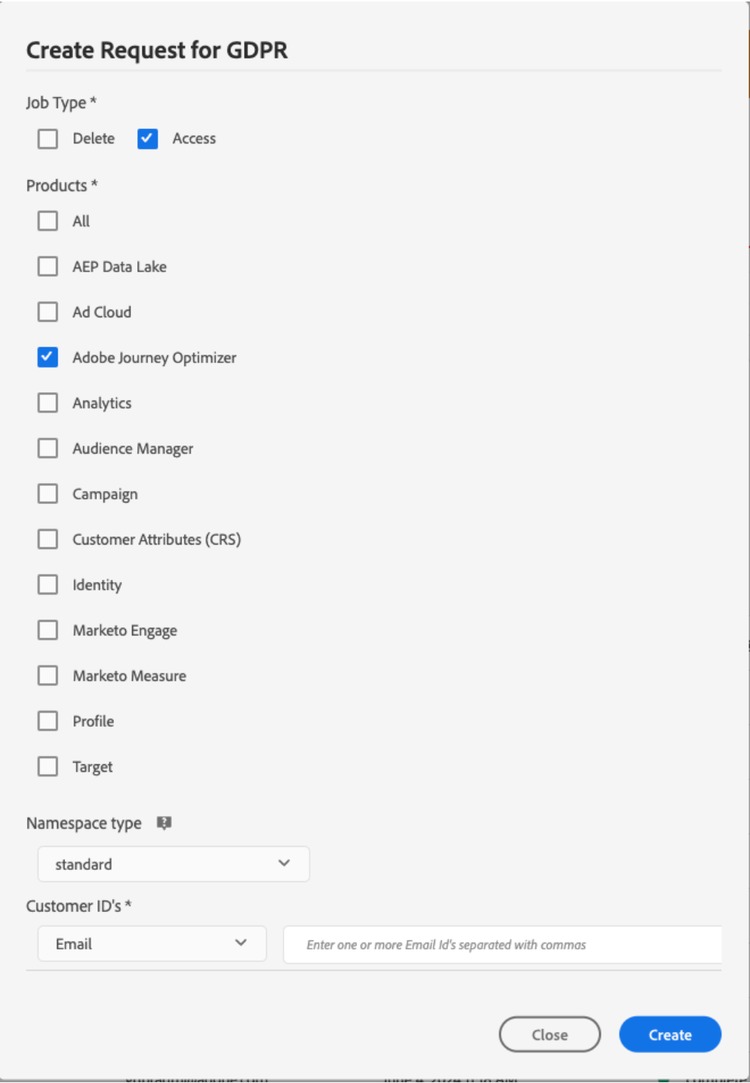
Geben Sie für Zugriffsanfragen „Adobe Journey Optimizer“ über die Benutzeroberfläche an (oder „CJM“ als Produkt-Code in der API).
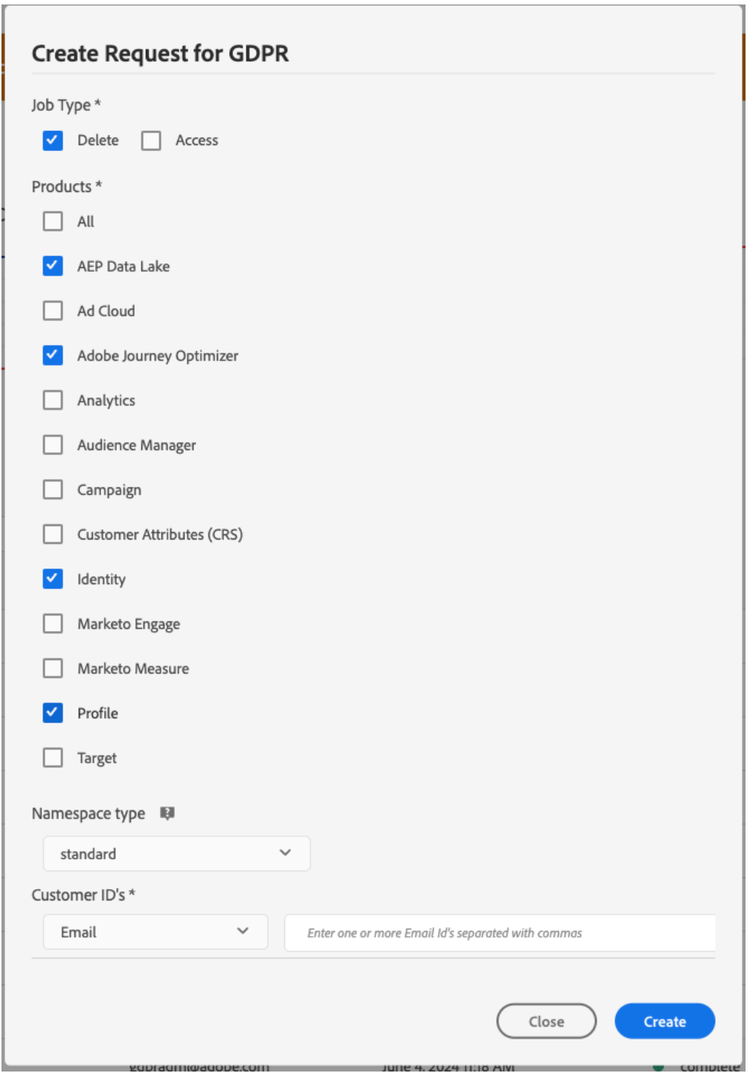
Für Anfragen zum Löschen müssen Sie zusätzlich zur Anfrage „Adobe Journey Optimizer“ auch Anfragen zum Löschen an drei vorgelagerte Services senden, um zu verhindern, dass Journey Optimizer die gelöschten Daten wieder aufnimmt. Wenn diese vorgelagerten Services nicht angegeben werden, bleibt die Anfrage „Adobe Journey Optimizer“ im Verarbeitungsstatus, bis Anfragen zum Löschen für die vorgelagerten Services erstellt werden.
Bei den drei vorgelagerten Services handelt es sich um:
- Profile (Produkt-Code: „profileService“)
- AEP Data Lake (Produkt-Code: „AdobeCloudPlatform“)
- Identity (Produkt-Code: „identity“)
Erstellen von Zugriffs- und Löschanfragen
Voraussetzungen
Um Anfragen für den Zugriff auf und zum Löschen von Daten in Adobe Journey Optimizer zu stellen, ist Folgendes erforderlich:
- eine Adobe-Organisations-ID
- eine Identitätskennung der Person, auf die Sie reagieren möchten, und die entsprechenden Namespaces. Weitere Informationen zu Identity-Namespaces in Adobe Journey Optimizer und Experience Platform finden Sie im Abschnitt Übersicht zu Identity-Namespace.
Erforderliche Feldwerte in Journey Optimizer für API-Anfragen
"companyContexts":
    "namespace": imsOrgID
    "value": <Your Adobe Organization ID Value>

"users":
    "action": either access or delete

    "userIDs":
        "namespace": e.g. email, aaid, ecid, etc.
        "type": standard
        "value": <Data Subject's Identity Identifier>

"include":
    CJM (which is the Adobe product code for Adobe Journey Optimizer)
    profileService (product code for Profile)
    AdobeCloudPlatform (product code for AEP Data Lake)
    identity (product code for Identity)

"regulation":
    gdpr, ccpa, pdpa, lgpd_bra, or nzpa_nzl (which is the privacy regulation that applies to the request)
Beispiel für eine DSGVO-Zugriffsanfrage:
Über die Benutzeroberfläche:
Über das API:
// JSON Request
{
   "companyContexts":[
      {
         "namespace":"imsOrgID",
         "value":"745F37C35E4B776E0A49421B@AdobeOrg"
      }
   ],
   "users":[
      {
         "action":[
            "access"
         ],
         "userIDs":[
            {
               "namespace":"ecid",
               "value":"38400000-8cf0-11bd-b23e-10b96e40000d",
               "type":"standard"
            },
            {
               "namespace":"email",
               "value":"johndoe4@gmail.com",
               "type":"standard"
            }
         ]
      }
   ],
   "include":[
      "CJM"
   ],
   "regulation":"gdpr"
}
// JSON Response
{
    "requestId": "17163122360480365RX-705",
    "totalRecords": 1,
    "jobs": [
        {
            "jobId": "e709b1f4-1796-11ef-b422-eddd0aebc40d",
            "customer": {
                "user": {
                    "key": "John Doe",
                    "action": [
                        "access"
                    ],
                    "userIDs": [
                        {
                            "namespace": "ecid",
                            "value": "38400000-8cf0-11bd-b23e-10b96e40000d",
                            "type": "standard",
                            "namespaceId": 4,
                            "isDeletedClientSide": false
                        },
                        {
                            "namespace": "email",
                            "value": "johndoe4@gmail.com",
                            "type": "standard",
                            "namespaceId": 6,
                            "isDeletedClientSide": false
                        }
                    ]
                }
            }
        }
    ]
}
Beispiel für eine DSGVO-Anfrage zum Löschen:
Über die Benutzeroberfläche:
Über das API:
// JSON Request
{
  "companyContexts": [
    {
      "namespace": "imsOrgID",
      "value": "745F37C35E4B776E0A49421B@AdobeOrg"
    }
  ],
  "users": [
    {
      "action": [
          "delete"
      ],
      "userIDs": [
        {
          "namespace": "ecid",
          "value": "38400000-8cf0-11bd-b23e-10b96e40000d",
          "type": "standard"
        },
                {
          "namespace": "email",
          "value": "johndoe4@gmail.com",
          "type": "standard"
        }
      ]
    }
  ],
  "include": [
    "CJM", "profileService", "AdobeCloudPlatform", "identity"
  ],
  "regulation": "gdpr"
}
// JSON Response
{
    "requestId": "17163122360480365RX-705",
    "totalRecords": 1,
    "jobs": [
        {
            "jobId": "e709b1f4-1796-11ef-b422-eddd0aebc40d",
            "customer": {
                "user": {
                    "key": "John Doe",
                    "action": [
                        "delete"
                    ],
                    "userIDs": [
                        {
                            "namespace": "ecid",
                            "value": "38400000-8cf0-11bd-b23e-10b96e40000d",
                            "type": "standard",
                            "namespaceId": 4,
                            "isDeletedClientSide": false
                        },
                        {
                            "namespace": "email",
                            "value": "johndoe4@gmail.com",
                            "type": "standard",
                            "namespaceId": 6,
                            "isDeletedClientSide": false
                        }
                    ]
                }
            }
        }
    ]
}
This section contains structured knowledge intended to support interpretation, retrieval, and question answering related to this topic.
For complete understanding, this information should be combined with the documentation on this page. Neither source is intended to stand alone; the page describes the feature, while this section provides additional context that helps disambiguate terminology, intent, applicability, and constraints.
- TL;DR: This page explains how to use the Adobe Experience Platform Privacy Service to submit and manage data access and deletion requests for Adobe Journey Optimizer so you can fulfill data subject rights and automate compliance with privacy regulations.
Intents:
- Understand how Privacy Service manages data access and deletion requests
- Submit privacy requests through the Privacy Service UI or API
- Identify the product code and upstream services required for delete requests
- Understand the prerequisites and required field values for requests
- Know which privacy regulations can be specified on a request
Glossary:
- Privacy Service: Adobe Experience Platform service that provides a RESTful API and user interface to manage customer requests to access and delete personal customer data (product-specific)
- Privacy request: a data access or data deletion request submitted for Adobe Journey Optimizer, created and managed from the Requests menu (product-specific)
- CJM: the Adobe product code for Adobe Journey Optimizer, used in the API
includefield (product-specific) - Upstream services: Profile (
profileService), AEP Data Lake (AdobeCloudPlatform), and Identity (identity), to which delete requests must also be submitted to prevent Journey Optimizer from reinjecting the deleted data (product-specific) - Requests: the menu from which privacy requests can be created and managed (product-specific)
Guardrails:
- Privacy Service supports two types of requests: data access and data deletion
- For access requests, specify “Adobe Journey Optimizer” from the UI, or “CJM” as the product code in the API
- For delete requests, in addition to the “Adobe Journey Optimizer” request you must also submit delete requests to three upstream services — Profile (
profileService), AEP Data Lake (AdobeCloudPlatform), and Identity (identity) — if these upstream services are not specified, the “Adobe Journey Optimizer” request remains in the “processing” state until delete requests for the upstream services are created - For delete requests, if you do not explicitly include the product name and all applicable namespaces, data is not removed from Adobe Journey Optimizer
- Making a privacy request to Adobe Journey Optimizer will not remove data from all these systems (Platform data lake, Real time customer profile, Identity service); for delete and access requests, you need to call these individual systems to make sure the requests are handled by each of them
- Prerequisites: an Adobe organization ID, and an identity identifier of the person to act on with the corresponding namespace(s)
- In the API, the
regulationfield is the privacy regulation that applies to the request; the page listsgdpr,ccpa,pdpa,lgpd_bra, ornzpa_nzl
Terminology:
- Canonical name: Privacy request
- Synonyms: “Adobe Journey Optimizer” (product name in the UI) = “CJM” (product code in the API)
- Do not confuse: “data access” request ≠ “data deletion” request
- Do not confuse: “Adobe Journey Optimizer” request ≠ the three upstream services (Profile, AEP Data Lake, Identity) that delete requests must also target
FAQ:
- Q: What are the two types of privacy requests? — Data access and data deletion.
- Q: What product code represents Adobe Journey Optimizer in the API? — CJM.
- Q: Why must delete requests also target upstream services? — To prevent Journey Optimizer from reinjecting the deleted data; if these upstream services are not specified, the “Adobe Journey Optimizer” request remains in the “processing” state until delete requests for the upstream services are created.
- Q: Which upstream services must be included in a delete request? — Profile (
profileService), AEP Data Lake (AdobeCloudPlatform), and Identity (identity). - Q: Which values does the page list for the
regulationfield? —gdpr,ccpa,pdpa,lgpd_bra, ornzpa_nzl. - Q: Does a privacy request to Adobe Journey Optimizer remove data from all systems? — No, for delete and access requests, you need to call these individual systems to make sure the requests are handled by each of them.
Personas:
- marketer: Can submit individual requests to access and delete consumer data from Adobe Journey Optimizer through the Requests menu. Can submit delete requests to the three upstream services Profile, AEP Data Lake, and Identity, in addition to the Adobe Journey Optimizer request. The page states that if these upstream services are not specified, the Adobe Journey Optimizer request remains in the processing state. Where: “Manage individual data privacy requests that you can send to Adobe Journey Optimizer”.
Onboarding:
- Level: Intermediate
- First minimal step: Create and manage privacy requests from the Requests menu.
- Success check: The Adobe Journey Optimizer request no longer remains in the processing state once delete requests for the upstream services are created.