Auf dieser Seite: Erfahren Sie, wie Sie mit der Feldergruppe „Details zu Einverständnis und Voreinstellungen“ eine Journey erstellen, die eine Nachricht an die Abonnentinnen und Abonnenten auf einer Liste sendet.
In diesem Anwendungsbeispiel soll eine Journey erstellt werden, um eine Nachricht an die Abonnenten auf einer Liste zu senden.
In diesem Beispiel wird die Feldergruppe Einverständnis und Präferenzdetails aus Adobe Experience Platform verwendet. Um diese Feldergruppe zu finden, wählen Sie im Menü Daten-Management die Option Schemata. Geben Sie auf der Registerkarte Feldergruppen im Suchfeld den Namen der Feldergruppe ein.
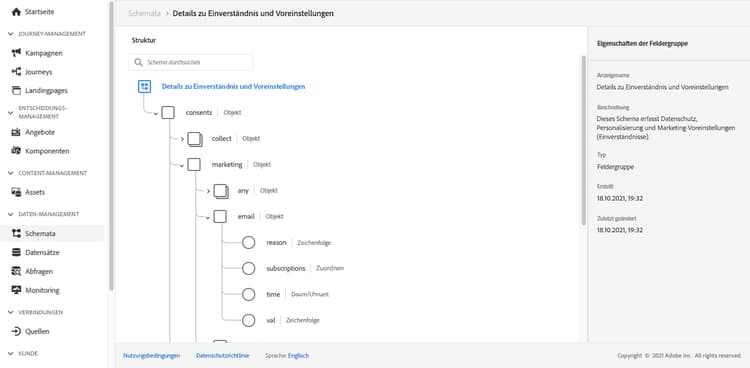
Gehen Sie wie folgt vor, um diese Journey zu konfigurieren:
-
Erstellen Sie eine Journey, die mit der Aktivität Lesen beginnt. Weitere Informationen finden Sie unter Erstellen der ersten Journey.
-
Fügen Sie der Journey die Aktionsaktivität E-Mail hinzu. Weitere Informationen zum Arbeiten mit Kanalaktivitäten.
-
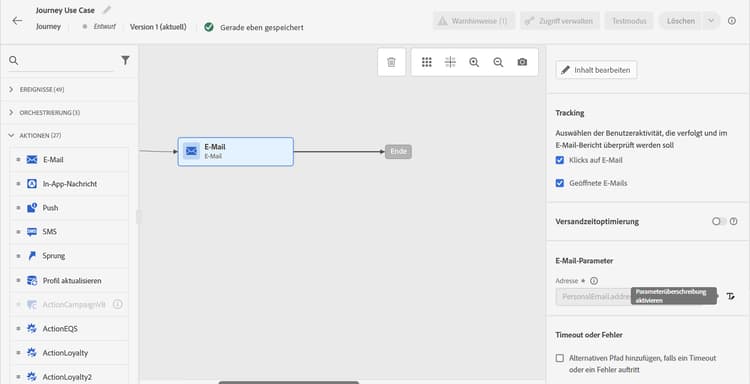
Ersetzen Sie im Abschnitt E-Mail-Parameter der Aktivitätseinstellungen der E-Mail die standardmäßige E-Mail-Adresse (
PersonalEmail.adress) durch die E-Mail-Adresse der Abonnenten auf der Liste:-
Klicken Sie auf das Symbol Parameterüberschreibungen aktivieren rechts neben dem Feld Adresse und klicken Sie auf das Symbol Bearbeiten.
-
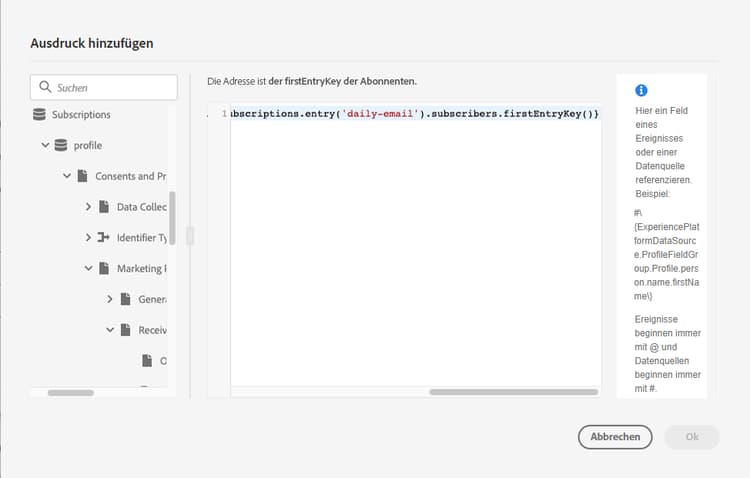
Geben Sie im Ausdruckseditor den Ausdruck ein, um die E-Mail-Adressen der Abonnenten abzurufen. Weitere Informationen.
Dieses Beispiel zeigt einen Ausdruck, der Verweise auf Zuordnungsfelder enthält:
code language-json #{ExperiencePlatform.Subscriptions.profile.consents.marketing.email.subscriptions.entry('daily-email').subscribers.firstEntryKey()}In diesem Beispiel werden die folgenden Funktionen verwendet:
table 0-row-3 1-row-3 2-row-3 Funktion Beschreibung Beispiel entryVerweist auf ein Zuordnungselement entsprechend dem ausgewählten Namespace Verweis auf eine spezifische Abonnement-Liste firstEntryKeyRuft den ersten Eintragsschlüssel einer Zuordnung ab Abrufen der ersten E-Mail-Adresse der Abonnenten In diesem Beispiel erhält die Abonnement-Liste den Namen
daily-email. E-Mail-Adressen werden als Schlüssel in der Zuordnungsubscribersdefiniert, die mit der Zuordnung der Abonnement-Liste verknüpft ist.Lesen Sie mehr über Verweise auf Felder in Ausdrücken.
-
Klicken Sie im Dialogfeld Ausdruck hinzufügen auf OK.
-
This section contains structured knowledge intended to support interpretation, retrieval, and question answering related to this topic.
For complete understanding, this information should be combined with the documentation on this page. Neither source is intended to stand alone; the page describes the feature, while this section provides additional context that helps disambiguate terminology, intent, applicability, and constraints.
- TL;DR: This page shows how to build a journey that sends an email to subscribers of a list by overriding the default email address parameter using an expression that reads subscriber addresses from a consent map field.
Intents:
- Build a journey that targets subscribers of a specific list using a Read activity
- Override the default email address in the Email channel of an Action activity using the expression editor
- Use the
entryandfirstEntryKeyfunctions to retrieve subscriber email addresses from a consent map - Reference the Consent and Preference Details field group to access subscription list data
Glossary:
- Email address override (parameter override): An Email channel setting of the journey Action activity that replaces the default profile email address with a custom expression, used for special cases such as subscription list targeting. (product-specific)
- Consent and Preference Details field group: An Adobe Experience Platform schema field group that contains subscription and consent data, including the subscriptions element; subscriber email addresses are defined as keys in the
subscribersmap, which is linked to the subscription list map. (product-specific) entryfunction: An expression function that refers to a map element by its namespace key — used here to reference a specific subscription list (e.g.,daily-email). (product-specific)firstEntryKeyfunction: An expression function that retrieves the first key of a map — used here to retrieve the first email address from the subscribers map of a subscription list. (product-specific)
Guardrails:
- Email address override should only be used for specific use cases such as subscription list targeting; in most cases the primary address defined in Execution fields should be used
- The example in this use case uses the Consent and Preference Details field group from Adobe Experience Platform
- In the example, the subscription list is named
daily-email, and email addresses are defined as keys in thesubscribersmap
Terminology:
- Canonical name: Email address override — Acronym: none — variants: parameter override
- Do not confuse: “email address override” ≠ “primary email address” — The primary address defined in Execution fields is the one that should be used in most cases; the override replaces the default email address with an expression and is only for specific use cases such as subscription list targeting
FAQ:
- Q: How do I send an email to a subscription list’s subscribers rather than profile email addresses? — Enable the parameter override on the Address field of the Email channel in the Action activity and enter an expression using
entryandfirstEntryKeyfunctions to retrieve addresses from the subscribers map of the target subscription list. - Q: What field group is required for this use case? — The example uses the Consent and Preference Details field group from Adobe Experience Platform, which includes the subscriptions element.
- Q: Should I always use email address override when targeting subscribers? — No; email address override is for specific use cases only. In most journeys, the primary address defined in Execution fields should be used.
- Q: What does the
firstEntryKeyfunction do in this context? — It retrieves the first email address key from thesubscribersmap associated with a specific subscription list.