Auf dieser Seite: Definieren Sie eine Konfiguration des Posteingangskanals, die das Einverständnis, optionale Zugriffs-Labels und wo der Posteingang im Web oder in Ihrer iOS- oder Android-App angezeigt wird festlegt, damit Sie Inhaltskartenerlebnisse über den Posteingang bereitstellen können.
Bevor Sie Inhaltskartenerlebnisse über den Posteingang bereitstellen können, müssen Sie eine Kanalkonfiguration für den Posteingang in Kanalkonfigurationen definieren. Diese Konfiguration verknüpft die Oberfläche mit dem Einverständnis, optionalen Zugriffs-Labels und dem Ort, an dem das Erlebnis im Web oder in Ihrer iOS- oder Android-App angezeigt wird. Gehen Sie wie folgt vor, um eine Konfiguration zu erstellen:
-
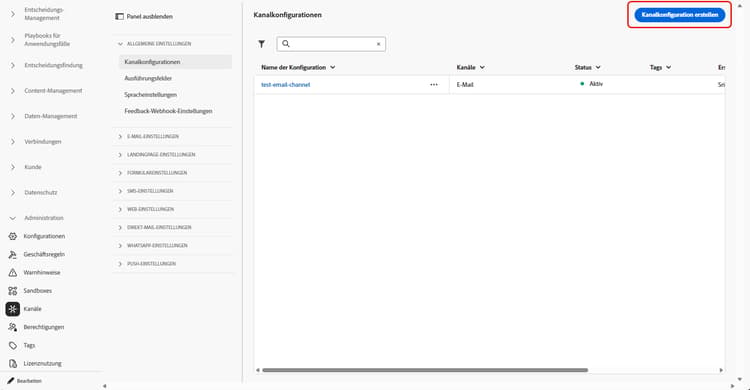
Rufen Sie das Menü Kanäle > Allgemeine Einstellungen > Kanalkonfigurationen auf und klicken Sie dann auf Kanalkonfiguration erstellen.
-
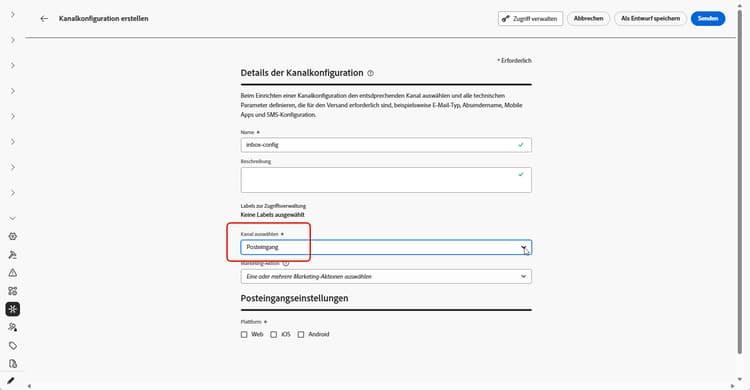
Geben Sie einen Namen und eine Beschreibung (optional) für die Konfiguration an.
note NOTE Namen müssen mit einem Buchstaben (A–Z) beginnen. Ein Name darf nur alphanumerische Zeichen enthalten. Sie können auch die Zeichen Unterstrich _, Punkt.und Bindestrich-verwenden. -
Um der Konfiguration benutzerdefinierte oder grundlegende Datennutzungs-Labels zuzuweisen, können Sie Zugriff verwalten auswählen. Erfahren Sie mehr über die Zugriffssteuerung auf Objektebene (Object Level Access Control, OLAC).
-
Wählen Sie den Kanal Posteingang aus.
-
Wählen Sie eine Marketing-Aktion aus, um Einverständnisrichtlinien mit den Nachrichten zu verknüpfen, die diese Konfiguration verwenden. Es werden alle mit der Marketing-Aktion verknüpften Einverständnisrichtlinien genutzt, um die Präferenzen Ihrer Kundinnen und Kunden zu respektieren. Weitere Informationen
-
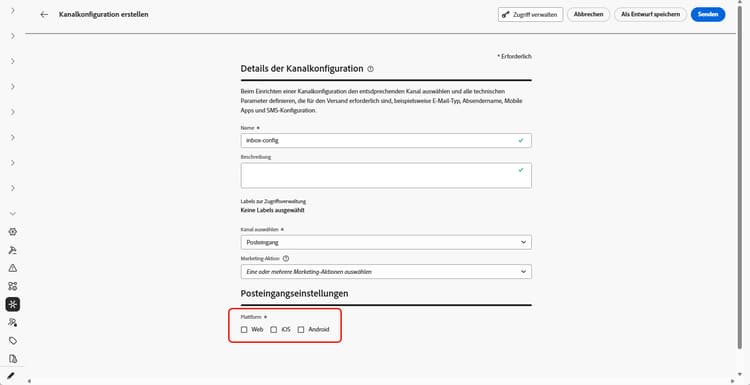
Wählen Sie die Plattform aus, auf die das Posteingangserlebnis angewendet werden soll.
-
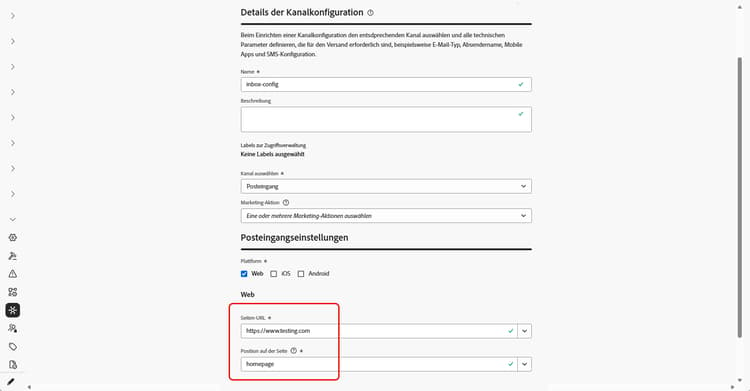
Beim Web:
-
Geben Sie unter Seiten-URL die URL der Seite ein, auf der der Posteingang angezeigt werden soll, oder wählen Sie sie aus. Verwenden Sie diese Option, wenn das Erlebnis auf eine Seite beschränkt ist.
-
Definieren Sie unter Position auf der Seite die seiteninterne Platzierung, z. B. die Region oder Kennung, die Ihre Site für die Oberfläche des Posteingangs verwendet. Weitere Informationen
-
-
Für iOS und Android:
-
Geben Sie unter App-ID die Kennung für Ihre App ein, damit die Konfiguration für den richtigen iOS- oder Android-Build gilt.
-
Geben Sie unter Speicherort oder Pfad in der App den Bildschirm, die Route oder den Container an, in dem Benutzende den Posteingang öffnen sollen.
-
-
Senden Sie Ihre Änderungen ab.
Sie können Ihre Konfiguration jetzt beim Erstellen Ihres Posteingangserlebnisses auswählen.
➡️ Folgen Sie den auf dieser Seite beschriebenen Schritten
This section contains structured knowledge intended to support interpretation, retrieval, and question answering related to this topic.
For complete understanding, this information should be combined with the documentation on this page. Neither source is intended to stand alone; the page describes the feature, while this section provides additional context that helps disambiguate terminology, intent, applicability, and constraints.
- TL;DR: This page explains how to create an Inbox channel configuration that ties the surface to consent, optional access labels, and where the inbox appears on the web or in your iOS or Android app.
Intents:
- Create an Inbox channel configuration in Channel configurations
- Associate consent policies to messages by selecting marketing action(s)
- Assign custom or core data usage labels through Manage access
- Define where the inbox appears for Web using Page URL and Location on page
- Define where the inbox appears for iOS and Android using App id and the location or path inside the app
Glossary:
- Inbox channel configuration: A configuration in Channel configurations that ties the surface to consent, optional access labels, and where the experience appears on web, iOS, or Android (product-specific)
- Marketing action: A selection that associates consent policies to messages using the configuration so customer preferences are respected (product-specific)
- Page URL: For Web, the URL of the page where the inbox should appear, used when the experience is limited to one page (product-specific)
- Location on page: For Web, the in-page placement (region or identifier your site uses for the inbox surface) (product-specific)
- App id: For iOS and Android, the identifier for your app so the configuration applies to the correct build (product-specific)
- Manage access: The option used to assign custom or core data usage labels to the configuration, related to Object Level Access Control (OLAC) (product-specific)
Guardrails:
- You must define an Inbox channel configuration in Channel configurations before you can deliver Content card experiences through the Inbox.
- Configuration names must begin with a letter (A-Z) and can only contain alpha-numeric characters plus underscore, dot, and hyphen characters.
- All consent policies associated with the selected marketing action are leveraged to respect customer preferences.
Terminology:
- Canonical name: Inbox channel configuration — Acronym: n/a — variants: Inbox configuration, channel configuration
- Synonyms: “OLAC” = “Object Level Access Control”
- Do not confuse: “Page URL” (the page URL where the inbox appears on Web) ≠ “Location on page” (the in-page placement/region or identifier for the inbox surface)
- Do not confuse: “App id” (identifier for the iOS or Android app) ≠ “Location or path inside the app” (the screen, route, or container where users open the inbox)
FAQ:
- Q: What must I create before delivering Content card experiences through the Inbox? — An Inbox channel configuration in Channel configurations.
- Q: What are the rules for naming a configuration? — The name must begin with a letter (A-Z) and can only contain alpha-numeric characters plus underscore, dot, and hyphen.
- Q: How do I associate consent to messages using this configuration? — Select marketing action(s); all consent policies associated with the marketing action are leveraged to respect customer preferences.
- Q: How do I set where the inbox appears on the web? — Enter or select the Page URL and define the in-page placement in Location on page.
- Q: How do I set where the inbox appears on iOS or Android? — Enter the App id and specify the screen, route, or container in Location or path inside the app.