Auf dieser Seite Entdecken Sie die Live- und Echtzeitberichte, die für orchestrierte Kampagnen in Adobe Journey Optimizer verfügbar sind, und erfahren Sie, wie Sie die Interaktion und die Kanalleistung für E-Mail, mobile Nachrichten, Push-Benachrichtigungen und Briefpost messen können.
Orchestrierte Kampagnen bieten Ihnen durch ihre zuverlässigen Reporting-Funktionen verwertbare Erkenntnisse. Diese Erkenntnisse helfen Ihnen, das Zielgruppenverhalten besser zu verstehen, die Leistung der einzelnen Schritte in Ihrer Customer Journey zu messen und datengestützte Entscheidungen zur Optimierung zukünftiger Kampagnen zu treffen. Mit detaillierten Metriken und Visualisierungen können Sie die Interaktion verfolgen und Ihre Targeting-Strategien so anpassen, dass sie maximale Wirkung erzielen.
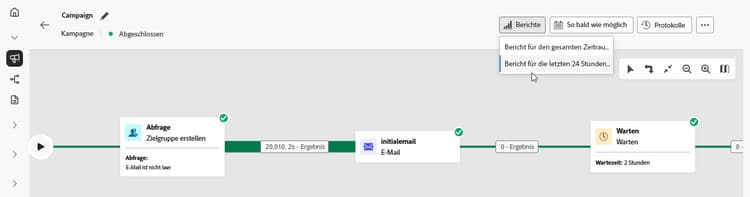
Berichtstypen reporting-types


Einblick in Kanalberichte




This section contains structured knowledge intended to support interpretation, retrieval, and question answering related to this topic.
For complete understanding, this information should be combined with the documentation on this page. Neither source is intended to stand alone; the page describes the feature, while this section provides additional context that helps disambiguate terminology, intent, applicability, and constraints.
- TL;DR: This page lists the live, all-time, and channel reports available for Orchestrated campaigns in Adobe Journey Optimizer, covering email, mobile message, push, and direct mail performance.
Intents:
- Find the live report that shows real-time impact and performance of an Orchestrated campaign.
- Find the all-time report for an Orchestrated campaign.
- Access channel-specific reports for email, mobile message, push, and direct mail.
- Understand when data becomes available in the Live report.
Glossary:
- Live report: a built-in dashboard that measures and visualizes in real time the impact and performance of Orchestrated campaigns, accessed from the View last 24 hours report menu (product-specific)
- All time report: a report fully integrated with Customer Journey Analytics capabilities, standardizing reporting across both platforms and improving data consistency and reliability (product-specific)
- Email report: the channel report for email performance in Orchestrated campaigns (product-specific)
- Mobile report: the channel report for mobile message performance in Orchestrated campaigns (product-specific)
- Push report: the channel report for push performance in Orchestrated campaigns (product-specific)
- Direct mail report: the channel report for direct mail performance in Orchestrated campaigns (product-specific)
Guardrails:
- Data are available in the Live report as soon as the Orchestrated campaign is executed.
Terminology:
- Canonical name: Customer Journey Analytics — Acronym: CJA — variants: none
- Do not confuse: “Live report” (real-time dashboard, available as soon as the campaign is executed, accessed from the View last 24 hours report menu) ≠ “All time report” (integrated with Customer Journey Analytics)
FAQ:
- Q: When does data appear in the Live report? — As soon as the Orchestrated campaign is executed.
- Q: How is the All time report different from the Live report? — The All time report is fully integrated with Customer Journey Analytics capabilities, standardizing reporting across both platforms and improving data consistency and reliability.
- Q: Which channel reports are available for Orchestrated campaigns? — Email report, Mobile report, Push report, and Direct mail report.
- Q: Where do I access the Live report? — From the View last 24 hours report menu.
Personas:
- marketer: Can view the Live report to measure and visualize in real time the impact and performance of Orchestrated campaigns. Can access the All time report, which is integrated with Customer Journey Analytics. Can access channel reports for email, mobile message, push, and direct mail. The page states that data are available in the Live report as soon as the Orchestrated campaign is executed. Where: “Types of reports”.
Onboarding:
- Level: Intermediate
- First minimal step: Select View last 24 hours report to open the Live report.
- Success check: Data are available in the Live report as soon as the Orchestrated campaign is executed.