Auf dieser Seite Aktivieren Sie den Modus „Hoher Durchsatz“ für API-ausgelöste Kampagnen, damit Sie sehr große Echtzeit-Transaktionsnachrichten (E-Mail und Push-Benachrichtigung) mit bis zu 5.000 Transaktionen pro Sekunde senden können, ohne auf Profile angewiesen zu sein.
Der Modus mit hohem Durchsatz wurde für Unternehmen entwickelt, (sehr umfangreiches Echtzeit-Transaktionsnachrichten (bis zu 5.000 Transaktionen pro Sekunde) benötigen. Im Gegensatz zu regulären API-ausgelösten Kampagnen werden Kampagnen mit hohem Durchsatz unabhängig von Adobe-Profilen ausgeführt und erfordern ein anderes Konfigurationsmodell.
Auf dieser Seite wird erläutert, wie sich Kampagnen mit hohem Durchsatz von standardmäßigen API-ausgelösten Kampagnen, Einrichtungsanforderungen und wann die einzelnen Modi ausgewählt werden.
Schutzmechanismen und Einschränkungen guardrails
-
Access - In allen Regionen außer der Schweiz für Organisationen verfügbar, die über das Add-on „Transaktionsnachrichten mit hohem Durchsatz“ lizenziert sind.
-
Kanäle: E-Mail- und Push-Benachrichtigungen.
-
Personalization in Kampagnen mit hohem Durchsatz:
- Die gesamte Personalisierung muss als kontextuelle Daten in der API-Payload enthalten sein. Informationen zum Personalisieren von Inhalten mit kontextuellen Daten
- Profilbasierte Personalisierung wird nicht unterstützt. Wenn Profilvariablen verwendet werden, treten Validierungsfehler auf.
-
Personalization in Kanalkonfigurationen mit hohem Durchsatz - Kanalkonfigurationen mit hohem Durchsatz unterstützen keine kontextuelle oder profilbasierte Personalisierung.
-
Matching Resources - Kampagnen, Kanalkonfigurationen und IP-Pools mit hohem Durchsatz können nur miteinander verwendet werden. Standard-Ressourcen und Ressourcen mit hohem Durchsatz können nicht gemischt werden.
-
API-Endpunkt - Kampagnen mit hohem Durchsatz verwenden einen anderen Endpunkt als standardmäßige API-ausgelöste Kampagnen. Weitere Informationen finden Sie unter Ausführen einer durch API ausgelösten Kampagne.
-
Kampagnenexklusivität: Kampagnen mit hohem Durchsatz verwenden keine Adobe-Profile. Nachrichten werden unabhängig davon versendet, ob ein Profil vorhanden ist oder nicht.
Darüber hinaus kann eine Kampagne nicht sowohl für Anwendungsfälle mit aktiviertem Profil als auch für Anwendungsfälle ohne Profil verwendet werden. Wenn Sie beides benötigen, erstellen Sie zwei separate Kampagnen und stellen Sie sicher, dass das aufrufende System anhand des Kontexts entscheidet, welche Kampagne ausgelöst werden soll.
-
Datensätze für Feedback und Tracking - Feedback- und Tracking-Daten für Kampagnen mit hohem Durchsatz werden in dedizierten Datensätzen gespeichert, die nicht für Profile aktiviert sind. Daher werden diese Ereignisse nicht mit Profilen verknüpft, selbst wenn ein passendes Profil vorhanden ist.
Die verwendeten Datensätze sind:
- Ereignisdatensatz zu AJO-Nachrichten-Feedback – Kein Profil – wird sowohl für E-Mail- als auch für Push-Feedback verwendet.
- Ereignisdatensatz zu Erfahrungen beim AJO-E-Mail-Tracking – Kein Profil – wird nur für das E-Mail-Tracking verwendet. Ein dedizierter profilunabhängiger Tracking-Datensatz für Push ist noch nicht verfügbar.
-
Durchsatzzuweisung - Der im Add-on „Hoher Durchsatz“ bereitgestellte Durchsatz ist ausschließlich für Kampagnen mit hohem Durchsatz reserviert. Es gibt keine gemeinsame Nutzung des Durchsatzes in API-ausgelösten Kampagnen mit standardmäßigem und hohem Durchsatz.
-
Nicht unterstützte Funktionen:
-
Nachrichtenexport und dynamische Subdomains werden für hohen Durchsatz nicht unterstützt.
-
Personalisierte PDF-Anhänge - Wird nicht unterstützt, wenn Traffic mit hohem Durchsatz durch die sekundäre Region geleitet wird. Weitere Informationen zu personalisierten PDF-Anhängen
-
-
Push-Benachrichtigungen:
- Web-Push - Web-Push-Kampagnen mit hohem Durchsatz werden auf einer gemeinsam genutzten Infrastruktur ausgeführt und profitieren nicht von der dedizierten Kapazität, die für mobile Push-Benachrichtigungen mit hohem Durchsatz reserviert ist.
- Payload-Größe – Die maximale Payload-Größe beträgt 5 KB.
- Verhalten von Blockierungslisten – Wenn eine Nachricht auf eine Blockierungsliste trifft, bleibt das Feedback zum Versand erhalten, es wird jedoch kein Feedback zur Profilaktualisierung erzeugt. Das bedeutet, dass Antworten von Blockierungslisten keine Profilaktualisierungen oder Token-Invalidierung in Adobe Experience Platform auslösen.
Auswahl zwischen standardmäßigen Kampagnen und Kampagnen mit hohem Durchsatz
Verwenden Sie diese Tabelle, um zu entscheiden, welcher Typ einer API-ausgelösten Kampagne zu Ihrem Anwendungsfall passt:
Mit anderen Worten:
-
Wählen Sie API-ausgelöste Standard Kampagnen aus, wenn:
- Sie haben keinen vertraglich festgelegten hohen Durchsatz.
- Ihre Anforderungen an den Durchsatz betragen <500 TPS.
- Sie benötigen Personalisierung basierend auf Adobe-Profilen.
- Kampagnendaten sollen für zukünftiges Targeting Profilen zugeordnet werden.
- Sie möchten einen anderen Kanal als E-Mail oder Push verwenden.
-
Gründe für die Auswahl von Kampagnen mit hohem Durchsatz:
- Sie benötigen einen Durchsatz von >500 TPS.
- Sie benötigen keine Profilzuordnung.
- Sie können die gesamte Personalisierung in der API-Payload übergeben.
- Sie möchten den E-Mail- oder Push-Kanal verwenden.
API-ausgelöste Kampagnen mit hohem Durchsatz konfigurieren configure-high-throughput
Sobald die Voraussetzung erfüllt ist, können Sie in der Produkt-Benutzeroberfläche für beide Kanäle selbst „Hoher Durchsatz“ einrichten:
- E-Mail: Erstellen Sie einen dedizierten IP-Pool mit hohem Durchsatz und dann eine E-Mail-Kanalkonfiguration mit hohem Durchsatz, die ihn verwendet. Weitere Informationen
- Push: Erstellen Sie eine Push-Kanal-Konfiguration mit hohem Durchsatz. Weitere Informationen
Voraussetzung prerequisite
Wenden Sie sich nach dem Kauf Add-ons Transaktionsnachrichten mit hohem Durchsatz“ an die Adobe-Kundenunterstützung oder Ihren Adobe-Support-Mitarbeiter, damit die erforderliche Backend-Aktivierung abgeschlossen kann.
Einrichten von API-ausgelösten E-Mail-Kampagnen mit hohem Durchsatz setup-guidelines
Gehen Sie wie folgt vor, um E-Mail-Kampagnen mit hohem Durchsatz zu konfigurieren.
Erstellen eines dedizierten IP-Pools create-ip-pool
Hoher Durchsatz erfordert einen dedizierten IP-Pool, da er so konzipiert ist, dass eine hohe Verfügbarkeit und Leistung in zwei Regionen gewährleistet ist.
Wenn Sie das Add-on für hohen Durchsatz erwerben, werden zusätzlich zu den IPs, die Ihnen in der primären Region zugewiesen sind, auch die sendenden IPs in einer sekundären Region bereitgestellt.
- Failover - Wenn die primäre Region nicht mehr verfügbar ist, wechselt der gesamte Traffic mit hohem Durchsatz automatisch in die sekundäre Region, sodass Ihre Transaktionsnachrichten weiterhin zugestellt werden.
- IP-Warm-up - Um sicherzustellen, dass die IPs der sekundären Region bei Bedarf bereit sind, wird ein Teil Ihres Traffics mit hohem Durchsatz laufend durch die sekundäre Region geleitet. Dadurch bleiben diese IPs warm. Das Senden von IPs ohne Versandverlauf kann dazu führen, dass Internetdienstanbieter (ISPs) Ihre E-Mails ablehnen.
Erstellen Sie den IP-Pool wie folgt.
-
Erstellen Sie einen IP-Pool. Weitere Informationen
-
Wählen Sie die Aktivieren eines hohen Durchsatzes aus.
-
Wählen Sie eine oder mehrere IPs der sekundären Region für den dedizierten IP-Pool aus. Dadurch wird eine hohe Verfügbarkeit für Ihren Traffic mit hohem Durchsatz sichergestellt.
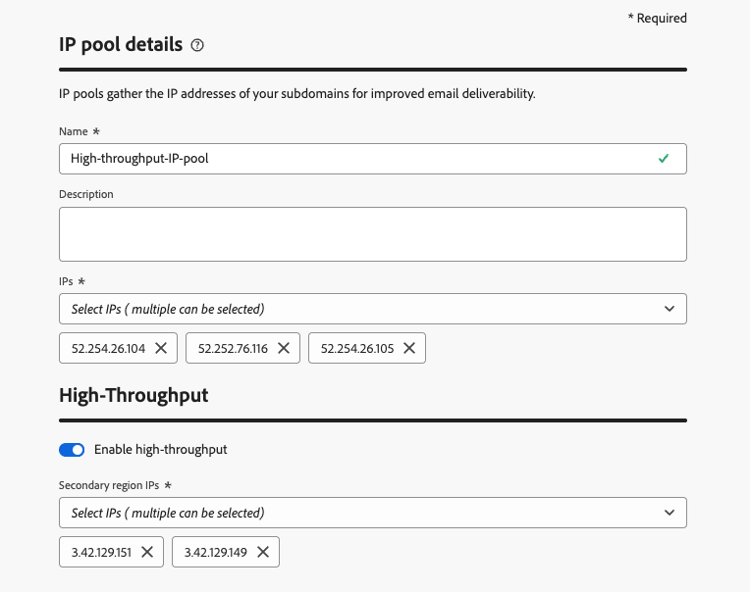
Der dedizierte IP-Pool kann jetzt mit Kanalkonfigurationen mit hohem Durchsatz verwendet werden.
Erstellen einer E-Mail-Kanal-Konfiguration mit hohem Durchsatz configuration-guidelines
-
Erstellen Sie eine E-Mail-Kanalkonfiguration. Weitere Informationen
-
Wählen Sie den Transaktions E-Mail-Typ in E-Mail-Einstellungen.
-
Aktivieren Sie den Erstellen einer Konfiguration mit hohem Durchsatz.
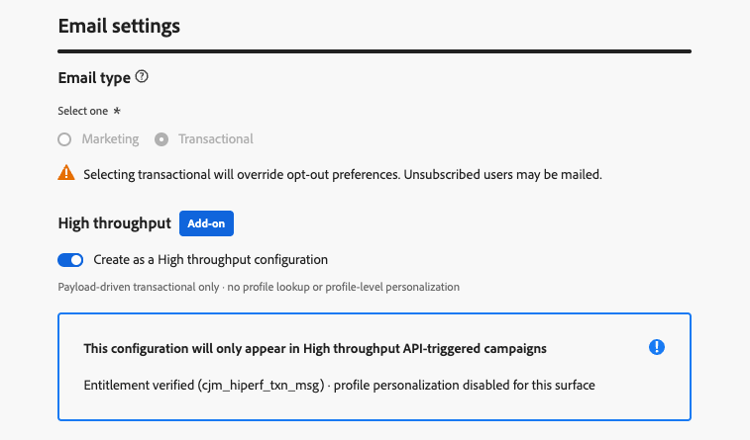
-
Wählen Sie im Abschnitt Details zum IP Pool den von Ihnen erstellten IP-Pool mit hohem Durchsatz aus. Es werden nur IP-Pools mit hohem Durchsatz aufgelistet.
-
Senden Sie die Kanalkonfiguration.
Die Konfiguration Ihres E-Mail-Kanals mit hohem Durchsatz ist jetzt für die Verwendung in einer API-ausgelösten Kampagne mit hohem Durchsatz bereit.
Einrichten von Push-Kampagnen mit hohem Durchsatz setup-push
Wie bei E-Mails können Sie direkt in der Benutzeroberfläche für sich selbst hohen Durchsatz für Push-Benachrichtigungen einrichten. Gehen Sie dazu wie folgt vor.
-
Erstellen Sie eine Push-Kanalkonfiguration. Weitere Informationen
-
Aktivieren Sie den Erstellen einer Konfiguration mit hohem Durchsatz.
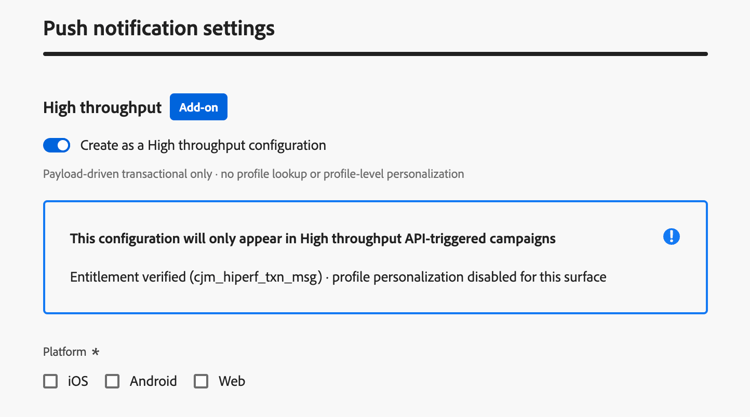
-
Wählen Sie die Plattform(en) und die entsprechenden App-ID(s) für Ihre Push-Konfiguration aus.
note NOTE Wenn der Umschalter Hoher Durchsatz aktiviert ist, ist Personalisierung der Push-AppID) nicht verfügbar. -
Senden Sie die Kanalkonfiguration.
Die Konfiguration Ihres Push-Kanals mit hohem Durchsatz ist jetzt für die Verwendung in einer API-ausgelösten Kampagne mit hohem Durchsatz bereit.
This section contains structured knowledge intended to support interpretation, retrieval, and question answering related to this topic.
For complete understanding, this information should be combined with the documentation on this page. Neither source is intended to stand alone; the page describes the feature, while this section provides additional context that helps disambiguate terminology, intent, applicability, and constraints.
- TL;DR: This page explains how High throughput mode for API triggered campaigns differs from standard API triggered campaigns, its guardrails and setup requirements, and when to choose each mode for very large-scale, real-time transactional messages (email and push) without relying on profiles.
Intents:
- Decide between a standard API triggered campaign and a High throughput campaign
- Know the guardrails and limitations of High throughput campaigns
- Set up High throughput campaigns: a dedicated IP pool and a channel configuration for email, a channel configuration for push
- Know how to personalize a High throughput campaign (contextual data only)
- Know which datasets store feedback and tracking data for High throughput campaigns
Glossary:
- High throughput mode (also written High Throughput): A mode of API triggered campaigns designed for very large-scale, real-time transactional messaging, which operates independently of Adobe Profiles (product-specific)
- Standard API triggered campaign: An API triggered campaign that is not in High throughput mode
- High Throughput transactional messaging add-on: The add-on that organizations must be licensed with to use High throughput campaigns (product-specific)
- Contextual data: Personalization data passed in the API payload
- AJO Message Feedback Event Dataset - Non Profile: Dataset used for both email and push feedback of High throughput campaigns
- AJO Email Tracking Experience Event Dataset - Non Profile: Dataset used for email tracking only of High throughput campaigns
Guardrails:
- Throughput: High throughput campaigns support up to 5000 transactions per second; standard API triggered campaigns support up to 500 transactions per second.
- Channels: Email and push notifications for High throughput campaigns.
- Personalization: all personalization must be included in the API payload as contextual data. Profile-based personalization is not supported, and validation errors occur if profile variables are used.
- Channel configurations that use profile-based personalization cannot be used with High throughput campaigns. Only channel configurations without profile personalization can be used.
- High throughput campaigns use a different API endpoint than standard API triggered campaigns.
- High throughput campaigns do not use Adobe Profiles. Messages are delivered whether or not a profile exists.
- A campaign cannot be used for both profile-enabled and non-profile use cases. If you need both, create two separate campaigns, and make the calling system decide which one to trigger based on the context.
- Feedback and tracking data for High throughput campaigns are stored in dedicated datasets that are not enabled for profiles, so these events are not stitched to profiles, even if a matching profile exists. A dedicated non-profile tracking dataset for push is not yet available.
- The throughput provisioned under the High Throughput add-on is exclusively reserved for High throughput campaigns. There is no sharing of throughput between standard and High throughput API triggered campaigns.
- Personalized PDF attachments are not supported when a High throughput campaign fails over to another region.
- Web push: High Throughput web push campaigns run on shared infrastructure and do not benefit from the dedicated capacity reserved for High Throughput mobile push.
- Push payload size: the maximum payload size is 5 KB (hard limit).
- Denylist behavior for push: when a message hits a denylist, delivery feedback is retained but no profile-update feedback is produced, so denylist responses do not trigger profile updates or token invalidation in Adobe Experience Platform.
- High throughput channel configurations (and, for email, IP pools) can only be used with High throughput API triggered campaigns, and not with standard transactional messaging using API triggered campaigns or journeys.
- The type of a channel configuration or IP pool cannot be changed after creation: a standard resource cannot be converted to High throughput, and vice versa.
- Push App id personalization is not available in High throughput push channel configurations.
- When creating a High throughput API triggered campaign, only High throughput channel configurations are available for selection.
Prerequisites and permissions:
- The organization must be licensed with the High Throughput transactional messaging add-on.
- A one-time backend activation after purchasing the add-on, requested through Adobe Customer Care or your Adobe representative (not needed for each channel configuration).
- Email: a new dedicated High throughput IP pool, and a new email channel configuration with the Create as a High throughput configuration toggle enabled that uses this IP pool.
- Push: a new push channel configuration with the Create as a High throughput configuration toggle enabled, with the platform(s) and App id(s) selected. No IP pool is needed.
Applicability:
- Access: available across all regions except Switzerland.
- Applies to API triggered campaigns, in High throughput mode.
Terminology:
- Canonical name: High throughput mode — variants: High Throughput mode, High throughput campaigns
- Acronym: TPS — transactions per second (used on the page body)
- Do not confuse: “Standard API triggered campaign” (included in the base offering, standard entitlement and message packs, standard infrastructure, uptime 99,9%) ≠ “High throughput campaign” (requires the High Throughput transactional messaging add-on, separate tiered message volumes, enhanced infrastructure, uptime 99,99%); both have a health check API
FAQ:
- Q: When should I choose a standard API triggered campaign? — When you do not have High Throughput contracted, your throughput needs are under 500 TPS, you require personalization based on Adobe Profiles, you want campaign data stitched to profiles for future targeting, or you want to use another channel than Email or Push.
- Q: When should I choose a High throughput campaign? — When you need throughput over 500 TPS, you do not require profile stitching, you can pass all personalization in the API payload, and you want to use the Email or Push channel.
- Q: Can a High throughput campaign use profile attributes for personalization? — No. Profile-based personalization is not supported, and validation errors occur if profile variables are used. Pass all personalization as contextual data in the API payload.
- Q: Can one campaign serve both profile-enabled and non-profile use cases? — No. Create two separate campaigns, and make the calling system decide which one to trigger.
- Q: Is throughput shared between standard and High throughput campaigns? — No. The throughput provisioned under the High Throughput add-on is exclusively reserved for High throughput campaigns.
- Q: How do I set up High throughput campaigns? — Both email and push can be self-configured in the UI. For email, create a dedicated High throughput IP pool, then create a channel configuration with the Create as a High throughput configuration toggle enabled and select that IP pool. For push, create a push channel configuration with the toggle enabled and select the platform(s) and App id(s); no IP pool is needed. App id personalization is not available for High throughput push.
Related pages:
- Personalizing content with contextual data: Learn how to personalize content using contextual data (campaigns/api-triggered-campaign-content.md#contextual)
- Endpoint used by High throughput campaigns: Execute an API triggered campaign (campaigns/trigger-campaigns.md#trigger)
- Channel configurations with profile-based personalization: profile-based personalization (email/surface-personalization.md)
- Personalized PDF attachments: Learn more about personalized PDF attachments (email/pdf-attachments.md#personalized-attachments)
- Create IP pools: Learn how to create IP pools (configuration/ip-pools.md)
- Set up channel configurations: Learn how to set up channel configurations (configuration/channel-surfaces.md)
- Set up push channel configurations: Learn how to create a push channel configuration (push/push-configuration.md#message-preset)
- Push App id personalization: Learn about push App id personalization (push/push-configuration.md#app-id-personalization)
Personas:
- developer: Can pass all personalization for High throughput campaigns as contextual data in the API payload. Can call a different API endpoint than the one used for standard API triggered campaigns. Can use the AJO Message Feedback Event Dataset - Non Profile and the AJO Email Tracking Experience Event Dataset - Non Profile for feedback and tracking. The page states that profile variables cause validation errors, and push payload size is limited to 5 KB. Where: “Guardrails & limitations”.
Onboarding:
- Level: Experienced
- First minimal step: Create a new IP pool.
- Success check: The page states a Health check API is available for the High Throughput Campaign.
- Next: Learn how to personalize content using contextual data: Edit the API triggered campaign content (campaigns/api-triggered-campaign-content.md); Learn how to set up channel configurations: Set up channel configurations (configuration/channel-surfaces.md)