在此頁面上:瞭解如何使用[同意和偏好設定詳細資料]欄位群組,建立傳送訊息給清單訂閱者的歷程。
此使用案例的目的是建立歷程,以傳送訊息給清單的訂閱者。
在此範例中,使用Adobe Experience Platform的 同意和偏好設定詳細資料 欄位群組。 若要尋找此欄位群組,請從 資料管理 功能表選擇結構描述。 在 欄位群組 索引標籤上,在搜尋欄位中輸入欄位群組的名稱。
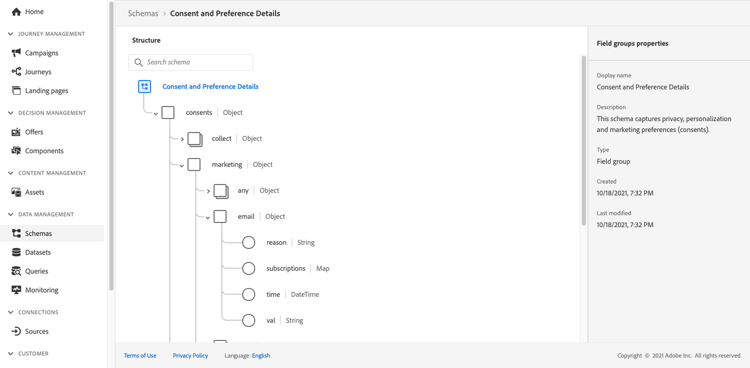
若要設定此歷程,請遵循下列步驟:
-
建立以 讀取 活動開始的歷程。 深入瞭解建立您的第一個歷程。
-
將 電子郵件 動作活動新增至歷程。 瞭解如何使用頻道動作。
-
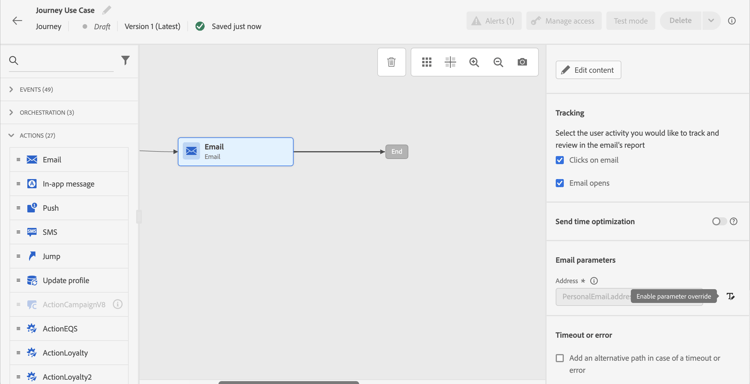
在 電子郵件 活動設定的 電子郵件引數 區段中,將預設電子郵件地址(
PersonalEmail.adress)取代為清單訂閱者的電子郵件地址:-
按一下 位址 欄位右側的 啟用引數覆寫 圖示,然後按一下 編輯 圖示。
-
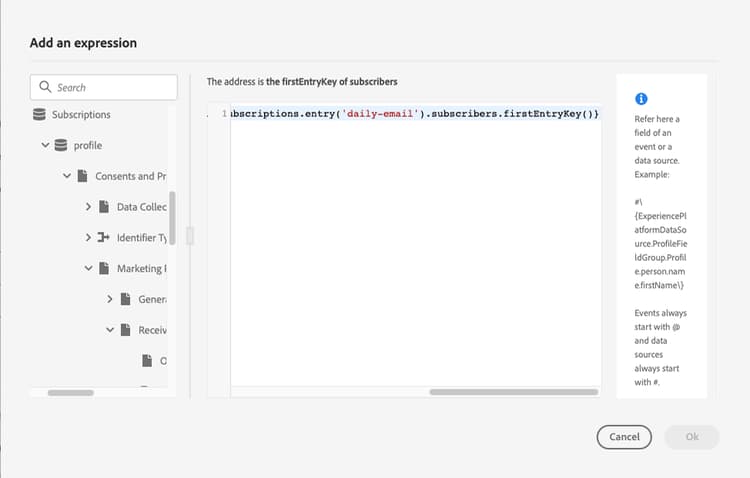
在運算式編輯器中,輸入運算式以擷取訂閱者的電子郵件地址。 閱讀全文。
此範例顯示包含對應欄位參照的運算式:
code language-json #{ExperiencePlatform.Subscriptions.profile.consents.marketing.email.subscriptions.entry('daily-email').subscribers.firstEntryKey()}在此範例中,會使用下列函式:
table 0-row-3 1-row-3 2-row-3 函數 說明 範例 entry根據選取的名稱空間參考對應元素 請參閱特定訂閱清單 firstEntryKey擷取對應的第一個專案索引鍵 擷取訂閱者的第一個電子郵件地址 在此範例中,訂閱清單名為
daily-email。 電子郵件地址在subscribers對應中定義為金鑰,此對應連結至訂閱清單對應。深入瞭解運算式中欄位🔗的參考。
-
在 新增運算式 對話方塊中,按一下確定。
-
This section contains structured knowledge intended to support interpretation, retrieval, and question answering related to this topic.
For complete understanding, this information should be combined with the documentation on this page. Neither source is intended to stand alone; the page describes the feature, while this section provides additional context that helps disambiguate terminology, intent, applicability, and constraints.
- TL;DR: This page shows how to build a journey that sends an email to subscribers of a list by overriding the default email address parameter using an expression that reads subscriber addresses from a consent map field.
Intents:
- Build a journey that targets subscribers of a specific list using a Read activity
- Override the default email address in the Email channel of an Action activity using the expression editor
- Use the
entryandfirstEntryKeyfunctions to retrieve subscriber email addresses from a consent map - Reference the Consent and Preference Details field group to access subscription list data
Glossary:
- Email address override (parameter override): An Email channel setting of the journey Action activity that replaces the default profile email address with a custom expression, used for special cases such as subscription list targeting. (product-specific)
- Consent and Preference Details field group: An Adobe Experience Platform schema field group that contains subscription and consent data, including the subscriptions element; subscriber email addresses are defined as keys in the
subscribersmap, which is linked to the subscription list map. (product-specific) entryfunction: An expression function that refers to a map element by its namespace key — used here to reference a specific subscription list (e.g.,daily-email). (product-specific)firstEntryKeyfunction: An expression function that retrieves the first key of a map — used here to retrieve the first email address from the subscribers map of a subscription list. (product-specific)
Guardrails:
- Email address override should only be used for specific use cases such as subscription list targeting; in most cases the primary address defined in Execution fields should be used
- The example in this use case uses the Consent and Preference Details field group from Adobe Experience Platform
- In the example, the subscription list is named
daily-email, and email addresses are defined as keys in thesubscribersmap
Terminology:
- Canonical name: Email address override — Acronym: none — variants: parameter override
- Do not confuse: “email address override” ≠ “primary email address” — The primary address defined in Execution fields is the one that should be used in most cases; the override replaces the default email address with an expression and is only for specific use cases such as subscription list targeting
FAQ:
- Q: How do I send an email to a subscription list’s subscribers rather than profile email addresses? — Enable the parameter override on the Address field of the Email channel in the Action activity and enter an expression using
entryandfirstEntryKeyfunctions to retrieve addresses from the subscribers map of the target subscription list. - Q: What field group is required for this use case? — The example uses the Consent and Preference Details field group from Adobe Experience Platform, which includes the subscriptions element.
- Q: Should I always use email address override when targeting subscribers? — No; email address override is for specific use cases only. In most journeys, the primary address defined in Execution fields should be used.
- Q: What does the
firstEntryKeyfunction do in this context? — It retrieves the first email address key from thesubscribersmap associated with a specific subscription list.