在此頁面上:瞭解來源連接器是什麼,以及它們如何將您的 CRM、雲端儲存空間和資料庫中的資料帶入 Adobe Journey Optimizer,讓您能夠支援個人化、資料導向的客戶歷程。
什麼是來源? what-is-source
來源是將外部資料帶入 Adobe Journey Optimizer 的連接器。 來源可讓您從已使用的系統 (例如 CRM 平台、雲端儲存空間或資料庫) 匯入客戶資訊,並讓該資料可用於建立個人化的客戶歷程。
請將來源視為 Journey Optimizer 與外部資料系統之間的橋樑。 它們會自動同步資料,讓您一律擁有最新的客戶資訊,以支援行銷活動。
來源為何重要 why-sources-matter
在 Journey Optimizer 中建立個人化、資料導向的客戶體驗時,來源至關重要。 原因如下:
- 整合式客戶檢視 - 結合來自多個系統的資料,以檢視每個客戶的完整情況
- 即時個人化 - 使用最新資料在您的歷程中及時傳遞相關訊息
- 自動資料同步 - 保持客戶資訊最新狀態,無需手動匯入資料
- 有效的工作流程 - 連線一次,然後資料會自動流入您的歷程
例如,您可以使用來源從您的電子商務平台匯入購買記錄,然後建立歷程,以根據客戶已購買的商品傳送個人化產品推薦。
您可以使用來源做什麼 sources-use-cases
Journey Optimizer 中來源的常見使用案例包括:
- 從 CRM 系統匯入客戶資料 - 從 Salesforce 或 Microsoft Dynamics 等平台同步連絡資訊、偏好設定和參與歷史記錄
- 連線購買資料 - 從電子商務平台匯入訂單歷史記錄和產品偏好設定,以個人化產品建議
- 整合忠誠度方案資料 - 存取點餘額與階層資訊,以獎勵最常參與的客戶
- 同步行為資料 - 匯入網站互動和應用程式使用模式以觸發相關歷程
- 更新輪廓屬性 - 讓客戶輪廓與雲端儲存空間或資料庫中的資料保持最新
常見來源類型 source-types
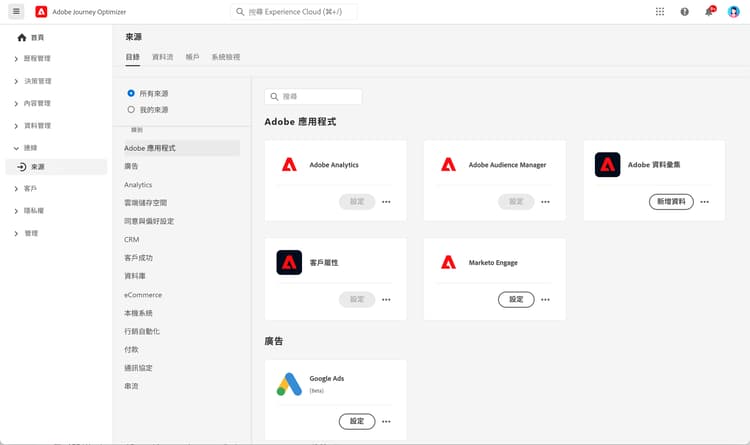
Journey Optimizer 支援各種類型的來源,以便連線至您現有的系統:
Adobe 應用程式:
- Adobe Analytics
- Adobe Audience Manager
- Adobe Campaign
- Adobe Commerce
雲端儲存空間
- Amazon S3
- Azure Blob 儲存體
- Google Cloud Storage
- SFTP
資料庫:
- Amazon Redshift
- Google BigQuery
- Microsoft SQL Server
- MySQL
- PostgreSQL
CRM 與行銷自動化:
- Microsoft Dynamics
- Salesforce
- Salesforce Marketing Cloud
忠誠度與獎勵:
- Talon.One
- Capillary
- Kobie
- LAVA
➡️請在 Experience Platform 來源目錄中,檢視完整清單
開始之前 prerequisites
請在設定來源之前,先確定您擁有:
- 合適權限 — 存取 Adobe Experience Platform,即可管理來源
- 來源系統認證 — 您想連線的外部系統驗證詳細資料
- 瞭解資料 — 瞭解您還需要哪些資料欄位,如何把資料對應至 Journey Optimizer 設定檔
➡️瞭解存取控制和權限
來源如何運作 how-sources-work
Adobe Journey Optimizer 使用 Adobe Experience Platform 的來源框架。 以下是基本工作流程:
- Connect — 設定外部資料系統的驗證
- 選取資料 — 選擇想匯入的資料,即可同步處理資料
- 對應欄位 — 定義外部資料欄位,該如何對應至 Journey Optimizer 設定檔屬性
- 排程 — 設定自動資料重新整理區間
- 監視 — 追蹤資料流量,解決任何同步處理問題
一旦完成設定,來源就會在背景自動執行,讓您的客戶資料保持最新狀態,可供歷程使用。
_change_request_type」欄位為必填項。 支援的值為 u (更新插入) 或 d (刪除)。 這些值必須為小寫 u 和 d,而非大寫 U 和 D。 詳細瞭解協調行銷活動的護欄和限制了解更多 learn-more
請觀看此影片,瞭解來源連接器,還有如何在 Journey Optimizer 中設定它們:
如需設定和管理來源的詳細資訊,請參閱 Adobe Experience Platform 來源文件。
後續步驟 next-steps
現在您已瞭解來源是什麼,以及它們為何重要:
- 探索來源目錄,尋找您系統的連接器
- 瞭解如何建立來源連線
- 瞭解資料對應和轉換
- 瞭解如何在歷程中使用匯入的資料
- 檢閱開始使用資料管理概觀,瞭解來源如何融入 Journey Optimizer 的完整資料設定
This section contains structured knowledge intended to support interpretation, retrieval, and question answering related to this topic.
For complete understanding, this information should be combined with the documentation on this page. Neither source is intended to stand alone; the page describes the feature, while this section provides additional context that helps disambiguate terminology, intent, applicability, and constraints.
- TL;DR: This page explains what source connectors are, why they matter, the common source types, and how sources bring external data from CRM, cloud storage, and databases into Journey Optimizer for personalized journeys.
Intents:
- Understand what a source is and how it brings external data into Journey Optimizer
- Identify the common source types available for Adobe applications, cloud storage, databases, CRM and marketing automation, and loyalty and rewards
- Confirm the prerequisites needed before configuring sources
- Understand the basic sources workflow from connection through monitoring
- Configure file-based Change Data Capture sources for Orchestrated campaigns correctly
Glossary:
- Source: A connector that brings external data into Adobe Journey Optimizer from systems such as CRM platforms, cloud storage, or databases (product-specific)
- Sources framework: The Adobe Experience Platform framework that Journey Optimizer uses to power sources (product-specific)
_change_request_type: A field required for file-based Change Data Capture sources used with Orchestrated campaigns, indicating the change operation (product-specific)
Guardrails:
- Before configuring sources, you need appropriate permissions to manage sources in Adobe Experience Platform, source system credentials, and an understanding of which data fields you need and how they map to Journey Optimizer profiles.
- For file-based Change Data Capture sources used with Orchestrated campaigns, the
_change_request_typefield is required, and its supported values must be lowercaseu(upsert) ord(delete), not uppercaseUandD. - Once configured, sources run automatically in the background to keep customer data fresh.
Terminology:
- Canonical name: Source — variants: source connector, sources
- Synonyms: “source” = “source connector”
- Do not confuse: “
u(upsert)” ≠ “d(delete)” — both must be lowercase
FAQ:
- Q: What is a source in Journey Optimizer? — A connector that brings external data from systems such as CRM platforms, cloud storage, or databases into Journey Optimizer and makes that data available for personalized journeys.
- Q: Do I have to import data manually? — No; once configured, sources sync data automatically in the background so customer information stays current.
- Q: What do I need before I configure a source? — Appropriate permissions to manage sources in Adobe Experience Platform, source system credentials, and an understanding of your data fields and how they map to profiles.
- Q: What values does the
_change_request_typefield accept for Orchestrated campaign Change Data Capture sources? — Lowercaseufor upsert ordfor delete; uppercaseUandDare not supported.