在此頁面:從介面或API設定LINE通道設定,讓Adobe Journey Optimizer可以使用LINE傳訊API進行驗證,並傳送訊息給您的客戶。
-
存取頻道 > 一般設定 > 頻道設定功能表,然後按一下建立頻道設定。
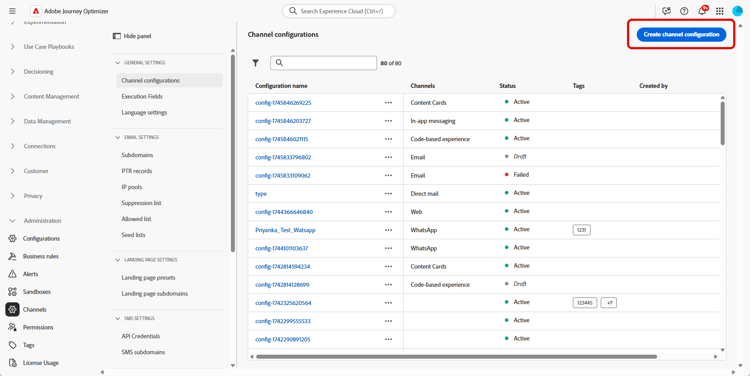
-
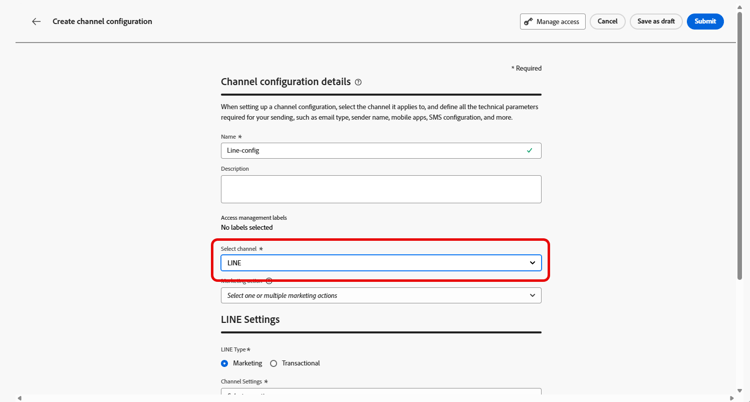
輸入設定的名稱和說明(選擇性),然後選取要設定的通道。
note NOTE 名稱必須以字母(A-Z)開頭。 它只能包含英數字元。 您也可以使用底線 _、點.和連字號-字元。 -
若要將自訂或核心資料使用標籤指派給組態,您可以選取管理存取權。 進一步瞭解物件層級存取控制(OLAC)。
-
選取 LINE 頻道。
-
選取行銷動作,以使用此設定將同意原則與訊息相關聯。 系統會運用與行銷動作相關的所有同意政策,以尊重客戶的偏好設定。 了解更多
-
選取設定的訊息型別:
- 行銷:針對促銷訊息,例如零售商店的每週促銷活動。 這些訊息需要使用者同意,且應符合LINE關於使用者選擇加入的原則。
- 異動:針對非商業訊息,例如訂單確認、密碼重設通知或傳遞更新。 這些訊息甚至可傳送給已取消訂閱行銷通訊的使用者,但嚴格限於特定交易內容。
-
選取您的頻道設定。
請聯絡您的Adobe代表以設定您的頻道設定。
-
選取您要對映的LINE使用者識別碼。 這是用來將訊息連結至LINE頻道中個別使用者的識別碼。
note NOTE 您在此對應的LINE使用者識別碼必須已存在於客戶的Real-Time Customer Profile上。 擷取LINE使用者ID (例如,透過LINE登入或LIFF SDK),將其擷取到Adobe Experience Platform,然後將其拼接到具有Identity Service的已知識別碼,以便Journey Optimizer可以存取整合式設定檔。 進一步瞭解Journey Optimizer中的身分識別。 如需使用Identity Service將LINE使用者ID與客戶設定檔整合的端對端範例,請參閱社群文章使用AEP Identity Stitching將LINE使用者ID與客戶設定檔整合。 -
輸入您的寄件者名稱,例如您的品牌名稱。
-
提交變更。
您現在可以在建立LINE訊息時選取設定。
設定LINE頻道設定API line-api
此API設定頻道設定,以儲存連線到LINE傳訊API所需的授權和設定詳細資訊。 這些設定可讓Adobe Journey Optimizer使用提供的憑證驗證及透過LINE傳送訊息。
端點
POST https://platform.adobe.io/journey/imp/config/channel-settings
要求內文
{
    "name": "your_defined_name",
    "channelRegistryId": "line",
    "channel": "line",
    "channelSettings": {
        "channelId": "your_line_channel_id",
        "channelSecret": "your_line_channel_secret"
    }
}
頻道設定回應
{
"id": "3603ed66-ae86-42b8-8a90-d4b4e54e7c3b",
"name": "your_defined_name",
"channelRegistryId": "line",
"channel": "line",
"channelSettings": {
    "channelId": "your_line_channel_id",
    "channelSecret": "your_line_channel_secret"
    },
    "channelPublicationId": "v1_line",
    "createdAt": "2025-07-30T12:00:00.000Z",
    "modifiedAt": "2025-07-30T12:00:00.000Z",
    "isFromLatestVersion": true,
    "_etag": "\"eab98d24-18af-48ae-90f9-e59d4f8cfb2b\""
}
This section contains structured knowledge intended to support interpretation, retrieval, and question answering related to this topic.
For complete understanding, this information should be combined with the documentation on this page. Neither source is intended to stand alone; the page describes the feature, while this section provides additional context that helps disambiguate terminology, intent, applicability, and constraints.
- TL;DR: This page explains how to create a LINE channel configuration, from the interface or the API, so that Journey Optimizer can authenticate with the LINE Messaging API and send messages to your customers.
Intents:
- Create a LINE channel configuration from the Channel configurations menu
- Associate consent policies to the configuration through marketing actions
- Choose the message type (Marketing or Transactional) for the configuration
- Map the LINE user ID and define the Sender Name
- Configure the LINE Channel settings through the API
Glossary:
- Channel configuration: The configuration created from Channels > General settings > Channel configurations for which you enter a name, a description (optional), and the channel to configure (product-specific)
- Marketing action: The setting used to associate consent policies to the messages using this configuration, so that customer preferences are respected (product-specific)
- Channel settings: The connection settings that store the authorization and configuration details for connecting to the LINE Messaging API (product-specific)
- LINE user ID: The identifier used to link messages to individual users within your LINE channel (product-specific)
- Sender Name: The name, such as your brand’s name, entered for the configuration (product-specific)
Guardrails:
- Configuration names must begin with a letter (A-Z) and can only contain alphanumeric characters, underscore, dot, and hyphen.
- Marketing messages require user consent and should comply with LINE’s policy regarding user opt-ins.
- Transactional messages can be sent even to users who have unsubscribed from marketing communications but are strictly limited to specific transactional contexts.
- The LINE user ID mapped here must already exist on your customers’ Real-Time Customer Profile.
- For the Channel settings field, reach out to your Adobe representative to set up your Channel settings.
- The API uses headers including a user token from your technical account, the client ID from Adobe Developer Console, the IMS Organization ID, the sandbox name, and Content-Type application/json.
Terminology:
- Canonical name: LINE channel configuration — Acronym: n/a — variants: channel configuration
- Do not confuse: “Marketing” (promotional messages requiring user consent) ≠ “Transactional” (non-commercial messages limited to specific transactional contexts)
- Do not confuse: “Channel settings” (authorization and connection details for the LINE Messaging API) ≠ “Marketing action” (associates consent policies to the configuration)
FAQ:
- Q: What characters are allowed in a configuration name? — The name must begin with a letter (A-Z) and can only contain alphanumeric characters, underscore, dot, and hyphen.
- Q: What is the difference between a Marketing and a Transactional configuration? — Marketing is for promotional messages that require user consent, while Transactional is for non-commercial messages that can reach unsubscribed users but are strictly limited to specific transactional contexts.
- Q: Does the LINE user ID need to exist beforehand? — Yes, the LINE user ID mapped in the configuration must already exist on your customers’ Real-Time Customer Profile.
- Q: How are the Channel settings set up? — Reach out to your Adobe representative to set up your Channel settings.
- Q: Can the Channel settings be configured through the API? — Yes, the page describes an API (POST to the channel-settings endpoint) that sets up Channel settings storing the authorization and configuration details needed to connect to the LINE Messaging API.