在此頁面上:瞭解如何使用規則產生器來篩選資料,以及建立查詢,在您的協調行銷活動中鎖定對象。
協調的行銷活動隨附規則產生器,可簡化根據各種條件篩選資料庫的流程。 規則產生器能有效管理非常複雜和冗長的查詢,提供增強的彈性和精確度。
它也支援條件內預先定義的篩選器,使您可輕鬆調整查詢,同時利用進階運算式和運算子實現全面的客群目標定位和細分策略。
存取規則產生器 access
您必須在每個需要定義規則以篩選資料的內容中,都能使用規則產生器。
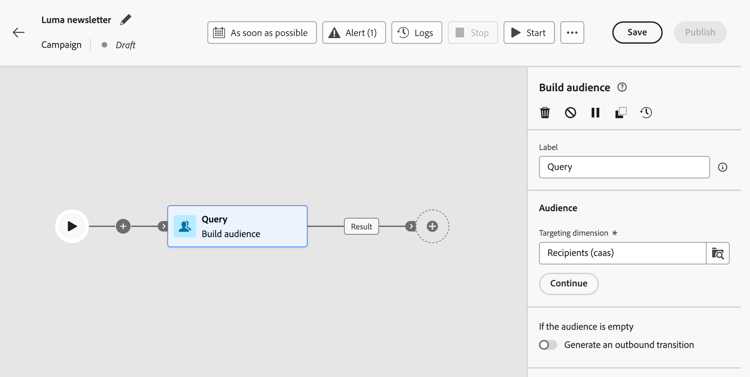
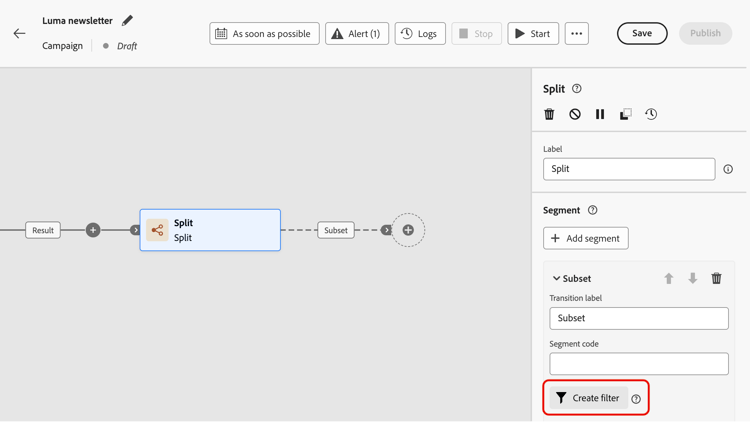
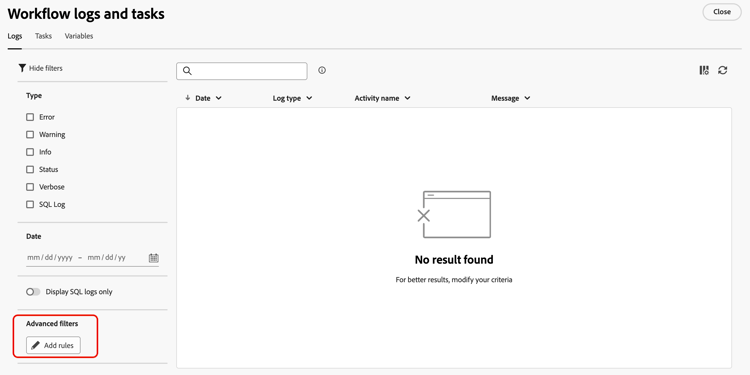
規則產生器介面 interface
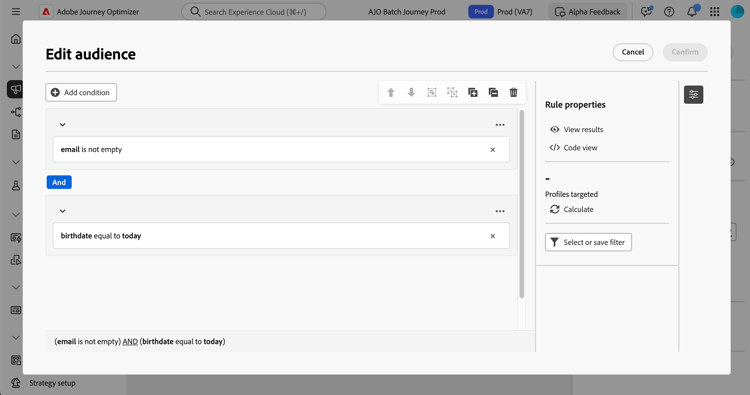
規則產生器提供中央畫布,您可在其中建立查詢,以及提供規則相關資訊的屬性窗格。
-
您可以在 中央畫布 新增並合併不同元件以建立規則。 了解如何建立規則
-
規則屬性窗格會提供有關您規則的資訊。 它可讓您執行各種作業來檢查規則,並確保它符合您的需求。
建立查詢以建立客群時,會顯示此窗格。 了解如何檢查及驗證您的查詢
使用預先定義的篩選器
預先定義的篩選器可讓您重複使用規則產生器中儲存的查詢,包括含有引數的版本。 如需儲存、套用及管理預先定義篩選器的完整逐步解說,請參閱使用預先定義篩選器。
This section contains structured knowledge intended to support interpretation, retrieval, and question answering related to this topic.
For complete understanding, this information should be combined with the documentation on this page. Neither source is intended to stand alone; the page describes the feature, while this section provides additional context that helps disambiguate terminology, intent, applicability, and constraints.
- TL;DR: This page explains how to access and use the rule builder to filter data and build the queries that target audiences in Orchestrated campaigns.
Intents:
- Identify the contexts where the rule builder is available.
- Specify a target population using a Build audience activity.
- Apply a condition in the campaign canvas using a Split activity.
- Build advanced filters for lists such as campaign logs or targeting dimensions.
- Understand the central canvas and the Rule properties pane in the rule builder interface.
- Reuse saved queries through predefined filters.
Glossary:
- Rule builder: a tool that simplifies filtering the database based on various criteria, manages complex and long queries, and supports predefined filters within conditions (product-specific)
- Central canvas: the part of the rule builder interface where components are added and combined to build a rule (product-specific)
- Rule properties pane: the pane that provides information on the rule and allows operations to check the rule and ensure it suits the user’s needs; it displays when building a query to create an audience (product-specific)
- Build audience activity: used to specify the population to target in an Orchestrated campaign by creating new audiences (product-specific)
- Split activity: used to apply rules within the campaign canvas (product-specific)
- Predefined filters: saved queries, including versions with parameters, that can be reused in the rule builder (product-specific)
Guardrails:
- None stated on the page.
Terminology:
- Canonical name: rule builder — variants: none stated
FAQ:
- Q: Where is the rule builder available? — In every context where rules are needed to filter data, including building audiences with a Build audience activity, applying conditions in the campaign canvas with a Split activity, and building advanced filters for lists such as campaign logs or targeting dimensions.
- Q: What does the rule builder interface consist of? — A central canvas where components are added and combined to build the rule, and a Rule properties pane that provides information on the rule and lets the user check it.
- Q: When does the Rule properties pane display? — When building a query to create an audience.
- Q: Can saved queries be reused in the rule builder? — Yes, through predefined filters, including versions with parameters.
Related pages:
- To build audiences in Orchestrated campaigns: Learn how to build audiences (orchestrated/activities/build-audience.md)
- To apply a condition in the campaign canvas: Learn how to use a Split activity (orchestrated/activities/split.md)
- To build a rule in the central canvas: Learn how to build a rule (orchestrated/build-query.md)
- To check and validate a query: Learn how to check and validate your query (orchestrated/build-query.md)
- To save, apply, and manage predefined filters: Work with predefined filters (orchestrated/predefined-filters.md)
Personas:
- marketer: Can specify a target population in an Orchestrated campaign using a Build audience activity. Can apply a condition in the campaign canvas using a Split activity, or build advanced filters for lists such as campaign logs. Where: “Access the rule builder”.
Onboarding:
- Level: Intermediate
- First minimal step: Specify the population you want to target in your Orchestrated campaigns using a Build audience activity.
- Success check: The Rule properties pane lets you check the rule to ensure it suits your needs.
- Previous: Specify a target population using a Build audience activity: Use the Build audience activity (orchestrated/activities/build-audience.md); Apply a condition in the campaign canvas using a Split activity: Use the Split activity (orchestrated/activities/split.md)
- Next: Build a rule in the central canvas: Build your first rule (orchestrated/build-query.md); Reuse saved queries through predefined filters: Work with predefined filters (orchestrated/predefined-filters.md)