在此頁面上:瞭解如何使用增量查詢目標定位活動,以在每次協調的行銷活動執行時僅傳回新記錄,排除已在先前執行中定位的設定檔。
增量查詢活動是 目標定位 活動,每次執行協調的行銷活動時都會執行資料庫查詢。 重要部分是每次執行只輸出其日期欄位值晚於上次執行日期的記錄。 如此,您就能避免重新鎖定相同人員目標,或重新匯出相同列。
當行銷活動可以執行多次時,例如當您排程行銷活動時(例如每週),或當行銷活動由外部訊號或API觸發時,可使用它。 每次執行目標只會記錄日期在前一次執行之後的資料,因此您可以避免重複專案。
一般用途:
- 傳訊與對象:只將新註冊、新購買者或其他「自上次執行以來的新專案」區段提取至下一個步驟(例如電子郵件、行動訊息)。
- 持續匯出:只將新的或更新後的資料列傳送至檔案以供報表或BI工具使用,而不會複製您已匯出的資料。
設定增量查詢活動 incremental-query-configuration
設定目標維度、建立查詢,然後選擇活動如何決定要從未來執行中排除哪些記錄。
-
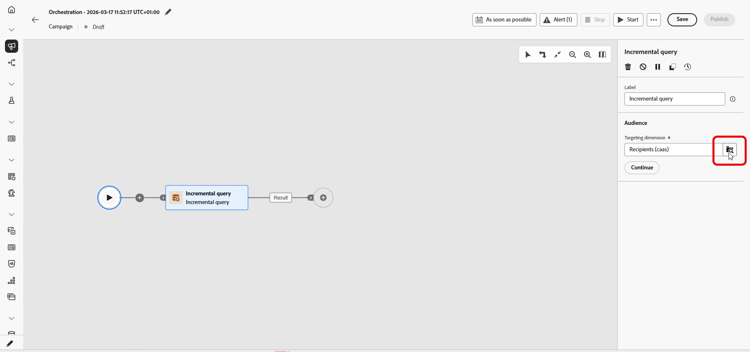
將 增量查詢 活動拖放到您的協調行銷活動中。
-
在 對象 中,選取目標維度 (例如收件者、訂閱者),然後按一下繼續。 深入瞭解目標維度。
-
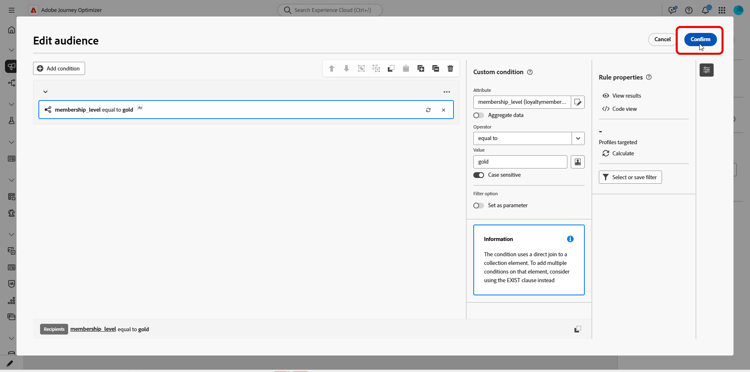
按一下 新增條件 以定義查詢。 瞭解如何使用規則產生器。
-
在 已處理的資料 下,選擇您的日期欄位路徑。 需要日期欄位,而且屬性必須使用 日期時間 格式。 每次執行只傳回日期在最後一次執行之後的列。
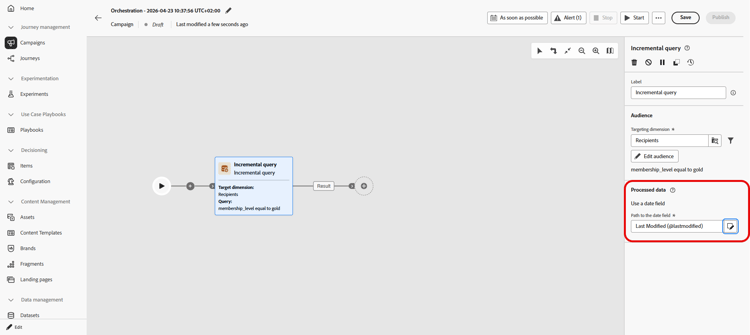
note NOTE 適用性僅取決於日期欄位的值,而不取決於記錄何時引入。 如果記錄的日期欄位值早於上次執行的日期,則不會傳回上次執行後擷取的記錄。
檢查上一個執行日期 incremental-query-last-execution
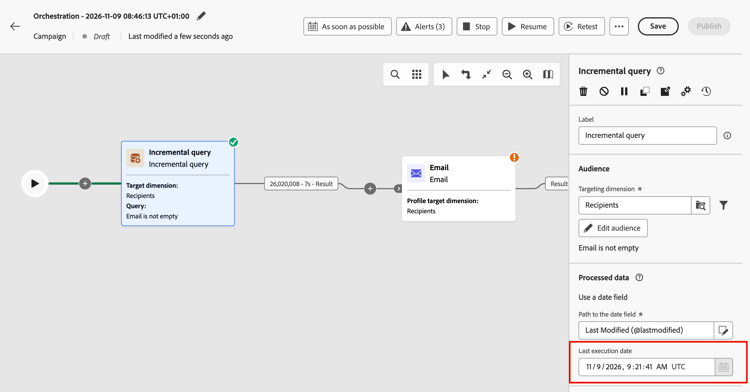
活動執行後,上次執行日期欄位會顯示在 已處理資料 下,日期欄位 的 路徑下方。 它會顯示活動先前執行的日期和時間。 這是下次執行所使用的截止日期。 此欄位是唯讀的。
範例 incremental-query-example
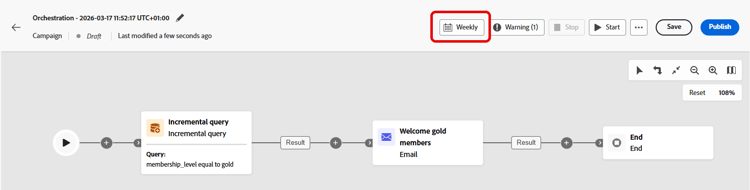
下列範例會傳送歡迎電子郵件給剛成為金會員的設定檔。 此行銷活動可排程為每週、每週一執行。 每次執行只會鎖定自上次執行以來符合金級成員資格的設定檔,因此每位收件者都會收到一次歡迎電子郵件。
- 增量查詢:選取金會員。 第一次執行:所有目前的金會員。 稍後執行:僅自上次執行以來成為金會員的設定檔。
- 電子郵件傳遞:透過查詢將歡迎電子郵件傳送至設定檔輸出。
This section contains structured knowledge intended to support interpretation, retrieval, and question answering related to this topic.
For complete understanding, this information should be combined with the documentation on this page. Neither source is intended to stand alone; the page describes the feature, while this section provides additional context that helps disambiguate terminology, intent, applicability, and constraints.
- TL;DR: This page explains how to configure the Incremental query targeting activity in an Orchestrated campaign so that each run returns only records whose date field value is later than the previous execution.
Intents:
- Understand what the Incremental query activity does across repeated Orchestrated campaign runs.
- Configure the activity’s targeting dimension and query condition.
- Choose a date field under Processed data so that each run returns only rows dated after the last execution.
- Understand what happens to downstream activities when a run returns no rows.
- Build a “new since last run” audience for messaging or ongoing exports.
Glossary:
- Incremental query: a Targeting activity that runs a database query each time the Orchestrated campaign runs and outputs only records whose date field value is later than the previous execution (product-specific)
- Processed data: the configuration area where you choose how the activity excludes records from earlier runs, for example by using a date field (product-specific)
- Path to the date field: the attribute, in Date Time format, used under Processed data so each run returns only rows whose date is after the last execution (product-specific)
- Last execution date: the field displayed under Processed data, below the Path to the date field, once the activity has run; it shows the date and time of the previous execution and is the cutoff date used by the next run; the field is read-only (product-specific)
- Targeting dimension: the audience type selected for the activity, for example recipients or subscribers (product-specific)
Guardrails:
- When a run returns no rows, the Orchestrated campaign stops at the Incremental query; activities after it are not executed until there is data, when the campaign runs again.
- A date field is required under Processed data, and the attribute must use the Date Time format.
- Each run returns only rows whose date is after the last execution.
- Eligibility depends only on the value of the date field, not on when the record was ingested. A record ingested after the previous execution is not returned if its date field value is older than the date of that execution.
Terminology:
- Canonical name: Incremental query — variants: none
- Synonyms: none
- Do not confuse: “Incremental query” (a Targeting activity that excludes previously returned records) ≠ “Targeting dimension” (the audience type, e.g. recipients or subscribers, selected within the activity)
FAQ:
- Q: What does the Incremental query activity return on each run? — Only records whose date field value is later than the previous execution, regardless of when they were ingested.
- Q: When should I use the Incremental query activity? — When the campaign can run multiple times, for example when scheduled (e.g. weekly) or triggered by an external signal or API, so each run targets only records dated after the previous execution.
- Q: What is required under Processed data? — A Path to the date field, using the Date Time format; each run returns only rows whose date is after the last execution.
- Q: What happens if a run returns no rows? — The Orchestrated campaign stops at the Incremental query, and activities after it are not executed until there is data on a later run.
- Q: What are typical uses of the Incremental query? — Pulling “new since last run” segments (e.g. new sign-ups, new purchasers) into messaging, or sending only new or updated rows to files for reporting or BI tools.
Examples:
- Welcome email to new gold members: an Incremental query selects gold members (first run: all current gold members; later runs: only profiles that became gold members since the previous execution), followed by an Email delivery activity that sends the welcome email to the profiles output by the query. The campaign can be scheduled to run weekly, every Monday, so each recipient receives the welcome email once.
Related pages:
- To pick the audience type for the Incremental query: Targeting dimensions (orchestrated/target-dimension.md)
- To build the query condition for the Incremental query: Learn how to use the rule builder (orchestrated/orchestrated-rule-builder.md)
Personas:
- marketer: Can configure the Incremental query activity so each Orchestrated campaign run returns only records whose date field value is later than the previous execution. Can select the Targeting dimension, add a condition with the rule builder, and choose the Path to the date field under Processed data. The page states that a date field is required and the attribute must use the Date Time format. Where: “Configure the Incremental query activity”.
Onboarding:
- Level: Intermediate
- First minimal step: Drop an Incremental query activity into your Orchestrated campaign.
- Success check: Each run returns only rows whose date is after the last execution.
- Next: Selecting the Targeting dimension for the Incremental query activity: Create your Targeting dimension (orchestrated/target-dimension.md); Adding a condition to define the query in the Incremental query activity: Work with the rule builder (orchestrated/orchestrated-rule-builder.md)