Adobe Commerce與RTCDP
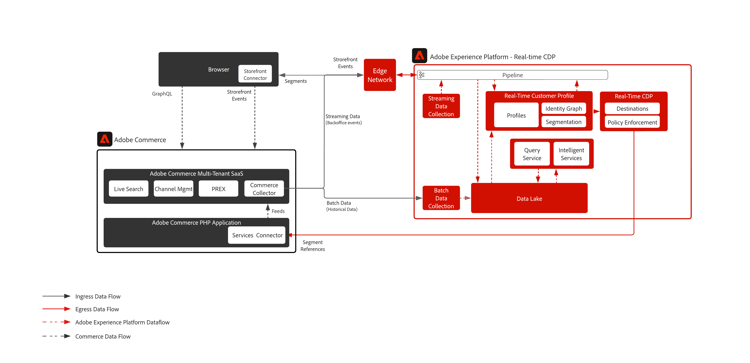
Data Connection擴充功能可協助Adobe Commerce客戶順暢地與Adobe Experience Platform整合,以豐富客戶設定檔並個人化數位店面和其他管道中的體驗。
已啟用技術功能
- 收集並傳送到任何Adobe Experience Cloud產品的店面資料(使用者端,例如加入購物車、放棄購物車等)。
- 任何Adobe Experience Cloud產品的後台訂單狀態
- 可將後台歷史訂單傳送至Adobe Experience Platform
- 在Adobe Commerce共用及個人化RTCDP對象
先決條件
若要使用Data Connection擴充功能,您必須具備下列條件:
- Adobe Commerce 2.4.4或更新版本
- Adobe ID和組織ID
- Adobe Experience Platform/RTCDP
- Adobe使用者端資料層(ACDL)。 需要ACDL才能收集店面事件資料。
入門步驟
從Adobe Commerce到Adobe Experience Platform的資料收集
- 安裝 Data Connection延伸模組。
- 登入您的Adobe帳戶並檢視以確認您的組織ID。 組織ID是與已布建Experience Cloud公司相關聯的ID。 此ID是24個字元的英數字串,後面接著(而且必須包含) @AdobeOrg。
- 建立或更新具有Commerce特定欄位群組的XDM結構描述。
- 根據您建立或更新的結構描述建立資料集。 此資料集將包含您傳送的Commerce資料。
- 建立資料流並選取包含Commerce特定欄位群組的XDM結構描述。
- 連線到Commerce服務。
- 連線到Adobe Experience Platform。
從Adobe Experience Platform連線至Commerce目的地以共用對象
若要連線至Adobe Commerce目的地:
- 在Adobe Experience Platform介面中,前往「目的地>目錄」。
- 選取「Personalization」。
- 選取Adobe Commerce目標以反白顯示,然後選取「設定」。
- 請依照目的地組態教學課程中所述的步驟進行。
現成可用的資料
- 店面(瀏覽器/應用程式)活動
- 後台活動
- 歷史訂單資料
如需支援事件的完整清單,請參閱Commerce事件
架構
相關實作指南
recommendation-more-help
045b7d44-713c-4708-a7a6-5dea7cc2546b