在此页面上:了解如何使用“同意和偏好设置详细信息”字段组构建历程,以向列表的订阅者发送消息。
此用例的目的在于创建历程,以向列表的订阅者发送消息。
在此示例中,使用了Adobe Experience Platform中的 同意和偏好设置详细信息 字段组。 若要查找此字段组,请从 数据管理 菜单中选择架构。 在 字段组 选项卡上,在搜索字段中输入字段组的名称。
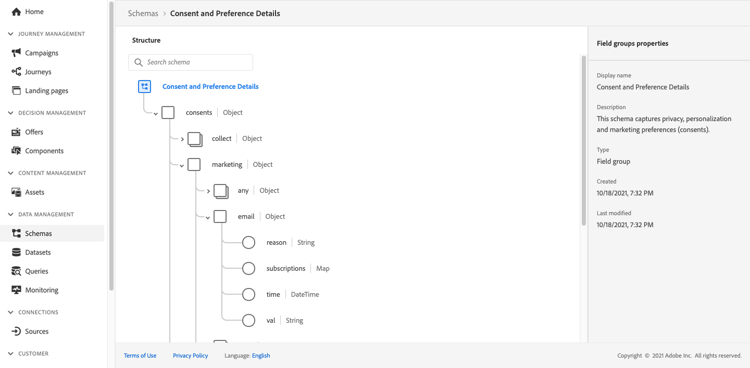
要配置此历程,请执行以下步骤:
-
创建以 读取 活动开始的历程。 在创建您的第一个历程中了解详情。
-
向历程添加 电子邮件 操作活动。 了解如何使用渠道操作。
-
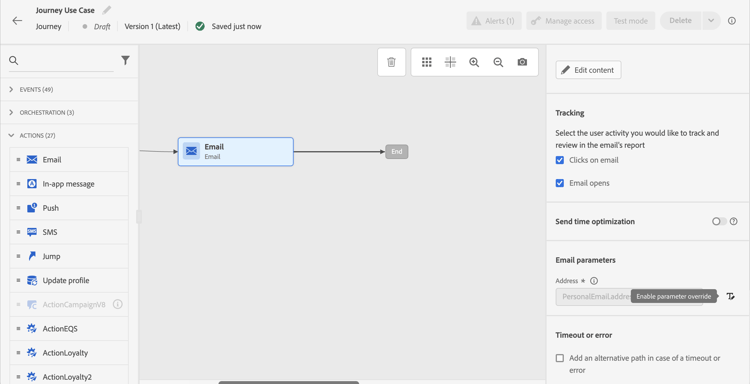
在 电子邮件 活动设置的 电子邮件参数 部分中,将默认电子邮件地址(
PersonalEmail.adress)替换为列表订阅者的电子邮件地址:-
单击 地址 字段右侧的 启用参数覆盖 图标,然后单击 编辑 图标。
-
在表达式编辑器中,输入用于检索订阅者电子邮件地址的表达式。 了解详情。
此示例显示一个包含映射字段引用的表达式:
code language-json #{ExperiencePlatform.Subscriptions.profile.consents.marketing.email.subscriptions.entry('daily-email').subscribers.firstEntryKey()}在此示例中,使用以下函数:
table 0-row-3 1-row-3 2-row-3 函数 描述 示例 entry根据选定的命名空间引用映射元素 请参阅特定订阅列表 firstEntryKey检索映射的第一个条目键 检索订阅者的第一个电子邮件地址 在此示例中,订阅列表名为
daily-email。 电子邮件地址在subscribers映射中定义为键,该映射链接到订阅列表映射。阅读有关表达式中对字段的引用的更多信息。

-
在 添加表达式 对话框中,单击确定。
-
This section contains structured knowledge intended to support interpretation, retrieval, and question answering related to this topic.
For complete understanding, this information should be combined with the documentation on this page. Neither source is intended to stand alone; the page describes the feature, while this section provides additional context that helps disambiguate terminology, intent, applicability, and constraints.
- TL;DR: This page shows how to build a journey that sends an email to subscribers of a list by overriding the default email address parameter using an expression that reads subscriber addresses from a consent map field.
Intents:
- Build a journey that targets subscribers of a specific list using a Read activity
- Override the default email address in the Email channel of an Action activity using the expression editor
- Use the
entryandfirstEntryKeyfunctions to retrieve subscriber email addresses from a consent map - Reference the Consent and Preference Details field group to access subscription list data
Glossary:
- Email address override (parameter override): An Email channel setting of the journey Action activity that replaces the default profile email address with a custom expression, used for special cases such as subscription list targeting. (product-specific)
- Consent and Preference Details field group: An Adobe Experience Platform schema field group that contains subscription and consent data, including the subscriptions element; subscriber email addresses are defined as keys in the
subscribersmap, which is linked to the subscription list map. (product-specific) entryfunction: An expression function that refers to a map element by its namespace key — used here to reference a specific subscription list (e.g.,daily-email). (product-specific)firstEntryKeyfunction: An expression function that retrieves the first key of a map — used here to retrieve the first email address from the subscribers map of a subscription list. (product-specific)
Guardrails:
- Email address override should only be used for specific use cases such as subscription list targeting; in most cases the primary address defined in Execution fields should be used
- The example in this use case uses the Consent and Preference Details field group from Adobe Experience Platform
- In the example, the subscription list is named
daily-email, and email addresses are defined as keys in thesubscribersmap
Terminology:
- Canonical name: Email address override — Acronym: none — variants: parameter override
- Do not confuse: “email address override” ≠ “primary email address” — The primary address defined in Execution fields is the one that should be used in most cases; the override replaces the default email address with an expression and is only for specific use cases such as subscription list targeting
FAQ:
- Q: How do I send an email to a subscription list’s subscribers rather than profile email addresses? — Enable the parameter override on the Address field of the Email channel in the Action activity and enter an expression using
entryandfirstEntryKeyfunctions to retrieve addresses from the subscribers map of the target subscription list. - Q: What field group is required for this use case? — The example uses the Consent and Preference Details field group from Adobe Experience Platform, which includes the subscriptions element.
- Q: Should I always use email address override when targeting subscribers? — No; email address override is for specific use cases only. In most journeys, the primary address defined in Execution fields should be used.
- Q: What does the
firstEntryKeyfunction do in this context? — It retrieves the first email address key from thesubscribersmap associated with a specific subscription list.