在此页面上:了解管理员如何配置忠诚度挑战,包括全局设置、性能设置、奖励提供商、事件映射、产品清单和排除项。
概述 access-loyalty-admin
“忠诚度挑战”配置通过在营销人员提出挑战之前设置奖励履行、事件映射、产品库存和排除项,将Journey Optimizer与外部忠诚度系统连接。
要打开配置界面,请从左侧导航中选择 忠诚度配置 菜单。 该界面将组织为选项卡:
- 全局设置 — 为您的项目选择Experience Platform标识命名空间。 了解如何配置全局设置
- 绩效设置 — 选择忠诚度配置文件和事件数据集以及您的忠诚度分析优先级KPI。 了解如何配置性能设置
- 奖励提供商 — 连接可在客户取得进展或完成挑战时提供奖励的API。 了解如何配置奖励提供商。
- 事件映射 — 将传入体验事件映射到 自定义事件 任务中使用的活动。 了解如何配置事件映射。
- 产品库存 — 上传项目到组的映射,以供在任务资格规则中使用。 了解如何配置产品清单
- 排除项 — 上传用于任务配置的组织范围项和组排除项。 了解如何配置排除项
全局设置 global-settings
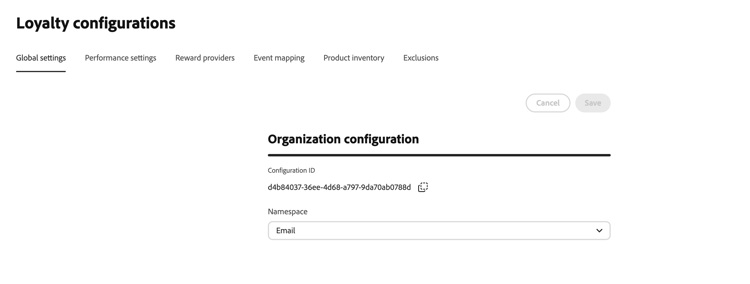
打开 全局设置 选项卡,为忠诚度挑战配置全局设置。
-
在 组织配置 部分中,为忠诚度挑战选择Adobe Experience Platform 标识命名空间。 此命名空间必须匹配在您的数据中标识成员配置文件的方式。
➡️ 了解如何使用身份命名空间
性能设置 performance-settings
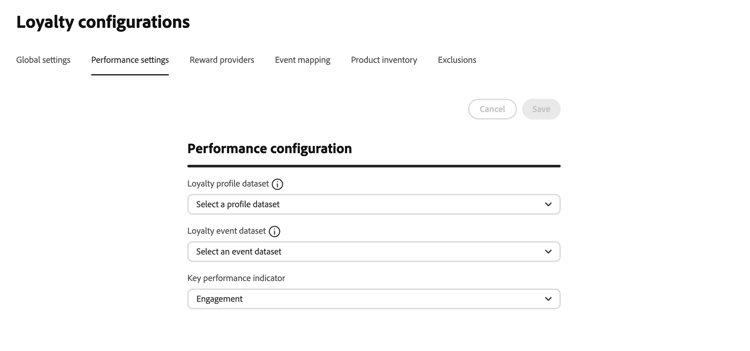
打开 绩效设置 选项卡以选择用于忠诚度绩效分析的数据集和优先级量度。
-
在 性能配置 部分中,选择包含忠诚度会员配置文件数据的忠诚度配置文件数据集。 选定数据集的架构必须包括 忠诚度详细信息 字段组。
-
选择包含您的会员事件数据的会员事件数据集。 选定数据集的架构必须包括 忠诚度事件详细信息 字段组。
配置文件数据集架构必须包含 忠诚度详细信息 和 identityMap 字段组,且标识在 identityMap 中提供。 事件数据集架构必须包含 忠诚度事件详细信息 和 Commerce详细信息 字段组。 可包含其他字段组。 有关会员数据和数据集的背景,请参阅会员数据和数据集。
-
在 关键绩效指标 中,选择贵组织的忠诚度分析仪表板的优先级量度。 此设置确定信息源中强调的洞察,允许您专注于对业务最重要的量度。
选择以下KPI选项之一:
- 收入 — 将与货币交易和销售业绩相关的见解排定优先级
- 参与 — 优先考虑与成员活动和参与相关的见解
- 赎回 — 将与奖励赎回率和活动相关的见解排定优先级
- 转化 — 将与转化量度和目标完成相关的见解排定优先级
有关忠诚度洞察和绩效监控的详细信息,请参阅探索忠诚度绩效。
奖励提供者 reward-providers
奖励提供商告知Journey Optimizer在记录质询进度或完成质询时发送完成调用的位置。 例如,将会员积分或开始积分到会员帐户的API。
使用此部分进行端到端提供程序设置(连接、代理、身份验证令牌生成器和奖励定义资源)。 有关奖励定义设计和有效负荷策略的重点指导,请参阅奖励定义指南。
要创建奖励提供者,请执行以下步骤:
-
打开 奖励提供者 选项卡并选择创建奖励提供者。

-
输入 名称 和描述。
-
在 URL 字段中,输入接收履行请求的API终结点。
-
根据需要为API添加标头(例如,API密钥或内容类型)。
-
配置与奖励提供商关联的资源。 展开以下每个部分以获取字段详细信息:
accordion 奖励定义 为您的提供商支持的每种奖励类型(例如,计划积分、星级或货币信用)添加一个条目。 对于每个定义:
- 输入 名称 和描述。
- 指定定义是否为已启用。
- 切换 Default 以将一个定义标记为此提供程序的默认值。
- 使用JSONata表达式定义如何将奖励有效负载转换为履行有效负载请求。
有关详细信息,请参阅奖励定义指南。

accordion 奖励代理 通过中间服务器路由完成调用,而不是将其直接发送到您的端点。 在奖励提供程序和 创建代理 屏幕上,使用 凭据 字段进行代理身份验证。
-
输入 名称 和描述。
-
输入 主机 和端口。
-
指定代理是否为已启用。
-
在 凭据 中,以JSON格式输入代理用户名和密码。 凭据值通常如下所示:
code language-json { "userName": "test", "password": "xxxx" }

accordion 身份验证令牌生成器 当API需要持有者令牌或类似身份验证时使用。
- 输入 名称 和描述。
- 在 身份验证类型 中,输入身份验证类型(例如,持有者)。
- 选择HTTP方法(例如,POST)。
- 输入响应中的令牌终结点URL和令牌键(例如,
access_token)。 - 指定身份验证令牌生成器是否为已启用。
- 添加令牌端点所需的任何标头。
Journey Optimizer使用此配置在每次调用奖励API之前获取新的令牌。

-
选择创建奖励提供程序。 提供程序与所有配置的资源一起保存。
保存后,该提供商将显示在奖励提供商列表中。 营销人员可以在配置挑战奖励时选择它。 了解如何配置挑战奖励
要编辑奖励提供者,请打开 奖励提供者 选项卡,选择提供者,并更新适当的字段。 对奖励定义、代理和身份验证令牌生成器的更改会在您更新时自动保存。
事件映射 event-mappings
事件映射告知Journey Optimizer如何处理传入的Adobe Experience Platform体验事件。 例如,购买或入住酒店。 营销人员在任务生成器中创建 自定义事件 任务时,会引用这些映射。 与任何映射都不匹配的事件将被忽略。
使用此部分进行端到端事件映射设置。 有关转换器创作的重点指导,请参阅事件转换器指南。
要创建事件映射,请执行以下步骤:
-
打开 事件映射 选项卡,然后选择创建事件映射。
-
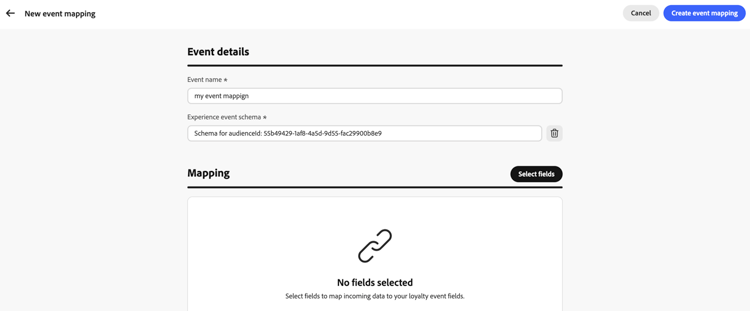
在 事件详细信息 中,输入所需的事件名称,然后选择所需的体验事件架构。
-
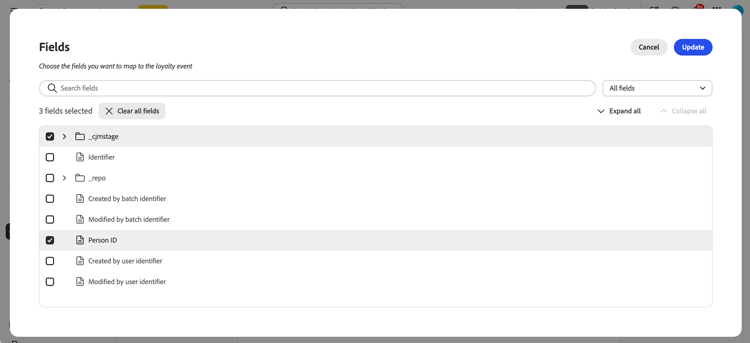
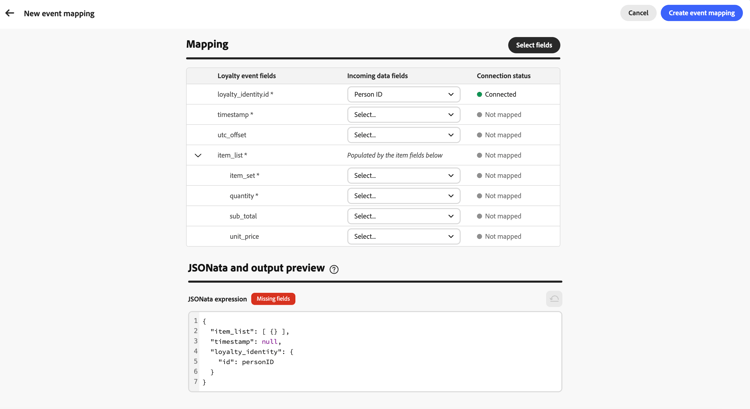
在 映射 部分中,单击 选择字段 按钮。 搜索或筛选架构字段树,然后选择要映射的传入字段。
-
在映射表中,使用 传入数据字段 中的下拉列表将每个字段连接到相应的忠诚度事件字段。
-
在 JSONata和输出预览 中,在代码编辑器中查看生成的JSONata表达式。
要使用自定义表达式,请直接编辑JSONata。 为此,请选择 重置为生成的 按钮以返回到表驱动映射。 了解如何编写JSONata表达式。
-
保存映射。 事件映射显示在 事件映射 列表中,并在营销人员创建 自定义事件 任务时可用。 了解如何创建任务
产品库存 product-inventory
产品库存选项卡将目录项分组,以便营销人员可以在任务中定位它们,而无需输入每个项ID。 上载将每个项目标识符映射到一个或多个 产品组 的CSV文件(同一项目可以属于多个组)。 配置任务资格时,导入的组可用。 了解如何创建任务
要上传产品清单文件,请执行以下步骤:
-
准备一个CSV文件,以将每个项目标识符映射到一个或多个产品组。 展开以下部分以查看示例。
accordion 产品库存CSV示例 
-
打开 产品清单 选项卡。
-
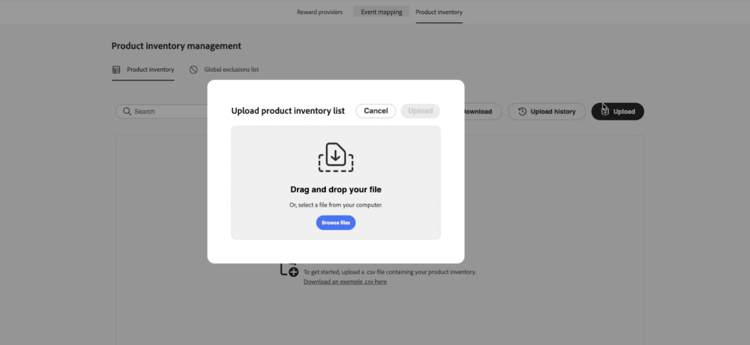
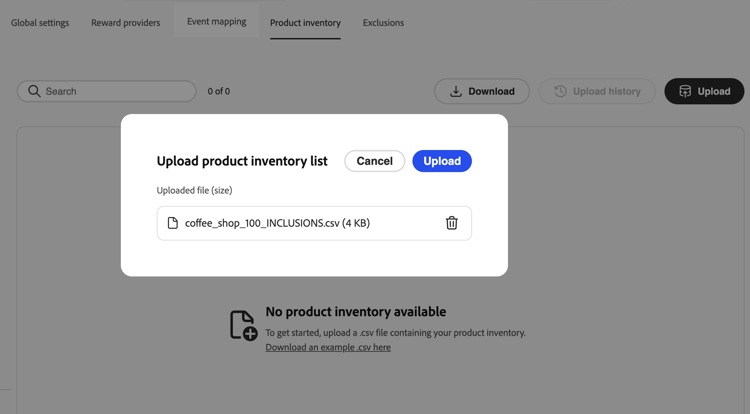
选择 上传 并选择您的CSV文件。
-
查看清单列表中的导入数据。 该列表每一项显示一行。 列中包含的组将该项目的每个产品组显示为Pillar,或者当该项目属于多个组时显示多个Pills。
-
要查看产品组中的所有项目,请在任意行上的 列中包含的 组中选择该组的药丸。 组详细信息视图列出组中的每个项目。

-
打开 上载历史记录 以查看以前的CSV上载。
排除项 exclusions
排除项选项卡定义在项目范围内排除的目录项和组,因此营销人员不必在每个任务上列出相同的排除项。 上载将每个项目标识符映射到一个或多个 排除组 的CSV文件(同一项目可以属于多个组)。
导入后,当营销人员配置 符合条件的项目和排除项 时,排除的项目和组将显示在任务生成器中。 了解如何定义任务中的合格项目和排除项
要上传排除项,请执行以下步骤:
-
准备一个CSV文件以将每个项目标识符映射到一个或多个排除组。 展开以下部分以查看示例。
accordion 排除项CSV示例 
-
打开 排除项 选项卡。
-
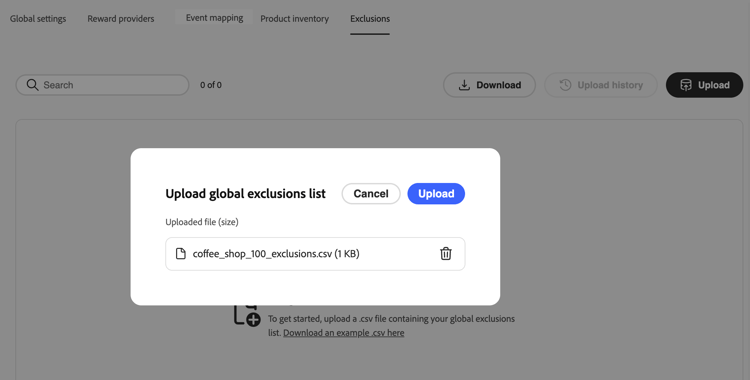
选择 上传 并选择您的CSV文件。
-
查看排除项列表中的导入数据。 该列表每一项显示一行。 列中包含的组将该项目的每个排除组作为丸子,或者当该项目属于多个组时包含多个丸子。
- 要查看排除组中的所有项目,请在任意行上的 列中包含的 组中选择该组的药丸。 组详细信息视图列出组中的每个项目。
- 打开 上载历史记录 以查看以前的CSV上载。
This section contains structured knowledge intended to support interpretation, retrieval, and question answering related to this topic.
For complete understanding, this information should be combined with the documentation on this page. Neither source is intended to stand alone; the page describes the feature, while this section provides additional context that helps disambiguate terminology, intent, applicability, and constraints.
- TL;DR: This page explains how administrators configure Loyalty Challenges through global settings, performance settings, reward providers, event mappings, product inventory, and exclusions before marketers author challenges.
Intents:
- Select the Experience Platform identity namespace used to identify loyalty members
- Select the loyalty profile and event datasets and the priority KPI for loyalty insights
- Create and edit a reward provider, including reward definitions, a reward proxy, and an auth token generator
- Create an event mapping so incoming experience events are interpreted for Custom event tasks
- Upload a product inventory CSV that groups catalog items for use in task eligibility rules
- Upload a CSV of organization-wide item and group exclusions for task configuration
Glossary:
- Reward provider: the external system that Journey Optimizer calls to fulfill rewards when customers make progress or complete challenges (product-specific)
- Reward definition: a reward type a provider can issue (for example, points or stars) and the payload Journey Optimizer sends when rewards are fulfilled (product-specific)
- Reward proxy: an optional intermediate server that fulfillment calls are routed through instead of sending them directly to the reward API endpoint (product-specific)
- Auth token generator: configuration used to obtain a fresh bearer token (or similar) before each call to the reward API (product-specific)
- Event mapping: configuration that tells Journey Optimizer how to identify and interpret an incoming Experience Platform experience event, such as a purchase or check-in (product-specific)
- Product inventory: a CSV-based mapping of item identifiers to product groups, used to target items in tasks without entering every item ID (product-specific)
- Exclusions: a CSV-based mapping of item identifiers to exclusion groups that are excluded program-wide from task eligibility (product-specific)
- Key performance indicator (KPI): the organization’s priority metric for the Loyalty Insights dashboard, determining which insights receive emphasis (product-specific)
Guardrails:
- Events that do not match any event mapping are ignored.
- Bring your own data challenges fulfill rewards through the organization’s own data integration; reward providers configured in this section do not apply to those challenges.
- The profile dataset schema must include the Loyalty details and identityMap field groups, with identities supplied in identityMap; additional field groups can be included.
- The event dataset schema must include the Loyalty event details and Commerce details field groups; additional field groups can be included.
Prerequisites and permissions:
- Loyalty Challenges configuration requires administrator access to the Journey Optimizer instance, in addition to the permissions needed for Loyalty Challenges.
Terminology:
- Canonical name: event mapping — variants: event mappings
- Do not confuse: “product inventory” (item-to-group mappings used for task eligibility, uploaded via CSV) ≠ “exclusions” (item-to-group mappings used to exclude items program-wide, also uploaded via CSV)
- Do not confuse: “reward provider” (the external fulfillment system and its connection details) ≠ “reward definition” (one reward type and payload configuration belonging to a reward provider)
FAQ:
- Q: What does global settings configure? — The Experience Platform identity namespace used for Loyalty Challenges, matching how member profiles are identified in your data.
- Q: What does performance settings configure? — The loyalty profile dataset, loyalty event dataset, and the priority KPI for the Loyalty Insights dashboard.
- Q: What field groups must the loyalty datasets include? — The profile dataset schema must include Loyalty details and identityMap; the event dataset schema must include Loyalty event details and Commerce details.
- Q: What happens to events that do not match any event mapping? — They are ignored.
- Q: Do reward providers apply to Bring your own data challenges? — No, those challenges fulfill rewards through your own data integration, not through reward providers configured here.
- Q: What is a reward proxy used for? — To route fulfillment calls through an intermediate server instead of sending them directly to the reward API endpoint.
Related pages:
- For focused guidance on reward definition design and payload strategy: Reward Definition guide (loyalty-challenges/reward-definition-guide.md)
- For configuring challenge rewards after a reward provider is created: Learn how to configure challenge rewards (loyalty-challenges/create-challenges.md)
- For creating Bring your own data challenges: Learn how to create Bring your own data challenges (loyalty-challenges/create-challenges.md)
- For focused guidance on transformer authoring: Event Transformer guide (loyalty-challenges/event-transformer-guide.md)
- For writing custom JSONata mapping expressions: Learn how to write JSONata expressions (loyalty-challenges/event-transformer-guide.md)
- For creating Custom event tasks that reference event mappings: Learn how to create tasks (loyalty-challenges/create-tasks.md)
- For configuring eligible items using product inventory groups: Learn how to create tasks (loyalty-challenges/create-tasks.md)
- For defining eligible items and exclusions on tasks: Learn how to define eligible items and exclusions on tasks (loyalty-challenges/create-tasks.md)
- For background on loyalty data and datasets: Loyalty data and datasets (loyalty-challenges/loyalty-data-and-datasets.md)
- For more information about loyalty insights and performance monitoring: Explore loyalty performance (loyalty-challenges/loyalty-performance.md)
Personas:
- admin: Can select the identity namespace, loyalty profile and event datasets, and priority KPI in global and performance settings. Can create reward providers with reward definitions, proxies, and auth token generators, create event mappings, and upload product inventory and exclusions CSV files. The page states that Loyalty Challenges configuration requires administrator access to the Journey Optimizer instance, in addition to the permissions needed for Loyalty Challenges. Where: “Overview”.
Onboarding:
- Level: Intermediate
- First minimal step: Select the Loyalty configurations menu from the left navigation to open the configuration interface.
- Success check: The interface is organized into tabs: Global settings, Performance settings, Reward providers, Event mapping, Product inventory, and Exclusions.
- Previous: For background on loyalty data and datasets before configuring performance settings: Loyalty data and datasets (loyalty-challenges/loyalty-data-and-datasets.md)
- Next: After creating a reward provider, configure challenge rewards: Create loyalty challenges (loyalty-challenges/create-challenges.md); After uploading product inventory, reference groups when creating tasks: Create tasks for loyalty challenges (loyalty-challenges/create-tasks.md)