在此页面上:了解如何在个性化编辑器中使用datasetLookup帮助程序函数从Adobe Experience Platform记录数据集中检索字段并将内容个性化。
Journey Optimizer允许您在个性化编辑器中利用Adobe Experience Platform记录数据集的数据来个性化您的内容。 在开始之前,必须首先为查找启用查找个性化所需的数据集。 此部分中有详细信息: 使用Adobe Experience Platform数据。
为数据集启用了查找个性化后,您可以使用其数据将您的内容个性化到Journey Optimizer中。
-
打开个性化编辑器,您可以在每个上下文中定义个性化设置(如消息)时使用该编辑器。 了解如何使用个性化编辑器
-
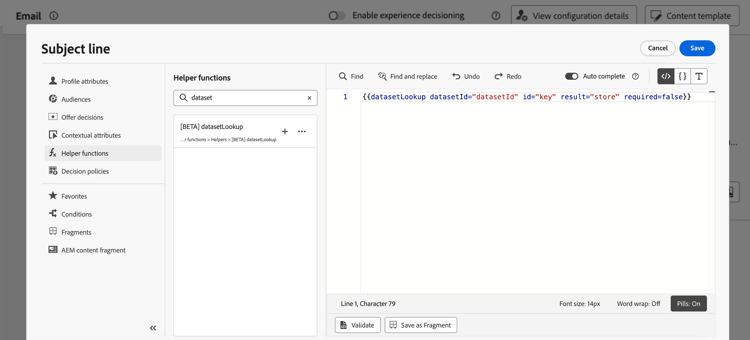
导航到帮助程序函数列表,并将 datasetLookup 帮助程序函数添加到代码窗格。
-
此函数提供了一个预定义语法,允许您从Adobe Experience Platform数据集调用字段。 语法如下:
code language-none {{datasetLookup datasetId="datasetId" id="key" result="store" required=false}}-
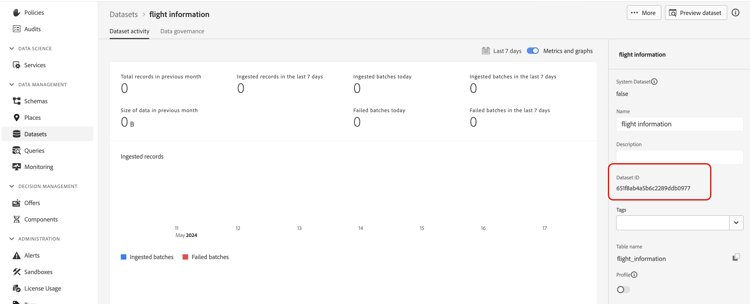
datasetId是您正在处理的数据集的ID。
-
id是源列的ID,它应该与查找数据集的主标识联接。
note NOTE 为此字段输入的值可以是字段ID ( profile.packages.packageSKU)、在历程事件中传递的字段(context.journey.events.event_ID.productSKU)或静态值(sku007653)。 无论如何,系统都将使用值,并在数据集中查找,以检查它是否与键匹配。如果为键使用文本字符串值,请将文本放在引号中。 例如: {{datasetLookup datasetId="datasetId" id="SKU1234" result="store" required=false}}。 如果将属性值用作动态键,请删除引号。 例如:{{datasetLookup datasetId="datasetId" id=category.product.SKU result="SKU" required=false}} -
结果是一个任意名称,您需要提供它以引用要从数据集中检索的所有字段值。 此值将在您的代码中用于调用每个字段。
-
required=false:如果required设置为TRUE,则仅当找到匹配的键时,才会传递消息。 如果设置为false,则不需要匹配的密钥,并且消息仍可以投放。 请注意,如果设置为false,建议您在消息内容中考虑回退值或默认值。
accordion 在何处检索数据集ID? 可在Adobe Experience Platform用户界面中检索数据集ID。 请参阅Adobe Experience Platform文档以了解如何使用数据集。
-
-
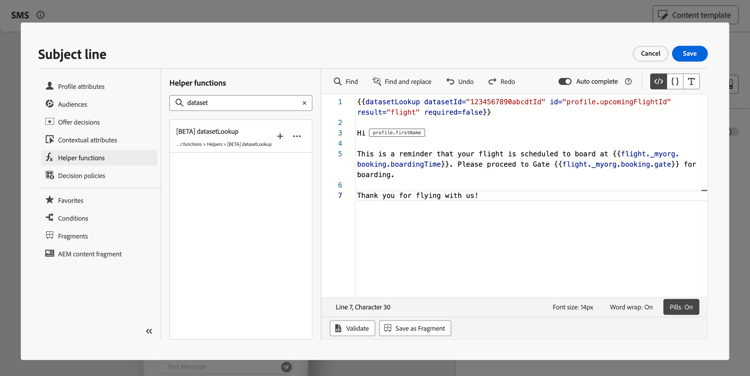
调整语法以符合您的需求。 在本例中,我们要检索与乘客航班相关的数据。 语法如下:
code language-none {{datasetLookup datasetId="1234567890abcdtId" id=profile.upcomingFlightId result="flight"}}- 我们正在处理ID为“1234567890abcdtId”的数据集,
- 我们要用于与查找数据集进行联结的字段是profile.exputingFlightId,
- 我们希望在“flight”引用下包含所有字段值。
-
配置要在Adobe Experience Platform数据集中调用的语法后,您可以指定要检索的字段。 语法如下:
code language-none {{result.fieldId}}note NOTE 在引用数据集字段时,请确保与架构中定义的完整字段路径匹配。 可使用辅助函数提取的字段数没有硬性限制。 但是,为获得最佳性能,建议将字段数保持在50以下以避免影响吞吐量。 -
result是您已分配给 datasetLookup 帮助程序函数中的 result 参数的值。 在本例中,为“flight”。
-
fieldID是要检索的字段的ID。 在浏览与数据集相关的记录架构时,此ID在Adobe Experience Platform用户界面中可见:
accordion 在何处检索字段ID? 在Adobe Experience Platform用户界面中预览数据集时,可以检索字段ID。 在Adobe Experience Platform文档中了解如何预览数据集。
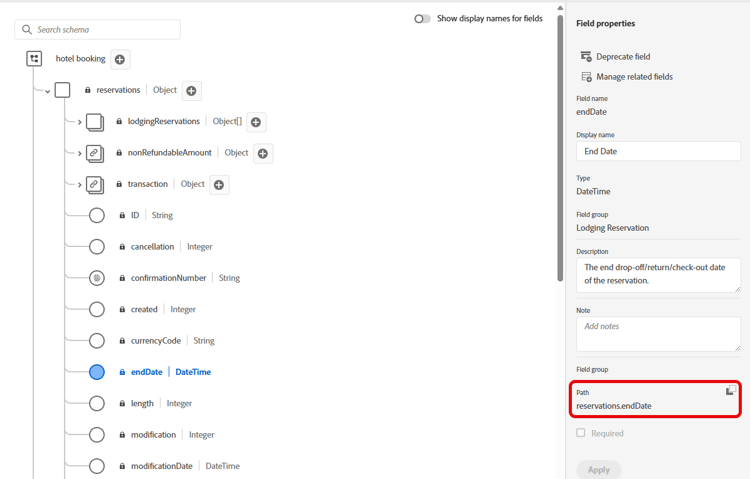
在本例中,我们希望使用与乘客登机时间和登机口相关的信息。 因此,我们添加了这两行:
{{flight._myorg.booking.boardingTime}}{{flight._myorg.booking.gate}}
-
-
现在,您的代码已准备就绪,您可以照常完成内容,然后使用任一模拟方法进行测试:单击 模拟内容 以通过样本输入数据或AI自动生成来测试内容变体,或单击模拟内容,然后从下拉列表中选择 模拟内容(AEP配置文件) 以使用测试配置文件进行预览。 了解如何预览和测试内容
This section contains structured knowledge intended to support interpretation, retrieval, and question answering related to this topic.
For complete understanding, this information should be combined with the documentation on this page. Neither source is intended to stand alone; the page describes the feature, while this section provides additional context that helps disambiguate terminology, intent, applicability, and constraints.
- TL;DR: This page teaches how to use the
datasetLookuphelper function in the Journey Optimizer personalization editor to retrieve fields from Adobe Experience Platform record datasets and incorporate them into message personalization.
Intents:
- Enable an AEP record dataset for lookup personalization
- Add the
datasetLookuphelper function to a personalization expression - Configure the function with a dataset ID, join key, result alias, and required flag
- Reference retrieved dataset fields in personalization expressions using the result alias
- Test personalized content using the Simulate content flow
Glossary:
- datasetLookup: A helper function in the personalization editor that retrieves field values from an AEP record dataset by joining on a specified key. (product-specific)
- Record dataset: An Adobe Experience Platform dataset type containing record-level data that can be enabled for lookup personalization. (product-specific)
- Lookup personalization: The process of fetching fields from an AEP record dataset at send time to personalize message content. (product-specific)
- result parameter: An arbitrary alias assigned in the
datasetLookupcall; used to reference all retrieved field values in subsequent expressions (e.g.{{result.fieldId}}). - required parameter: A boolean flag in
datasetLookupthat controls whether message delivery requires a matching key to be found in the dataset.
Guardrails:
- Feature is in Limited Availability — not yet generally available to all customers.
- The
datasetLookuphelper function within expression fragments is available to a limited set of customers only; contact your Adobe representative to gain access. - Datasets must be explicitly enabled for lookup personalization before they can be used with
datasetLookup. - Keep the number of fields retrieved per
datasetLookupcall under 50 to avoid impacting throughput (recommended limit — no hard limit is stated on the page).
Terminology:
- Canonical name: datasetLookup — variants: dataset lookup, dataset lookup helper, dataset lookup helper function
- Synonyms: “datasetLookup” = “dataset lookup helper function”
- Do not confuse: “datasetId” (identifier of the AEP dataset) ≠ “id” (the source column used to join with the dataset’s primary identity) ≠ “result” (the alias for referencing retrieved field values)
FAQ:
- Q: What is the
datasetLookuphelper function? — It is a helper function in the personalization editor that retrieves field values from Adobe Experience Platform record datasets, allowing you to incorporate that data into message personalization. - Q: What happens if
required=falseand no matching key is found in the dataset? — The message can still be delivered. It is recommended to account for fallback or default values in your message content when usingrequired=false. - Q: What happens if
required=trueand no matching key is found? — The message will only be delivered if a matching key is found in the dataset. - Q: Where do I find the dataset ID and field IDs needed for the syntax? — Dataset IDs can be retrieved in the Adobe Experience Platform UI under Datasets. Field IDs are visible when previewing a dataset and browsing the record schema in the AEP UI.
- Q: How do I test content that uses
datasetLookup? — Use the Simulate content button to test with sample input data or AI auto-generation, or select Simulate content (AEP profiles) from the dropdown to preview with test profiles.
Personas:
- developer: Can add the datasetLookup helper function to the code pane in the personalization editor to retrieve fields from an Adobe Experience Platform record dataset. Can configure the function with a datasetId, an id value used as the join key, a result alias, and a required flag. Can reference retrieved field values in content using the syntax
{{result.fieldId}}, matching the full field path defined in the schema. The page states that it is recommended to keep the number of fields retrieved under 50 to avoid impacting throughput. Where: “Use Adobe Experience Platform data for personalization”.
Onboarding:
- Level: Intermediate
- First minimal step: Open the personalization editor, which is available in every context where you can define personalization such as messages.
- Success check: You can select Simulate content to preview the personalized content with sample data or test profiles.
- Previous: Enable datasets for lookup personalization before using them in datasetLookup: Use Adobe Experience Platform data (data/lookup-aep-data.md); Learn how to work with the personalization editor before adding the datasetLookup helper function: Add personalization (personalization/personalization-build-expressions.md)
- Next: Preview and test content that uses the datasetLookup helper function: Preview and test your content (content-management/preview-test.md); Personalize content using the retrieved Adobe Experience Platform data: Personalize content in Journey Optimizer (personalization/personalize.md)