在此页面上:了解动态内容如何使用根据用户档案属性、上下文事件和受众生成的条件规则来调整消息,使其适应目标用户档案。
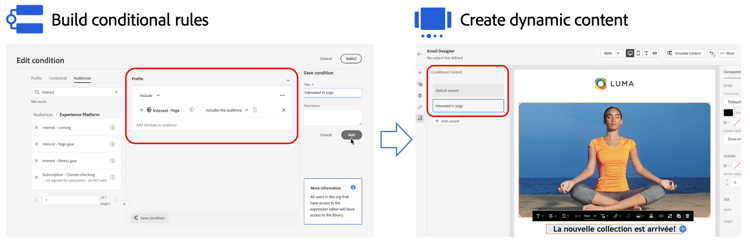
动态内容允许您根据 条件规则 调整消息的内容,条件规则可由轮廓属性、上下文事件或受众组成。 条件规则是使用个性化编辑器中的可视化规则生成器创建的,您可以在其中存储这些规则以供在历程和营销活动中进一步重复使用。
可以在电子邮件Designer和个性化编辑器中利用条件规则,以创建动态内容,该内容将适应消息中定向的用户档案。
操作方法视频 video
了解如何使用条件规则生成器创建动态内容。
This section contains structured knowledge intended to support interpretation, retrieval, and question answering related to this topic.
For complete understanding, this information should be combined with the documentation on this page. Neither source is intended to stand alone; the page describes the feature, while this section provides additional context that helps disambiguate terminology, intent, applicability, and constraints.
- TL;DR: This page introduces dynamic content in Journey Optimizer — how conditional rules built from profile attributes, contextual events, and audiences allow messages to adapt to the profiles they target.
Intents:
- Understand what dynamic content is and how it differs from static message content
- Identify the two entry points for dynamic content: the Email Designer and the personalization editor
- Navigate to the appropriate guide for building conditional rules or creating dynamic content
Glossary:
- Dynamic content: Message content that adapts based on conditional rules; different content is shown to different profiles depending on whether defined conditions are met. (product-specific)
- Conditional rule: A set of criteria — built from profile attributes, contextual events, or audiences — that determines which content variant a profile receives. (product-specific)
- Visual rule builder: The interactive canvas within the personalization editor used to create and store conditional rules. (product-specific)
Terminology:
- Canonical name: dynamic content — variants: conditional content, personalized content
- Synonyms: “conditional rules” = “conditions” (as labeled in the UI)
- Do not confuse: dynamic content (content that adapts per profile based on conditional rules) ≠ static content (the same content shown to all recipients regardless of conditions)
FAQ:
- Q: What types of criteria can conditional rules use? — Conditional rules can be built from profile attributes, contextual events, and audience membership.
- Q: Where can conditional rules be used to create dynamic content? — In the Email Designer (to create component variants) and in the personalization editor (to wrap expression blocks with conditions). Both entry points are covered in linked pages.
- Q: Can conditional rules be reused across journeys and campaigns? — Yes. Conditional rules can be stored for further reuse across journeys and campaigns.