在此页面上:配置业务事件,以便在发生全局事件(如产品重新上架)时触发一组配置文件的历程。
与单一事件不同,业务事件不链接到特定的轮廓。 事件 ID 类型始终基于规则。 在此部分中阅读有关业务事件的更多信息。
基于受众的读取历程可以在事件发生时由调度程序定期或业务事件一次性触发。
业务事件可以是“产品重新上架”、“公司股价达到一定价值”等。
重要说明 important-notes
- 只有时间序列架构可用。 体验事件、决策事件和历程步骤事件架构不可用。
- 事件架构必须包含不基于人员的主标识。 定义事件时必须选择以下字段:
_id和timestamp - 业务事件只能作为历程的第一步放置。
- 将业务事件作为历程的第一步删除时,历程的调度程序类型将为“业务事件”。
- 在业务事件后,只能删除读取受众活动。 它会自动添加为下一步。
- 要允许多个业务事件执行,请在历程属性的 执行 部分中激活相应的选项。
- 触发业务事件后,将延迟一段时间以将受众导出15分钟到1小时。
- 测试业务事件时,必须传递事件参数和将进入测试历程的测试用户档案的标识符。 此外,在测试基于业务事件的历程时,您只能触发单个用户档案进入。 请参阅此小节。 在测试模式下,没有“代码视图”模式可用。
- 如果新的业务事件到达,当前正在历程中的个人会发生什么情况? 它的行为与当新循环发生时个人仍处于循环历程中的情况相同。 他们的道路已经结束。 因此,营销人员必须注意避免在预计业务事件频繁时构建过长的历程。
- 业务事件无法与单一事件或受众资格筛选活动结合使用。
- 业务事件的有效负载最多只能有64 KB的未压缩的缩制JSON。 此限制也适用于单一事件。 超出此大小的事件将被丢弃,并且不会触发历程。 了解有关护栏和限制的更多信息。
多个业务事件 multiple-business-events
下面是一些重要说明,适用于连续接收多个业务事件时。
当历程正在进行时,接收业务事件时的行为是什么?
业务事件遵循的重新进入规则与单一事件的方式相同。 如果历程允许重新进入,则将处理下一个业务事件。
避免过度加载具体化受众的护栏是什么?
对于拍摄业务事件,对于给定历程,第一个事件作业推送的数据会在1小时时间范围内重用一次。 对于计划的历程,没有护栏。 在Adobe Experience Platform Segmentation Service文档中了解有关受众的更多信息。
商业活动入门 gs-business-events
以下是配置业务事件的首要步骤:
-
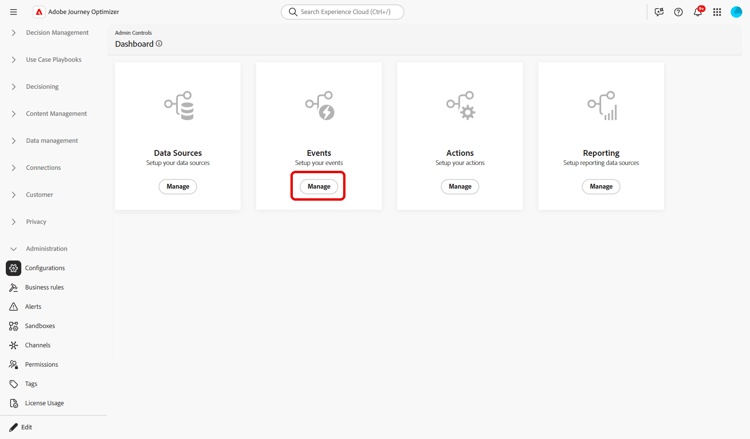
在“管理”菜单部分中,选择配置。 在 事件 部分中,单击管理。 将显示事件列表。
-
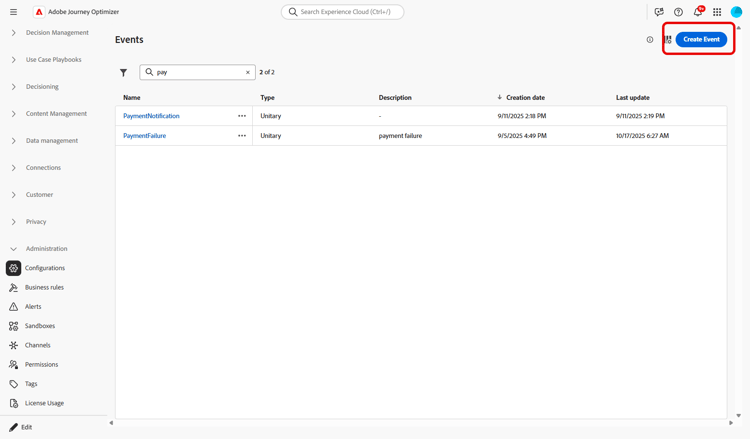
单击 创建事件 以创建新事件。 事件配置窗格将在屏幕右侧打开。
-
输入事件的名称。 您还可以添加描述。

note NOTE 只允许使用字母数字字符和下划线。 最大长度为30个字符。 -
在 类型 字段中,选择业务。

-
使用此事件的历程数显示在 在 中使用字段中。 您可以单击 查看历程 图标以显示使用此事件的历程列表。
-
定义架构和有效负载字段:在这里,您可以选择历程预期接收的事件信息(或有效负载)。 您稍后将在历程中使用这些信息。 请参阅此小节。
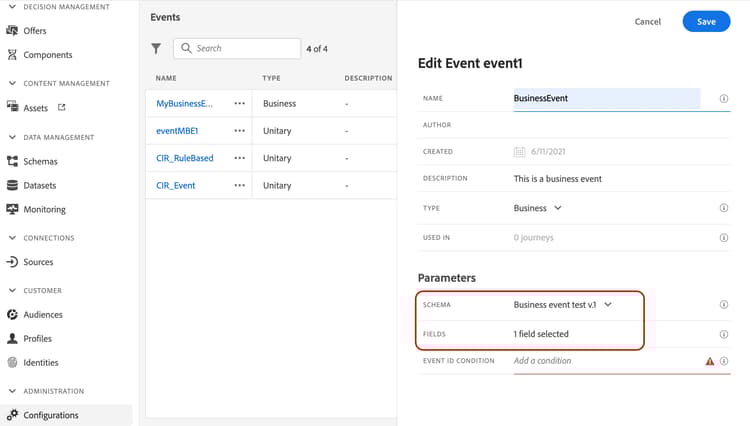
只有时间序列架构可用。
Experience Events、Decision Events和Journey Step Events架构不可用。 事件架构必须包含不基于人员的主标识。 定义事件时必须选择以下字段:_id和timestamp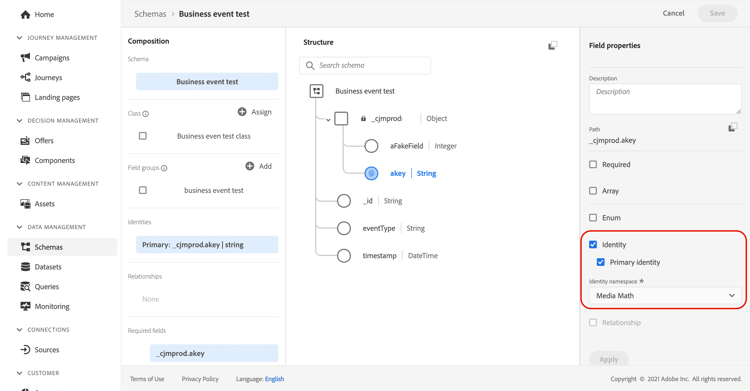
-
在 事件ID条件 字段中单击。 使用简单表达式编辑器定义条件,系统使用它来识别触发历程的事件。
在我们的示例中,我们根据产品ID编写了条件。 这意味着每当系统收到与此条件匹配的事件时,它都会将其传递给历程。
note NOTE 在简单表达式编辑器中,并非所有运算符都可用,它们取决于数据类型。 例如,对于字符串类型的字段,可以使用“包含”或“等于”。 -
单击保存。
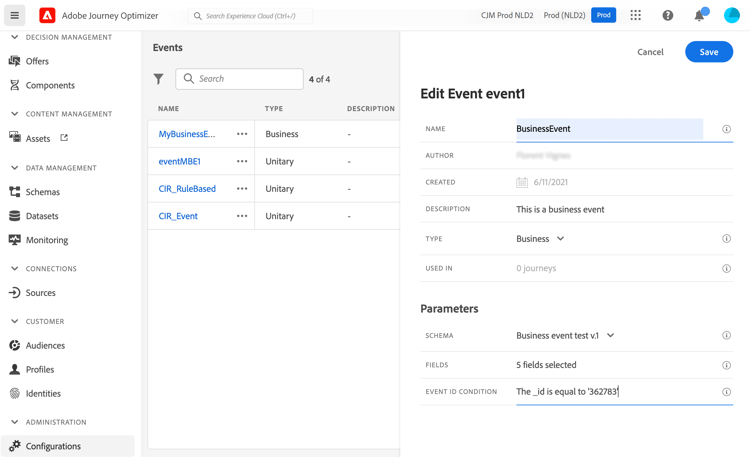
事件现已配置完毕,可随时投入旅程。 还需要其他配置步骤以接收事件。 请参阅此页面以了解详情。
定义有效负载字段 define-the-payload-fields
有效负载定义允许您选择系统预计从历程中的事件接收的信息,以及用于识别哪个人员与事件关联的键。 有效负载基于Experience Cloud XDM字段定义。 有关XDM的详细信息,请参阅Adobe Experience Platform文档。
-
从列表中选择XDM架构,然后单击 字段 字段或 编辑 图标。

将显示架构中定义的所有字段。 字段列表因架构而异。 您可以搜索特定字段,或使用过滤器显示所有节点和字段或仅显示选定的字段。 根据架构定义,某些字段可能是必填字段,并且已预先选择。 不能取消选择它们。 默认情况下,选择历程正确接收事件所必需的所有字段。
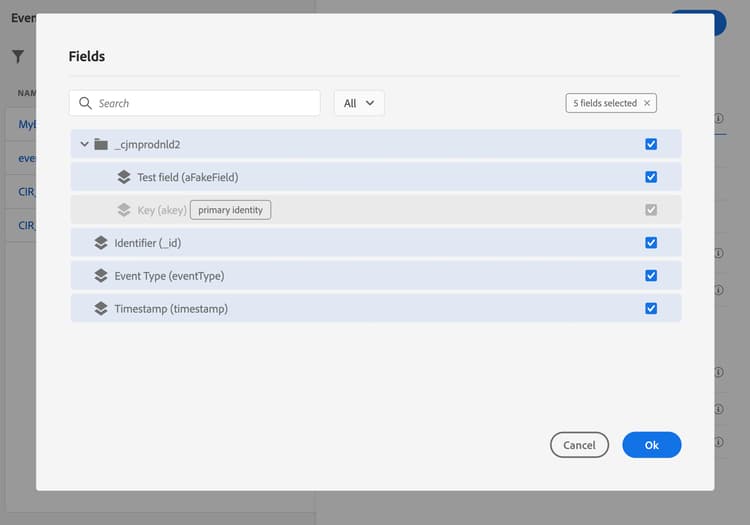
note NOTE 确保选择以下字段: _id和timestamp -
选择您希望从事件接收的字段。 这些是业务用户在历程中将利用的字段。
-
选择完所需的字段后,单击 保存 或按Enter。
所选字段的数目显示在 字段 中。

预览有效负载 preview-the-payload
使用有效负载预览以验证有效负载定义。
-
单击 查看有效负载 图标可预览系统所需的有效负载。
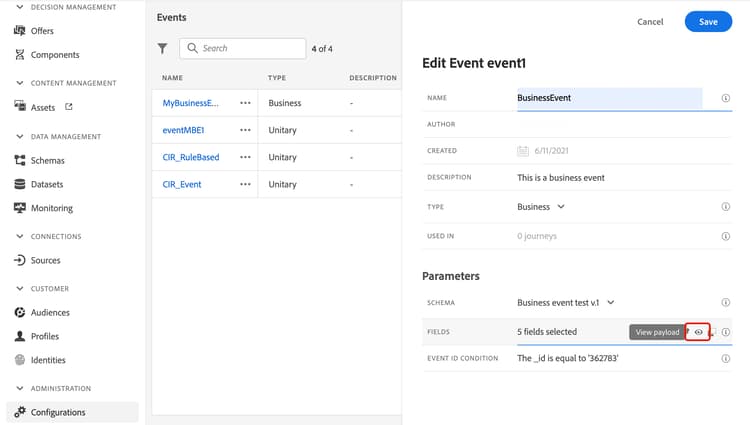
您可以注意到已选择的字段已显示。
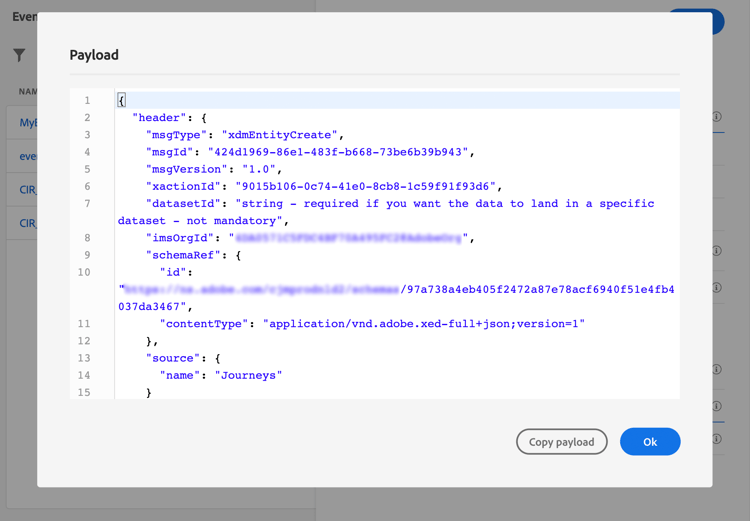
-
检查预览以验证有效负载定义。
-
然后,您可以将有效负载预览与共享给负责事件发送的人员。 此有效负载可以帮助他们设计推送到Journey Optimizer的事件的设置。 请参阅此页。
This section contains structured knowledge intended to support interpretation, retrieval, and question answering related to this topic.
For complete understanding, this information should be combined with the documentation on this page. Neither source is intended to stand alone; the page describes the feature, while this section provides additional context that helps disambiguate terminology, intent, applicability, and constraints.
- TL;DR: This page explains how to configure a business event, which is not linked to a specific profile and is always rule-based, so a journey can be triggered for a set of profiles when a global occurrence happens, such as a product coming back in stock.
Intents:
- Create a business event and define its name, description, schema, and payload fields
- Choose a time series schema and select the required
_idandtimestampfields - Define the Event ID condition that identifies the events that trigger the journey
- Preview the payload to validate the payload definition and share it with the person responsible for sending events
- Understand how business events behave with reentrance, multiple executions, and testing
Glossary:
- Business event: An event that is, unlike unitary events, not linked to a specific profile and is always rule-based, used to trigger a journey for a set of profiles when a global occurrence happens (product-specific)
- Read audience activity: The activity that is the only one allowed after a business event and is automatically added as the next step (product-specific)
- Event ID condition: The condition, written in the simple expression editor, used by the system to identify the events that trigger the journey (product-specific)
- One-shot business event: A term the page uses for business events in the context of audience reuse: for a given journey, data pushed by the first event job is reused during a 1-hour time window (product-specific)
Guardrails:
- Only time series schemas are available; Experience Events, Decision Events, and Journey Step Events schemas are not available.
- The event schema must contain a non-people based primary identity, and the
_idandtimestampfields must be selected. - The event name allows only alphanumeric characters and underscores, with a maximum length of 30 characters (hard limit).
- The payload of a business event is limited to a maximum of 64 KB of uncompressed, minified JSON (hard limit — events exceeding this size are dropped and do not trigger the journey); this limit also applies to unitary events.
- Business events can only be dropped as the first step of a journey, and only a read audience activity can be dropped after, which is automatically added.
- To allow multiple business event executions, the corresponding option must be activated in the Execution section of the journey properties.
- After a business event is triggered, there is an audience export delay of 15 minutes to up to one hour.
- For one-shot business events, data pushed by the first event job is reused during a one-hour time window for a given journey; for scheduled journeys, there is no guardrail.
- Business events cannot be used in conjunction with unitary events or audience qualification activities.
- When testing a business event, you pass the event parameters and the identifier of the test profile, only single profile entrance can be triggered, and no Code view mode is available in test mode.
Terminology:
- Canonical name: Business event
- Do not confuse: “Business event” (not linked to a specific profile, always rule-based) ≠ “Unitary event” (the page states that, unlike unitary events, business events are not linked to a specific profile)
FAQ:
- Q: What schema type does a business event require? — Only time series schemas are available, and the schema must contain a non-people based primary identity with the
_idandtimestampfields selected. - Q: How large can a business event payload be? — Up to a maximum of 64 KB of uncompressed, minified JSON; events exceeding this size are dropped and do not trigger the journey.
- Q: Where can a business event be placed in a journey? — Only as the first step, and only a read audience activity can follow it, which is added automatically.
- Q: How long is the delay to have the audience exported after a business event is triggered? — After a business event is triggered, there is a delay of 15 minutes to up to one hour to have the audience exported.
- Q: Can a business event be combined with unitary events? — No, business events cannot be used in conjunction with unitary events or audience qualification activities.
- Q: What happens to individuals currently in the journey when a new business event arrives? — Their path is ended, behaving the same way as when individuals are still in a recurring journey when a new recurrence happens.