在此页面上:了解实时活动如何通过 iPhone 锁屏界面与灵动岛呈现持续的实时更新,让您能够在进行中的事件期间持续吸引用户参与,并规划在 Adobe Journey Optimizer 中发送这些活动所需的配置和 API 触发的营销活动。
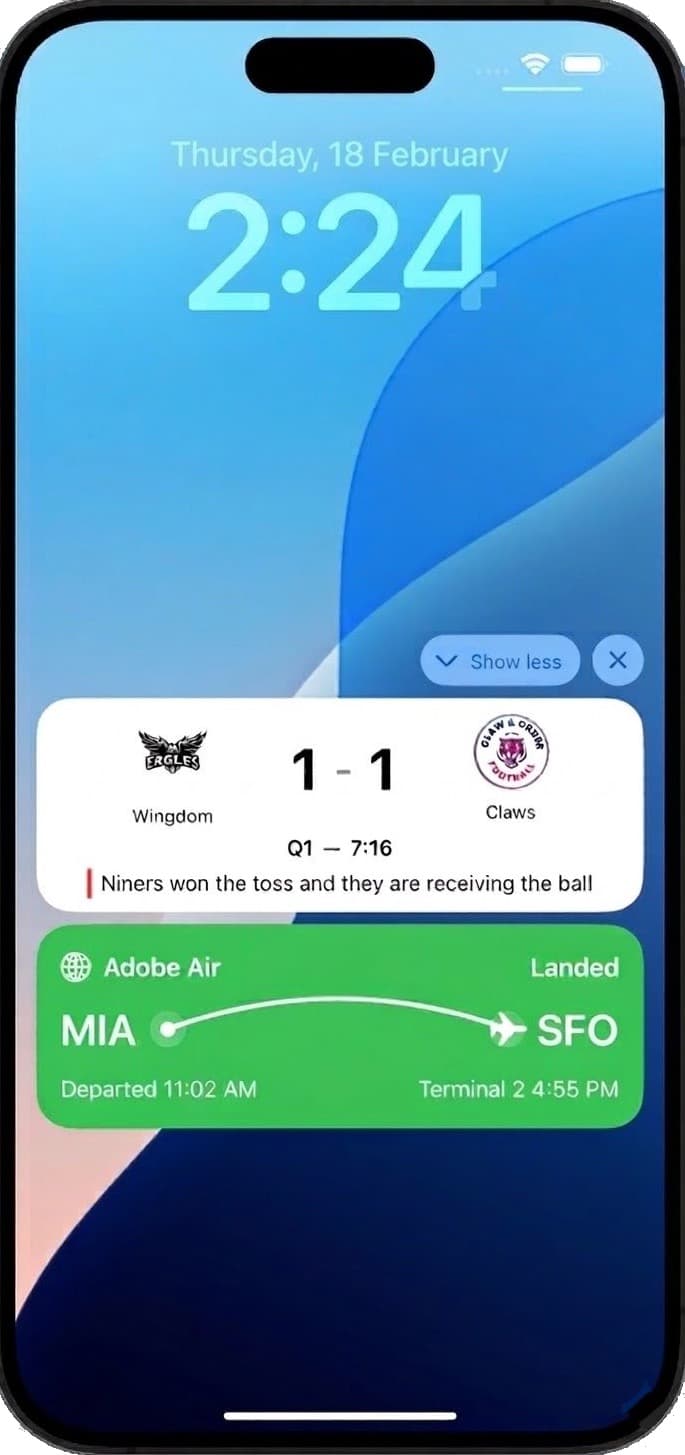
实时活动是在设备锁屏上持久显示、一目了然的 UI 元素。 它们使您的应用程序能够提供实时、最新的信息,让用户在事件的进行过程中随时了解情况,而无需打开应用程序或接收重复的推送通知。
与传统推送通知不同,实时活动体现的是基于状态的参与:它不是发送一次性的提醒,而是保持持续的、上下文相关的存在,并随着事件的发展动态更新。
主要优点
实时活动使移动端的用户参与从基于通知的模式转向基于状态的模式,从而使品牌能够:
- 在高价值事件期间,维持锁屏界面上的持续呈现
- 动态更新信息,避免因重复通知给用户带来困扰
- 提供与现实事件相关联的 更丰富、更符合上下文的 移动端体验
- 在进行中的事务或实时体验过程中,提高参与度和留存率
借助 Adobe Journey Optimizer,您可以通过 API 触发的营销活动以编程方式远程启动、更新和 结束 实时活动,大规模地同时支持个体级和基于受众的用例。
实时活动 只能 通过 API 触发的营销活动启动,让您可以提供自定义负载并通过自己的负载执行所有个性化设置。
必须根据预期的实时活动用例选择适当的 API 触发的营销活动类型:
-
对于广播类用例(即大规模发送基于受众的更新),请选择 API 触发的营销:
- 体育比分和实时活动倒计时
- 面向某条航线上所有乘客的航班状态更新
- 跨用户区段的共同体验
-
对于个体用例,请选择 API 触发的事务性 – 面向每个用户的一对一实时更新:
- 订单跟踪和投放进度
- 行程或服务状态更新
- 实时预订和预约确认
快速入门指南
请完成以下步骤,在应用程序中配置和实施实时活动:
-
通过创建移动配置来设置环境。
-
集成 Adobe Experience Platform Mobile SDK
与 Adobe Experience Platform Mobile SDK 集成,可在锁屏界面和灵动岛上实现实时动态更新。
-
在 Journey Optimizer 中使用 API 触发的营销活动来启动实时活动。
-
使用内置报告,开始衡量实时活动的影响。
操作方法视频
了解如何使用 Adobe Journey Optimizer 配置 iOS 实时活动,以便在 iPhone 锁屏界面和灵动岛上提供丰富的实时更新。
This section contains structured knowledge intended to support interpretation, retrieval, and question answering related to this topic.
For complete understanding, this information should be combined with the documentation on this page. Neither source is intended to stand alone; the page describes the feature, while this section provides additional context that helps disambiguate terminology, intent, applicability, and constraints.
- TL;DR: This page introduces Live activities as persistent, real-time updates on the iPhone Lock Screen and Dynamic Island, and explains that in Adobe Journey Optimizer they are sent only through API-triggered campaigns.
Intents:
- Understand what Live activities are and how state-based engagement differs from push notifications
- Determine when to use API-triggered Marketing (broadcast) versus API-triggered Transactional (individual) campaigns
- Plan the quick start steps: create a mobile configuration, integrate the Mobile SDK, create a Live activity, and track campaigns
Glossary:
- Live activity: A persistent, glanceable UI element on the device lock screen that presents real-time, up-to-date information throughout an ongoing event (product-specific)
- State-based engagement: A continuous, contextual presence that updates dynamically as events evolve, in contrast to one-time alerts
- Dynamic Island: The iPhone display area where Live activities appear alongside the Lock Screen
- API-triggered Marketing: The campaign type used for broadcast use cases, sending audience-based updates at scale (product-specific)
- API-triggered Transactional: The campaign type used for individual use cases, sending 1:1 real-time updates per user (product-specific)
Guardrails:
- Live activities in Adobe Journey Optimizer are only compatible with Apple iOS.
- Live activities can only be initiated via API-triggered campaigns, and all personalization is performed through your own payload.
- Broadcast use cases require an API-triggered Marketing campaign; individual use cases require an API-triggered Transactional campaign.
Terminology:
- Canonical name: Live activity — Acronym: n/a — variants: Live activities
- Synonyms: “broadcast use cases” = “audience-based updates sent at scale”
- Synonyms: “individual use cases” = “1:1 real-time updates per user”
- Do not confuse: “API-triggered Marketing” (broadcast, audience-based) ≠ “API-triggered Transactional” (individual, 1:1)
- Do not confuse: “Live activity” (persistent, continuously updatable presence) ≠ “push notification” (one-time alert)
FAQ:
- Q: Which platforms support Live activities in Journey Optimizer? — Only Apple iOS.
- Q: How are Live activities initiated? — Only via API-triggered campaigns, with all personalization performed through your own payload.
- Q: When should I use API-triggered Marketing versus API-triggered Transactional? — Marketing for broadcast, audience-based use cases such as sports scores or flight status; Transactional for individual 1:1 use cases such as order tracking or booking confirmations.
- Q: What are the quick start steps? — Create a mobile configuration, integrate the Adobe Experience Platform Mobile SDK, create a Live activity through an API-triggered campaign, then track the impact with built-in reports.