在此页面上:在Journey Optimizer中构建一个API触发的营销活动,以便您可以远程启动、更新和结束单个用户或受众的直播活动。
配置移动配置并实施Adobe Experience Platform移动SDK后,您可以在Journey Optimizer中开始创建实时活动:
-
访问 营销活动 菜单,然后单击创建营销活动。
-
选择 API触发 营销活动类型。
-
对于基于受众的营销活动,请选择 API 触发的营销
-
为各个营销活动选择API触发的事务型。
note important IMPORTANT 请注意,对于API触发的事务性,不应启用 高吞吐量 选项。 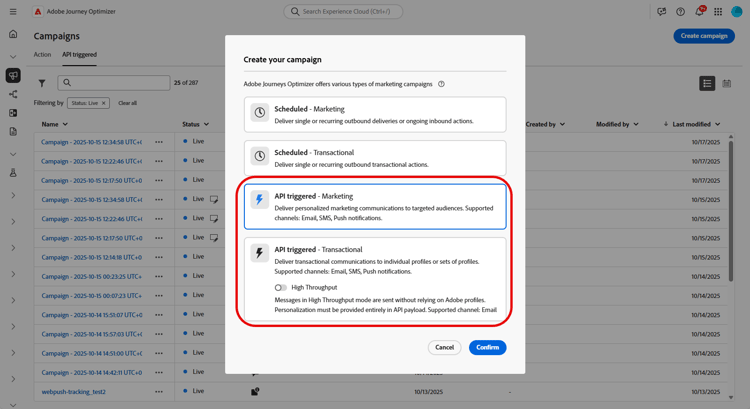
-
-
从 属性 部分,编辑营销活动的 标题 和描述。
-
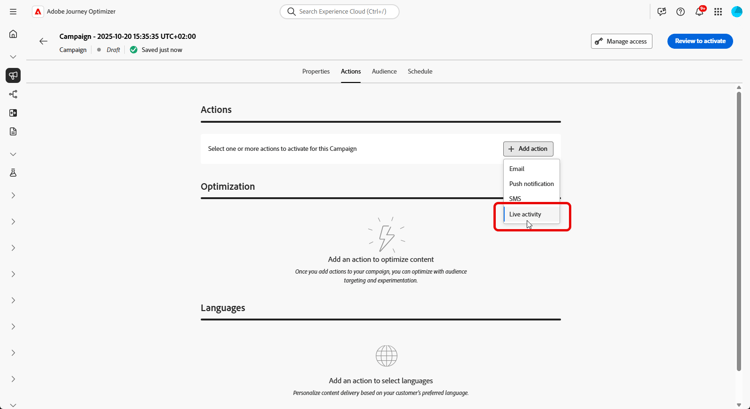
在 操作 部分中,选择实时活动,然后选择或创建新配置。
在此页面上了解有关实时活动配置的更多信息。
-
单击 创建试验 开始配置内容试验并创建处理以测量其性能并为目标受众确定最佳选项。 了解详情
-
从 受众 选项卡中,选择您的 标识类型 了解更多。
note NOTE 对于 API触发的营销 营销活动,您可以在从API有效负载检查APNs channelID订阅之前,选择充当第一个分段的现有受众。 -
营销活动旨在按特定日期或循环频率执行。 在本节中了解如何配置促销活动的计划。
-
配置完毕后,单击查看以激活,然后单击激活。
-
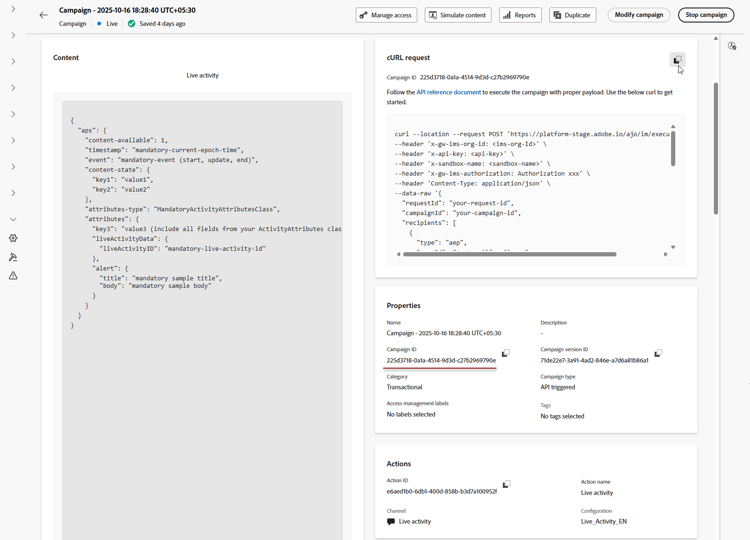
激活营销活动后,使用提供的 cURL请求 作为模板来触发实时活动开始、更新或结束事件。 在执行之前,使用特定数据更新示例有效负载。
请确保您还复制要包含在有效负载中的 促销活动ID 标识符。
➡️请参阅API触发的营销活动文档以了解身份验证要求,包括OAuth令牌和API密钥。
设计实时活动后,您可以使用内置报告跟踪衡量实时活动的影响。
有效负载示例 payload
有效负载结构取决于iOS使用Apple推送通知服务(APN) aps对象的平台,而Android使用Firebase Cloud Messaging (FCM) fcm对象的平台。 为您的平台和营销活动类型使用下面的示例。
iOS有效负载
对于iOS,请将个性化和生命周期字段置于APN aps对象中。 确保attributes-type与您应用程序的LiveActivityAttributes结构的名称匹配,并且attributes与该结构中定义的字段匹配。
单一用例(API触发的事务性营销活动)
此有效负载示例适用于使用 API触发的事务性 营销活动类型的单个营销活动。 请注意,以下有效负载示例中的大多数字段是必填字段,只有requestId、dismissal-date和alert是可选的。
| code language-json |
|---|
|
广播用例(API触发的营销活动)
此有效负载示例适用于使用 API触发的营销 营销类型的基于受众的营销活动。
| code language-json |
|---|
|
Android有效负载
对于Android,请将实时活动字段放在Firebase Cloud Messaging (FCM) fcm对象中。 使用应用程序样式提供程序配置为处理的custom_key_*键在content_state中定义动态值。
单一用例(API触发的事务性营销活动)
fcm对象包含两个时间字段,均以Epoch秒表示:timestamp控制邮件排序。 对于同一notification_id(或广播的topic_name),每个开始、更新和结束事件都必须使用大于上一个事件的值。 仅当更新的时间戳比上次处理的值新时,才会显示更新。 较旧或相等的时间戳将被忽略。when控制通知的显示时间。 此可选字段对应于Android的setWhen方法,不影响消息排序。 使其值保持合理的最新,因为过时的值可能会导致显示问题。
将这些负载用于 API触发的事务型 类型的各个营销活动。
对所有开始、更新和结束事件使用相同的notification_id,以确保它们以同一实时活动实例为目标。
| code language-json |
|---|
|
要更新实时活动,请将event_type设置为update并保留notification_id不变。 根据需要更新body、critical_text和content_state中的值以反映最新状态。
| code language-json |
|---|
|
要结束实时活动,请将event_type设置为end。 (可选)包含dismiss_after以指定在取消已完成的实时活动之前的延迟(以秒为单位)。
| code language-json |
|---|
|
广播用例(API触发的营销活动)
将此有效负载用于 API触发的营销 类型的基于受众的营销活动。
将topic_name设置为用户设备订阅的FCM主题。 将所有更新和结束事件发送到同一主题,并保留notification_id不变,以定位相同的实时活动通知。
| code language-json |
|---|
|
添加具有执行元数据的自定义数据 metadata
executionMetadata仅可用于 API触发的事务性 营销活动。使用可选的executionMetadata字段将您自己的 自定义数据 附加到配置文件,如订单ID、忠诚度级别或区域代码。 Journey Optimizer将此数据与执行一起存储,以便您以后可以从 实时活动反馈数据集 中检索它,并将交付结果与您自己的业务记录进行匹配。
要通过API发送此数据,请参阅executionMetadata字段🔗的消息传送API引用。 要重新读取设备上的值,请参阅关于从API触发器接收执行元数据的Mobile SDK指南。
要添加包含执行元数据的自定义数据,请执行以下操作:
-
将
executionMetadata添加到配置文件中userId和namespace旁边。 仅接受字符串键和字符串值,在发送之前将任何非字符串值转换为字符串。 -
这些值将完全按照发送时进行记录。
executionMetadata不支持个性化表达式,因此任何{{...}}表达式都会被视为文本而非已解析。 您应始终发送最终文本值。 -
每个配置文件最多可携带50个键/值对,所有键和值的组合大小限制为2 KB。 超过此限制的元数据将被丢弃,但仍会交付实时活动。 将有效负载限制为报告所需的信息。
在此示例中,orderId、tier、restaurant和region是您自己的值。 触发实时活动后,您可以从反馈数据集中读取这些信息,以将投放链接到您的订单记录。
| code language-json |
|---|
|
| note |
|---|
| NOTE |
在Android上检索执行元数据的方式与在iOS上检索执行元数据的方式相同:从AJO消息反馈数据集中的message.feedback事件检索。 有关查询示例,请参阅 高级:通过数据集查询调试 部分。 |
| Android对Mobile SDK使用开源Adobe Experience Platform (AEP) Messaging扩展。 |
在此示例中,seat和type是包含您的预订详细信息的自定义元数据字段。 触发实时活动后,从实时活动反馈数据集中检索这些值,以将投放结果与预订记录关联。
| code language-json |
|---|
|
操作方法视频
了解如何使用 Adobe Journey Optimizer 配置 iOS 实时活动,以便在 iPhone 锁屏界面和灵动岛上提供丰富的实时更新。
This section contains structured knowledge intended to support interpretation, retrieval, and question answering related to this topic.
For complete understanding, this information should be combined with the documentation on this page. Neither source is intended to stand alone; the page describes the feature, while this section provides additional context that helps disambiguate terminology, intent, applicability, and constraints.
- TL;DR: This page explains how to build an API-triggered campaign in Journey Optimizer to remotely start, update, and end Live activities for individual users or audiences, and how to attach custom data to a profile using the optional
executionMetadatafield.
Intents:
- Create an API-triggered campaign for Live activities, selecting API-triggered Marketing for audience-based campaigns or API-triggered Transactional for individual campaigns
- Choose Live activity in the Actions section and select or create a configuration
- Create a content experiment with treatments to measure performance
- Activate the campaign and use the provided cURL request to trigger start, update, or end events
- Attach custom data to a profile using the optional
executionMetadatafield for later retrieval from the Live activity feedback dataset
Glossary:
- API-triggered Marketing: The campaign type used for audience-based campaigns (product-specific)
- API-triggered Transactional: The campaign type used for individual campaigns (product-specific)
- High Throughput: An option that should not be enabled for API-triggered Transactional Live activity campaigns (product-specific)
- Live activity: The action chosen in the Actions section, tied to a selected or newly created configuration (product-specific)
- executionMetadata: An optional field that attaches custom data to a profile, stored alongside the execution and retrievable from the Live activity feedback dataset (product-specific)
- Live activity feedback dataset: The dataset from which stored
executionMetadatavalues can be retrieved to match delivery results to your own records (product-specific) - event (iOS) / event_type (Android): The payload field whose values are
start,update, orend
Guardrails:
- For API-triggered Transactional campaigns, the High Throughput option should not be enabled.
executionMetadatais only available for API-triggered Transactional campaigns.executionMetadataaccepts only string keys and string values; convert any non-string value to a string before sending.executionMetadatadoes not support personalization expressions, so any{{...}}expression is treated as literal text rather than resolved.- Each profile can carry up to 50 key/value pairs in
executionMetadata(hard limit), with a combined size limit of 2 KB for all keys and values (hard limit). Metadata exceeding this limit is discarded, but the Live activity is still delivered. - In the iOS unitary payload example, most fields are mandatory; only
requestId,dismissal-date, andalertare optional.
Terminology:
- Canonical name: Live activity — Acronym: n/a — variants: Live activities
- Synonyms: “Unitary use cases” = “individual campaigns (API-triggered Transactional)”
- Synonyms: “Broadcast use cases” = “audience-based campaigns (API-triggered Marketing)”
- Do not confuse: “API-triggered Marketing” (audience-based campaigns) ≠ “API-triggered Transactional” (individual campaigns)
- Do not confuse: “start” ≠ “update” ≠ “end” (the values of the
eventfield in iOS payloads and theevent_typefield in Android payloads) - Do not confuse: “dismissal-date” (optional; auto-removes the activity when
eventisend) ≠ “timestamp” (current epoch time)
FAQ:
- Q: Which campaign type do I use for Live activities? — API-triggered Marketing for audience-based campaigns; API-triggered Transactional for individual campaigns.
- Q: Should High Throughput be enabled for API-triggered Transactional? — No; for API-triggered Transactional, the High Throughput option should not be enabled.
- Q: How do I trigger start, update, or end events after activation? — Use the provided cURL request as a template, update the sample payload with your specific data, and copy the Campaign ID into your payload.
- Q: What is
executionMetadatafor? — Attaching your own custom data, such as an order ID, loyalty tier, or region code, to a profile; it is stored alongside the execution and retrievable from the Live activity feedback dataset. It is only available for API-triggered Transactional campaigns. - Q: What are the
executionMetadatalimits? — Up to 50 key/value pairs per profile with a combined 2 KB size limit; only string keys and values are accepted, and personalization expressions are not resolved. Metadata exceeding the limit is discarded, but the Live activity is still delivered.