在此页面上:通过接口或API设置LINE渠道配置,以便Adobe Journey Optimizer可以使用LINE消息传送API进行身份验证并向您的客户发送消息。
-
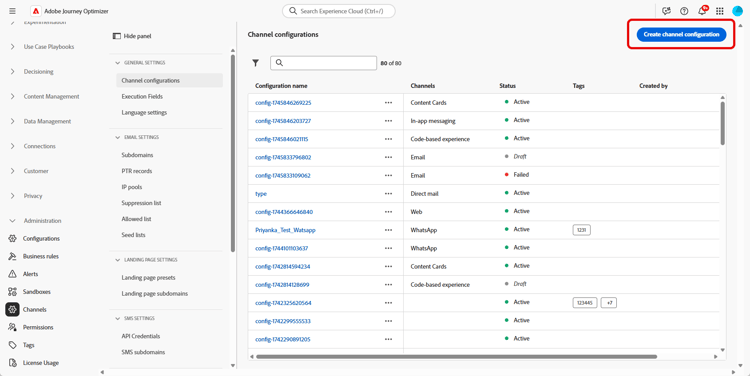
访问渠道 > 常规设置 > 渠道配置菜单,然后单击创建渠道配置。
-
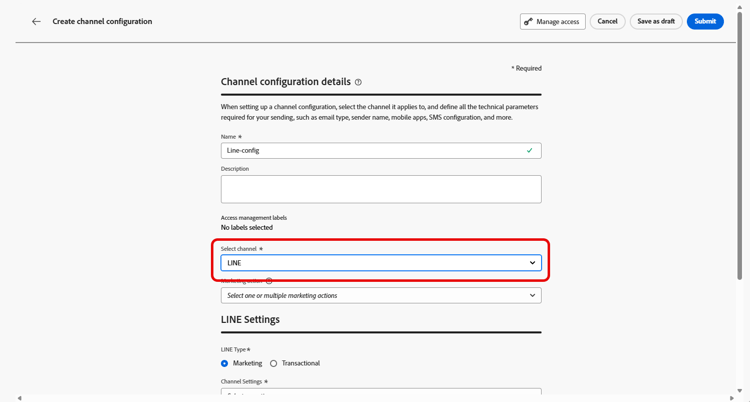
输入配置的名称和说明(可选),然后选择要配置的渠道。
note NOTE 名称必须以字母(A-Z)开头。 它只能包含字母数字字符。 您还可以使用下划线 _、点.和连字符-符号。 -
要为配置分配自定义或核心数据使用标签,您可以选择管理访问权限。 了解有关对象级访问控制(OLAC)的更多信息。
-
选择 LINE 频道。
-
选择 营销操作 以使用此配置将同意策略关联到消息。 所有与营销活动相关的同意政策均可利用,以尊重客户的偏好。 了解详情
-
选择配置的消息类型:
- 营销:促销消息,如零售商店的每周促销活动。 这些消息需要用户同意,并应遵守LINE有关用户选择加入的策略。
- 事务性:对于非商业消息,如订单确认、密码重置通知或投放更新。 这些消息甚至可以发送给已取消订阅营销通信但严格限于特定事务上下文的用户。
-
选择您的渠道设置。
请联系您的Adobe代表以设置您的渠道设置。
-
选择要映射的LINE用户ID。 这是用于将消息链接到LINE渠道中各个用户的标识符。
note NOTE 您在此映射的LINE用户ID必须已存在于客户的Real-Time Customer Profile上。 捕获LINE用户ID(例如,通过LINE登录或LIFF SDK),将其摄取到Adobe Experience Platform中,并将其与通过Identity Service的已知标识符拼合,以便Journey Optimizer可以访问统一配置文件。 了解有关Journey Optimizer中标识的更多信息。 有关使用Identity Service将LINE用户ID与客户配置文件统一的端到端示例,请参阅社区文章使用AEP Identity Stitching将LINE用户ID与客户配置文件统一。 -
键入您的发件人姓名,如您的品牌名称。
-
提交更改。
现在,您可以在创建LINE消息时选择配置。
配置LINE渠道设置API line-api
此API设置渠道设置,这些设置存储连接到LINE消息传递API所需的授权和配置详细信息。 这些设置允许Adobe Journey Optimizer使用提供的凭据通过LINE进行身份验证和发送消息。
终结点
POST https://platform.adobe.io/journey/imp/config/channel-settings
请求正文
{
    "name": "your_defined_name",
    "channelRegistryId": "line",
    "channel": "line",
    "channelSettings": {
        "channelId": "your_line_channel_id",
        "channelSecret": "your_line_channel_secret"
    }
}
渠道设置响应
{
"id": "3603ed66-ae86-42b8-8a90-d4b4e54e7c3b",
"name": "your_defined_name",
"channelRegistryId": "line",
"channel": "line",
"channelSettings": {
    "channelId": "your_line_channel_id",
    "channelSecret": "your_line_channel_secret"
    },
    "channelPublicationId": "v1_line",
    "createdAt": "2025-07-30T12:00:00.000Z",
    "modifiedAt": "2025-07-30T12:00:00.000Z",
    "isFromLatestVersion": true,
    "_etag": "\"eab98d24-18af-48ae-90f9-e59d4f8cfb2b\""
}
This section contains structured knowledge intended to support interpretation, retrieval, and question answering related to this topic.
For complete understanding, this information should be combined with the documentation on this page. Neither source is intended to stand alone; the page describes the feature, while this section provides additional context that helps disambiguate terminology, intent, applicability, and constraints.
- TL;DR: This page explains how to create a LINE channel configuration, from the interface or the API, so that Journey Optimizer can authenticate with the LINE Messaging API and send messages to your customers.
Intents:
- Create a LINE channel configuration from the Channel configurations menu
- Associate consent policies to the configuration through marketing actions
- Choose the message type (Marketing or Transactional) for the configuration
- Map the LINE user ID and define the Sender Name
- Configure the LINE Channel settings through the API
Glossary:
- Channel configuration: The configuration created from Channels > General settings > Channel configurations for which you enter a name, a description (optional), and the channel to configure (product-specific)
- Marketing action: The setting used to associate consent policies to the messages using this configuration, so that customer preferences are respected (product-specific)
- Channel settings: The connection settings that store the authorization and configuration details for connecting to the LINE Messaging API (product-specific)
- LINE user ID: The identifier used to link messages to individual users within your LINE channel (product-specific)
- Sender Name: The name, such as your brand’s name, entered for the configuration (product-specific)
Guardrails:
- Configuration names must begin with a letter (A-Z) and can only contain alphanumeric characters, underscore, dot, and hyphen.
- Marketing messages require user consent and should comply with LINE’s policy regarding user opt-ins.
- Transactional messages can be sent even to users who have unsubscribed from marketing communications but are strictly limited to specific transactional contexts.
- The LINE user ID mapped here must already exist on your customers’ Real-Time Customer Profile.
- For the Channel settings field, reach out to your Adobe representative to set up your Channel settings.
- The API uses headers including a user token from your technical account, the client ID from Adobe Developer Console, the IMS Organization ID, the sandbox name, and Content-Type application/json.
Terminology:
- Canonical name: LINE channel configuration — Acronym: n/a — variants: channel configuration
- Do not confuse: “Marketing” (promotional messages requiring user consent) ≠ “Transactional” (non-commercial messages limited to specific transactional contexts)
- Do not confuse: “Channel settings” (authorization and connection details for the LINE Messaging API) ≠ “Marketing action” (associates consent policies to the configuration)
FAQ:
- Q: What characters are allowed in a configuration name? — The name must begin with a letter (A-Z) and can only contain alphanumeric characters, underscore, dot, and hyphen.
- Q: What is the difference between a Marketing and a Transactional configuration? — Marketing is for promotional messages that require user consent, while Transactional is for non-commercial messages that can reach unsubscribed users but are strictly limited to specific transactional contexts.
- Q: Does the LINE user ID need to exist beforehand? — Yes, the LINE user ID mapped in the configuration must already exist on your customers’ Real-Time Customer Profile.
- Q: How are the Channel settings set up? — Reach out to your Adobe representative to set up your Channel settings.
- Q: Can the Channel settings be configured through the API? — Yes, the page describes an API (POST to the channel-settings endpoint) that sets up Channel settings storing the authorization and configuration details needed to connect to the LINE Messaging API.