在此页面上:定义一个收件箱渠道配置,用于设置同意、可选访问标签以及收件箱在Web或iOS或Android应用程序中的显示位置,以便您可以通过收件箱提供内容卡体验。
您必须先在 渠道配置 中定义 收件箱 渠道配置,然后才能通过收件箱投放内容卡体验。 该配置会将界面与同意、可选访问标签以及体验在Web上或您的iOS或Android应用程序中出现的位置关联起来。 请按照以下步骤创建配置:
-
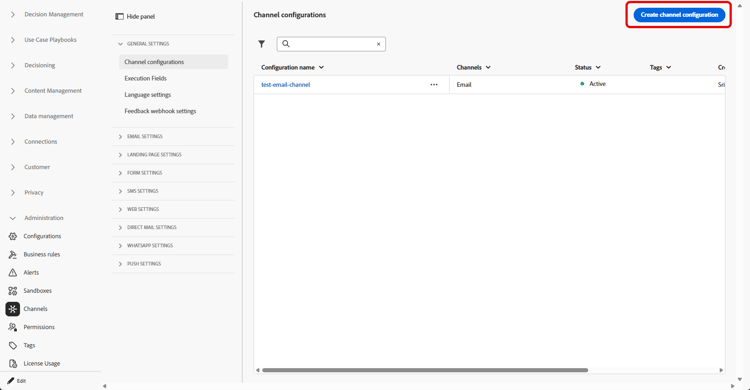
访问渠道 > 常规设置 > 渠道配置菜单,然后单击创建渠道配置。
-
输入配置的名称和说明(可选)。
note NOTE 名称必须以字母(A-Z)开头。 它只能包含字母数字字符。 您还可以使用下划线 _、点.和连字符-符号。 -
要为配置分配自定义或核心数据使用标签,您可以选择管理访问权限。 了解有关对象级访问控制(OLAC)的更多信息。
-
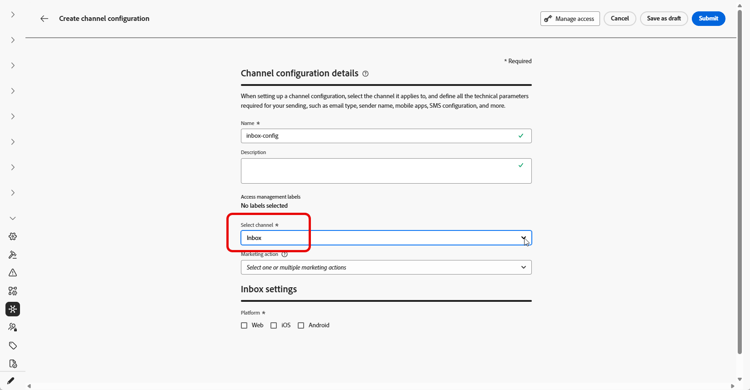
选择 收件箱 频道。
-
选择 营销操作 以使用此配置将同意策略关联到消息。 所有与营销活动相关的同意政策均可利用,以尊重客户的偏好。 了解详情
-
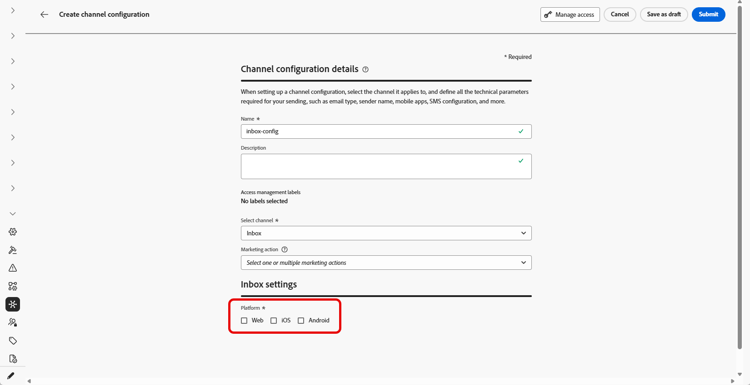
选择要应用收件箱体验的平台。
-
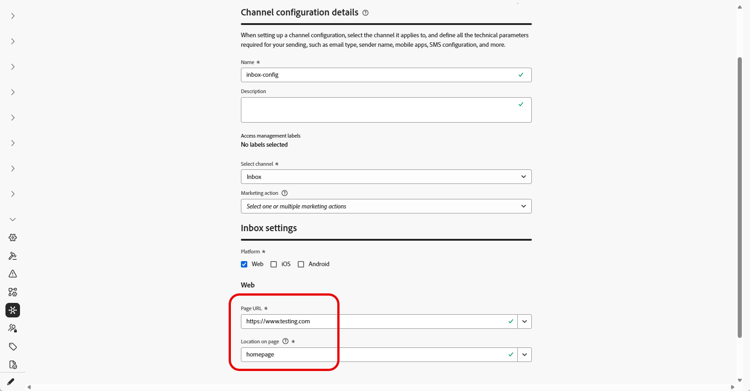
对于Web:
-
在 页面URL 中,输入或选择收件箱应出现的页面的URL。 当体验限制为一个页面时,可使用此选项。
-
在 页面 上的位置中,定义页面内投放位置,例如,网站用于收件箱表面的区域或标识符。 了解详情
-
-
对于iOS和Android:
-
在 应用程序ID 中,输入或选择应用程序的标识符,以便该配置适用于正确的iOS或Android内部版本。
-
在应用程序 内的 位置或路径中,指定用户应打开收件箱的屏幕、路由或容器。
-
-
提交更改。
现在,您可以在创建收件箱体验时选择配置。
This section contains structured knowledge intended to support interpretation, retrieval, and question answering related to this topic.
For complete understanding, this information should be combined with the documentation on this page. Neither source is intended to stand alone; the page describes the feature, while this section provides additional context that helps disambiguate terminology, intent, applicability, and constraints.
- TL;DR: This page explains how to create an Inbox channel configuration that ties the surface to consent, optional access labels, and where the inbox appears on the web or in your iOS or Android app.
Intents:
- Create an Inbox channel configuration in Channel configurations
- Associate consent policies to messages by selecting marketing action(s)
- Assign custom or core data usage labels through Manage access
- Define where the inbox appears for Web using Page URL and Location on page
- Define where the inbox appears for iOS and Android using App id and the location or path inside the app
Glossary:
- Inbox channel configuration: A configuration in Channel configurations that ties the surface to consent, optional access labels, and where the experience appears on web, iOS, or Android (product-specific)
- Marketing action: A selection that associates consent policies to messages using the configuration so customer preferences are respected (product-specific)
- Page URL: For Web, the URL of the page where the inbox should appear, used when the experience is limited to one page (product-specific)
- Location on page: For Web, the in-page placement (region or identifier your site uses for the inbox surface) (product-specific)
- App id: For iOS and Android, the identifier for your app so the configuration applies to the correct build (product-specific)
- Manage access: The option used to assign custom or core data usage labels to the configuration, related to Object Level Access Control (OLAC) (product-specific)
Guardrails:
- You must define an Inbox channel configuration in Channel configurations before you can deliver Content card experiences through the Inbox.
- Configuration names must begin with a letter (A-Z) and can only contain alpha-numeric characters plus underscore, dot, and hyphen characters.
- All consent policies associated with the selected marketing action are leveraged to respect customer preferences.
Terminology:
- Canonical name: Inbox channel configuration — Acronym: n/a — variants: Inbox configuration, channel configuration
- Synonyms: “OLAC” = “Object Level Access Control”
- Do not confuse: “Page URL” (the page URL where the inbox appears on Web) ≠ “Location on page” (the in-page placement/region or identifier for the inbox surface)
- Do not confuse: “App id” (identifier for the iOS or Android app) ≠ “Location or path inside the app” (the screen, route, or container where users open the inbox)
FAQ:
- Q: What must I create before delivering Content card experiences through the Inbox? — An Inbox channel configuration in Channel configurations.
- Q: What are the rules for naming a configuration? — The name must begin with a letter (A-Z) and can only contain alpha-numeric characters plus underscore, dot, and hyphen.
- Q: How do I associate consent to messages using this configuration? — Select marketing action(s); all consent policies associated with the marketing action are leveraged to respect customer preferences.
- Q: How do I set where the inbox appears on the web? — Enter or select the Page URL and define the in-page placement in Location on page.
- Q: How do I set where the inbox appears on iOS or Android? — Enter the App id and specify the screen, route, or container in Location or path inside the app.