在此页面上:了解如何使用读取受众活动检索现有的已保存或导入受众,并在编排的营销活动中重复使用它,还可以选择使用用户档案属性丰富该受众,以便进行定位、个性化或报告。
读取受众活动允许您检索之前保存或导入的现有受众,并在编排的营销活动中重复使用它。 在无需执行新的分段过程的情况下定位预定义的用户档案集时,此活动特别有用。
加载受众后,您可以选择通过选择一个唯一的身份字段并使用其他配置文件属性丰富受众来优化受众,以便进行定位、个性化或报告。
读取受众缓存 cache
测试编排的营销活动时,读取受众活动通常需要一些时间来获取数据,这会延长测试运行时间。 若要加快此速度,可使用 读取受众 缓存。
缓存将受众和选定的属性一起存储了两个小时。 在此期间,任何后续测试运行都可以使用缓存的结果,从而无需再次获取数据。 一旦 两小时期间 结束,必须重新检索数据。
将为每个编排的活动保存缓存,而不是为受众本身保存缓存。 如果在另一个编排的营销活动中的 读取受众 活动中使用了相同的受众,则系统仍需要重新获取数据。
在以下情况中,不保留缓存:
-
当使用新属性更新 读取受众 活动时,将使用新属性数据刷新缓存。 因此,更新后的首次测试运行将需要更长的时间,因为需要再次检索数据。
-
发布编排的营销活动时,在执行实时编排的营销活动时获取最新数据。
配置读取受众活动 read-audience-configuration
按照以下步骤配置 读取受众 活动:
-
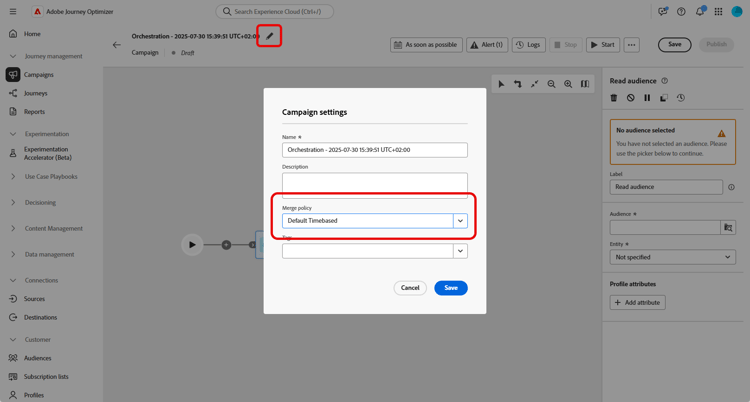
在添加 读取受众 活动之前,请确保在Campaign设置中选择合并策略。
-
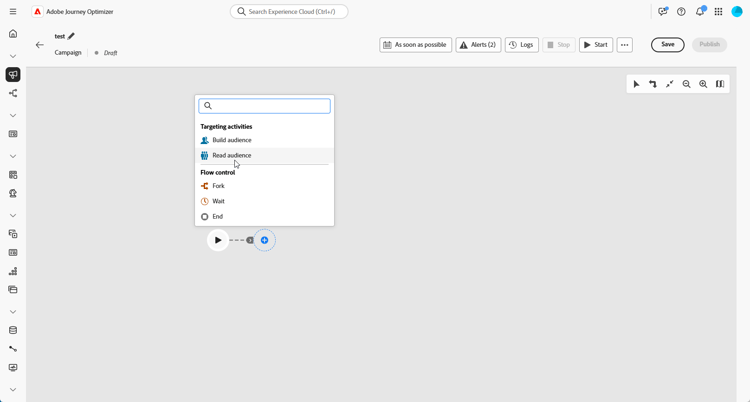
将 读取受众 活动添加到您的编排营销活动中。
-
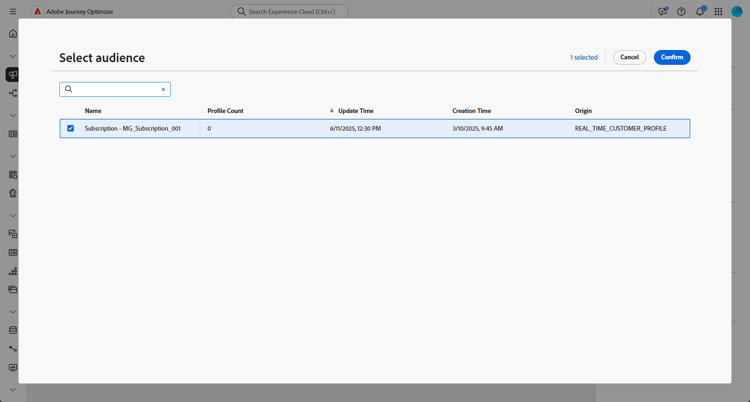
为您的活动输入标签。 此标签将用作受众的名称。
-
单击

-
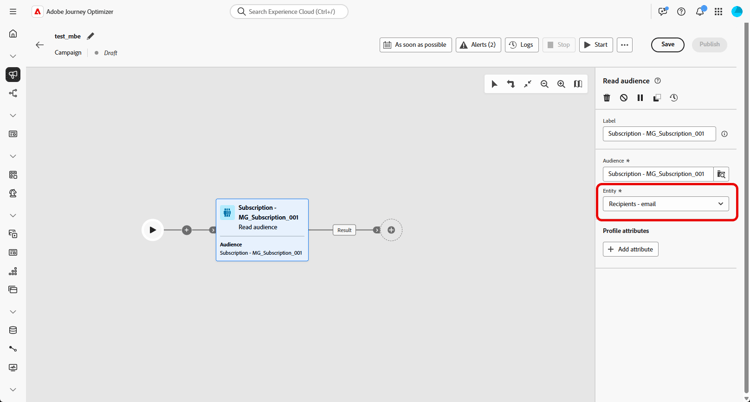
从营销活动定向维度中选择一个 实体{1}。 此设置定义目标实体以及用于协调受众与目标维度的属性。
-
选择 添加属性 以使用附加数据扩充所选受众。 通过此步骤,可将配置文件属性添加到受众,从而生成具有这些属性增强的收件人列表。
-
选择要添加到受众的属性。 属性选取器显示 联合配置文件架构 中的字段:
-
对于基于CSV的受众,这包括 配置文件 属性和自定义受众级别属性。 这些属性可以在以下架构路径下找到:
<audienceid> > _ajobatchjourneystage > audienceEnrichment > CustomerAudienceUpload > <audienceid> -
对于标准AEP受众,只有 配置文件 属性可用,因为它们不包含嵌入的受众特定字段。
note NOTE 虽然某些属性可能会显示在选取器中,但其运行时可用性取决于受众数据是否已成功协调并与 Adobe Experience Platform配置文件 合并。 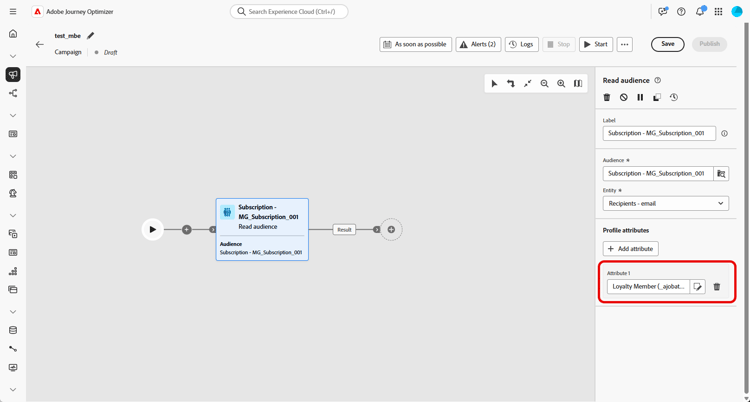
-
创建受众后,该受众将以只读形式提供,且无法再编辑。 它只能在创建过程完全完成后使用。
示例
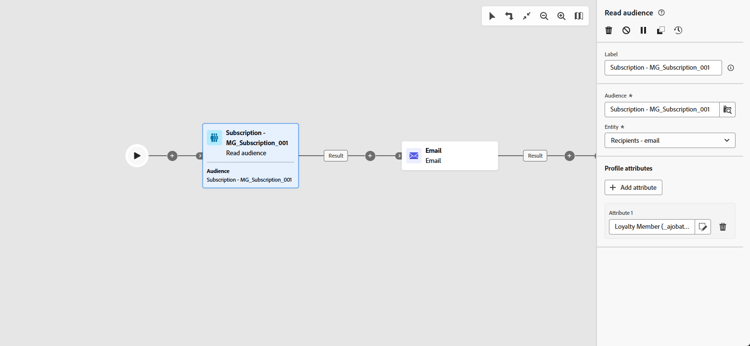
在下面的示例中,读取受众活动用于检索订阅新闻稿的先前创建和保存的用户档案受众。 然后,使用 忠诚度会员资格 属性丰富受众,以启用对忠诚度计划注册会员的用户的定位。
This section contains structured knowledge intended to support interpretation, retrieval, and question answering related to this topic.
For complete understanding, this information should be combined with the documentation on this page. Neither source is intended to stand alone; the page describes the feature, while this section provides additional context that helps disambiguate terminology, intent, applicability, and constraints.
- TL;DR: This page explains how to configure the Read audience activity in an Orchestrated campaign to retrieve an existing saved or imported audience and optionally enrich it with profile attributes.
Intents:
- Retrieve an existing saved or imported audience to use as the entry audience for an Orchestrated campaign.
- Select a Merge policy before adding the Read audience activity.
- Choose an Entity from the Campaign Targeting dimension to reconcile the audience with the target dimension.
- Enrich the selected audience with additional profile attributes for targeting, personalization, or reporting.
- Understand when the Read audience cache speeds up test runs and when it is refreshed.
Glossary:
- Read audience activity: an activity that retrieves an existing audience, previously saved or imported, and reuses it within an Orchestrated campaign, without executing a new segmentation process (product-specific)
- Read audience cache: a cache that stores the audience and selected attributes retrieved by the Read audience activity, used to speed up subsequent test runs of an Orchestrated campaign (product-specific)
- Merge policy: a Campaign setting that must be selected before adding a Read audience activity (product-specific)
- Entity: a setting chosen from the Campaign Targeting dimension that defines the target entity and the attribute used to reconcile the audience with the target dimension (product-specific)
- Union Profile Schema: the schema whose fields are displayed in the attribute picker when enriching an audience with the Add attribute step (product-specific)
Guardrails:
- The Read audience cache stores the audience and selected attributes for up to two hours; after this two-hour period, the data must be retrieved anew.
- The cache is saved per Orchestrated campaign, not per audience: using the same audience in a Read audience activity inside another Orchestrated campaign still requires the data to be fetched again.
- The cache is refreshed when the Read audience activity is updated with new attributes, so the first test run after the update takes longer because the data must be retrieved again.
- The cache is not retained when the Orchestrated campaign is published, because the latest data is fetched when executing the live Orchestrated campaign.
- For CSV-based audiences, the attribute picker includes both Profile attributes and custom audience-level attributes, found under the schema path
<audienceid> > _ajobatchjourneystage > audienceEnrichment > CustomerAudienceUpload > <audienceid>. - For standard AEP audiences, only Profile attributes are available in the attribute picker, because these audiences do not carry embedded audience-specific fields.
- The availability of an attribute at runtime depends on whether the audience data has been successfully reconciled and merged with the Adobe Experience Platform Profile, even if the attribute appears in the picker.
- Once an audience is created, it is available in read-only and can no longer be edited; it can only be used after the creation process is fully completed.
Terminology:
- Canonical name: Adobe Experience Platform — Acronym: AEP
- Canonical name: Read audience activity — variants: Read Audience
- Do not confuse: “Adobe Experience Platform” (the platform) ≠ “Adobe Experience Platform Profile” (the profile component with which audience data must be reconciled and merged for an attribute to be available at runtime)
FAQ:
- Q: What does the Read audience activity do? — It retrieves an existing audience, previously saved or imported, and reuses it within an Orchestrated campaign, targeting a predefined set of profiles without executing a new segmentation process.
- Q: How long does the Read audience cache store data? — Up to two hours; after this two-hour period, the data must be retrieved anew.
- Q: Does the cache carry over to another Orchestrated campaign using the same audience? — No, the cache is saved for each Orchestrated campaign, not for the audience itself, so the system still needs to fetch the data again.
- Q: What happens to the cache when the Read audience activity is updated with new attributes? — The cache is refreshed with the new attributes data, so the first test run after the update takes longer.
- Q: What must be selected before adding a Read audience activity? — A Merge policy in the Campaign settings.
- Q: What attributes are available for CSV-based audiences versus standard AEP audiences? — CSV-based audiences offer both Profile attributes and custom audience-level attributes; standard AEP audiences offer only Profile attributes, since they do not carry embedded audience-specific fields.
- Q: Can a created audience be edited afterward? — No, once an audience is created it is available in read-only and can no longer be edited; it can only be used after the creation process is fully completed.
Examples:
- Example: The Read audience activity retrieves a previously created and saved audience of profiles who subscribed to the newsletter, then enriches it with the Loyalty membership attribute to enable targeting of users who are registered members of the loyalty program.
Related pages:
- To generate and target the audience selected in the Read audience activity: Learn more about how to generate and target audiences in Journey Optimizer (audience/about-audiences.md)
- To create the Campaign Targeting dimension used to choose the Entity setting: Create your Targeting dimension (orchestrated/target-dimension.md)
Personas:
- marketer: Can retrieve an existing saved or imported audience and reuse it within an Orchestrated campaign. Can select a Merge policy, enter a Label, choose an Entity from the Campaign Targeting dimension, and select Add attribute to enrich the audience. The page states that once an audience is created, it is available in read-only and can no longer be edited. Where: “Configure the Read audience activity”.
Onboarding:
- Level: Intermediate
- First minimal step: Select a Merge policy in your Campaign settings before adding the Read audience activity.
- Success check: The selected audience is enriched with the chosen attribute, as shown by the example enriching a newsletter audience with the Loyalty membership attribute.
- Previous: Generate and target an audience in Journey Optimizer: About Adobe Experience Platform audiences (audience/about-audiences.md); Create the Campaign Targeting dimension: Create your Targeting dimension (orchestrated/target-dimension.md)