在此页面上:了解如何使用增量查询定位活动,以仅返回每次协调的活动运行时的新记录,不包括以前执行中已定位的用户档案。
增量查询活动是 定位 活动,每次运行编排的活动时都会运行数据库查询。 重要部分是每次运行只输出其日期字段值晚于上次执行日期的记录。 这样,您就可以避免重新定位相同的人员或重新导出相同的行。
当营销活动可以运行多次时使用,例如,当您计划营销活动时,例如每周一次或者当活动由外部信号或API触发时,可使用它。 每个运行目标仅记录在上次执行后的日期,因此可避免重复。
典型用途:
- 消息和受众:在下一步中只提取新注册、新购买者或其他“自上次运行以来新增的”区段(例如电子邮件、移动消息)。
- 正在进行的导出:只将新行或更新行发送到文件以用于报表或BI工具,而不复制已导出的内容。
配置增量查询活动 incremental-query-configuration
设置定向维度,构建查询,然后选择活动如何决定从未来运行中排除哪些记录。
-
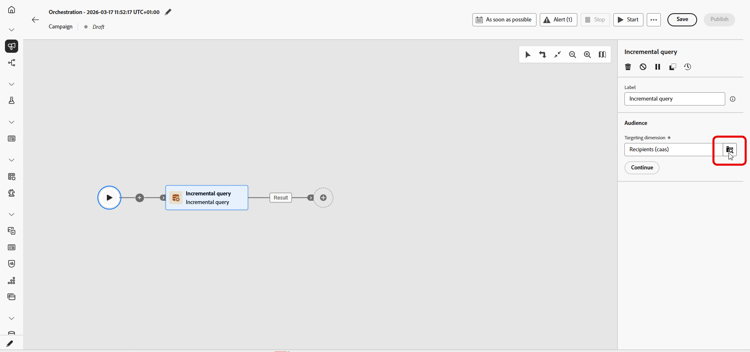
将 增量查询 活动拖放到您的编排的活动中。
-
在 受众 中,选择定向维度,例如收件人、订阅者,然后单击继续。 了解有关定向维度的更多信息。
-
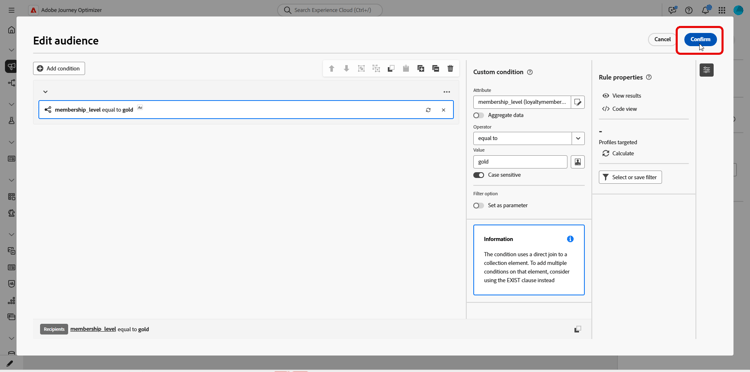
单击 添加条件 以定义查询。 了解如何使用规则生成器。
-
在 已处理数据 下,选择您的日期字段路径。 日期字段为必填,属性必须使用 日期时间 格式。 每次运行只返回日期在最后一次执行之后的行。
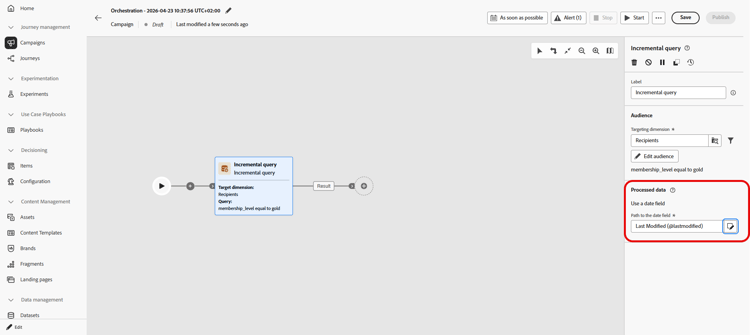
note NOTE 资格仅取决于日期字段的值,而不取决于记录何时引入。 如果记录的日期字段值早于该执行日期,则不会返回在上次执行后摄取的记录。
检查上一个执行日期 incremental-query-last-execution
活动运行后,上次执行日期字段显示在 已处理数据 下,日期字段 的 路径下。 它显示上次执行活动的日期和时间。 这是下次运行使用的截止日期。 此字段为只读。

示例 incremental-query-example
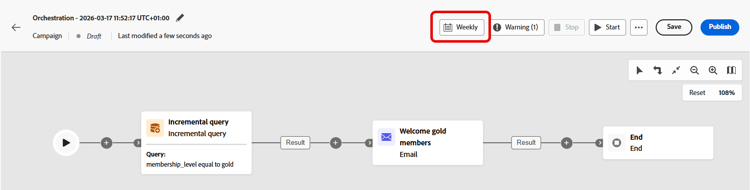
以下示例向刚刚成为金会员的用户档案发送欢迎电子邮件。 可将营销活动安排为每周、每周一运行。 每次运行仅定向自上次运行以来符合金会员资格的用户档案,因此每位收件人都会收到一次欢迎电子邮件。
- 增量查询:选择金会员。 第一次运行:所有当前金会员。 以后运行:仅包含自上次执行以来成为金会员的用户档案。
- 电子邮件投放:通过查询将欢迎电子邮件发送到用户档案输出。
This section contains structured knowledge intended to support interpretation, retrieval, and question answering related to this topic.
For complete understanding, this information should be combined with the documentation on this page. Neither source is intended to stand alone; the page describes the feature, while this section provides additional context that helps disambiguate terminology, intent, applicability, and constraints.
- TL;DR: This page explains how to configure the Incremental query targeting activity in an Orchestrated campaign so that each run returns only records whose date field value is later than the previous execution.
Intents:
- Understand what the Incremental query activity does across repeated Orchestrated campaign runs.
- Configure the activity’s targeting dimension and query condition.
- Choose a date field under Processed data so that each run returns only rows dated after the last execution.
- Understand what happens to downstream activities when a run returns no rows.
- Build a “new since last run” audience for messaging or ongoing exports.
Glossary:
- Incremental query: a Targeting activity that runs a database query each time the Orchestrated campaign runs and outputs only records whose date field value is later than the previous execution (product-specific)
- Processed data: the configuration area where you choose how the activity excludes records from earlier runs, for example by using a date field (product-specific)
- Path to the date field: the attribute, in Date Time format, used under Processed data so each run returns only rows whose date is after the last execution (product-specific)
- Last execution date: the field displayed under Processed data, below the Path to the date field, once the activity has run; it shows the date and time of the previous execution and is the cutoff date used by the next run; the field is read-only (product-specific)
- Targeting dimension: the audience type selected for the activity, for example recipients or subscribers (product-specific)
Guardrails:
- When a run returns no rows, the Orchestrated campaign stops at the Incremental query; activities after it are not executed until there is data, when the campaign runs again.
- A date field is required under Processed data, and the attribute must use the Date Time format.
- Each run returns only rows whose date is after the last execution.
- Eligibility depends only on the value of the date field, not on when the record was ingested. A record ingested after the previous execution is not returned if its date field value is older than the date of that execution.
Terminology:
- Canonical name: Incremental query — variants: none
- Synonyms: none
- Do not confuse: “Incremental query” (a Targeting activity that excludes previously returned records) ≠ “Targeting dimension” (the audience type, e.g. recipients or subscribers, selected within the activity)
FAQ:
- Q: What does the Incremental query activity return on each run? — Only records whose date field value is later than the previous execution, regardless of when they were ingested.
- Q: When should I use the Incremental query activity? — When the campaign can run multiple times, for example when scheduled (e.g. weekly) or triggered by an external signal or API, so each run targets only records dated after the previous execution.
- Q: What is required under Processed data? — A Path to the date field, using the Date Time format; each run returns only rows whose date is after the last execution.
- Q: What happens if a run returns no rows? — The Orchestrated campaign stops at the Incremental query, and activities after it are not executed until there is data on a later run.
- Q: What are typical uses of the Incremental query? — Pulling “new since last run” segments (e.g. new sign-ups, new purchasers) into messaging, or sending only new or updated rows to files for reporting or BI tools.
Examples:
- Welcome email to new gold members: an Incremental query selects gold members (first run: all current gold members; later runs: only profiles that became gold members since the previous execution), followed by an Email delivery activity that sends the welcome email to the profiles output by the query. The campaign can be scheduled to run weekly, every Monday, so each recipient receives the welcome email once.
Related pages:
- To pick the audience type for the Incremental query: Targeting dimensions (orchestrated/target-dimension.md)
- To build the query condition for the Incremental query: Learn how to use the rule builder (orchestrated/orchestrated-rule-builder.md)
Personas:
- marketer: Can configure the Incremental query activity so each Orchestrated campaign run returns only records whose date field value is later than the previous execution. Can select the Targeting dimension, add a condition with the rule builder, and choose the Path to the date field under Processed data. The page states that a date field is required and the attribute must use the Date Time format. Where: “Configure the Incremental query activity”.
Onboarding:
- Level: Intermediate
- First minimal step: Drop an Incremental query activity into your Orchestrated campaign.
- Success check: Each run returns only rows whose date is after the last execution.
- Next: Selecting the Targeting dimension for the Incremental query activity: Create your Targeting dimension (orchestrated/target-dimension.md); Adding a condition to define the query in the Incremental query activity: Work with the rule builder (orchestrated/orchestrated-rule-builder.md)