在此页面上:了解如何将数据从支持的源摄取到Adobe Experience Platform中,并为编排的营销活动配置数据流。
Adobe Experience Platform 允许从外部源摄取数据,同时让您能够使用 Experience Platform 服务来构建结构、添加标签和增强传入数据。 您可以从各种源中摄取数据,如 Adobe 应用程序、基于云的存储、数据库和许多其他源。
数据集是用于数据集合的存储和管理结构,通常是表格,其中包含架构(列)和字段(行)。 成功引入Experience Platform的数据将作为数据集存储在数据湖中。
编排的营销活动的支持来源 supported
以下源支持与编排的营销活动一起使用:
关系模式数据卫生准则 cdc
对于通过 更改数据捕获 启用的数据集,所有数据更改(包括删除)都会自动从源系统镜像到Adobe Experience Platform中。 您无法在已包含已摄取数据的数据集上启用更改数据捕获。
由于Adobe Journey Optimizer促销活动要求使用 变更数据捕获 启用所有已载入的数据集,因此客户有责任管理源中的删除操作。 任何从源系统中删除的记录都将自动从Adobe Experience Platform中的相应数据集中删除。
要通过基于文件的摄取删除记录,客户的数据文件应使用Change Request Type字段中的d值标记记录。 这表示应在Adobe Experience Platform中删除该记录,以镜像源系统。
如果客户希望仅从Adobe Experience Platform中删除记录而不影响原始源数据,则可以使用以下选项:
-
用于变更数据捕获复制的代理或经过清理的表
客户可以创建一个代理或经过清理的源表,以控制将哪些记录复制到Adobe Experience Platform。 然后,可以从该中间表中选择性地管理删除。
-
通过数据Distiller删除
如果获得许可,数据Distiller可用于直接在Adobe Experience Platform中支持删除操作,而不依赖于源系统。
配置数据流
此示例演示了如何配置将数据结构化摄取到Adobe Experience Platform的数据流。 配置的数据流支持自动、计划的摄取并支持实时更新。
-
在 连接 菜单中,访问 源 菜单。
-
根据编排的营销活动的支持的源选择您的源。
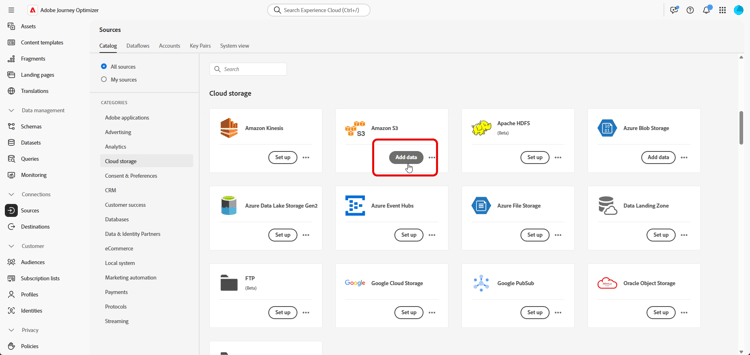
-
如果您选择基于云的源,请连接您的Cloud Storage或Google Cloud Storage帐户。
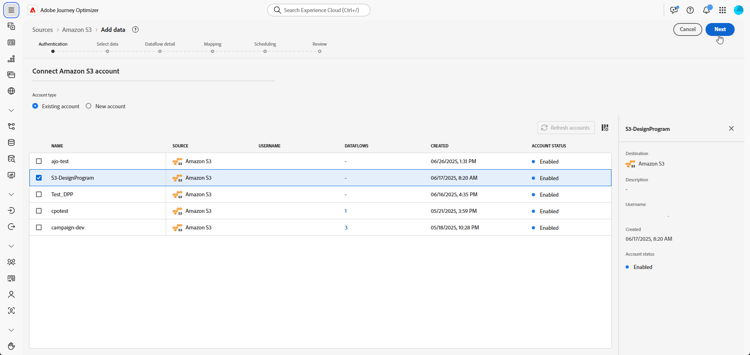
-
选择要提取到Adobe Experience Platform中的数据。
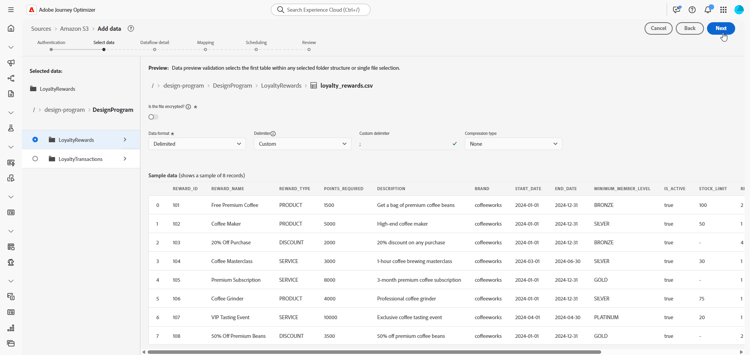
-
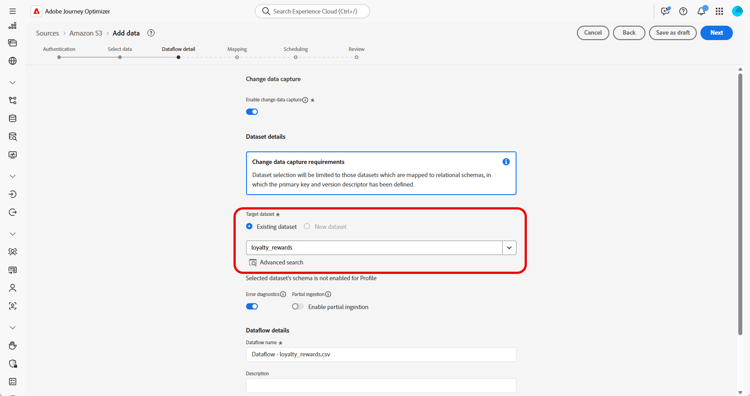
从 数据集详细信息 页面,选中 启用更改数据捕获 以仅显示映射到关系架构并包含主键和版本描述符的数据集。
note important IMPORTANT 仅对于基于文件的源,数据文件中的每一行必须包含值为 u(upsert)或d(delete)的_change_request_type列。 如果没有此列,系统将不会将数据识别为支持更改跟踪,并且不会显示“编排”营销活动切换开关,从而阻止选择数据集进行定位。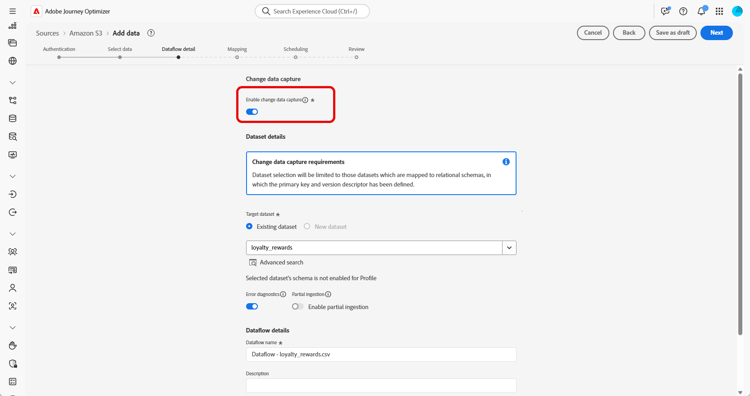
-
选择您之前创建的数据集并单击下一步。
-
如果仅使用基于文件的源,请从 选择数据 窗口中上载本地文件并预览其结构和内容。
请注意,支持的最大大小为100MB。
-
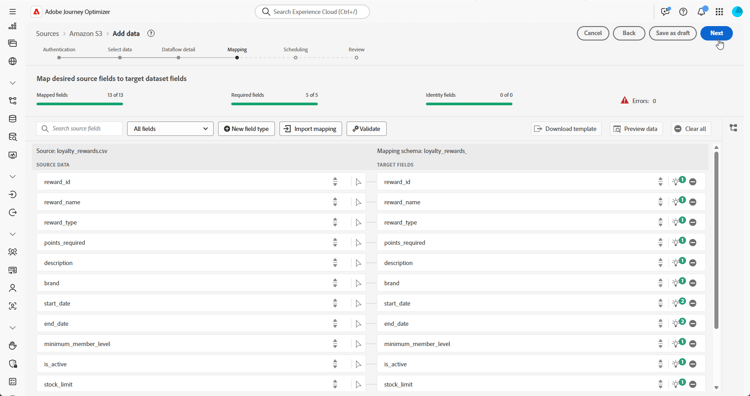
在 映射 窗口中,验证每个源文件属性是否正确映射到目标架构中的相应字段。 了解有关定向维度的更多信息。
完成后,单击下一步。
-
根据所需频率,配置数据流计划。
-
单击 完成 以创建数据流。 这将按照定义的计划自动执行。
-
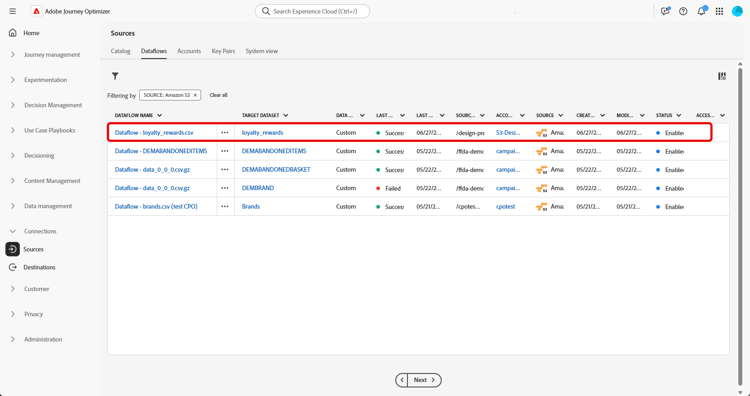
从 连接 菜单中,选择 源 并访问 数据流 选项卡,即可跟踪流程执行状态、检查摄取的记录并对任何错误进行排查。
This section contains structured knowledge intended to support interpretation, retrieval, and question answering related to this topic.
For complete understanding, this information should be combined with the documentation on this page. Neither source is intended to stand alone; the page describes the feature, while this section provides additional context that helps disambiguate terminology, intent, applicability, and constraints.
- TL;DR: This page explains how to ingest data into Adobe Experience Platform from sources supported for Orchestrated campaigns, configure a dataflow, and manage record deletions through Change data capture.
Intents:
- Identify the supported sources for ingesting data for Orchestrated campaigns (Cloud Storage, Cloud Data Warehouses, File-Based Uploads).
- Understand the one-to-one relationship enforced between dataflows and datasets, and how to change a data source.
- Configure a dataflow that ingests structured data into Adobe Experience Platform for Orchestrated campaigns.
- Enable Change data capture on a dataset mapped to a relational schema.
- Manage record deletions in Adobe Experience Platform using Change data capture, a file-based deletion marker, a proxy or sanitized table, or Data Distiller.
- Map source file attributes to target schema fields during dataflow configuration.
Glossary:
- Dataset: a storage and management construct for a collection of data, typically a table, that contains a schema (columns) and fields (rows) (product-specific)
- Change data capture: a dataset setting that automatically mirrors all data changes, including deletions, from the source system into Adobe Experience Platform (product-specific)
- Change Request Type: the file-based ingestion field used to mark a record for deletion with a “d” value (product-specific)
- _change_request_type: the required column for file-based sources, with values “u” (upsert) or “d” (delete), used to support change tracking (product-specific)
- Data Distiller: a licensed capability that can be used to support deletion operations directly within Adobe Experience Platform, independent of the source system (product-specific)
Guardrails:
- Adobe Experience Platform enforces a strict one-to-one relationship between dataflows and datasets (hard limit).
- To change the data source for a dataset, the existing dataflow must first be deleted before creating a new one that references the same dataset and the new source.
- Change data capture cannot be enabled on a dataset that already contains ingested data.
- Adobe Journey Optimizer Campaigns require all onboarded datasets to be enabled with Change data capture.
- Enabling Change data capture on the Dataset details page displays only datasets that are mapped to relational schemas and include both a primary key and a version descriptor.
- For file-based sources only, each row in the data file must include a _change_request_type column with values “u” (upsert) or “d” (delete); without this column, the system does not recognize the data as supporting change tracking, and the Orchestrated campaign toggle does not appear, preventing the dataset from being selected for targeting.
- For file-based sources, the maximum supported upload size is 100MB (hard limit).
Prerequisites and permissions:
- Data Distiller must be licensed to use it for deleting records directly within Adobe Experience Platform, independent of the source system.
Applicability:
- Applies: Orchestrated campaigns — the supported sources list and the dataflow configuration steps on this page are scoped to Orchestrated campaigns.
Terminology:
- Canonical name: Adobe Experience Platform — Acronym: AEP — variants: Platform
- Canonical name: Adobe Journey Optimizer — Acronym: AJO
- Synonyms: “dataflow” = “data flow”
- Do not confuse: “Change data capture” (automatically mirrors source deletions into Adobe Experience Platform) ≠ “Data Distiller” (deletes records only within Adobe Experience Platform, independent of the source system)
FAQ:
- Q: What must I do before changing the data source for an existing dataset? — Delete the existing dataflow before creating a new one that references the same dataset and the new source, because Adobe Experience Platform enforces a strict one-to-one relationship between dataflows and datasets.
- Q: Which sources are supported for Orchestrated campaigns? — Cloud Storage (Amazon S3, Google Cloud Storage, SFTP), Cloud Data Warehouses (Snowflake, Google BigQuery, Data Landing Zone, Azure Databricks), and File-Based Uploads (Local File Upload).
- Q: Can Change data capture be enabled on a dataset that already has ingested data? — No, Change data capture cannot be enabled on a dataset that already contains ingested data.
- Q: How do I delete a record using file-based ingestion? — Mark the record with a “d” value in the Change Request Type field, which indicates the record should be deleted in Adobe Experience Platform, mirroring the source system.
- Q: How can I delete records from Adobe Experience Platform without affecting the source data? — Use a proxy or sanitized source table for Change data capture replication, or, if licensed, use Data Distiller to delete records directly within Adobe Experience Platform.
- Q: What happens if the _change_request_type column is missing from a file-based source? — The system does not recognize the data as supporting change tracking, and the Orchestrated campaign toggle does not appear, preventing the dataset from being selected for targeting.
Related pages:
- For mapping source file attributes to target schema fields during dataflow configuration: Learn more about targeting dimensions (orchestrated/target-dimension.md)
Personas:
- developer: Can map each source file attribute to the corresponding field in the target schema during dataflow configuration. Can include a _change_request_type column in file-based source data, with values u for upsert or d for delete, to support change tracking. The page states that without this column, the Orchestrated campaign toggle does not appear, preventing the dataset from being selected for targeting. Where: “Configure a dataflow”.
- admin: Can configure a dataflow for Orchestrated campaigns using Cloud Storage, Cloud Data Warehouses, or File-Based Uploads sources. Can enable Change data capture only on datasets mapped to relational schemas with a primary key and version descriptor. The page states that a dataflow must be deleted before creating a new one that references the same dataset and a new source. Where: “Guardrails”.
Onboarding:
- Level: Experienced
- First minimal step: From the Connections menu, access the Sources menu.
- Success check: From the Connections menu, select Sources and access the Data Flows tab to track flow execution, review ingested records, and troubleshoot any errors.
- Next: Mapping source file attributes to target schema fields during dataflow configuration: Create your Targeting dimension (orchestrated/target-dimension.md)