Förväntad analys av livstidsvärde
Det här avsnittet visar hur du skapar en instrumentpanel som hjälper dig att förstå kundens livstidsvärde och kundernas förväntade livstidsvärde.
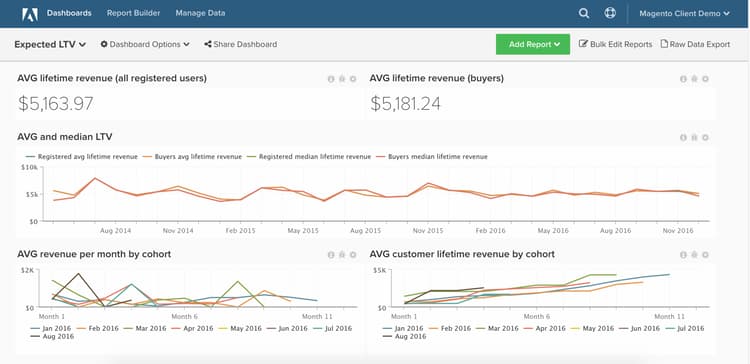
Den här analysen är endast tillgänglig för Pro-kontokunder med den nya arkitekturen. Om ditt konto har åtkomst till funktionen Persistent Views under sidofältet Manage Data, finns du i den nya arkitekturen och kan följa instruktionerna här för att själv bygga den här analysen.
Innan du börjar vill du bekanta dig med kohortrapportverktyget.
Beräknade kolumner
Kolumner att skapa i tabellen order om 30-dagars månader används:
-
Column name:
Months between first order and this order -
Column type:
Same Table -
Column equation:CALCULATION -
Column input: A =
Seconds between customer's first order date and this order -
Datatype:Integer -
Definition:
case when A is null then null when A <= 0 then '1'::int else (ceil(A)/2629800)::int end -
Column name:
Months since order -
Column type:
Same Table -
Column equation:CALCULATION -
Column input: A =
created_at -
Datatype:Integer -
Definition:
case when created_at is null then null else (ceil((extract(epoch from current_timestamp) - extract(epoch from created_at))/2629800))::int end
Kolumner som ska skapas i tabellen orders om kalendern månader används:
-
Column name:
Calendar months between first order and this order -
Column type:
Same Table -
Column equation:CALCULATION -
Column inputs:
A=created_atB=Customer's first order date
-
Datatype:Integer -
Definition:
case when (A::date is null) or (B::date is null) then null else ((date_part('year',A::date) - date_part('year',B::date))*12 + date_part('month',A::date) - date_part('month',B::date))::int end -
Column name:
Calendar months since order -
Column type:
Same Table -
Column equation:CALCULATION -
Column input:
A=created_at -
Datatype:Integer -
Definition:
case when A is null then null else ((date_part('year',current_timestamp::date) - date_part('year',A::date))*12 + date_part('month',current_timestamp::date) - date_part('month',A::date))::int end -
Column name:
Is in current month? (Yes/No) -
Column type:
Same Table -
Column equation:CALCULATION -
Column input: A =
created_at -
Datatype:String -
Definition:
case when A is null then null when (date_trunc('month', current_timestamp::date))::varchar = (date_trunc('month', A::date))::varchar then 'Yes' else 'No' end
Mått
Mätinstruktioner
Mätvärden som ska skapas
-
Distinkta kunder efter första orderdatum
- Om du aktiverar gästorder använder du
customer_email
- Om du aktiverar gästorder använder du
-
I tabellen
orders -
Detta mått utför ett antal distinkta värden
-
I kolumnen
customer_id -
Ordnad efter tidsstämpeln
Customer's first order date
Rapporter
Rapportinstruktioner
Förväntad intäkt per kund per månad
-
Mått
A:Revenue (hide)Calendar months between first order and this order<= X(Välj ett rimligt nummer för X, till exempel 24 månader)Is in current month?=No
-
-mått:Revenue -
Filter:
-
Mått
B:All time customers (hide)Is in current month?=No
-
Metric:
New customers by first order date -
Filter:
-
Mått
C:All time customers by month since first order (hide)Calendar months since order<= XIs in current month?=No
-
Metric:
New customers by first order date -
Filter:
-
Formula:
Expected revenue -
Formula:
A / (B - C) -
Format:Currency
Annan diagraminformation
-
Time period:
All time -
Tidsintervall:
None -
Group by:
Calendar months between first order and this order- visa alla -
Ändra
group byför måttetAll time customerstill Oberoende med pennikonen bredvidgroup by -
Redigera
Show top/bottom-fälten enligt följande:- Revenue:
Top 24 sorted by Calendar months between first order and this order - All time customers:
Top 24 sorted by All time customers - All time customers by month since first order:
Top 24 sorted by All time customers by month since first order
- Revenue:
Genomsnittlig intäkt per månad per kohort
- Mått
A:Revenue -
Metric view:Cohort - Cohort date:
Customer's first order date - Perspective:
Average value per cohort member
Kumulativ genomsnittlig intäkt per månad per kohort
- Mått
A:Revenue -
Metric view:Cohort - Cohort date:
Customer's first order date - Perspective:
Cumulative average value per cohort member
När du har kompilerat alla rapporter kan du ordna dem på kontrollpanelen som du vill. Resultatet kan se ut som bilden överst på sidan.
Kontakta support om du får frågor under arbetet med att skapa den här analysen, eller om du bara vill engagera Professional Services-teamet.