Nesta página: saiba como usar a atividade de direcionamento de consulta incremental para retornar somente novos registros em cada execução de campanha orquestrada, excluindo perfis já direcionados em execuções anteriores.
A atividade de Consulta incremental é uma atividade de Direcionamento que executa uma consulta de banco de dados sempre que a campanha Orquestrada é executada. A parte importante é que cada execução gera apenas registros cujo valor de campo de data seja posterior à data da execução anterior. Dessa forma, você evita redirecionar as mesmas pessoas ou reexportar as mesmas linhas.
Use-a quando a campanha puder ser executada várias vezes, por exemplo, ao agendar a campanha, por exemplo, semanalmente ou quando for acionada por um sinal externo ou uma API. Cada execução direciona somente registros datados após a execução anterior, de modo que você evite duplicatas.
Utilizações típicas:
- Mensagens e públicos-alvo: obtenha somente novas inscrições, novos compradores ou outros segmentos “novos desde a última execução” para a próxima etapa (por exemplo, email, mensagem móvel).
- Exportações em andamento: envie somente linhas novas ou atualizadas para arquivos para ferramentas de BI ou relatório, sem duplicar o que você já exportou.
Configurar a atividade de query incremental incremental-query-configuration
Defina o targeting dimension, crie seu query e escolha como a atividade decide quais registros serão excluídos de execuções futuras.
-
Solte uma atividade de Consulta incremental na sua campanha Orquestrada.
-
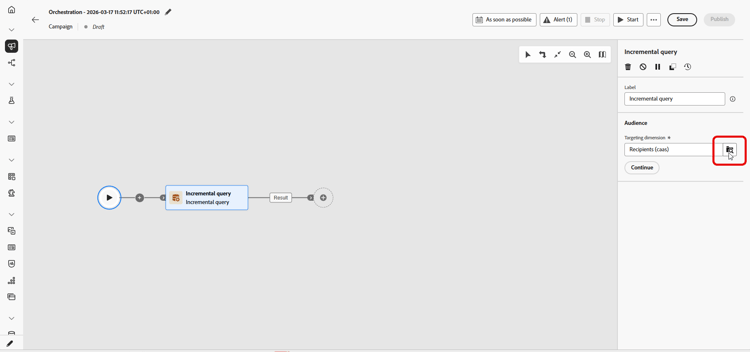
Em Audience, escolha a Targeting dimension, por exemplo, recipients, assinantes e clique em Continue. Saiba mais sobre Targeting dimensions.
-
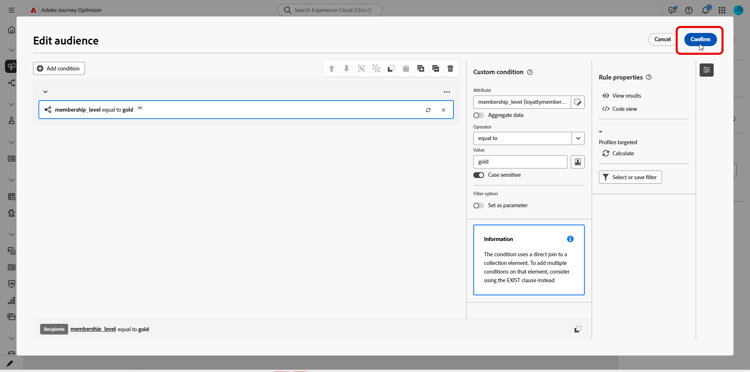
Clique em Adicionar condição para definir a consulta. Saiba como usar o construtor de regras.
-
Em Dados processados, escolha o Caminho para o campo de data. Um campo de data é obrigatório e o atributo deve usar o formato Data e hora. Cada execução retorna somente linhas cuja data seja posterior à última execução.
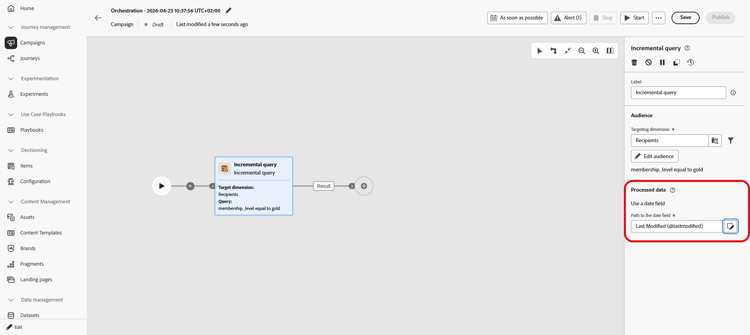
note NOTE A elegibilidade depende apenas do valor do campo de data, não de quando o registro foi assimilado. Um registro assimilado após a execução anterior não é retornado se o valor do campo de data for anterior à data dessa execução.
Verificar a data da última execução incremental-query-last-execution
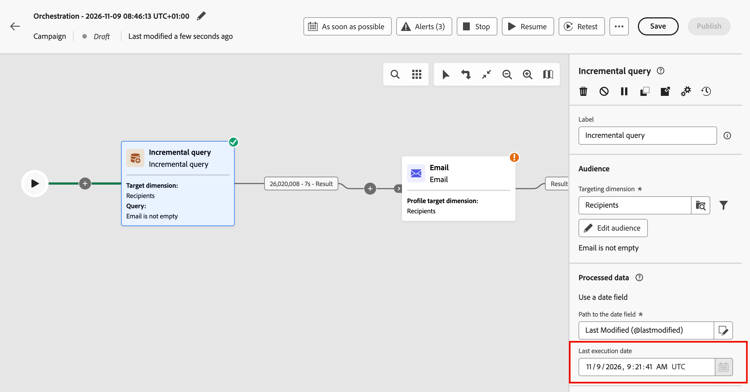
Depois que a atividade for executada, o campo Data da última execução será exibido em Dados processados, abaixo do Caminho para o campo de data. Ela mostra a data e a hora da execução anterior da atividade. Esta é a data limite usada pela próxima execução. Este campo é somente leitura.
Exemplo incremental-query-example
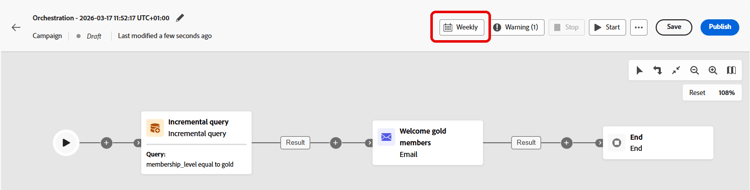
O exemplo a seguir envia um email de boas-vindas para perfis que acabaram de se tornar membros gold. A campanha pode ser agendada para ser executada semanalmente, às segundas-feiras. Cada execução direciona somente os perfis qualificados para associação gold desde a execução anterior, para que cada recipient receba o email de boas-vindas uma vez.
- Consulta incremental: seleciona membros gold. Primeira execução: todos os membros gold atuais. Execuções posteriores: somente perfis que se tornaram membros gold desde a execução anterior.
- Entrega de email: envia o email de boas-vindas para os perfis gerados pela consulta.
This section contains structured knowledge intended to support interpretation, retrieval, and question answering related to this topic.
For complete understanding, this information should be combined with the documentation on this page. Neither source is intended to stand alone; the page describes the feature, while this section provides additional context that helps disambiguate terminology, intent, applicability, and constraints.
- TL;DR: This page explains how to configure the Incremental query targeting activity in an Orchestrated campaign so that each run returns only records whose date field value is later than the previous execution.
Intents:
- Understand what the Incremental query activity does across repeated Orchestrated campaign runs.
- Configure the activity’s targeting dimension and query condition.
- Choose a date field under Processed data so that each run returns only rows dated after the last execution.
- Understand what happens to downstream activities when a run returns no rows.
- Build a “new since last run” audience for messaging or ongoing exports.
Glossary:
- Incremental query: a Targeting activity that runs a database query each time the Orchestrated campaign runs and outputs only records whose date field value is later than the previous execution (product-specific)
- Processed data: the configuration area where you choose how the activity excludes records from earlier runs, for example by using a date field (product-specific)
- Path to the date field: the attribute, in Date Time format, used under Processed data so each run returns only rows whose date is after the last execution (product-specific)
- Last execution date: the field displayed under Processed data, below the Path to the date field, once the activity has run; it shows the date and time of the previous execution and is the cutoff date used by the next run; the field is read-only (product-specific)
- Targeting dimension: the audience type selected for the activity, for example recipients or subscribers (product-specific)
Guardrails:
- When a run returns no rows, the Orchestrated campaign stops at the Incremental query; activities after it are not executed until there is data, when the campaign runs again.
- A date field is required under Processed data, and the attribute must use the Date Time format.
- Each run returns only rows whose date is after the last execution.
- Eligibility depends only on the value of the date field, not on when the record was ingested. A record ingested after the previous execution is not returned if its date field value is older than the date of that execution.
Terminology:
- Canonical name: Incremental query — variants: none
- Synonyms: none
- Do not confuse: “Incremental query” (a Targeting activity that excludes previously returned records) ≠ “Targeting dimension” (the audience type, e.g. recipients or subscribers, selected within the activity)
FAQ:
- Q: What does the Incremental query activity return on each run? — Only records whose date field value is later than the previous execution, regardless of when they were ingested.
- Q: When should I use the Incremental query activity? — When the campaign can run multiple times, for example when scheduled (e.g. weekly) or triggered by an external signal or API, so each run targets only records dated after the previous execution.
- Q: What is required under Processed data? — A Path to the date field, using the Date Time format; each run returns only rows whose date is after the last execution.
- Q: What happens if a run returns no rows? — The Orchestrated campaign stops at the Incremental query, and activities after it are not executed until there is data on a later run.
- Q: What are typical uses of the Incremental query? — Pulling “new since last run” segments (e.g. new sign-ups, new purchasers) into messaging, or sending only new or updated rows to files for reporting or BI tools.
Examples:
- Welcome email to new gold members: an Incremental query selects gold members (first run: all current gold members; later runs: only profiles that became gold members since the previous execution), followed by an Email delivery activity that sends the welcome email to the profiles output by the query. The campaign can be scheduled to run weekly, every Monday, so each recipient receives the welcome email once.
Related pages:
- To pick the audience type for the Incremental query: Targeting dimensions (orchestrated/target-dimension.md)
- To build the query condition for the Incremental query: Learn how to use the rule builder (orchestrated/orchestrated-rule-builder.md)
Personas:
- marketer: Can configure the Incremental query activity so each Orchestrated campaign run returns only records whose date field value is later than the previous execution. Can select the Targeting dimension, add a condition with the rule builder, and choose the Path to the date field under Processed data. The page states that a date field is required and the attribute must use the Date Time format. Where: “Configure the Incremental query activity”.
Onboarding:
- Level: Intermediate
- First minimal step: Drop an Incremental query activity into your Orchestrated campaign.
- Success check: Each run returns only rows whose date is after the last execution.
- Next: Selecting the Targeting dimension for the Incremental query activity: Create your Targeting dimension (orchestrated/target-dimension.md); Adding a condition to define the query in the Incremental query activity: Work with the rule builder (orchestrated/orchestrated-rule-builder.md)