Nesta página: defina o público-alvo, o tipo de identidade, a criação automática de perfil e os webhooks para que a campanha acionada pela API atinja os indivíduos certos e retorne o status da entrega em tempo real.
Use a guia Público-alvo para definir o público da campanha.
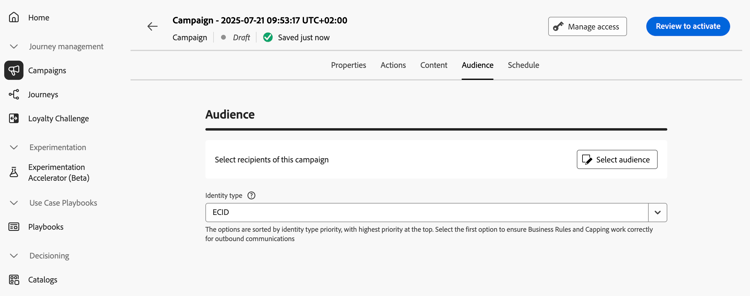
Selecionar o público-alvo
Para campanhas acionadas pela API de marketing, clique no botão Selecionar público-alvo para exibir a lista de públicos-alvo disponíveis da Adobe Experience Platform. Saiba mais sobre públicos.
Para campanhas acionadas por API transacional, os perfis direcionados precisam ser definidos na chamada de API. Uma única chamada de API suporta até 20 recipients únicos. Cada recipient deve ter uma ID de usuário exclusiva. IDs de usuário duplicadas não são permitidas. Saiba mais na Documentação da API de execução de mensagem interativa
Selecione o tipo de identidade
No campo Tipo de identidade, escolha o tipo de chave a ser usado para identificar os indivíduos do público-alvo selecionado. Você pode usar um tipo de identidade existente ou criar um novo usando o Serviço de identidade da Adobe Experience Platform. Os namespaces de Identidade Padrão estão listados em esta página.
Somente um tipo de identidade é permitido por campanha. Indivíduos pertencentes a um segmento que não tem o tipo de identidade selecionado entre suas diferentes identidades não podem ser alvos da campanha. Saiba mais sobre tipos de identidade e namespaces na documentação do Adobe Experience Platform.
Ativar criação de perfil na execução da campanha
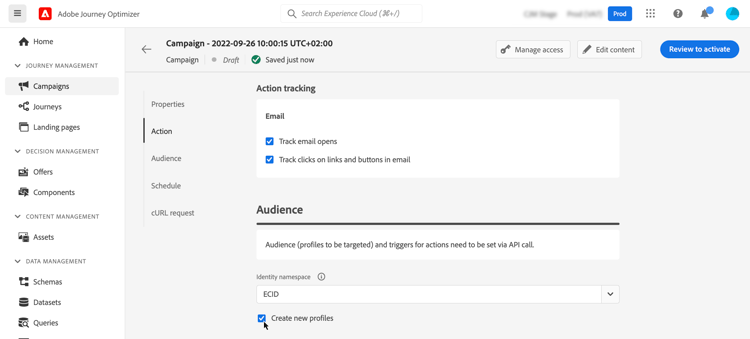
Em alguns casos, pode ser necessário enviar mensagens transacionais para perfis que não existem no sistema. Por exemplo, se um usuário desconhecido tentar redefinir a senha no seu site. Quando um perfil não existe no banco de dados, o Journey Optimizer permite que você o crie automaticamente ao executar a campanha para permitir o envio da mensagem para esse perfil.
Para ativar a criação de perfil na execução da campanha, alterne a opção Criar novos perfis para ativada. Se essa opção estiver desativada, perfis desconhecidos serão rejeitados para qualquer envio e a chamada à API falhará.
Habilitar webhooks webhook
Para campanhas acionadas por API transacional, é possível habilitar webhooks a receberem feedback em tempo real sobre o status de execução de suas mensagens. Para fazer isso, alterne a opção Habilitar webhooks para enviar eventos de status de entrega para um webhook configurado.
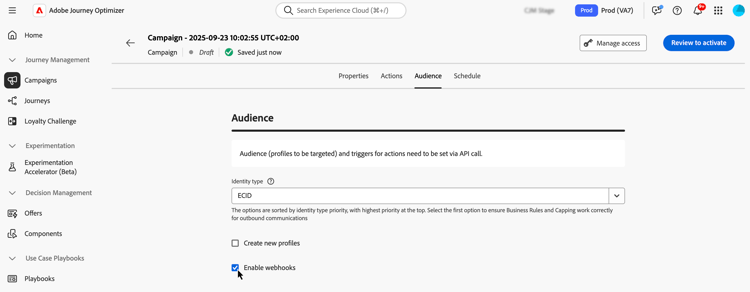
As configurações do Webhook são gerenciadas centralmente no menu Administração / Canais / Webhook de feedback. A partir daí, os administradores podem criar e editar endpoints do webhook. Saiba como criar webhooks de comentários
Próximas etapas next
Quando a configuração e o conteúdo da campanha estiverem prontos, você poderá agendar a execução. Saiba mais
This section contains structured knowledge intended to support interpretation, retrieval, and question answering related to this topic.
For complete understanding, this information should be combined with the documentation on this page. Neither source is intended to stand alone; the page describes the feature, while this section provides additional context that helps disambiguate terminology, intent, applicability, and constraints.
- TL;DR: This page explains how to define the audience of an API triggered campaign, including the identity type, automatic profile creation at campaign execution, and webhooks for delivery status.
Intents:
- Select the audience of a Marketing API triggered campaign
- Understand how recipients are defined for a Transactional API triggered campaign
- Select the identity type used to identify individuals
- Activate profile creation at campaign execution for unknown profiles
- Enable webhooks to receive delivery status events for Transactional API triggered campaigns
Glossary:
- Marketing API triggered campaigns: The audience is selected from the list of available Adobe Experience Platform audiences with Select audience (product-specific)
- Transactional API triggered campaigns: The targeted profiles are defined in the API call (product-specific)
- Identity type: The type of key used to identify the individuals from the selected audience; an existing identity type or a new one created with the Adobe Experience Platform Identity Service
- Create new profiles: Option that automatically creates a profile that does not exist in the database when the campaign is executed
- Enable webhooks: Option that sends delivery status events to a configured webhook
- Feedback Webhook: Menu under Administration / Channels where webhook configurations are managed centrally
Guardrails:
- A single API call supports up to 20 unique recipients, for Transactional API triggered campaigns.
- Each recipient must have a unique user ID; duplicate user IDs are not permitted.
- Only one identity type is allowed per campaign.
- Individuals belonging to a segment that does not have the selected identity type among their different identities cannot be targeted by the campaign.
- The use of audiences and attributes from audience composition is currently unavailable for use with Healthcare Shield or Privacy and Security Shield.
- If Create new profiles is disabled, unknown profiles are rejected for any sending and the API call fails.
- Create new profiles is provided for very small volume profile creation in a large volume transactional sending use case, with the bulk of profiles already existing in Platform.
- Unknown profiles are created in the AJO Interactive Messaging Profile Dataset dataset, in three default namespaces (email, phone and ECID) respectively for each outbound channel (Email, Mobile and Push). With a custom namespace, the identity is created with the same custom namespace.
- Profile creation at execution is not available for High Throughput campaigns, as this mode does not rely on Adobe profiles. The system does not check whether the profiles exist or not.
Applicability:
- Audience selection with Select audience: Marketing API triggered campaigns
- Targeted profiles defined in the API call: Transactional API triggered campaigns
- Enable webhooks: Transactional API triggered campaigns
Terminology:
- Canonical name: API triggered campaign audience
- Acronym: AEP — Adobe Experience Platform
- Short name: Platform — Adobe Experience Platform
- Do not confuse: “Marketing API triggered campaigns” (audience selected with Select audience) ≠ “Transactional API triggered campaigns” (profiles defined in the API call)
FAQ:
- Q: How are recipients defined for a Transactional API triggered campaign? — The targeted profiles need to be defined in the API call. A single API call supports up to 20 unique recipients, each with a unique user ID.
- Q: How many identity types can a campaign use? — Only one identity type is allowed per campaign.
- Q: What happens to an unknown profile? — If Create new profiles is on, the profile is created when the campaign is executed. If it is disabled, unknown profiles are rejected for any sending and the API call fails.
- Q: Can I create profiles at execution in High Throughput campaigns? — No. Profile creation at execution is not available for High Throughput campaigns.
- Q: Where are webhook configurations managed? — In the Administration / Channels / Feedback Webhook menu, where administrators can create and edit webhook endpoints.
Related pages:
- Audiences available for Marketing campaigns: Learn more about audiences (audience/about-audiences.md)
- Audience composition: audience composition (audience/get-started-audience-orchestration.md)
- Transactional recipients in the API call: Interactive Message Execution API documentation (https://developer.adobe.com/journey-optimizer-apis/references/messaging#operation/postIMUnitaryMessageExecution)
- Standard Identity namespaces: this page (https://experienceleague.adobe.com/en/docs/experience-platform/identity/features/namespaces#standard)
- Identity types and namespaces: Adobe Experience Platform documentation (https://experienceleague.adobe.com/docs/experience-platform/identity/home.html)
- High Throughput campaigns: High Throughput campaigns (campaigns/api-triggered-high-throughput.md)
- Creating Feedback Webhooks: Learn how to create Feedback Webhooks (configuration/feedback-webhooks.md)
- Next step, scheduling: Learn more (campaigns/api-triggered-campaign-schedule.md)