이 페이지에서 다루는 내용: 데이터 수명주기 작업을 구성하고 예약하여 기록이 정확하게 유지되고, 의도된 용도로 사용되며, 조직 정책에 따라 삭제되도록 합니다.
Adobe Experience Platform에서는 데이터를 지속적으로 수집하므로 데이터를 의도한 대로 사용하고 필요할 때 업데이트하며 조직 정책에 따라 삭제하는 것이 더욱 중요합니다.
이 작업은 데이터 수명주기 작업을 구성하고 예약함으로써 기록을 적절하게 유지 관리하도록 도와주는 데이터 수명주기 메뉴를 사용하여 실행할 수 있습니다.
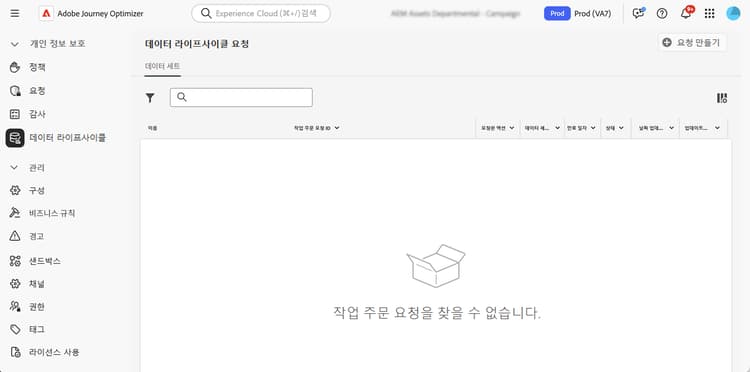
추천 data-hygiene-recommendations
데이터 정리 작업(예: 신원 또는 데이터 세트 삭제)을 수행할 때는 삭제된 신원과 연결된 과거 게재 이벤트가 표준 보고 또는 데이터레이크 쿼리에 더 이상 표시되지 않게 된다는 점에 유의하십시오. 이로 인해 전달됨으로 보고되는 이메일 수와 수신자의 받은 편지함에서 수신된 이메일 수가 일치하지 않을 수 있습니다. 특히 오래된 여정의 경우 더 그럴 가능성이 높습니다.
대규모 삭제를 실행하기 전에 필요한 게재 또는 보고 데이터를 모두 확인하고 내보냅니다. 데이터 정리 작업 이후에 조정이 필요한 경우 Adobe 지원팀과 협력하여 아카이빙된 로그에 액세스하거나 최근 데이터에 [메시지 피드백 이벤트 데이터 세트] 쿼리를 사용하십시오.
자세히 알아보기 data-hygiene-learn-more
Privacy Service 및 데이터 수명주기 작업을 수행하는 방법에 대한 자세한 내용은 Adobe Experience Platform 설명서를 참조하세요.
This section contains structured knowledge intended to support interpretation, retrieval, and question answering related to this topic.
For complete understanding, this information should be combined with the documentation on this page. Neither source is intended to stand alone; the page describes the feature, while this section provides additional context that helps disambiguate terminology, intent, applicability, and constraints.
- TL;DR: This page explains how to configure and schedule data lifecycle operations so you can keep your records accurate, used as intended, and deleted in line with your organizational policies.
Intents:
- Understand what data lifecycle operations accomplish
- Configure and schedule operations using the Data Lifecycle menu
- Understand the reporting impact of deleting identities or datasets
- Prepare for large-scale deletions by validating and exporting required data
- Know the availability requirements for data lifecycle capabilities
Glossary:
- Data lifecycle operations: operations configured and scheduled from the Data Lifecycle menu to keep records accurate, used as intended, and deleted per organizational policies (product-specific)
- Data hygiene operations: operations such as deleting identities or datasets (product-specific)
- Data Lifecycle: the menu used to configure and schedule data lifecycle operations (product-specific)
- Message Feedback Event Dataset: dataset that can be queried to access recent data if reconciliation is needed after data hygiene (product-specific)
Guardrails:
- Data lifecycle capabilities are currently only available for organizations that have purchased the Healthcare Shield and Privacy and Security Shield add-on offerings (availability constraint)
- When performing data hygiene operations (such as deleting identities or datasets), historical delivery events associated with deleted identities will no longer appear in standard reporting or datalake queries
- Data hygiene operations can result in discrepancies between the number of emails reported as Delivered and the number of emails Received in recipient inboxes, especially for older journeys
- Before executing large-scale deletions, validate and export any required delivery or reporting data (recommended)
Terminology:
- Canonical name: Data lifecycle operations
- Do not confuse: “Delivered” (emails reported as delivered in standard reporting) ≠ “Received” (emails received in recipient inboxes)
FAQ:
- Q: Who can use data lifecycle capabilities? — Organizations that have purchased the Healthcare Shield and Privacy and Security Shield add-on offerings.
- Q: What happens to reporting after data hygiene operations such as deleting identities or datasets? — Historical delivery events associated with deleted identities no longer appear in standard reporting or datalake queries.
- Q: What should you do before large-scale deletions? — Validate and export any required delivery or reporting data.
- Q: How can you reconcile data after data hygiene? — Coordinate with Adobe support to access archived logs, or use Message Feedback Event Dataset queries for recent data.