이 페이지에서: 외부 시스템이 지원되는 초당 요청 수를 초과하지 않도록 사용자 지정 작업 및 외부 데이터 원본을 사용하여 여정 처리를 제한하는 방법에 대해 알아봅니다.
외부 시스템에서 초당 제한된 요청 수를 처리해야 하는 경우 이 사용 사례를 사용하여 여정 처리를 조정합니다.
사용 사례에 대한 설명
Adobe Journey Optimizer을(를) 사용하면 전문가가 사용자 지정 작업 및 데이터 원본을 사용하여 외부 시스템에 API 호출을 보낼 수 있습니다.
이 작업은 를 사용하여 수행할 수 있습니다.
-
데이터 원본: 외부 시스템에서 정보를 수집하여 여정 컨텍스트에서 사용합니다. 예를 들어 프로필 도시에 대한 날씨 정보를 얻고 이를 기반으로 전용 여정 흐름을 가질 수 있습니다.
-
사용자 지정 작업: 외부 시스템에 정보를 보냅니다. 예를 들어 프로필 정보, 대상 데이터 및 여정 컨텍스트와 함께 Journey Optimizer의 오케스트레이션 기능을 사용하여 외부 솔루션을 통해 전자 메일을 보내는 작업입니다.
외부 데이터 소스 또는 사용자 지정 작업으로 작업하는 경우 여정 처리량을 제한하여 외부 시스템을 보호할 수 있습니다(단일 여정의 경우 최대 5,000인스턴스/초, 대상자에서 트리거되는 인스턴스의 경우 최대 20,000인스턴스/초). 이 섹션에서 여정 처리 속도 및 처리량에 대해 자세히 알아보세요.
사용자 지정 작업의 경우 제품 수준에서 제한 기능을 사용할 수 있습니다. 이 페이지를 참조하세요.
외부 데이터 소스의 경우 엔드포인트 수준에서 최대 가용량 제한을 정의하여 Journey Optimizer의 최대 가용량 API를 통해 이러한 외부 시스템을 압도하지 않도록 할 수 있습니다. 그러나 제한에 도달한 후 남은 모든 요청은 삭제됩니다. 이 섹션에서는 처리량을 최적화하는 데 사용할 수 있는 해결 방법을 찾을 수 있습니다.
외부 시스템과 통합하는 방법에 대한 자세한 내용은 이 페이지를 참조하세요.
구현
대상이 트리거된 여정의 경우 여정 처리량에 영향을 주는 대상 읽기 활동의 읽기 속도를 정의할 수 있습니다. 자세히 보기
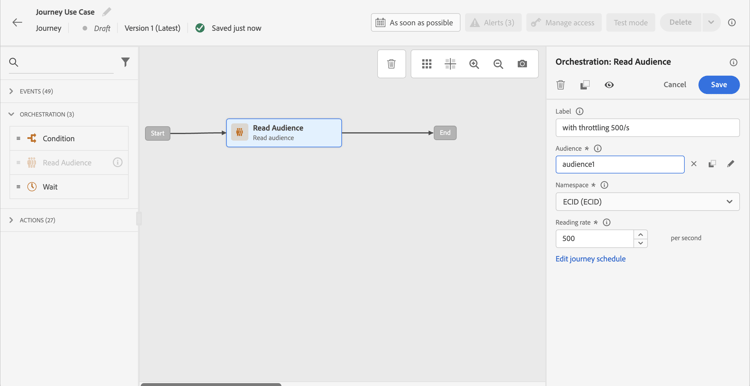
이 값은 초당 500개에서 20,000개의 인스턴스로 수정할 수 있습니다. 500/s보다 낮아야 하는 경우 대기 활동과 함께 “비율 분할” 조건을 추가하여 여정을 여러 분기로 분할하고 특정 시간에 실행되도록 할 수도 있습니다.
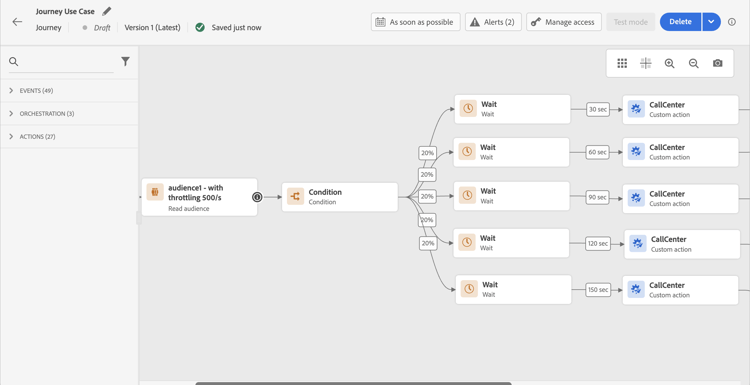
10,000개 프로필의 모집단으로 작업하고 100개 요청/초을 지원하는 외부 시스템에 데이터를 보내는 대상자에서 트리거되는 여정의 예를 살펴보겠습니다.
-
초당 500개의 프로필 처리량으로 프로필을 읽도록 대상 읽기 를 정의할 수 있습니다. 즉, 모든 프로필을 읽는 데 20초가 소요됩니다. 두 번째 1에서는 500개, 두 번째 2에서는 500개 더 읽을 수 있습니다.
-
그런 다음 20% 분할로 “비율 분할” 조건 활동을 추가하여 각 분기의 각 초 100개 프로필을 가질 수 있습니다.
-
그런 다음 각 분기에 특정 타이머가 있는 대기 활동을 추가합니다. 여기서는 각 항목을 30초 동안 대기하도록 설정했습니다. 매 초마다 100개의 프로필이 각 분기로 유입됩니다.
-
분기 1에서 30초 동안 대기하며, 이는 다음을 의미합니다.
- 두 번째 1에서는 100개의 프로필이 두 번째 31을 기다립니다.
- 두 번째 2에서는 100개의 프로필이 두 번째 32개를 기다립니다.
-
2분기에서는 60초 동안 대기하며, 이는 다음을 의미합니다.
- 두 번째 1에서는 100개의 프로필이 두 번째 61(1’01’')을 기다립니다.
- 두 번째 2에서는 100개의 프로필이 두 번째 62(1’02’')를 기다립니다.
-
최대 20초가 모든 프로필을 읽을 것으로 예상되므로 각 분기 간에 겹치는 부분이 없으며 프로필이 조건으로 유입되는 마지막 부분이 20초입니다. 두 번째 31과 두 번째 51 사이에서 분기 1의 모든 프로필이 처리됩니다. 두 번째 61(1’01’‘)과 두 번째 81(1’21’') 사이에 분기 2의 모든 프로필이 처리됩니다.
-
가드레일로서, 특히 외부 시스템이 초당 100개의 요청만 지원하는 경우 여섯 번째 분기를 추가하여 분기당 100개 미만의 프로필을 보유할 수도 있습니다.
-
추가 가드레일로는 캡핑 기능을 사용할 수도 있습니다.
This section contains structured knowledge intended to support interpretation, retrieval, and question answering related to this topic.
For complete understanding, this information should be combined with the documentation on this page. Neither source is intended to stand alone; the page describes the feature, while this section provides additional context that helps disambiguate terminology, intent, applicability, and constraints.
- TL;DR: This page explains how to limit journey throughput when external data sources or custom actions have a capped number of requests per second, using Read Audience rate configuration, percentage splits, and wait activities.
Intents:
- Limit the throughput of an audience-triggered journey to protect an external system from being overwhelmed
- Configure the reading rate of a Read Audience activity to control how many profiles enter per second
- Combine percentage split conditions and wait activities to spread profile processing over time
- Understand the difference between journey-level throughput workarounds and sandbox-level capping capabilities
- Apply capping capabilities to custom actions at the product level
Glossary:
- Throttling / throughput limiting: Controlling the rate at which profiles flow through a journey to avoid exceeding the request capacity of an external system. (product-specific)
- Read Audience reading rate: A configurable parameter on the Read Audience activity that sets the maximum number of profiles entering the journey per second (range: 500–20,000 instances/second). (product-specific)
- Capping API: A Journey Optimizer API that defines a maximum request limit per endpoint for external data sources; requests beyond the cap are dropped. (product-specific)
- Percentage split condition: A condition activity that divides the profile flow into branches by percentage, used here to distribute profiles across time-staggered wait paths. (product-specific)
Guardrails:
- Read Audience reading rate can be set between 500 and 20,000 instances per second; values below 500/s require a workaround using percentage splits and wait activities
- Unitary journeys support up to 5,000 instances/second; audience-triggered journeys support up to 20,000 instances/second
- The percentage-split + wait workaround operates only at journey level, not across all journeys in the sandbox
- When multiple journeys target the same external endpoint in parallel, this workaround does not account for the combined load — capping capabilities should be used instead
- Remaining requests that exceed the capping limit on external data sources are dropped, not queued
- The workaround must be thoroughly tested before going to production
Terminology:
- Canonical name: Throughput limiting — Acronym: none — variants: throttling, rate limiting, journey throughput control
- Synonyms: “Capping” = “throttling” in the context of external endpoint protection
- Do not confuse: “Capping API (endpoint-level)” ≠ “reading rate (journey-level)” — The Capping API applies globally to all journeys in a sandbox targeting an endpoint; the reading rate and split/wait workaround apply only to the individual journey
FAQ:
- Q: What is the maximum reading rate I can set on a Read Audience activity? — Between 500 and 20,000 profiles per second; to go below 500/s, use a percentage split with wait activities.
- Q: How do percentage splits and wait activities help limit throughput? — By splitting profiles into branches (e.g., 20% each) and adding staggered wait timers per branch, you ensure that only a controlled number of profiles reach the external system per second.
- Q: Does the percentage-split workaround protect all journeys targeting the same endpoint? — No; it only works at the individual journey level. If multiple journeys run in parallel against the same endpoint, use sandbox-level Capping capabilities instead.
- Q: What happens to requests that exceed the capping limit on an external data source? — They are dropped; the Capping API does not queue excess requests.
- Q: Should I use custom actions or data sources for external data use cases? — Custom actions are preferred because they support response handling; data sources should be used only when the use case specifically requires them.