이 페이지에서: 사용자 지정 작업의 API 호출에서 반환된 응답 페이로드를 캡처하여 여정을 조정하고, 메시지를 개인화하고, 외부 시스템의 데이터를 기반으로 오류를 처리할 수 있습니다.
사용자 지정 작업에서 API 호출 응답을 활용하고, 이러한 응답을 기반으로 여정을 오케스트레이션할 수 있습니다.
중요 정보 custom-action-enhancements-notes
-
스칼라 배열은 응답 페이로드에서 지원됩니다.
code language-none "dummyScalarArray": [ "val1", "val2" ] -
이기종 스토리지는 응답 페이로드에서 지원되지 않습니다.
code language-none "dummyRandomArray": [ 20, "aafw", false ]
사용자 지정 작업 구성 config-response
-
사용자 지정 작업을 만듭니다. 이 페이지를 참조하십시오.
-
응답(성공 응답) 필드 내부를 클릭합니다.
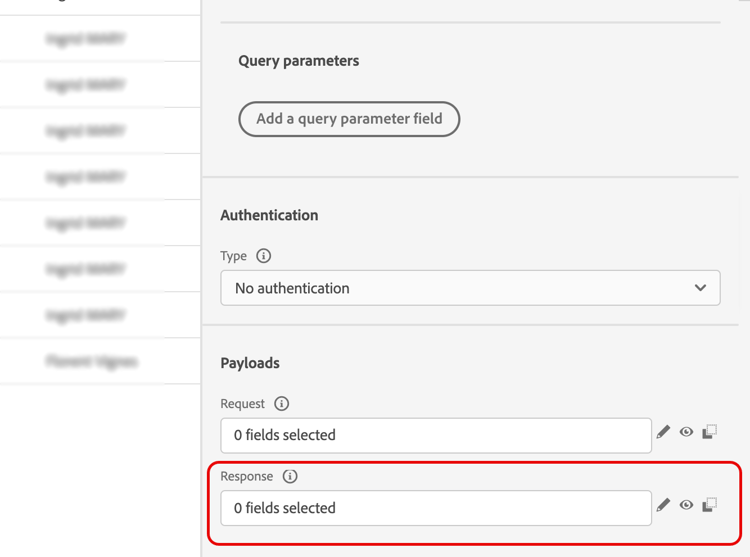
-
호출에서 반환된 페이로드의 예제를 붙여넣습니다. 필드 유형(문자열, 정수 등)이 올바른지 확인합니다. 다음은 호출 동안 캡처된 응답 페이로드의 예입니다. 로컬 엔드포인트는 충성도 포인트 수 및 프로필 상태를 전송합니다.
code language-none { "customerID" : "xY12hye", "status":"gold", "points": 1290 }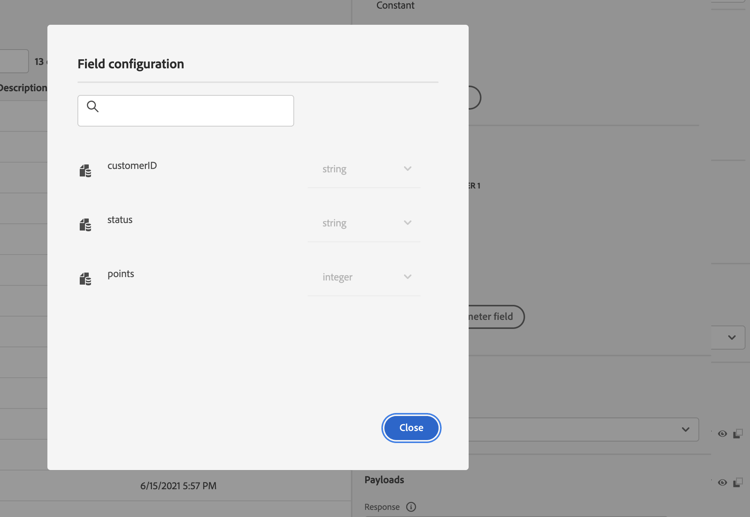
API를 호출할 때마다 시스템은 페이로드 예제에 포함된 모든 필드를 검색합니다.
-
(선택 사항) 오류 응답 페이로드를 활성화하여 호출 실패 시 반환되는 형식을 캡처한 다음 예제 페이로드를 붙여 넣습니다. 이렇게 하려면 사용자 지정 작업 구성에서 실패 응답 페이로드 정의를 선택하십시오. 사용자 지정 작업 구성에서 페이로드 필드를 구성하는 방법에 대해 자세히 알아보세요.
code language-none { "errorResponse" : "customer not found" }오류 응답 페이로드는 사용자 지정 작업 구성에서 활성화한 경우에만 사용할 수 있습니다.
-
customerID를 쿼리 매개 변수로도 추가하겠습니다.
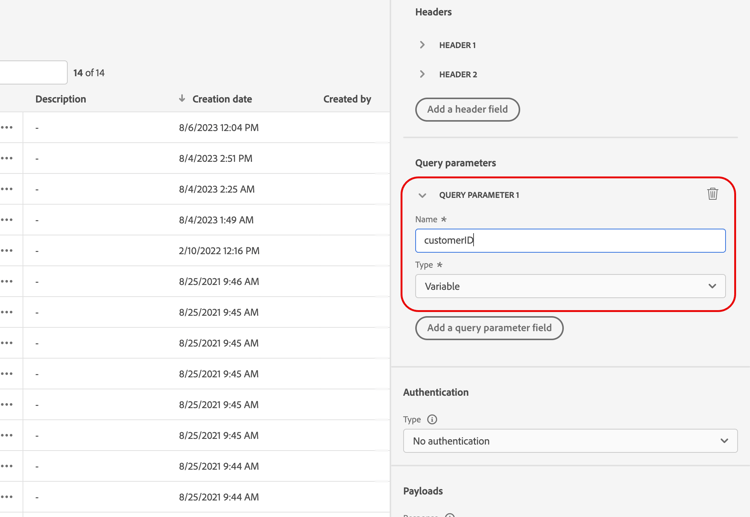
-
저장을 클릭합니다.
여정에서 응답 활용 response-in-journey
여정에 사용자 지정 작업을 추가하기만 하면 됩니다. 그런 다음 조건, 기타 작업 및 메시지 개인화의 응답 페이로드 필드를 활용할 수 있습니다.
오류 응답 페이로드를 정의한 경우 컨텍스트 특성 > Journey Orchestration > 작업 > <action name> > 오류 응답에 표시됩니다. 시간 초과 및 오류 분기에서 이를 사용하여 대체 논리 및 오류 처리를 구동할 수 있습니다.
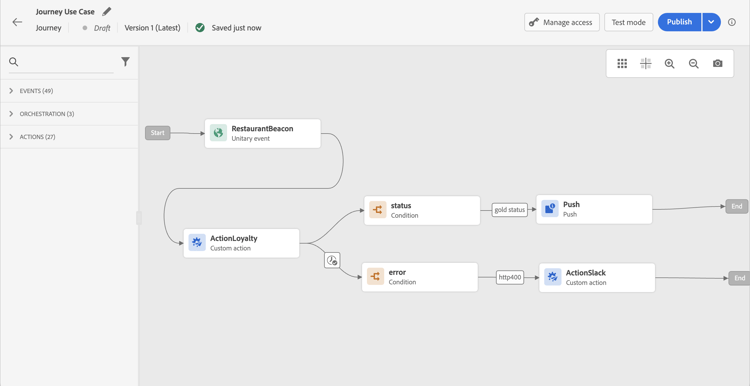
예를 들어 충성도 포인트의 수를 확인하는 조건을 추가할 수 있습니다. 사용자가 레스토랑에 들어오면 로컬 종단점이 프로필의 충성도 정보와 함께 호출을 보냅니다. 프로필이 Gold 고객인 경우 푸시를 보낼 수 있습니다. 또한 호출에서 오류가 감지되면 시스템 관리자에게 알리는 사용자 지정 작업을 보내십시오.
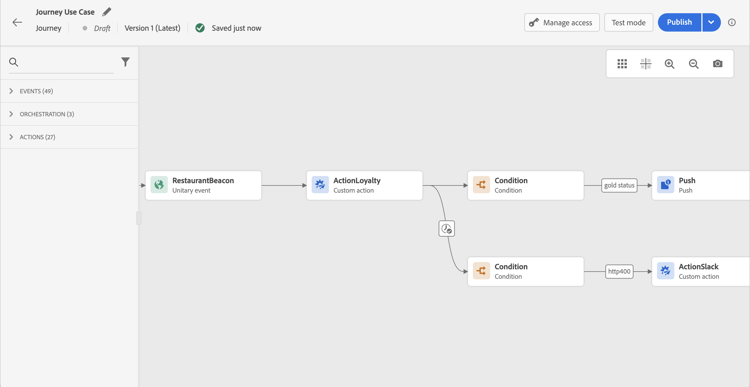
-
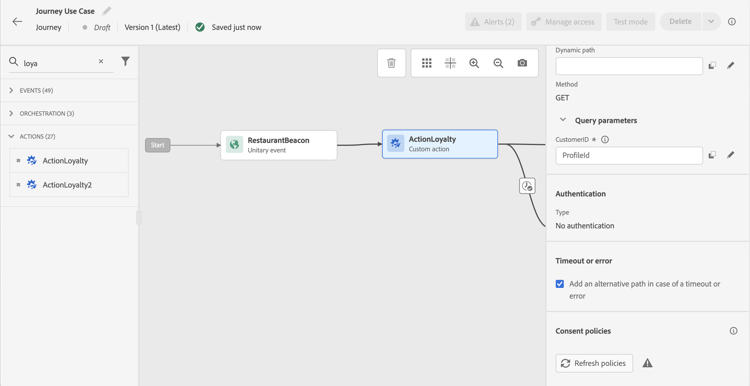
이전에 만든 이벤트와 충성도 사용자 지정 작업을 추가합니다.
-
충성도 사용자 지정 작업에서 고객 ID 쿼리 매개 변수를 프로필 ID에 매핑합니다. 시간 초과 또는 오류 발생 시 대체 경로를 추가 옵션을 선택합니다.
-
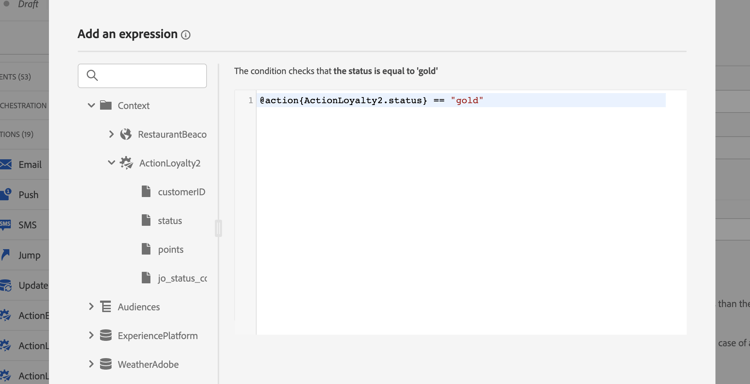
첫 번째 분기에서 조건을 추가하고 고급 편집기를 사용하여 Context 노드 아래의 작업 응답 필드를 활용합니다.
-
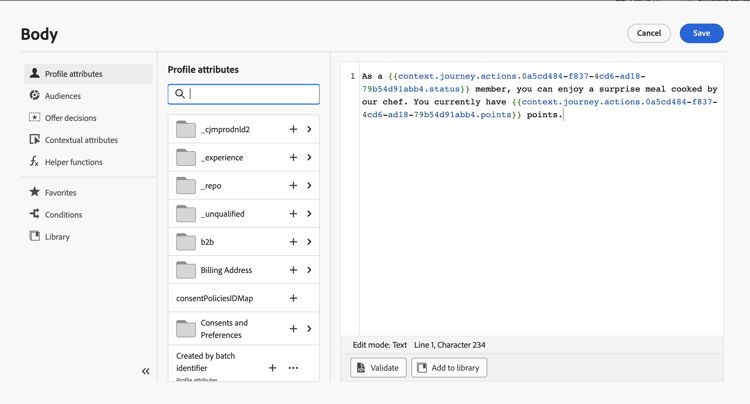
그런 다음 푸시를 추가하고 응답 필드를 사용하여 메시지를 개인화합니다. 이 예제에서는 충성도 포인트 수와 고객 상태를 사용하여 콘텐츠를 개인화합니다. 작업 응답 필드는 컨텍스트 특성 > Journey Orchestration > 작업에서 사용할 수 있습니다.
note NOTE 사용자 지정 작업을 입력하는 각 프로필은 호출을 트리거합니다. 응답이 항상 동일하더라도 여정은 프로필당 한 번의 호출을 수행합니다. -
시간 제한 및 오류 분기에 조건을 추가하고 기본 제공 jo_status_code 필드를 활용하십시오. 이 예제에서는
http_400 오류 유형입니다. 이 섹션을 참조하십시오.code language-none @action{ActionLoyalty.jo_status_code} == "http_400"오류 응답 페이로드가 정의된 경우 해당 필드를 타겟팅할 수도 있습니다. 예를 들면 다음과 같습니다.
code language-none @action{ActionLoyalty.errorResponse.errorResponse} == "customer not found"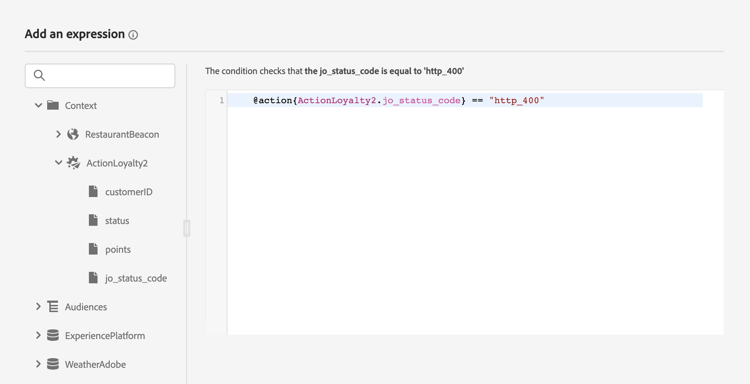
-
조직에 전송할 사용자 지정 작업을 추가합니다.
테스트 모드 로그 test-mode-logs
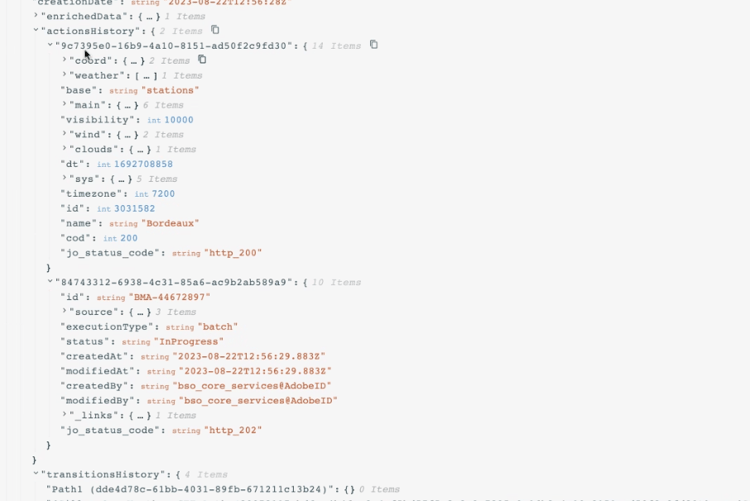
테스트 모드를 통해 사용자 지정 작업 응답과 관련된 상태 로그에 액세스할 수 있습니다. 여정에서 응답이 있는 사용자 지정 작업을 정의한 경우 해당 로그에 외부 끝점에서 반환된 페이로드를 표시하는 actionsHistory 섹션이 표시됩니다(해당 사용자 지정 작업의 응답). 오류 응답 페이로드가 정의되면 실패한 호출에 포함됩니다. 이 기능은 디버깅 측면에서 매우 유용할 수 있습니다.
오류 상태 error-status
응답 페이로드가 정의되지 않은 경우에도 jo_status_code 필드를 항상 사용할 수 있습니다.
다음은 이 필드에 사용할 수 있는 값입니다.
- http 상태 코드: http_
<HTTP API call returned code>(예: http_200 또는 http_400) - 시간 초과 오류: 시간 초과
- 최대 가용량 오류: 제한됨
- 내부 오류: internalError
반환된 http 코드가 2xx보다 크거나 오류가 발생하면 작업 호출이 오류로 간주됩니다. 이러한 경우 여정은 전용 시간 초과 또는 오류 분기로 이동합니다.
사용자 지정 작업에 대해 오류 응답 페이로드가 구성된 경우 해당 필드가 실패한 호출에 대해 errorResponse 노드 아래에 표시됩니다. 오류 응답 페이로드가 구성되어 있지 않으면 해당 노드를 사용할 수 없습니다.
표현식 구문 exp-syntax
구문은 다음과 같습니다.
#@action{myAction.myField}
다음은 몇 가지 예입니다.
 // action response field
 @action{<action name>.<path to the field>}
 @action{ActionLoyalty.status}
 // action response field
 @action{<action name>.<path to the field>, defaultValue: <default value expression>}
 @action{ActionLoyalty.points, defaultValue: 0}
 @action{ActionLoyalty.points, defaultValue: @event{myEvent.newPoints}}
사용자 지정 작업 응답에서 컬렉션을 조작하는 동안 currentActionField을(를) 사용하여 현재 항목에 액세스할 수 있습니다.
count(
@action{MyAction.MyCollection.all(
currentActionField.description == "abc"
)}
)
기본 채널에서 사용자 지정 작업 응답 사용 response-in-channels
사용자 지정 작업의 응답 페이로드 필드는 메시지 개인화를 위해 기본 채널(이메일, 푸시, 모바일 메시지)에서 사용할 수 있습니다. 여기에는 외부 API에서 반환되는 중첩된 데이터 구조와 배열을 반복하는 기능이 포함됩니다.
메시지의 사용자 지정 작업 응답 데이터를 반복하기 위한 자세한 예제와 구문은 Handlebars를 사용하여 컨텍스트 데이터 반복을 참조하십시오.
추가 리소스
자세한 내용은 다음 페이지를 참조하십시오.
This section contains structured knowledge intended to support interpretation, retrieval, and question answering related to this topic.
For complete understanding, this information should be combined with the documentation on this page. Neither source is intended to stand alone; the page describes the feature, while this section provides additional context that helps disambiguate terminology, intent, applicability, and constraints.
- TL;DR: This page explains how to capture the response payload returned by a custom action’s API call and leverage it to orchestrate journeys, personalize messages, and handle errors.
Intents:
- Configure a custom action to capture success and failure response payloads
- Leverage response payload fields in conditions, other actions, and message personalization
- Handle errors and timeouts using the jo_status_code field and the errorResponse node
- Inspect custom action responses through test mode logs
- Use the expression syntax to reference response fields, including default values and collections
Glossary:
- Response payload: The example payload pasted in the Response (success response) field whose fields are retrieved on each call (product-specific)
- Error response payload: The payload captured when a call fails, enabled by selecting Define a failure response payload, exposed under the errorResponse node (product-specific)
- jo_status_code: A built-in field, always available even when no response payload is defined, that carries the call outcome (product-specific)
- actionsHistory: A section shown in test mode logs that displays the payload returned by the external endpoint (product-specific)
- currentActionField: A reference used to access the current item when manipulating collections in a custom action response (product-specific)
- Test mode: The mode through which you access status logs related to custom action responses (product-specific)
Guardrails:
- Scalar arrays are supported in the response payload, but heterogeneous arrays are not supported.
- Only newly created custom actions include the jo_status_code field out-of-the-box; to use it with an existing custom action you need to update the action, for example by updating the description and saving.
- An action call is considered in error when the returned http code is greater than 2xx or if an error occurs, and the journey flows to the dedicated timeout or error branch.
- If an error response payload is configured, its fields are exposed under the errorResponse node for failed calls; if none is configured, that node is not available.
- Each profile entering the custom action triggers one call, even if the response is always the same.
Terminology:
- Canonical name: API call response in custom actions — Acronym: n/a — variants: custom action response, response payload
- Synonyms: “success response” = “Response field”
- Do not confuse: “Response” (success response payload) ≠ “Error Response” (failure response payload defined via Define a failure response payload)
- jo_status_code values: http_
(for example http_200 or http_400), timedout (timeout error), capped (capping error), internalError (internal error)``
`FAQ:
Q: Which array types are supported in the response payload? — Scalar arrays are supported; heterogeneous arrays are not supported. Q: Why does an existing custom action not expose the jo_status_code field? — Only newly created custom actions include it out-of-the-box; update the existing action, for example by updating the description and saving, to add it. Q: When is an action call considered in error? — When the returned http code is greater than 2xx or an error occurs, after which the journey flows to the dedicated timeout or error branch. Q: Where can the returned payload be inspected? — Through test mode logs, in the actionsHistory section that displays the payload returned by the external endpoint. Q: Can response payload fields be used in native channels? — Yes, response payload fields from custom actions can be used in native channels (email, push, mobile messages) for message personalization.`
``