이 페이지에서: 중지 작업 활동을 사용하여 여정을 종료하지 않고 선택한 인바운드 활동에서 프로필을 제거하는 방법에 대해 알아봅니다.
하나 이상의 선택한 업스트림 인바운드 활동(최대 5개)에서 프로필을 제거하려면 중지 작업 활동을 사용하십시오(인앱, 콘텐츠 카드, 웹 또는 코드 기반 경험). 프로필이 이 단계에 도달하면 선택한 경험에 대한 자격이 중지되고 여정에서 계속 진행됩니다. 다른 인바운드 활동은 영향을 받지 않습니다.
여정을 중지하여 모든 프로필이 중지되는 것과 달리 중지 작업은(는) 이 단계에 도달하는 프로필에 대해 선택한 인바운드 활동에만 적용됩니다.
활동을 배치할 위치 placement
Stop 작업 활동은 대상 인바운드 활동의 다운스트림이어야 하며 동일한 여정 경로에서 사용해야 합니다. 대기 또는 반응과 같은 다른 활동은 인바운드 활동과 작업 중지 사이에 배치할 수 있습니다.
배치할 위치 선택 시:
- 프로필에서 인바운드 경험을 보지 못하게 할 수 있으므로 인바운드 활동 직후에 배치하지 마십시오.
- 프로필이 여정을 종료할 때 인바운드 활동이 이미 제거되었으므로 End 바로 앞에 배치하는 작업이 중복됩니다.
가드레일 guardrails
중지 작업 활동을 구성하면 선택한 인바운드 활동과 활동의 배치를 확인합니다. 오류가 발생하는 조건도 있고, 경고가 발생하는 조건도 있습니다.
다음 구성은 오류를 생성합니다.
- 인바운드 활동이 없거나 5개 이상의 인바운드 활동.
- 두 번 이상 동일한 인바운드 활동.
- 동일한 여정 경로에서 작업 중지의 업스트림이 아닌 인바운드 활동입니다.
- 삭제된 인바운드 활동입니다. 사용할 수 없는 활동(으)로 표시됩니다.
다음 구성은 경고를 생성합니다.
- 여정 초기에 이미 중지된 인바운드 활동입니다.
- 인바운드 활동이 활성화된 직후에 중지되므로 프로필에서 경험을 볼 수 없습니다.
- End 바로 앞에 중지 작업을 배치했습니다. 프로필이 여정을 종료할 때 인바운드 활동이 이미 제거되어 필요하지 않습니다.
활동 구성 configure
-
여정 디자인을 시작합니다. 첫 번째 여정 만들기에서 자세히 알아보세요.
-
인바운드 활동을 여정에 추가합니다.
-
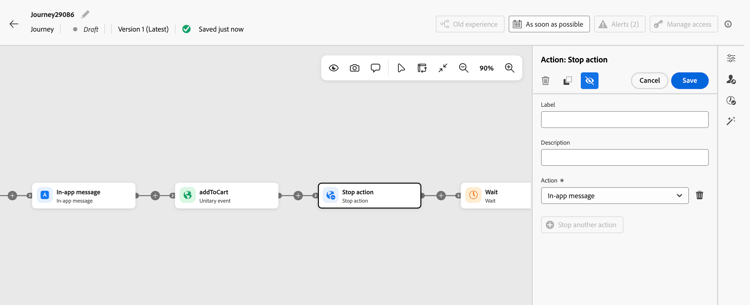
경험을 중지하려는 지점에서 동일한 여정 경로에서 인바운드 활동의 다운스트림에 있는 더하기(+) 아이콘을 클릭하고 목록에서 중지 작업을 선택합니다. 활동을 배치할 위치를 참조하세요.
-
활동에 Label을(를) 추가하고 Action 필드에서 프로필을 제거할 업스트림 인바운드 활동을 선택합니다.
note tip TIP 인바운드 활동에 고유한 레이블을 지정합니다. Action 드롭다운에는 활동 이름만 표시되며 두 활동의 이름은 같을 수 있습니다. -
추가 인바운드 활동을 타겟팅하려면 다른 작업 중지를 클릭하고 다른 활동을 선택하십시오. 최대 5개의 활동을 선택할 수 있습니다.
-
저장을 클릭합니다.
-
여정을 완료하려면 다음 활동을 추가하십시오.
이제 중지 작업 활동이 구성되었습니다. 프로필이 이 단계에 도달하면 선택한 인바운드 경험에서 제거되고 여정에서 계속 진행됩니다.
프로필이 다시 여정에 들어오면 프로필이 여기에 도달하면 경험이 다시 활성화됩니다.
사용 사례 use-cases
-
등록 후 인앱 알림 메시지를 중지합니다. 프로필에서 이벤트를 등록하도록 유도하는 인앱 여정이 표시됩니다. 여정이 프로필이 등록된 것을 감지하면 중지 작업을 사용하여 업스트림 인앱 활동에서 해당 프로필을 제거하십시오. 프로필이 더 이상 등록 미리 알림을 받을 자격이 없지만 이벤트 준비 이메일을 받는 등 나머지 여정 단계를 계속 수행합니다.
-
전환 후 구매 프로모션을 중지합니다. 여정은 프로모션 웹 또는 코드 기반 경험을 프로필에 제공합니다. 여정이 구매를 감지하면 중지 작업을 사용하여 업스트림 프로모션 활동에서 프로필을 제거하여 더 이상 해당 경험을 사용할 수 없습니다. 프로필은 동일한 여정에서 구매 후 단계를 계속 진행할 수 있지만, 중지 작업에서 선택하지 않은 인바운드 활동은 영향을 받지 않습니다.
-
코드 기반 환경을 바꿉니다. 코드 기반 경험 A를 활성화하고 대기 활동을 추가한 다음, 코드 기반 경험 B를 활성화하기 전에 중지 작업을 사용하여 경험 A를 중지하십시오. 이 시퀀스는 프로필이 여정을 계속 진행하는 동안 첫 번째 경험을 대체합니다.
This section contains structured knowledge intended to support interpretation, retrieval, and question answering related to this topic.
For complete understanding, this information should be combined with the documentation on this page. Neither source is intended to stand alone; the page describes the feature, while this section provides additional context that helps disambiguate terminology, intent, applicability, and constraints.
- TL;DR: Stop action removes a profile from selected upstream inbound experiences without ending the profile’s journey.
Intents:
- Remove a profile from selected inbound experiences while continuing the journey
- Configure Stop action downstream of inbound activities on the same path
- Distinguish Stop action from stopping a journey
- Replace a code-based experience while continuing the journey
- Resolve selection errors and avoid redundant Stop action activities
Glossary:
- Stop action: A journey activity that removes the profile reaching it from selected upstream inbound activities while the profile continues progressing in the journey. (product-specific)
- Inbound activities: The in-app, content card, web, or code-based experience activities that Stop action can target. (product-specific)
Guardrails:
- Stop action must be downstream of the selected inbound activities on the same journey path. Wait or Reaction can be placed between the inbound activity and Stop action.
- Select one to five upstream inbound activities (hard limit). Selecting none, more than five, or the same activity more than once generates an error.
- Selecting an activity that is not upstream on the same path or has been deleted generates an error. Deleted selections appear as Unavailable activity.
- Warnings identify an activity already stopped earlier, an activity stopped immediately after activation, or a redundant Stop action immediately before End.
- Avoid stopping an inbound activity immediately after activation, as this can prevent the profile from seeing the experience.
- Inbound activities are already removed when a profile exits the journey. Stop action immediately before End is redundant.
- Give inbound activities distinct labels because the Action dropdown shows only activity names, which can be identical.
- Other inbound activities are not affected.
Terminology:
- Canonical activity name: Stop action
- Target selection field: Action
- Additional target control: Stop another action
- Deleted selection label: Unavailable activity
- Do not confuse Stop action with stopping a journey: Stop action applies to selected inbound activities for the profile reaching it; stopping a journey halts all profiles progressing through it.
FAQ:
- Q: Does Stop action end the profile’s journey? The profile stops qualifying for the selected experiences and continues progressing in the journey.
- Q: Which inbound activities can Stop action target? In-app, content card, web, or code-based experience activities upstream of Stop action.
- Q: How many inbound activities can be selected? Up to five (hard limit).
- Q: Are other inbound activities affected? Other inbound activities are not affected.
- Q: Must Stop action immediately follow an inbound activity? Wait or Reaction can be placed between the inbound activity and Stop action on the same path. Avoid stopping an inbound activity immediately after activation, as this can prevent the profile from seeing the experience.
- Q: What happens when a profile re-enters the journey? The inbound experience activates again when the profile reaches that activity.