이 페이지에서: 반응 활동을 사용하여 동일한 여정 내에서 열기 및 클릭과 같은 메시지 추적 데이터에 응답하고, 참여하지 않는 개인의 시간 제한 경로를 구성하는 방법에 대해 알아봅니다.
개요 overview
팔레트에서 사용할 수 있는 다양한 이벤트 활동 중에서 기본으로 제공되는 반응 이벤트를 찾을 수 있습니다. 이 활동을 통해 동일한 여정 내에서 전송된 메시지와 관련된 추적 데이터에 반응할 수 있습니다. Adobe Experience Platform과 공유되는 순간 이 정보를 실시간으로 캡처합니다.
클릭하거나 연 메시지에 반응할 수 있습니다. 예를 들어, 개인이 이전 이메일을 열거나 그 내부를 클릭한 경우 다른 메시지를 보내거나, 커뮤니케이션에 참여하지 않은 경우 다른 후속 메시지를 보낼 수 있습니다.
작업 활동을 참조하세요.
메시지에 대한 반응이 없는 경우 반응 활동을 사용하여 작업을 수행할 수 있습니다. 이렇게 하려면 반응 활동과 평행한 두 번째 경로를 만들고 대기 활동을 추가합니다. 대기 활동에 정의된 기간 동안 반응이 없으면 두 번째 경로가 선택됩니다. 예를 들어 후속 메시지를 보내도록 선택할 수 있습니다.
반응 이벤트를 구성하는 방법 configure
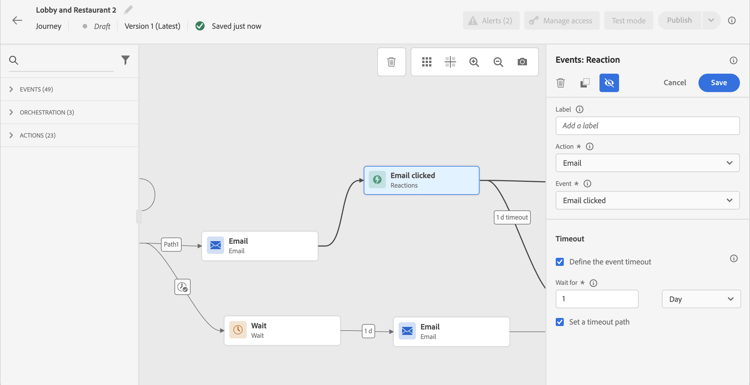
다음 단계에 따라 반응 이벤트를 구성합니다.
- 여정 캔버스에서 채널 작업 활동 후에 반응 활동을 즉시합니다.
- 반응에 Label을(를) 추가합니다. 데이터 소스에 이벤트에 설명을 추가합니다.
- 드롭다운 목록에서 반응할 작업 활동을 선택합니다. 경로의 이전 단계에 배치된 모든 작업 활동을 선택할 수 있습니다.
- 선택한 작업에 따라 반응할 항목을 선택합니다.
- 이벤트 시간 제한(40초~90일)과 시간 제한 경로를 정의할 수 있습니다. 이렇게 하면 정의된 기간 내에 반응하지 않은 개인에 대한 두 번째 경로가 만들어집니다. 반응 이벤트를 사용하는 여정을 테스트할 때 테스트 모드 대기 시간의 기본값과 최소값은 40초입니다. 이 섹션을 참조하십시오.
가드레일 및 제한 사항 guardrails-limitations
- 반응 활동은 여정 캔버스에서 채널 작업 활동 후에 즉시해야 합니다.
- 반응 활동 전에 채널 작업 활동이 없으면 활동을 사용할 수 없습니다.
- 채널 액션과 반응 활동 사이에 대기 활동 또는 다른 활동을 배치하는 것은 지원되지 않으며 예상대로 반응이 작동하지 않을 수 있습니다.
- 반응 이벤트는 동일한 여정 내에서만 전송된 메시지를 추적할 수 있습니다. 다른 여정에서 발생하는 메시지를 추적할 수 없습니다.
- 반응 이벤트는 “추적됨” 유형의 링크에 대한 클릭을 추적합니다. 구독 취소 링크 클릭도 고려되며 이메일 클릭 반응 이벤트를 트리거합니다. 미러 페이지 링크는 고려하지 않습니다.
- 이메일에 포함된 0픽셀 이미지를 사용하여 이메일 열람을 추적합니다. 이메일 클라이언트(예: Gmail)가 이미지를 차단하는 경우 이메일 열기는 고려하지 않습니다.
This section contains structured knowledge intended to support interpretation, retrieval, and question answering related to this topic.
For complete understanding, this information should be combined with the documentation on this page. Neither source is intended to stand alone; the page describes the feature, while this section provides additional context that helps disambiguate terminology, intent, applicability, and constraints.
- TL;DR: This page explains how to use the built-in Reaction event activity in Adobe Journey Optimizer to branch journey paths based on real-time message engagement data such as email opens and link clicks.
Intents:
- Add a Reaction event activity to respond to message opens or clicks within a journey
- Configure an event timeout and timeout path for individuals who do not react within the defined duration
- Create a parallel path with a Wait activity to handle non-responders
- Select an action activity from an earlier step in the path to react to
Glossary:
- Reaction event: A built-in journey event activity that listens to real-time tracking data (opens, clicks) from a message sent earlier in the same journey (product-specific)
- Timeout path: A second path for individuals who did not react within the defined duration (product-specific)
Guardrails:
- A Reaction activity must be placed immediately after a channel action activity. Placing a Wait activity or any other activity between the channel action and the Reaction activity is not supported and may result in the Reaction not working as expected.
- A Reaction activity cannot be used if there is no channel action activity before it in the path.
- Reaction events can only track messages sent within the same journey; cross-journey tracking is not supported.
- Reaction events track clicks on links of the type “tracked”. Clicks on unsubscription links are also taken into account and trigger an Email Click reaction event. Mirror page links are not taken into account.
- Email opens rely on a 0-pixel tracking image; if the email client blocks images (e.g., Gmail), opens will not be recorded.
- You can define an event timeout between 40 seconds and 90 days, and a timeout path. In test mode, Wait time has a default and minimum value of 40 seconds.
Terminology:
- The built-in event in the palette is Reactions; the activity is Reaction.
FAQ:
- Q: Can a Reaction event track a message sent in a different journey? — No; reaction events only track messages sent within the same journey.
- Q: How do I handle individuals who do not open or click a message? — Add a parallel path alongside the Reaction activity with a Wait activity; individuals who do not react within the wait duration will follow that second path.
- Q: Are unsubscribe link clicks tracked by reaction events? — Yes; clicks on unsubscription links trigger an Email Click reaction event. Mirror page links are not taken into account.
- Q: What happens if an email client blocks images? — Email opens tracked via the 0-pixel image will not be recorded for clients that block images, such as Gmail.
- Q: What is the valid timeout range for a reaction event? — Between 40 seconds and 90 days.