이 페이지에서: 공유 URL에서 누구나 열 수 있는 공개 랜딩 페이지를 만들고 이를 사용하여 프로필이 아닌 데이터 세트에서 익명 방문자의 데이터를 캡처하는 방법을 알아봅니다.
랜딩 페이지는 일반적으로 개인화된 링크(예: 이메일에서)를 클릭하는 방문자에게 표시되므로 페이지가 로드될 때 방문자의 프로필을 식별할 수 있습니다. 공개 랜딩 페이지를 사용하면 누구나 열 수 있는 공개 URL에 랜딩 페이지를 게시할 수도 있습니다. 그런 다음 방문자가 페이지의 양식을 작성하고 데이터를 제출할 수 있습니다.
이메일, SMS 메시지 또는 웹 사이트 등 어디에서나 공개 URL을 공유하고 외부 마케팅 캠페인에 사용할 수 있습니다.
주요 특성 lp-anonymous-characteristics
시작하기 전에 lp-anonymous-prerequisites
공개 랜딩 페이지를 만들기 전에 다음을 확인하십시오.
- 랜딩 페이지에 사용할 하위 도메인이 Cloudflare로 마이그레이션되었습니다. 이미 구성한 랜딩 페이지 하위 도메인을 다시 사용하는 경우에 적용됩니다.
-
해당 하위 도메인에 대한 랜딩 페이지 사전 설정이(가) 있습니다.
-
데이터 세트에 연결된 양식 사전 설정이(가) 있습니다.
note important IMPORTANT Adobe은 공개 랜딩 페이지에 비프로필 사용 데이터 세트를 사용할 것을 강력히 권장합니다. 프로필 활성화 데이터 세트를 사용하면 불필요하게 많은 리드 프로필이 생성되고 기존 프로필이 손상될 수 있습니다. -
해당 사전 설정에서 form을(를) 만들고 게시했습니다.
note caution CAUTION Adobe Experience Platform에서 수집이 성공하려면 양식에 데이터 세트 스키마의 모든 필수 루트 수준 필드가 포함되어야 합니다. 수집이 실패하게 되므로 양식 구성에서 이러한 필수 필드를 재정의하지 마십시오.
공개 랜딩 페이지 만들기 lp-anonymous-create
공개 랜딩 페이지는 다른 랜딩 페이지처럼 만들어집니다. 몇 가지 특정 설정은 익명 방문자가 페이지에 액세스할 수 있도록 해야 하며 이 페이지에 포함된 양식은 프로필이 아닌 데이터 집합에 데이터를 저장해야 합니다. 만들려면 아래 단계를 수행합니다.
-
왼쪽 메뉴에서 콘텐츠 관리 > 랜딩 페이지로 이동한 다음 랜딩 페이지 만들기를 클릭합니다.
-
제목 및 설명(선택 사항)을 추가합니다.
-
사전 설정을 선택합니다. 랜딩 페이지 사전 설정을 만드는 방법을 알아봅니다
-
랜딩 페이지 유형으로 데이터 캡처를 선택하십시오.
note NOTE 데이터 캡처 랜딩 페이지만 특정 양식을 포함할 수 있습니다. -
만들기를 클릭합니다. 기본 페이지 및 해당 속성이 표시됩니다.
-
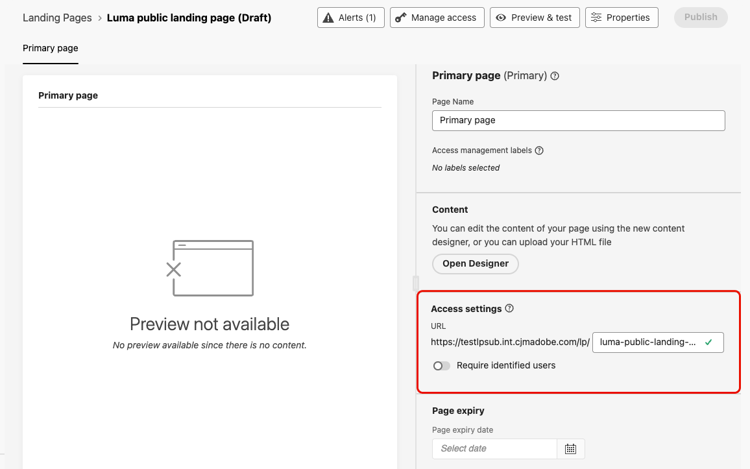
액세스 설정 섹션에서 랜딩 페이지 URL을 정의합니다. URL의 첫 번째 부분은 사전 설정에 정의된 하위 도메인입니다. 옆에 있는 필드에 URL의 고유한 끝을 입력합니다.
-
식별된 사용자 필요 옵션이 비활성화되었는지 확인하십시오. 이 옵션이 활성화되면 식별된 프로필만 페이지에 액세스할 수 있습니다. 비활성화되면 익명 방문자가 페이지에 액세스할 수 있습니다.
-
페이지의 콘텐츠를 디자인하려면 Designer 열기를 클릭하세요. 랜딩 페이지 디자이너에 대해 자세히 알아보기
-
Structure 구성 요소를 콘텐츠에 끌어다 놓은 다음 Form 구성 요소를 해당 구조에 끌어다 놓습니다.
-
양식 포함 섹션에서 게시된 양식을 선택하고 프로필이 아닌 사용 데이터 집합에 연결하는 것이 좋습니다.
note NOTE Adobe에서는 불필요한 프로필과 손상된 데이터를 만들 수 있으므로 프로필 활성화 데이터 세트에 연결된 양식을 사용하지 않는 것이 좋습니다. 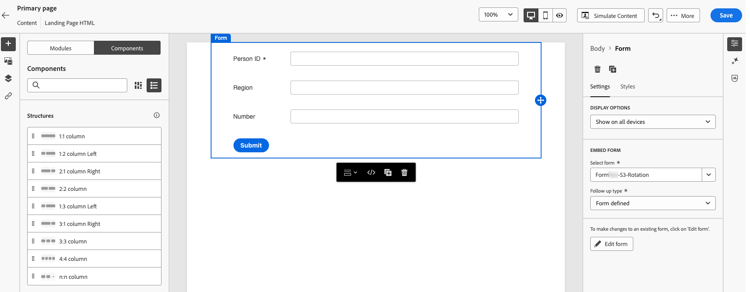
-
후속 작업 유형 섹션에서 방문자가 양식을 제출할 때 발생할 작업을 정의합니다. 자세히 알아보기
-
필요한 경우 페이지 만료 날짜와 페이지가 만료될 때 수행되는 작업을 정의합니다. 자세히 알아보기
-
저장을 클릭한 다음 미리 보기 및 테스트를 사용하여 페이지를 테스트하세요. 방법 알아보기
-
게시를 클릭합니다. 게시하는 데 시간이 걸릴 수 있습니다. 랜딩 페이지가 게시되면 알림을 받습니다.
랜딩 페이지 공유 lp-anonymous-share
랜딩 페이지가 게시되면 누구나 해당 URL에서 액세스할 수 있습니다. 공개 상태인지 확인하려면 URL을 복사하여 브라우저 창에 붙여넣습니다.
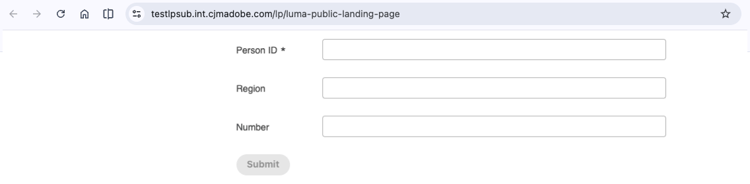
이메일, SMS 메시지 또는 웹 사이트에서와 같이, URL을 필요한 위치에 추가합니다. 메시지에서 클릭을 추적하려면 추적 매개 변수를 추가하세요.
방문자가 양식을 제출하면 양식 사전 설정에 정의된 데이터 세트로 데이터가 전송됩니다. 데이터를 처리하고 사용할 수 있도록 최대 15분 까지 허용.
가드레일 및 제한 사항 lp-anonymous-limitations
-
비프로필 사용 데이터 세트에 양식 데이터를 저장합니다. 공개 랜딩 페이지는 프로필을 만들거나 보강하기 위한 것이 아닙니다. 프로필이 활성화된 데이터 세트에서 발생할 수 있으며 의도하지 않은 프로필 생성 및 데이터 손상을 초래할 수 있습니다.
-
공개 랜딩 페이지에 대해서는 보고가 지원되지 않습니다.
-
공용 랜딩 페이지에 사용되는 하위 도메인에서는 허용된 IP를 관리할 수 없습니다.
-
다른 랜딩 페이지의 경우 샌드박스 도구를 사용하여 공개 랜딩 페이지를 다른 샌드박스로 복사할 수 없습니다.
-
익명 방문자는 식별되지 않으므로 공개 랜딩 페이지의 콘텐츠에서 프로필 데이터를 기반으로 한 개인화를 사용하지 마십시오.
관련 항목 lp-anonymous-related
This section contains structured knowledge intended to support interpretation, retrieval, and question answering related to this topic.
For complete understanding, this information should be combined with the documentation on this page. Neither source is intended to stand alone; the page describes the feature, while this section provides additional context that helps disambiguate terminology, intent, applicability, and constraints.
- TL;DR: This page explains how to create and publish public landing pages, which are public landing pages that anyone can open from a shared URL and use to submit form data stored in a non-profile enabled dataset, without identifying the visitor.
Intents
- Publish a landing page on a public URL that anonymous visitors can open without being identified.
- Capture data from anonymous visitors with a form, in a non-profile enabled dataset.
- Check the prerequisites before creating a public landing page.
- Create, test, and publish a public landing page.
- Share the public URL of a public landing page in emails, SMS messages, or on a website.
- Identify the limitations that apply to public landing pages.
Glossary
- Public landing page: a Data Capture landing page published on a public URL that anyone can open, without being identified. Visitors can fill in a form on the page and submit data.
- Data Capture landing page: the only type of landing page that lets you embed a specific form, and therefore the type used for public landing pages.
- Non-profile enabled dataset: the type of dataset that is strongly recommended to store data submitted through a public landing page. With a profile-enabled dataset, many lead profiles might be created unnecessarily and existing profiles might be corrupted.
- Require identified users (product-specific): the option that restricts access to identified profiles when enabled. It must be disabled for the page to be accessible to anonymous visitors.
- Cloudflare migration: the migration of a landing page subdomain to Cloudflare, required to use public landing pages when you reuse a landing page subdomain that you already configured.
- Landing page preset: the configuration object, linked to a subdomain, from which a landing page is created.
- Form preset: the configuration object, linked to a non-profile enabled dataset for public landing pages, from which a form is created and published.
Guardrails
- Public landing pages are available in Limited Availability; contact your Adobe representative to request access.
- The landing page subdomain must be migrated to Cloudflare, a landing page preset must exist for that subdomain, and a form, preferably linked to a non-profile enabled dataset, must be created and published from a form preset.
- Form data should be stored in non-profile enabled datasets; public landing pages are not meant to create or enrich profiles, which can happen with a profile-enabled dataset.
- Reporting is not supported for public landing pages.
- Managing allowed IPs is not supported for subdomains used for public landing pages.
- Public landing pages cannot be copied to another sandbox using Sandbox tooling.
- Personalization based on profile data should not be used in the content of a public landing page, because visitors are not identified.
- Submitted data can take up to 15 minutes to be processed and available for use.
Terminology
- Do not confuse a public landing page with a Data Capture landing page for known profiles: the latter is usually opened from a personalized link so that the visitor’s profile can be identified, and the former is opened from a public URL without identification.
- Data submitted through a public landing page is stored in a dataset, not in a profile.
FAQ
- Who can open a public landing page? Anyone with the URL.
- Which type of landing page must I select? Data Capture, as only Data Capture landing pages let you embed a specific form.
- Where is the data submitted by visitors stored? In the non-profile enabled dataset defined in the form preset, not in a profile.
- Do submissions create or enrich profiles? Not with a non-profile enabled dataset, which is strongly recommended. With a profile-enabled dataset, lead profiles might be created unnecessarily and existing profiles might be corrupted.
- Which option must be disabled so that anonymous visitors can access the page? The Require identified users option.
- Do I need to migrate my landing page subdomain to Cloudflare? Yes, when you reuse a landing page subdomain that you already configured.
- Can I use allowed IPs with a public landing page? No, managing allowed IPs is not supported for subdomains used for public landing pages.
- Is reporting available for public landing pages? No.
- How long before submitted data is available? Up to 15 minutes.