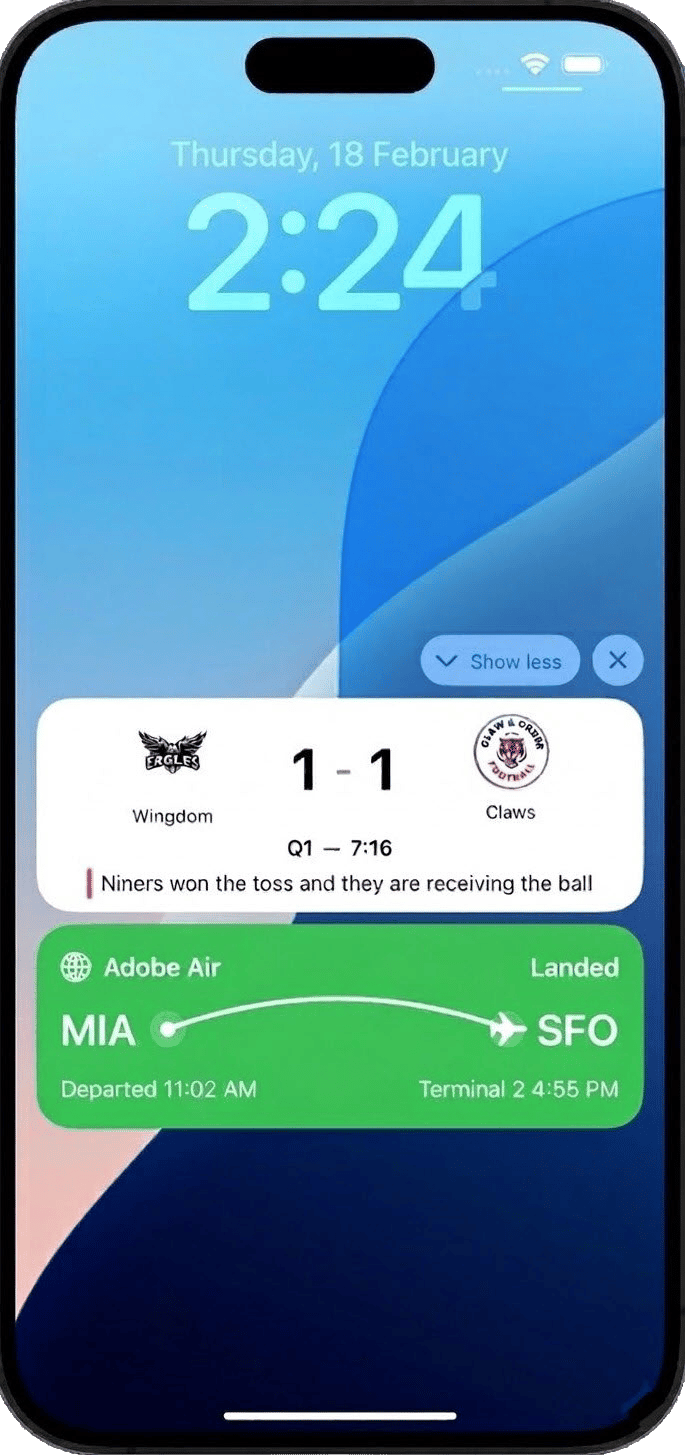
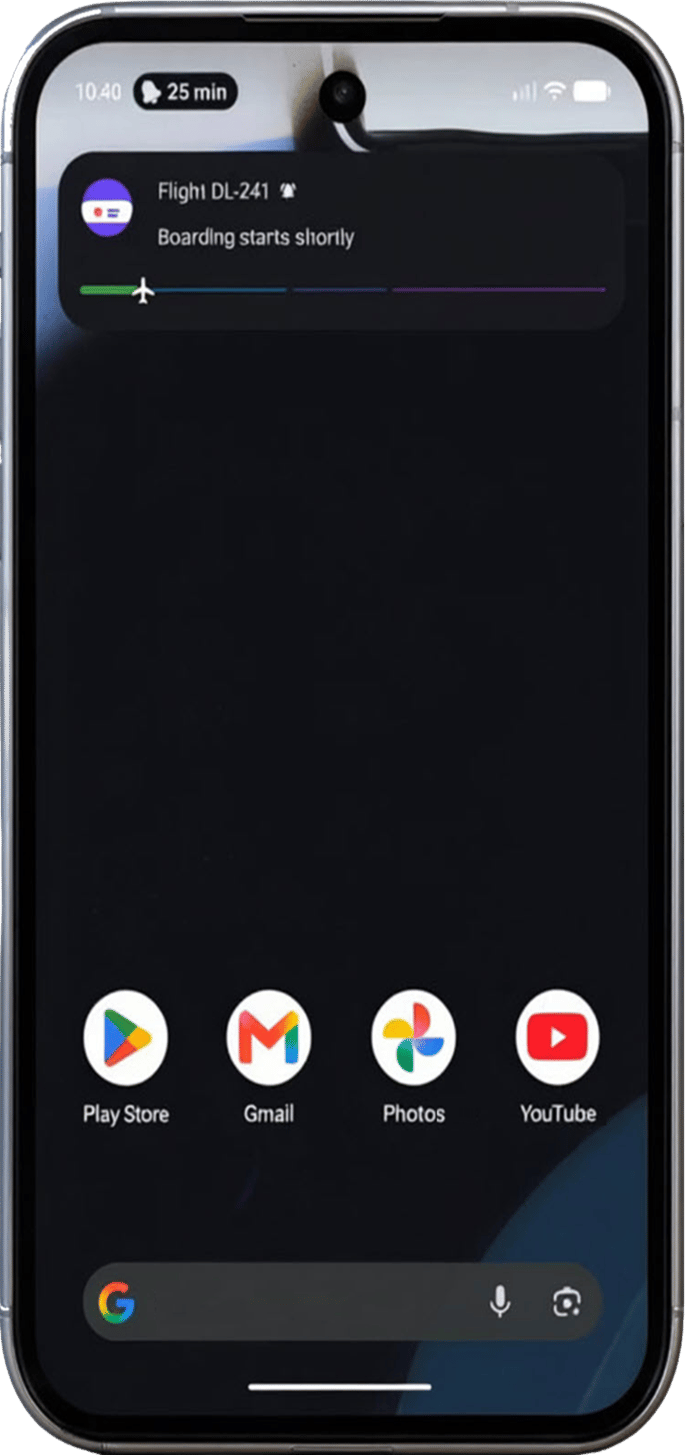
이 페이지에서: 라이브 활동이 Android 또는 iPhone 잠금 화면 및 Dynamic Island에서 지속적인 실시간 업데이트를 제공하므로 진행 중인 이벤트 동안 사용자의 참여를 유지하고 Adobe Journey Optimizer으로 보내는 데 필요한 구성 및 API 트리거 캠페인을 계획할 수 있습니다.
라이브 활동은 디바이스 잠금 화면에 표시되는 지속적이고 매력적인 UI 요소입니다. 앱을 사용하면 앱을 열거나 반복적인 푸시 알림을 수신할 필요 없이 진행 중인 이벤트 동안 사용자에게 계속 알림을 제공하여 앱에 최신 실시간 정보가 표시되도록 할 수 있습니다.
기존의 푸시 알림과 달리 라이브 활동은 상태 기반 참여를 나타냅니다. 즉, 일회성 알림을 제공하는 대신 이벤트가 발전함에 따라 동적으로 업데이트되는 연속적이고 상황에 맞는 존재감을 유지합니다.
주요 이점
라이브 활동은 모바일 참여를 알림 기반에서 상태 기반으로 전환하여 브랜드가 다음 목표를 달성하도록 지원합니다.
- 가치가 높은 이벤트 기간 내내 잠금 화면에서 지속적인 존재감 유지
- 반복된 알림으로 사용자에게 부담을 주지 않으면서 정보를 동적으로 업데이트
- 실제 이벤트에 연결된 보다 풍부하고 상황에 맞는 모바일 순간 제공
- 활성 트랜잭션 또는 라이브 경험 중 참여도 및 유지율 증가
Adobe Journey Optimizer을 사용하면 API 트리거 캠페인을 통해 원격으로 시작, 업데이트 및 종료 라이브 활동을 프로그래밍 방식으로 수행할 수 있으며, 이는 규모에 따라 개별 및 대상 기반 사용 사례를 모두 지원합니다.
라이브 활동은 API 트리거 캠페인을 통해서만 시작할 수 있으며, 이를 통해 사용자 정의 페이로드를 제공하고 자체 페이로드를 통해 모든 개인화를 수행할 수 있습니다.
의도한 라이브 활동 사용 사례를 기반으로 적절한 API 트리거 캠페인 유형을 선택해야 합니다.
-
대규모로 전송된 대상 기반 업데이트인 브로드캐스트 사용 사례에 대해 API 트리거된 마케팅을(를) 선택하십시오.
- 스포츠 점수 및 라이브 이벤트 카운트
- 경로의 모든 승객에게 비행 상태 업데이트
- 사용자 세그먼트 전체에 걸쳐 공유 경험
-
개별 사용 사례에 대해 API 트리거 트랜잭션을(를) 선택합니다. 사용자당 1:1 실시간 업데이트:
- 주문 추적 및 배송 진행 상황
- 승차 또는 서비스 상태 업데이트
- 실시간 예약 및 약속 확인
빠른 시작 안내서
아래 단계를 완료하여 애플리케이션에서 라이브 활동을 구성하고 구현하세요.
-
모바일 구성을 만들어 환경을 설정합니다.
-
Adobe Experience Platform Mobile SDK 통합
Adobe Experience Platform Mobile SDK와 통합하여 잠금 화면 및 Dynamic Island에서 실시간 동적 업데이트를 가능하게 합니다.
-
Journey Optimizer에서 라이브 활동 만들기
Journey Optimizer에서 API 트리거 캠페인을 사용하여 라이브 활동을 시작합니다.
-
기본 제공 보고서를 통해 라이브 활동의 영향을 측정하기 시작합니다.
방법 비디오
Adobe Journey Optimizer로 iOS 라이브 활동을 구성하여 iPhone 잠금 화면 및 Dynamic Island에서 다양한 실시간 업데이트를 제공하는 방법에 대해 알아봅니다.
Adobe Journey Optimizer에서 Android 라이브 업데이트를 만들고 전달하는 방법을 알아봅니다. 이 튜토리얼에서는 Android 라이브 업데이트 채널을 구성하고, 캠페인을 만들고, 활성화하고, API를 사용하여 고객 여정 전반에서 라이브 경험을 시작, 업데이트 및 종료하는 방법을 보여 줍니다.
This section contains structured knowledge intended to support interpretation, retrieval, and question answering related to this topic.
For complete understanding, this information should be combined with the documentation on this page. Neither source is intended to stand alone; the page describes the feature, while this section provides additional context that helps disambiguate terminology, intent, applicability, and constraints.
- TL;DR: This page introduces Live activities as persistent, real-time updates on the Android or iPhone Lock Screen and Dynamic Island, and explains that in Adobe Journey Optimizer they are sent only through API-triggered campaigns.
Intents:
- Understand what Live activities are and how state-based engagement differs from push notifications
- Determine when to use API-triggered Marketing (broadcast) versus API-triggered Transactional (individual) campaigns
- Plan the quick start steps: create a mobile configuration, integrate the Mobile SDK, create a Live activity, and track campaigns
Glossary:
- Live activity: A persistent, glanceable UI element on the device lock screen that presents real-time, up-to-date information throughout an ongoing event (product-specific)
- State-based engagement: A continuous, contextual presence that updates dynamically as events evolve, in contrast to one-time alerts
- Dynamic Island: The iPhone display area where Live activities appear alongside the Lock Screen
- API-triggered Marketing: The campaign type used for broadcast use cases, sending audience-based updates at scale (product-specific)
- API-triggered Transactional: The campaign type used for individual use cases, sending 1:1 real-time updates per user (product-specific)
Guardrails:
- Live activities can only be initiated via API-triggered campaigns, and all personalization is performed through your own payload.
- Broadcast use cases require an API-triggered Marketing campaign; individual use cases require an API-triggered Transactional campaign.
Terminology:
- Canonical name: Live activity — Acronym: n/a — variants: Live activities
- Synonyms: “broadcast use cases” = “audience-based updates sent at scale”
- Synonyms: “individual use cases” = “1:1 real-time updates per user”
- Do not confuse: “API-triggered Marketing” (broadcast, audience-based) ≠ “API-triggered Transactional” (individual, 1:1)
- Do not confuse: “Live activity” (persistent, continuously updatable presence) ≠ “traditional push notifications” (deliver one-time alerts)
FAQ:
- Q: Which devices show Live activities? — The page describes Live activities on the Android or iPhone Lock Screen and Dynamic Island.
- Q: How are Live activities initiated? — Only via API-triggered campaigns, with all personalization performed through your own payload.
- Q: When should I use API-triggered Marketing versus API-triggered Transactional? — Marketing for broadcast, audience-based use cases such as sports scores or flight status; Transactional for individual 1:1 use cases such as order tracking or booking confirmations.
- Q: What are the quick start steps? — Create a mobile configuration, integrate the Adobe Experience Platform Mobile SDK, create a Live activity through an API-triggered campaign, then track the impact with built-in reports.