이 페이지에서: 동의, 선택적 액세스 레이블 및 받은 편지함이 웹 또는 iOS 또는 Android 앱에 표시되는 위치를 설정하는 받은 편지함 채널 구성을 정의하면 받은 편지함을 통해 콘텐츠 카드 경험을 전달할 수 있습니다.
받은 편지함을 통해 콘텐츠 카드 경험을 전달하려면 채널 구성에서 받은 편지함 채널 구성을 정의해야 합니다. 이 구성은 표면을 동의, 선택적 액세스 레이블 및 웹 또는 iOS 또는 Android 앱에서 경험이 표시되는 위치에 연결합니다. 구성을 만들려면 아래 단계를 수행하십시오.
-
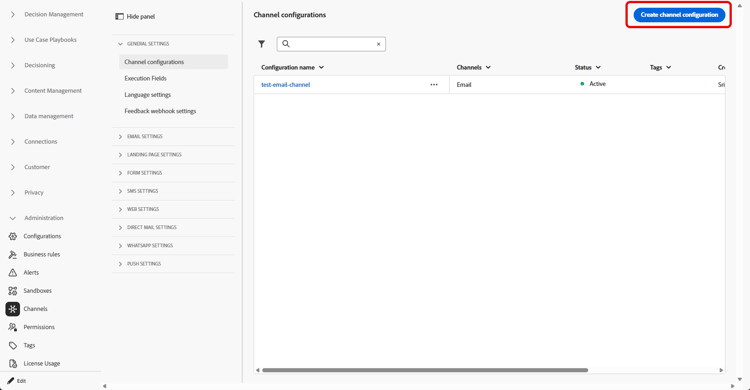
채널 > 일반 설정 > 채널 구성 메뉴에 액세스한 다음 채널 구성 만들기를 클릭하십시오.
-
구성의 이름 및 설명(선택 사항)을 입력합니다.
note NOTE 이름은 문자(A-Z)로 시작해야 합니다. 영숫자만 포함할 수 있습니다. 밑줄 _, 점., 하이픈-도 사용할 수 있습니다. -
구성에 사용자 지정 또는 핵심 데이터 사용 레이블을 할당하려면 액세스 관리를 선택할 수 있습니다. OLAC(개체 수준 액세스 제어)에 대해 자세히 알아보세요.
-
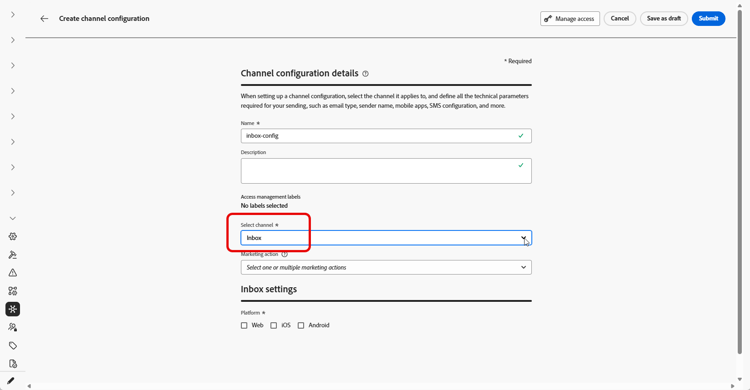
받은 편지함 채널을 선택하십시오.
-
이 구성을 사용하여 동의 정책을 메시지에 연결하려면 마케팅 액션을 선택하십시오. 마케팅 액션과 관련된 모든 동의 정책은 고객의 선호도를 존중하기 위해 활용됩니다. 자세히 알아보기
-
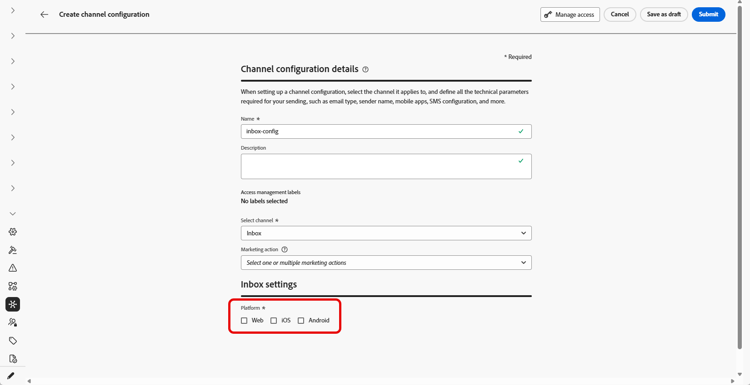
받은 편지함 경험을 적용할 플랫폼을 선택합니다.
-
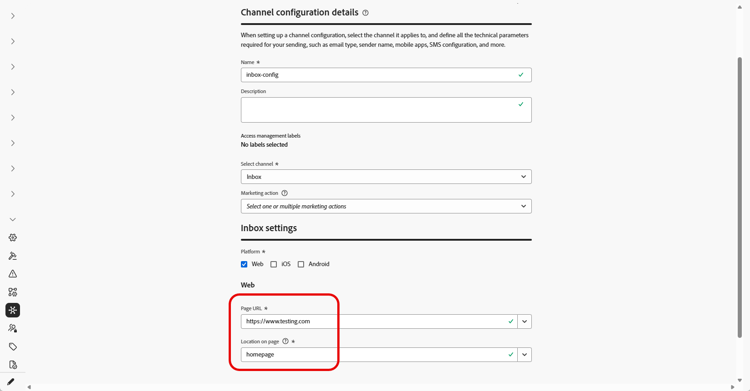
웹:
-
페이지 URL에서 받은 편지함이 표시될 페이지의 URL을 입력하거나 선택하십시오. 경험이 한 페이지로 제한된 경우 사용합니다.
-
페이지의 위치에서 받은 편지함 표면에 사이트가 사용하는 영역 또는 식별자와 같은 페이지 내 배치를 정의합니다. 자세히 알아보기
-
-
iOS 및 Android의 경우
-
구성이 올바른 iOS 또는 Android 빌드에 적용되도록 앱 ID에서 앱의 식별자를 입력하거나 선택하십시오.
-
앱 내부의 위치 또는 경로에서 사용자가 받은 편지함을 열 화면, 경로 또는 컨테이너를 지정합니다.
-
-
변경 사항을 제출합니다.
이제 받은 편지함 경험을 만들 때 구성을 선택할 수 있습니다.
This section contains structured knowledge intended to support interpretation, retrieval, and question answering related to this topic.
For complete understanding, this information should be combined with the documentation on this page. Neither source is intended to stand alone; the page describes the feature, while this section provides additional context that helps disambiguate terminology, intent, applicability, and constraints.
- TL;DR: This page explains how to create an Inbox channel configuration that ties the surface to consent, optional access labels, and where the inbox appears on the web or in your iOS or Android app.
Intents:
- Create an Inbox channel configuration in Channel configurations
- Associate consent policies to messages by selecting marketing action(s)
- Assign custom or core data usage labels through Manage access
- Define where the inbox appears for Web using Page URL and Location on page
- Define where the inbox appears for iOS and Android using App id and the location or path inside the app
Glossary:
- Inbox channel configuration: A configuration in Channel configurations that ties the surface to consent, optional access labels, and where the experience appears on web, iOS, or Android (product-specific)
- Marketing action: A selection that associates consent policies to messages using the configuration so customer preferences are respected (product-specific)
- Page URL: For Web, the URL of the page where the inbox should appear, used when the experience is limited to one page (product-specific)
- Location on page: For Web, the in-page placement (region or identifier your site uses for the inbox surface) (product-specific)
- App id: For iOS and Android, the identifier for your app so the configuration applies to the correct build (product-specific)
- Manage access: The option used to assign custom or core data usage labels to the configuration, related to Object Level Access Control (OLAC) (product-specific)
Guardrails:
- You must define an Inbox channel configuration in Channel configurations before you can deliver Content card experiences through the Inbox.
- Configuration names must begin with a letter (A-Z) and can only contain alpha-numeric characters plus underscore, dot, and hyphen characters.
- All consent policies associated with the selected marketing action are leveraged to respect customer preferences.
Terminology:
- Canonical name: Inbox channel configuration — Acronym: n/a — variants: Inbox configuration, channel configuration
- Synonyms: “OLAC” = “Object Level Access Control”
- Do not confuse: “Page URL” (the page URL where the inbox appears on Web) ≠ “Location on page” (the in-page placement/region or identifier for the inbox surface)
- Do not confuse: “App id” (identifier for the iOS or Android app) ≠ “Location or path inside the app” (the screen, route, or container where users open the inbox)
FAQ:
- Q: What must I create before delivering Content card experiences through the Inbox? — An Inbox channel configuration in Channel configurations.
- Q: What are the rules for naming a configuration? — The name must begin with a letter (A-Z) and can only contain alpha-numeric characters plus underscore, dot, and hyphen.
- Q: How do I associate consent to messages using this configuration? — Select marketing action(s); all consent policies associated with the marketing action are leveraged to respect customer preferences.
- Q: How do I set where the inbox appears on the web? — Enter or select the Page URL and define the in-page placement in Location on page.
- Q: How do I set where the inbox appears on iOS or Android? — Enter the App id and specify the screen, route, or container in Location or path inside the app.