이 페이지에서: Adobe Journey Optimizer에서 웹 채널 구성을 만드는 방법에 대해 알아봅니다. 단일 페이지 URL 또는 페이지 일치 규칙과 사용 가능한 연산자가 있는 여러 페이지를 대상으로 합니다.
웹 채널 구성 만들기 create-web-configuration
웹 구성은 콘텐츠가 전달될 URL로 식별되는 웹 속성입니다. 단일 페이지 URL 또는 여러 페이지를 일치시킬 수 있으므로 하나 또는 여러 웹 페이지에서 수정 사항을 전달할 수 있습니다.
웹 채널 구성을 만들려면 아래 단계를 수행합니다.
-
채널 > 일반 설정 > 채널 구성 메뉴에 액세스한 다음 채널 구성 만들기를 클릭하십시오.

-
구성의 이름 및 설명(선택 사항)을 입력합니다.
note NOTE 이름은 문자(A-Z)로 시작해야 합니다. 영숫자만 포함할 수 있습니다. 밑줄 _, 점., 하이픈-도 사용할 수 있습니다. -
구성에 사용자 지정 또는 핵심 데이터 사용 레이블을 할당하려면 액세스 관리를 선택할 수 있습니다. OLAC(개체 수준 액세스 제어)에 대해 자세히 알아보기
-
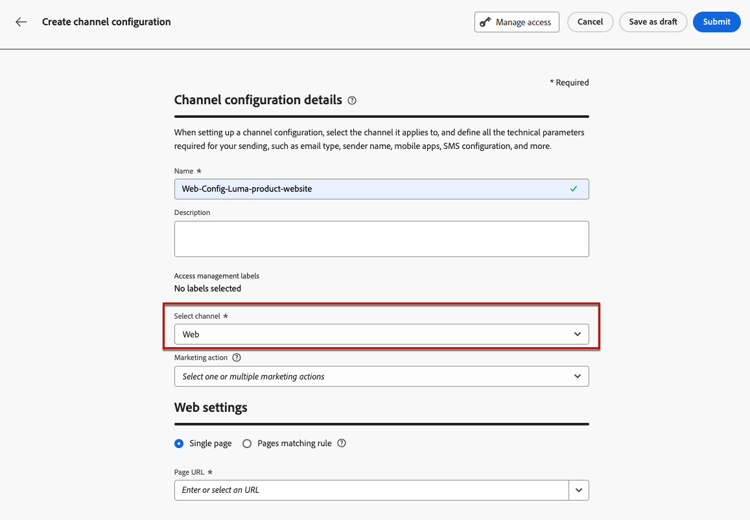
웹 채널을 선택하십시오.
-
이 구성을 사용하여 동의 정책을 메시지에 연결하려면 마케팅 액션을 선택하십시오. 마케팅 액션과 관련된 모든 동의 정책은 고객의 선호도를 존중하기 위해 활용됩니다. 자세히 알아보기
-
웹 설정 섹션에서 다음 옵션 중 하나를 선택합니다.
-
단일 페이지 - 변경 내용을 단일 페이지에만 적용하려면 페이지 URL을 입력하십시오.
-
페이지 일치 규칙 - 동일한 규칙과 일치하는 여러 URL을 타겟팅하려면 페이지 일치 규칙을 빌드하고 기본 작성 및 미리 보기 URL을(를) 입력하십시오. 자세히 알아보기
-
-
변경 내용을 저장하려면 제출을 클릭하세요.
이제 캠페인이나 여정에서 웹 채널을 사용할 때 이 구성을 선택할 수 있습니다.
페이지 일치 규칙 작성 web-page-matching-rule
웹 또는 코드 기반 경험 구성을 만들 때 동일한 규칙과 일치하는 여러 URL을 대상으로 페이지 일치 규칙을(를) 빌드할 수 있습니다. 따라서 여러 페이지에서 동일한 콘텐츠 변경 사항을 한 번에 적용할 수 있습니다.
예를 들어 전체 웹 사이트에서 영웅 배너에 변경 사항을 적용하거나 웹 사이트의 모든 제품 페이지에 표시되는 상위 이미지를 추가할 수 있습니다.
-
도메인 및 페이지 필드에 대한 조건을 정의합니다.
note NOTE 이 섹션에서 사용 가능한 연산자를 확인하십시오. 예를 들어 Luma 웹 사이트의 모든 여성 제품 페이지에 표시되는 요소를 편집하려면 도메인 > 다음으로 시작 >
luma및 페이지 > 포함 >women을(를) 선택합니다.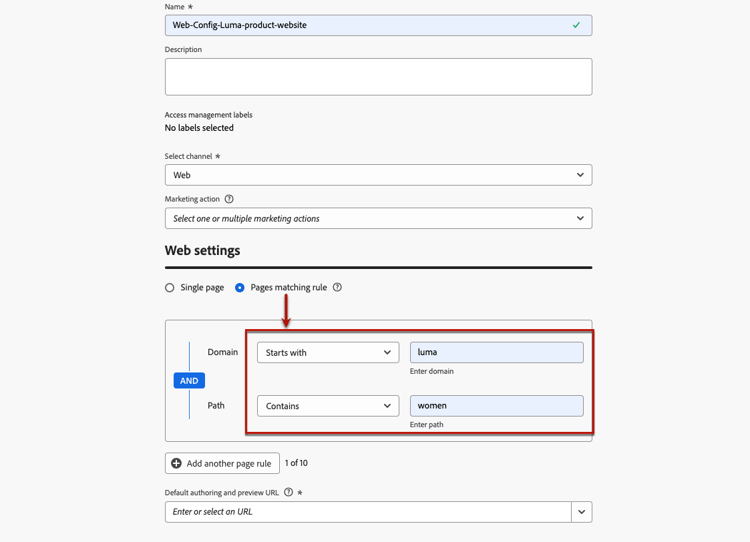
-
하나의 규칙을 사용하여 사용 사례를 모델링할 수 없는 경우 여러 규칙을 추가할 수 있습니다. 다른 페이지 규칙 추가를 클릭하고 위의 단계를 반복합니다.
note NOTE 최대 10개의 규칙을 추가할 수 있습니다. -
다른 규칙 간에 Or 또는 Exclude 연산자를 사용할 수 있습니다.
Exclude은(는) 정의된 규칙과 일치하는 페이지 중 하나를 타깃팅해서는 안 되는 경우에 유용합니다. 예를 들어
https://luma.com/blogs/productinfo페이지를 제외하고product을(를) 포함하는 모든luma.com페이지를 타깃팅할 수 있습니다.
-
기본 작성 및 미리 보기 URL을(를) 입력하십시오. 이 단계에서는 규칙을 통해 생성되거나 일치된 페이지에 콘텐츠 작성 및 미리보기 목적으로 지정된 URL이 있는지 확인합니다.
페이지 일치 규칙 작성에 사용 가능한 연산자 available-operators
여러 페이지와 일치하는 규칙을 만들 때, 도메인 및 경로 섹션에서 다른 연산자를 사용하여 원하는 규칙을 만들 수 있습니다. 사용 가능한 연산자는 아래에 나열되어 있습니다.
-
도메인
table 0-row-3 1-row-3 2-row-3 3-row-3 4-row-3 5-row-3 연산자 설명 예시 다음과 같음 도메인의 정확한 일치 다음으로 시작 입력한 문자열로 시작하는 모든 도메인(하위 도메인 포함)과 일치합니다. 예: “다음으로 시작: dev” -> dev.example.com, dev.products.example.com, developer.example.com과 같이 "dev"로 시작하는 모든 도메인 및 하위 도메인과 일치 다음으로 끝남 입력한 문자열로 끝나는 모든 도메인(하위 도메인 포함)과 일치합니다. 예: “example.com으로 끝남” -> stage.example.com, prod.example.com, myexample.com 등 "example.com"으로 끝나는 모든 도메인 및 하위 도메인과 일치 와일드카드 일치 “와일드카드 일치” 연산자를 사용하면 사용자가 "dev.*.example.com"과 같이 문자열 중간에 와일드카드 일치를 정의할 수 있습니다. 유효성 검사 규칙은 연산자가 "와일드카드 일치"인 경우 값에 와일드카드(별표)를 하나만 포함해야 합니다. 예: “Wildcard matching: dev.*.example.com” -> 는 dev.products.example.com, dev.mytest.products.example.com, dev.blog.example.com 등의 도메인과 일치합니다. Any 모든 도메인에 일치 - 도메인 간 특정 경로를 테스트할 때 유용함 -
경로
예: "와일드카드 일치: /products/*/detail", 다음과 같은 모든 경로를 일치시킵니다.
- example.com/products/yoga/detail
- example.com/products/surf/detail
- example.com/products/tennis/detail
- example.com/products/yoga/pants/detail
예: "일치함: /prod*/detail, 다음과 같은 모든 경로와 일치합니다.
- example.com/products/detail
- example.com/production/detail
다음과 같은 경로와 일치하지 않음:
- example.com/products/yoga/detail
예: "Contains: product", 다음과 같이 문자열 product가 포함된 모든 경로와 일치
- example.com/products
- example.com/yoga/perfproduct
- example.com/surf/productdescription
- example.com/home/product/page
This section contains structured knowledge intended to support interpretation, retrieval, and question answering related to this topic.
For complete understanding, this information should be combined with the documentation on this page. Neither source is intended to stand alone; the page describes the feature, while this section provides additional context that helps disambiguate terminology, intent, applicability, and constraints.
- TL;DR: This page explains how to create a web channel configuration in Journey Optimizer, targeting either a single page URL or multiple pages through a pages matching rule built with Domain and Path operators.
Intents:
- Create a web channel configuration from Channels > General settings > Channel configurations
- Target a single page by entering a Page URL
- Target multiple pages by building a pages matching rule
- Assign data usage labels to a configuration through Manage access (OLAC)
- Associate consent policies to messages by selecting Marketing actions
- Choose the right Domain and Path operators to match the intended URLs
Glossary:
- Web channel configuration: A web property identified by a URL where content will be delivered; it can match a single page URL or multiple pages (product-specific)
- Single page: Web settings option that applies changes to a single page by entering a Page URL (product-specific)
- Pages matching rule: Web settings option that targets multiple URLs matching the same rule so the same content changes apply across multiple pages at once (product-specific)
- Default authoring and preview URL: A URL entered for a pages matching rule so the pages generated or matched by the rule have a designated URL for content creation and preview (product-specific)
- Marketing action: A selection that associates consent policies to messages using the configuration so customer preferences are respected (product-specific)
- Wildcard matching: An operator allowing a wildcard (asterisk) match inside the Domain or Path string (product-specific)
Guardrails:
- Configuration names must begin with a letter (A-Z) and can only contain alphanumeric characters plus underscore, dot, and hyphen.
- You can add up to 10 rules when building a pages matching rule.
- For the Domain “Wildcard matching” operator, the value must contain one and only one wildcard (asterisk).
- A pages matching rule can be built when creating a web or code-based experience configuration.
- The Or and Exclude operators can be used between the different rules.
Terminology:
- Canonical name: Web channel configuration — Acronym: n/a — variants: web configuration, channel configuration
- Synonyms: “Pages matching rule” = “rule that matches multiple pages”
- Do not confuse: “Single page” (targets one Page URL) ≠ “Pages matching rule” (targets multiple URLs matching a rule)
- Do not confuse: “Domain” operators ≠ “Path” operators (each section has its own available operators)
FAQ:
- Q: How do I create a web channel configuration? — Go to Channels > General settings > Channel configurations, click Create channel configuration, enter a name, select the Web channel, choose Single page or Pages matching rule, then Submit.
- Q: What characters are allowed in a configuration name? — It must begin with a letter (A-Z) and can only contain alphanumeric characters plus underscore, dot, and hyphen.
- Q: How many rules can a pages matching rule contain? — You can add up to 10 rules, and use the Or or Exclude operators between them.
- Q: How do I target more than one page? — Select Pages matching rule, define criteria for the Domain and Page fields, and enter a Default authoring and preview URL.
- Q: When would I use the Exclude operator? — When one of the pages matching the defined rule should not be targeted.