이 페이지에서: 전자 메일 채널 구성 수준에서 URL 추적 매개 변수를 정의하여 콘텐츠 링크에 추가하고 웹 분석 및 성능 보고서에 캡처하는 방법을 알아봅니다.
새 전자 메일 채널 구성을 구성할 때 URL 추적 매개 변수를 정의하여 채널 전반에서 마케팅 활동의 효과를 측정할 수 있습니다. 이 기능은 활성화할 수 없습니다.
해당 섹션에 정의된 매개 변수가 이메일 메시지 콘텐츠에 포함된 URL의 끝에 추가됩니다. 그런 다음 Adobe Analytics나 Google Analytics 등 웹 분석 도구에서 이 매개변수를 캡처하여 다양한 성과 보고서를 만들 수 있습니다.
새 매개변수 추가 버튼을 사용하여 최대 10개의 추적 매개변수를 추가할 수 있습니다.
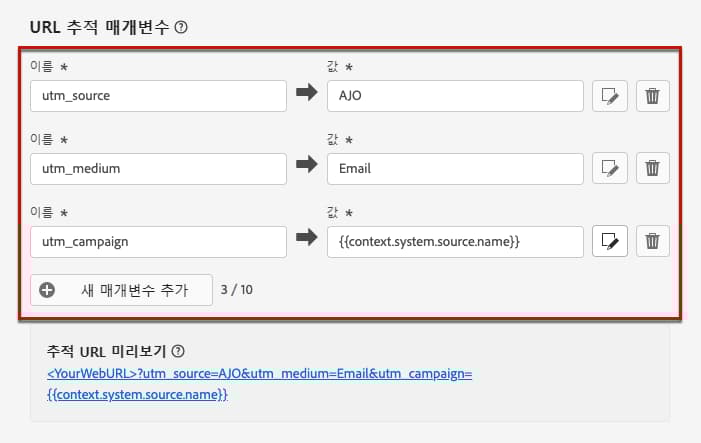
URL 추적 매개변수를 구성하기 위해 이름 및 값 필드에 원하는 값을 직접 입력할 수 있습니다.
개인화 편집기를 사용하여 각 값 필드를 편집할 수도 있습니다. 편집 아이콘을 클릭하여 편집기를 엽니다. 여기에서는 사용 가능한 상황별 속성을 선택하거나 텍스트를 직접 편집할 수 있습니다.
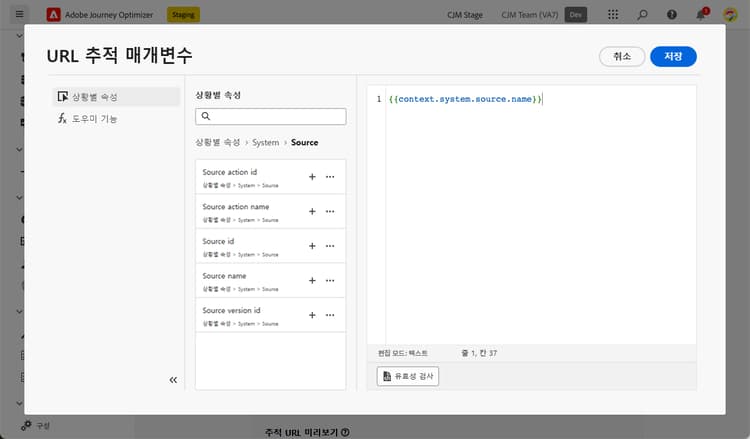
개인화 편집기를 통해 다음과 같은 사전 정의된 값을 사용할 수 있습니다.
-
메시지 프로필 ID: 게재의 각 대상 프로필에 전송된 각 메시지를 고유하게 식별하는 메시지 지향 특성입니다.
-
오퍼 ID: 이메일에 사용된 오퍼의 ID입니다.
-
소스 액션 ID: 여정 또는 캠페인에 추가된 이메일 액션의 ID입니다.
note NOTE 제품 변경 후 닫혔거나 다시 게시되지 않은 여정은 추적 URL에서 context.system.source.actionId을(를) 채우지 못해 빈 자리 표시자(예:cid=em-acou-adob{})가 생길 수 있습니다. 추적 매개 변수가 올바르게 채워지는지 확인하려면 영향을 받는 여정을 다시 게시하거나 닫은 여정에 대해 이 컨텍스트 필드에 대한 참조를 제거하십시오. 실시간 여정 실행 문제 해결에서 자세히 알아보세요. -
소스 액션 이름: 여정 또는 캠페인에 추가된 이메일 액션의 이름입니다.
-
소스 ID: 이메일을 보낸 여정 또는 캠페인의 ID입니다.
-
소스 이름: 이메일을 보낸 여정 또는 캠페인의 이름입니다.
-
소스 버전 ID: 이메일을 보낸 여정 또는 캠페인 버전의 ID입니다.
다음은 Adobe Analytics 및 Google Analytics 호환 URL의 예입니다.
-
Adobe Analytics 호환 URL:
www.YourLandingURL.com?cid=email_AJO_{{context.system.source.id}}_image_{{context.system.source.name}} -
Google Analytics 호환 URL:
www.YourLandingURL.com?utm_medium=email&utm_source=AJO&utm_campaign={{context.system.source.id}}&utm_content=image
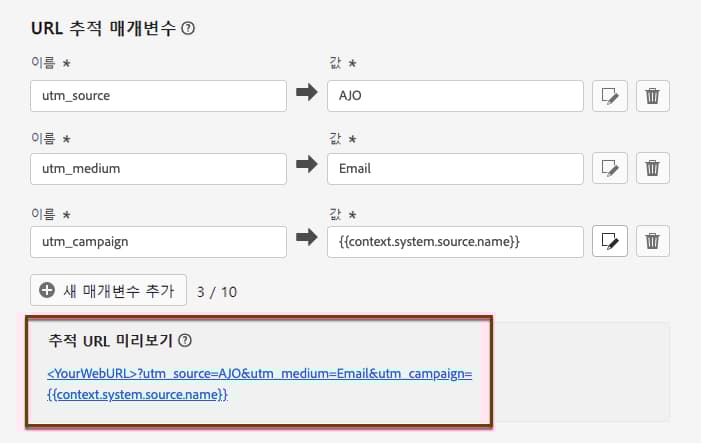
결과 추적 URL을 동적으로 미리 볼 수 있습니다. 매개변수를 추가, 편집 또는 제거할 때마다 미리보기가 자동으로 업데이트됩니다.
This section contains structured knowledge intended to support interpretation, retrieval, and question answering related to this topic.
For complete understanding, this information should be combined with the documentation on this page. Neither source is intended to stand alone; the page describes the feature, while this section provides additional context that helps disambiguate terminology, intent, applicability, and constraints.
- TL;DR: This page explains how to define URL tracking parameters at the email channel configuration level so they are appended to your content links and captured in web analytics and performance reports.
Intents:
- Define URL tracking parameters when configuring an email channel configuration
- Enter parameter Name and Value fields, or personalize Value with contextual attributes
- Use predefined contextual attributes in tracking parameters
- Build Adobe Analytics or Google Analytics compatible tracking URLs
- Preview how tracking parameters will be appended to content URLs
Glossary:
- URL tracking parameters: Parameters defined at the email channel configuration level that are appended to the end of the URLs in your email content, to be captured in web analytics tools and performance reports (product-specific)
- Message profile id: Message-oriented attribute uniquely identifying each message sent to each targeted profile in a delivery (product-specific)
- Source action id / Source action name: The ID / name of the Action activity with the Email channel added to the journey, or of the email in the campaign (product-specific)
- Source id / Source name / Source version id: The ID / name / version ID of the journey or campaign the email was sent with (product-specific)
- Offer id: The ID of the offer used in the email (product-specific)
Guardrails:
- Activating URL tracking parameters is optional.
- You can add up to 10 tracking parameters using the Add new parameter button.
- Each Value field can contain a number of characters up to the limit of 5 KB.
- The order of URL tracking parameters appended to the URL is random and cannot be controlled; if a specific order is required, parse and reorder them on your side.
- Journeys that were closed or not republished after a product change may fail to populate
context.system.source.actionId, resulting in empty placeholders; republish the affected journey or remove the reference for closed journeys.
Terminology:
- Canonical name: URL tracking — Acronym: n/a — variants: URL tracking parameters
- Synonyms: “Source action id” = “ID of the Action activity with the Email channel”; “Source id” = “ID of the journey or campaign”
- Do not confuse: “Source action id / name” (the Action activity with the Email channel) ≠ “Source id / name” (the journey or campaign)
- Do not confuse: configuration-level “URL tracking parameters” (applied to all content URLs) ≠ dynamic personalized tracking parameters added to individual links in content
FAQ:
- Q: How many tracking parameters can I add? — Up to 10, using the Add new parameter button.
- Q: Is URL tracking mandatory? — No; activating this feature is optional.
- Q: Can I control the order of appended parameters? — No; the order is random and cannot be controlled — parse and reorder on your side if needed.
- Q: What is the character limit for a Value field? — Up to 5 KB.
- Q: Which predefined attributes are available? — Message profile id, Offer id, Source action id, Source action name, Source id, Source name, and Source version id.
- Q: Where can I capture these parameters? — In web analytics tools such as Adobe Analytics or Google Analytics, and in performance reports.
Personas:
- admin: Can define URL tracking parameters at the email channel configuration level, adding up to 10 parameters with Add new parameter. Can enter Name and Value fields, with each Value field holding up to 5 KB of characters. The page states that activating URL tracking parameters is optional and that the order of appended parameters is random and cannot be controlled. Where: “Guardrails”.
Onboarding:
- Level: Experienced
- First minimal step: Select Add new parameter to define a URL tracking parameter for your email channel configuration.
- Success check: The preview automatically updates to show the resulting tracking URL each time you add, edit, or remove a parameter.
- Previous: to create the email channel configuration where URL tracking parameters are defined: Configure email settings (email/email-settings.md)
- Next: to personalize a Value field with contextual attributes using the personalization editor: Add personalization (personalization/personalization-build-expressions.md); to add dynamic personalized tracking parameters to links in the email content: Personalize email configuration settings (email/surface-personalization.md)